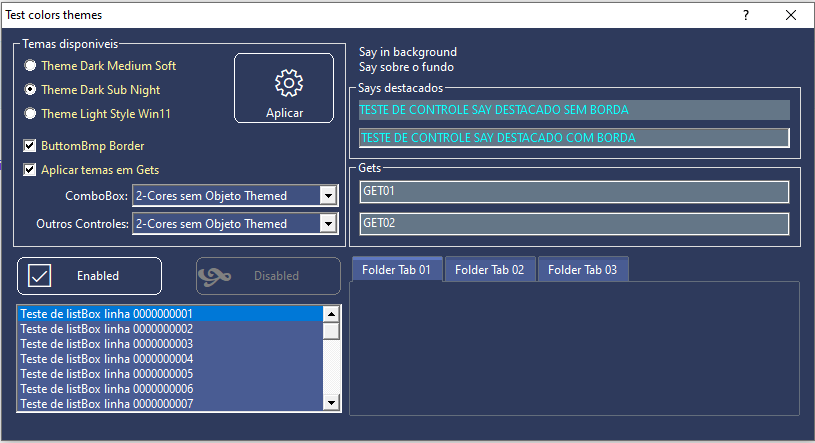
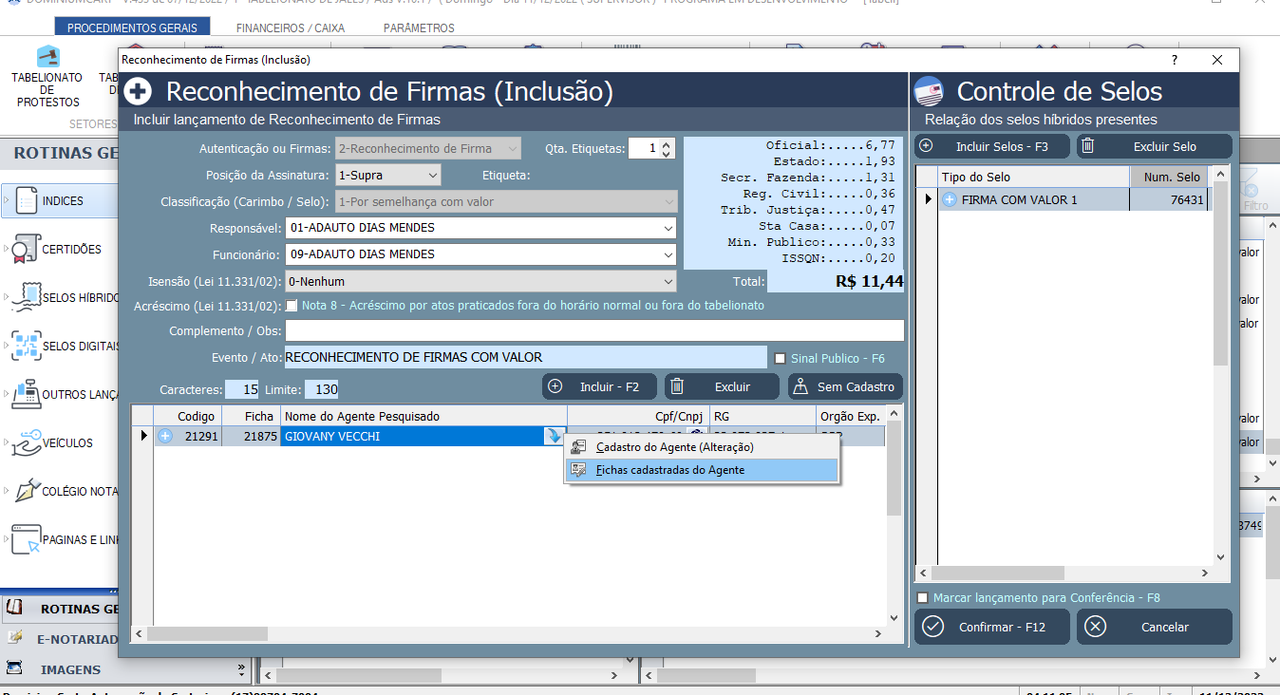
Master Enrico, simple example. Continue... Get the other functions from Giovanny's class, and test them. Your imagination is your limit.
#include "Fivewin.ch"

FUNCTION Main()

   LOCAL oDlg, oCbx, oSayItem, oSayAt, oFont
   LOCAL cItem := ""
   LOCAL aRect := {}

   SET _3DLOOK ON

   DEFINE FONT oFont NAME "TAHOMA" SIZE 0, - 20

   DEFINE DIALOG oDlg TITLE "Test ComboBox Witn Color" FROM 110, 1 TO 450, 600 ;
      PIXEL FONT oFont COLOR CLR_BLACK, CLR_WHITE TRANSPARENT

   oDlg:lHelPicon := .F.

   @ 10, 10 COMBOBOX oCbx VAR cItem ITEMS { "Testing", "this", "ComboBox" }  ;
      SIZE 200, 460 OF oDlg PIXEL HEIGHTGET 50

   ACTIVATE DIALOG oDlg CENTERED ;
      ON INIT( CTRLS_COLORS_DLG( oDlg ) )

   oFont:End()

RETURN NIL

FUNCTION CTRLS_COLORS_DLG( f_oDlgContainer )

   LOCAL lc_aCtrls := {}, lc_iFor := 0
   LOCAL lc_aItemsRadio := {}

   lc_aCtrls := f_oDlgContainer:aControls

   FOR lc_iFor := 1 TO Len( lc_aCtrls )

      IF ValType( lc_aCtrls[ lc_iFor ] ) == "O"

         IF lc_aCtrls[ lc_iFor ]:ClassName() == "TRADIO"

            /*
            AEval( lc_aCtrls[ lc_iFor ]:oRadMenu:aItems, ;
               {| _oRadId | { SetWindowTheme( _oRadId:hWnd, "", "" ), ;
               _oRadId:SetColor( st_oColorSys:nClrnRadioCheckBoxTxt, st_oColorSys:nClrBackGround ) } } )
            */

            aEval( lc_aCtrls[lc_iFor]:oRadMenu:aItems,                 ;
                   {|_oRadId|{ SetWindowTheme( _oRadId:hWnd, "", "" ), ;
                   _oRadId:SetColor( CLR_CYAN, CLR_WHITE ) } } )

         ELSEIF lc_aCtrls[ lc_iFor ]:ClassName() == "TCHECKBOX"

            SetWindowTheme( lc_aCtrls[ lc_iFor ]:hWnd, "", "" )
            Ctl3DLook( lc_aCtrls[ lc_iFor ]:hWnd, .F. )

            //lc_aCtrls[ lc_iFor ]:SetColor( st_oColorSys:nClrnRadioCheckBoxTxt, st_oColorSys:nClrBackGround )
            // G_COLOR_SYS( 31 ), G_COLOR_SYS( 1 )
            lc_aCtrls[ lc_iFor ]:SetColor( CLR_CYAN, CLR_WHITE )

         ELSEIF lc_aCtrls[ lc_iFor ]:ClassName() $ "TGET"

            //IF st_oColorSys:lGetsActiveColors

               // lc_aCtrls[ lc_iFor ]:SetColor( st_oColorSys:nClrGetTxtDis, st_oColorSys:nClrGetPaneDis )
               lc_aCtrls[ lc_iFor ]:SetColor( CLR_CYAN, CLR_WHITE )

            //ENDIF

         ELSEIF lc_aCtrls[ lc_iFor ]:ClassName() $ "TCOMBOBOX"

            //IF st_oColorSys:nComboBoxActiveColors > 0

            //   IF st_oColorSys:nComboBoxActiveColors == 2
            //      SetWindowTheme( lc_aCtrls[ lc_iFor ]:hWnd, "", "" )
            //      Ctl3DLook( lc_aCtrls[ lc_iFor ]:hWnd, .F. )
            //   ENDIF

            //   lc_aCtrls[ lc_iFor ]:oGet:SetColor( st_oColorSys:nClrGetTxtDis, st_oColorSys:nClrGetPaneDis )
            //    lc_aCtrls[lc_iFor]:SetColorFocus(st_oColorSys:nClrComboBoxFore) // user future
            //    lc_aCtrls[ lc_iFor ]:SetColor( st_oColorSys:nClrComboBoxFore, st_oColorSys:nClrComboBoxBack )

               lc_aCtrls[ lc_iFor ]:SetColor( CLR_MAGENTA, CLR_WHITE )

            //ENDIF

         ELSEIF lc_aCtrls[ lc_iFor ]:ClassName() $ "TLISTBOX;TTREEVIEW;TBAR"

            //IF st_oColorSys:nOthersActiveColors > 0
            //   IF st_oColorSys:nOthersActiveColors == 2
            //      SetWindowTheme( lc_aCtrls[ lc_iFor ]:hWnd, "", "" )
            //      Ctl3DLook( lc_aCtrls[ lc_iFor ]:hWnd, .F. )
            //   ENDIF
               //lc_aCtrls[ lc_iFor ]:SetColor( st_oColorSys:nClrOthersCtrlFore, st_oColorSys:nClrOthersCtrlBack )
               lc_aCtrls[ lc_iFor ]:SetColor( CLR_CYAN, CLR_WHITE )
           // ENDIF

         ELSEIF lc_aCtrls[ lc_iFor ]:ClassName() $ "TFOLDEREX"
            /*
            IF st_oColorSys:nOthersActiveColors > 0
               IF st_oColorSys:nOthersActiveColors == 2
                  SetWindowTheme( lc_aCtrls[ lc_iFor ]:hWnd, "", "" )
                  Ctl3DLook( lc_aCtrls[ lc_iFor ]:hWnd, .F. )
               ENDIF
               lc_aCtrls[ lc_iFor ]:aGradSel      := {  { 0.15, SetBrightColor( st_oColorSys:nClrOthersCtrlBack, 30 ), SetBrightColor( st_oColorSys:nClrOthersCtrlBack, 30 ) }, ;
                  { 0.85, st_oColorSys:nClrOthersCtrlBack, st_oColorSys:nClrOthersCtrlBack } }
               lc_aCtrls[ lc_iFor ]:aGradUnsel    := {  { 0.15, SetBrightColor( st_oColorSys:nClrOthersCtrlBack, 10, .T. ), SetBrightColor( st_oColorSys:nClrOthersCtrlBack, 10, .T. ) }, ;
                  { 0.85, st_oColorSys:nClrOthersCtrlBack, st_oColorSys:nClrOthersCtrlBack } }
               lc_aCtrls[ lc_iFor ]:aGradOverUnSel := {  { 0.15, st_oColorSys:nClrOthersCtrlBack, st_oColorSys:nClrOthersCtrlBack }, ;
                  { 0.85, SetBrightColor( st_oColorSys:nClrOthersCtrlBack, 30 ), SetBrightColor( st_oColorSys:nClrOthersCtrlBack, 30 ) } }
               lc_aCtrls[ lc_iFor ]:aGradOver     := {  { 0.15, SetBrightColor( st_oColorSys:nClrOthersCtrlBack, 40 ), SetBrightColor( st_oColorSys:nClrOthersCtrlBack, 40 ) }, ;
                  { 0.85, SetBrightColor( st_oColorSys:nClrOthersCtrlBack, 40 ), SetBrightColor( st_oColorSys:nClrOthersCtrlBack, 40 ) } }

               lc_aCtrls[ lc_iFor ]:bClrText := {| o, n |  If( O:aEnable[ n ], ;
                  st_oColorSys:nClrOthersCtrlFore, ;
                  GetSysColor( COLOR_GRAYTEXT ) ) }

            ENDIF
            */

         ENDIF

      ENDIF

   NEXT

RETURN NIL

FUNCTION SetBrightColor(f_nColorRgb,f_nPercent,f_lNegative)
   Local nColorRgbReturn := 0
   Local nRgbRed, nRgbGreen, nRgbBlue

   Default f_nPercent := 30, f_lNegative := .F.

   nRgbRed   := nRgbRed(f_nColorRgb)
   nRgbGreen := nRgbGreen(f_nColorRgb)
   nRgbBlue  := nRgbBlue(f_nColorRgb)

   If f_lNegative

      If nRgbRed > 0
         nRgbRed   := Int(nRgbRed-((nRgbRed/100)*f_nPercent))
         If nRgbRed < 0
            nRgbRed := 0
         EndIf
      EndIf

      If nRgbGreen > 0
         nRgbGreen   := Int(nRgbGreen-((nRgbGreen/100)*f_nPercent))
         If nRgbGreen < 0
            nRgbGreen := 0
         EndIf
      EndIf

      If nRgbBlue > 0
         nRgbBlue   := Int(nRgbBlue-((nRgbBlue/100)*f_nPercent))
         If nRgbBlue < 0
            nRgbBlue := 0
         EndIf
      EndIf

   Else

      If nRgbRed > 0
         nRgbRed   := Int(nRgbRed+((nRgbRed/100)*f_nPercent))
         If nRgbRed > 255
            nRgbRed := 255
         EndIf
      EndIf

      If nRgbGreen > 0
         nRgbGreen   := Int(nRgbGreen+((nRgbGreen/100)*f_nPercent))
         If nRgbGreen > 255
            nRgbGreen := 255
         EndIf
      EndIf

      If nRgbBlue > 0
         nRgbBlue   := Int(nRgbBlue+((nRgbBlue/100)*f_nPercent))
         If nRgbBlue > 255
            nRgbBlue := 255
         EndIf
      EndIf

   EndIf

   nColorRgbReturn := nRgb(nRgbRed, nRgbGreen, nRgbBlue)

 Return nColorRgbReturn

// FIN /END
Regards, saludos.