

Saludos
Estamos evaluando desarrollar una solución para odontología, la imagen del diente requiere asignarle imágenes según el diagnostico.
Saludos
Estamos evaluando desarrollar una solución para odontología, la imagen del diente requiere asignarle imágenes según el diagnostico.
function ImageOverlay()

   local aImage1, aImage2, hBmp
   local cFile1   := "c:\fwh\bitmaps\olga1.jpg"
   local cFile2   := "c:\fwh\bitmaps\alphabmp\calendar.bmp"
   local cSave    := "overlay.png"

   aImage1  := FW_ReadImage( nil, cFile1 ) // [3],[4] are width and height
   aImage2  := FW_ReadImage( nil, cFile2 )

   hBmp     := FW_MakeYourBitmap( aImage1[ 3 ], aImage1[ 4 ], ;
                  { |hDC, w, h| PaintOverlay( hDC, w, h, aImage1, aImage2 ) } )

   PalBmpFree( aImage1 )
   PalBmpFree( aImage2 )

   FW_SaveImage( hBmp, cSave ) // cSave can be bmp,jpg,png

   DeleteObject( hBmp )

   XImage( cSave ) // Test the saved image

return nil

static function PaintOverlay( hDC, w, h, aImage1, aImage2 )

   local t,l

   FW_DrawImage( hDC, aImage1 )

   t     := h - aImage2[ 4 ] - 20
   l     := w - aImage2[ 3 ] - 20

   FW_DrawImage( hDC, aImage2, { t, l, t + aImage2[ 4 ], l + aImage2[ 3 ] } )

return nil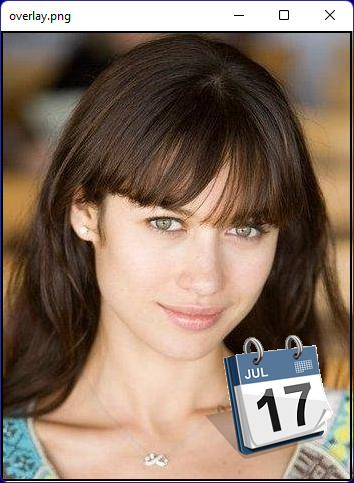
Rao
Saludos y Muchas gracias.
Rao
Saludos y gracias,
Actualmente utilizamos dos versiones de FW uno, muy viejo con xharbour .82 y otro con HB3.x, si es posible, la sintaxis con las funciones nativas de FW antes de implementar FW_FUNCTION.
What version of FWH you are using with Harbour?
cImage := GetPvProfString("Config","ImagenWnd",".\FapSoft.jpg",cIniFile)
   DEFINE BRUSH oBrush FILE cImage STRETCH // or RESIZE
   cImage2 := GetPvProfString("config","Image2",".\Zorra.jpg",cIniFile)

   DEFINE WINDOW oWnd MDI ;
          TITLE "WINCONT   " ;
          BRUSH oBrush ;
          ICON oIco

   //FW1204 Usando Bmp AlphaBlend con IMAGE  (Zorrita)
   @ 300, 60 IMAGE oImage2 FILENAME cImage2 NOBORDER SIZE 100,100 ADJUST OF oWnd:oWndClient
oWnd:bPainted := { || ABPaint( oWnd:oWndClient:hDC, 60, 300, oImage2:hBitmap, 255 ) }Francisco,
Gracias.
Mr. Rao,
In your sample, can we also have multiply images combined ? Lets say Olga and then more then 1 layover on top.
For my webshop I see a interesting use of it...
Do we have to save the first image with layover and then do the function with the new image and next layover ? etc....
Or can we use the hBmp and do the conversion in 1 loop (No idea for the source sample ?)
You can put any number of images, paint text, etc in one go.


