FiveTech Support Forums

FiveWin / Harbour / xBase community
Board index FiveWin for Harbour/xHarbour COLORMENU vertical MenuItem
Posts: 1772
Joined: Thu Sep 05, 2019 05:32 AM
COLORMENU vertical MenuItem
Posted: Tue Dec 27, 2022 08:35 AM
hi,

i have "read" about COLORMENU
Code (fw): Select all Collapse
   MENU oMenu HEIGHT -4.8 FLAT COLORMENU RGB(1,1,1), CLR_MSPURPLE ;
      COLORLINEBOTTOM RGB(1,1,1) FONT oFontMenu NOBORDER // 2013
and try to use it
Code (fw): Select all Collapse
║   MENU oMenu COLORMENU BGcolor, BFcolor ;
║         COLORLINEBOTTOM BGcolor FONT oFontDefault NOBORDER // 2013
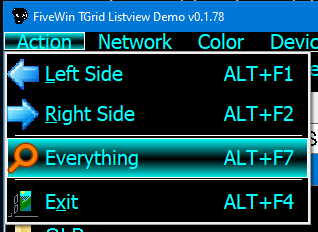
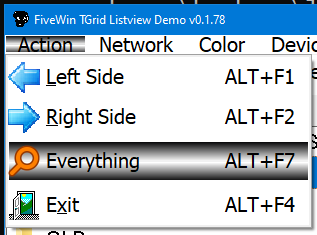
it does "paint" Horizontal Menu as i want in "Dark-Mode" but "fail" on Vertical Menu
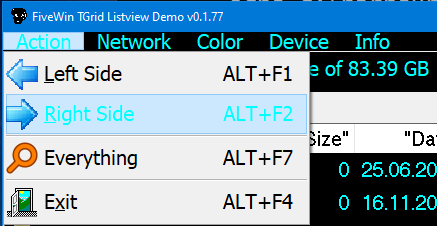
what i´m doing wrong :?:

p.s. how does COLORMENU work with POPUP ?
Code (fw): Select all Collapse
   MENU oMenu POPUP COLORMENU BGcolor, BFcolor ;
         COLORLINEBOTTOM BGcolor FONT oFontDefault // NOBORDER 2015
greeting,

Jimmy
Posts: 6755
Joined: Wed Feb 15, 2012 08:25 PM
Re: COLORMENU vertical MenuItem
Posted: Tue Dec 27, 2022 03:38 PM
Try
Code (fw): Select all Collapse
   MENU oMenu 2013 ;
       FONT oFontMenu HEIGHT -4.8 NOBORDER ;
       COLORMENU Rgb( 0, 0, 1 ), CLR_MSPURPLE ;
       COLORPNEL CLR_WHITE, Rgb( 0, 0, 1 ) ;
       COLORSELECT CLR_YELLOW, CLR_YELLOW, Rgb( 0, 0, 1 ) //;   //  COLORSELECT CLR_YELLOW, CLR_GRAY, Rgb( 0, 0, 1 )
//       COLORBOX CLR_RED
For POPUP Menus, use COLORPNEL and not use COLORMENU
Cristobal Navarro

Hay dos tipos de personas: las que te hacen perder el tiempo y las que te hacen perder la noción del tiempo

El secreto de la felicidad no está en hacer lo que te gusta, sino en que te guste lo que haces
Posts: 1772
Joined: Thu Sep 05, 2019 05:32 AM
Re: COLORMENU vertical MenuItem
Posted: Tue Dec 27, 2022 05:39 PM
hi,

thx for you answer.

have "play" with your Sample using different Color and Setting and found out

1.) need Style 2013
2.) must be Rgb( 0, 0, 1 ) instead of Rgb( 0, 0, 0 )

this is what i use now
Code (fw): Select all Collapse
   MENU oMenu 2013 ;
      COLORMENU BGcolor, BFcolor ;
      COLORPNEL BFcolor, BGcolor ;
      COLORLEFT BFcolor, BGcolor ;
      COLORSELECT BFcolor, BGcolor, BFcolor
   oMenu:oFont := oFontDefault
BGcolor = Background Color
BFcolor = Foreground Color

Question : which other Style than 2013 can i try :?: (have try 2015)

---

Dark-Mode Menu look nice using Gradient
but with "white" Menu it is hard to read Horizontal Menu when it is "small"


is there a Way not to use Gradient with COLORSELECT :?: (which need 3 x Parameter)
greeting,

Jimmy
Posts: 6755
Joined: Wed Feb 15, 2012 08:25 PM
Re: COLORMENU vertical MenuItem
Posted: Tue Dec 27, 2022 06:30 PM
In the COLORSELECT clause the first two parameters are for the background: if they are different it produces a gradient, but if you put the same color then you will get a single background color.
Clause 2013 is the one that allows the user to define the color or aspects of a totally personalized menu. If you use the 2007, 2010 or 2015 styles, it will use the colors that are already defined for that style in Fivewin.
You can also use the MENU command with the COLORS clause without defining any styles, which will allow you to modify FONTs, colors and appearances of the menu, but my advice, to get a fully customized menu is to include the 2013 clause.
MENU oMenu COLORS FONT oFontMenu ...
Pd.: not use CLR_BLACK or Rgb( 0, 0, 0 ), The class understands that the color is empty ( color value = 0 ), and assigns the default color. This is a topic that I have yet to review.
Cristobal Navarro

Hay dos tipos de personas: las que te hacen perder el tiempo y las que te hacen perder la noción del tiempo

El secreto de la felicidad no está en hacer lo que te gusta, sino en que te guste lo que haces
Posts: 1772
Joined: Thu Sep 05, 2019 05:32 AM
Re: COLORMENU vertical MenuItem
Posted: Wed Dec 28, 2022 08:56 AM

hi,

thx for Answer and Information

there is still a lot i have to learn about Fivewin.

greeting,

Jimmy

Continue the discussion