
Is there any example of an interactive color change in Footer (xBrowse) ?
Board index FiveWin for Harbour/xHarbour Change Footer colors (xBrowse)

Did you already make a looking for "footer color"?
Regards
Francisco J. Alegría P.
Chinandega, Nicaragua.
Fwxh-MySql-TMySql
Chinandega, Nicaragua.
Fwxh-MySql-TMySql

Hi,
oCol:bClrFooter := {|| {IF(oBrw:oCol(9):nTotal > 0, CLR_RED, CLR_BLACK), } }Thank you for your help !
Of course, I immediately tried the construction of
aCols[cl]:bClrFooter:={||{RGB(...), RGB(...)}}
aCols[cl]:RefreshFooter()
But at the same time, only the font color changes, and the background color does not change :(
Of course, I immediately tried the construction of
aCols[cl]:bClrFooter:={||{RGB(...), RGB(...)}}
aCols[cl]:RefreshFooter()
But at the same time, only the font color changes, and the background color does not change :(

return color pair { nClrText, nClrBack } when your bClrFooter is evaluated.
Regards
G. N. Rao.
Hyderabad, India
G. N. Rao.
Hyderabad, India
Sorry, I got it! Is the update method not enough aCols[cl]:RefreshFooter() ?
Hi,
this code...
this code...
oCol:bClrFooter := {|| {IF(oBrw:oCol(9):nTotal > 0, CLR_RED, CLR_BLACK), CLR_YELLOW} }hi Friends
oCol:bClrFooter := {|| {CLR_GREEN, CLR_BLUE} } // CLR_BLUE not working.........#include "fivewin.ch"
function Main()
local aData := { { "ONE ", 2000 }, { "TWO ", -5000 }, { "THREE", 2000 } }
XBROWSER aData FASTEDIT SETUP BrwSetup( oBrw )
return nil
static function BrwSetup( oBrw )
SetGetColorFocus()
oBrw:lFooter := .t.
oBrw:l2007 := .f.
WITH OBJECT oBrw:aCols[ 2 ]
:nFooterType := AGGR_SUM
:bClrFooter := { || If( oBrw:oCol( 2 ):nTotal < 0, { CLR_WHITE, CLR_HRED }, { CLR_BLACK, CLR_HGREEN } ) }
END
oBrw:MakeTotals()
return nil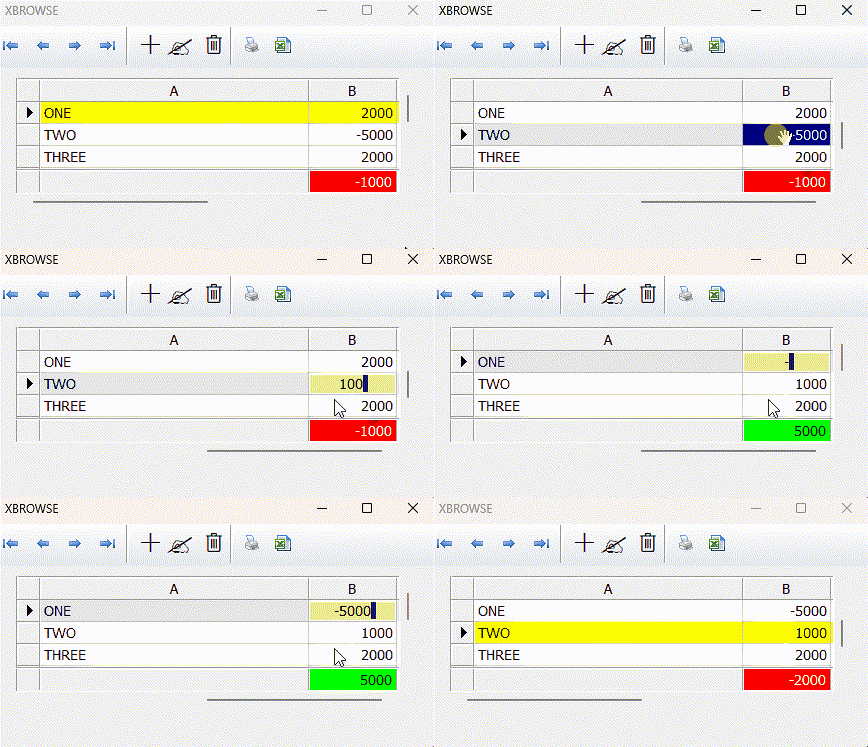
Regards
G. N. Rao.
Hyderabad, India
G. N. Rao.
Hyderabad, India
Hi Mr. Rao,
Which application do you use to create gif files.
Thanks.
Regards,
Hakan ONEMLI
Harbour & MSVC 2022 & FWH 23.06
Hakan ONEMLI
Harbour & MSVC 2022 & FWH 23.06
ScreenToGif
Regards
G. N. Rao.
Hyderabad, India
G. N. Rao.
Hyderabad, India