

Hello everyone;
Can I show more than one single bmp on an xbrowse column object?
Thank you,
Reinaldo.
Hello everyone;
Can I show more than one single bmp on an xbrowse column object?
Thank you,
Reinaldo.
Reinaldo, what would be the use of that necessity?
Why not two columns with a bmp in each one?
Or one with different bmp according to the needs?
It is just out of curiosity...
// xbrbtns.prg

#include "fivewin.ch"

function Main()

   local oDlg, oFont, oBrw, oBrush

   USE CUSTOMER

   DEFINE FONT oFont NAME "TAHOMA" SIZE 0,-14
   DEFINE DIALOG oDlg SIZE 500,400 PIXEL TRUEPIXEL FONT oFont RESIZABLE

   @ 20,20 XBROWSE oBrw SIZE -20,-20 PIXEL OF oDlg ;
      DATASOURCE "CUSTOMER" ;
      COLUMNS "FIRST", "AGE", "SALARY" ;
      LINES NOBORDER

   WITH OBJECT oBrw
      :nRowHeight    := 30
      WITH OBJECT :Age
         :nWidth        := 100
         :nDataStrAlign := AL_CENTER
         :nHeadStrAlign := AL_CENTER
         :AddBitmap( { FW_BmpPlus( nil, { CLR_WHITE, CLR_GREEN } ), FW_BmpMinus() } )

         // Right Button
         :nEditType     := EDIT_BUTTON
         :bEditBlock    := { |r,c,oCol| oCol:Value + 1 }
         :nBtnBmp       := 1
         :lBtnTransparent  := .t.

         // Left Button
         :bBmpData      := { |v,lSel| If( lSel, 2, 0 ) }
         :bBmpAction    := { |oCol| oCol:VarPut( oCol:Value - 1 ) }
      END
      :CreateFromCode()
   END

   ACTIVATE DIALOG oDlg CENTERED
   RELEASE FONT oFont

return nil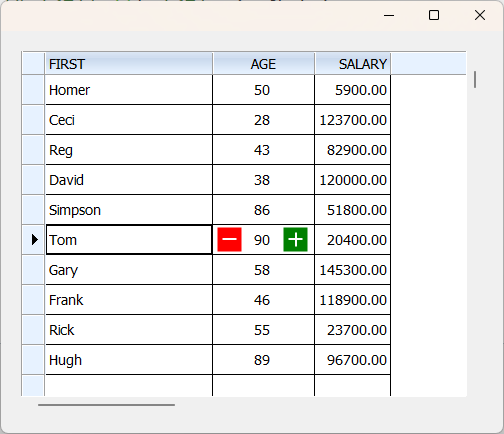
Second way is to use
bBmpData (left or right align)
bStrImage (any position)
Text any position
Lastly, paint the column on our own using either oBrw:bPaintRow or oCol:bPaintText
I will provide a sample if required
Dear Ramesh Babu
Actually, I posted that sample in a haste.
Later I realized that it is not what he is looking for.
I will post different samples now.
Mr Rao -- let me first say: he he he.
"In a haste" but excellent example and clever use of the right side button. It takes imagination to see in how many ways painting various bmps on a cell can be not just beautiful but also very useful.
I have seen it on grids where tags (like stack overflow tags) are shown.
Yes, it would help to see sample code using oCol:bPaintText to paint various bmps based on conditions.
Thank you,
Reinaldo.


