FiveTech Support Forums

FiveWin / Harbour / xBase community
Board index FiveWin for Harbour/xHarbour make a rectangule with a brush
Posts: 7318
Joined: Thu Oct 18, 2012 07:17 PM
make a rectangule with a brush
Posted: Thu Mar 23, 2023 11:58 AM
could someone help me in making a rectangle with a specific brush ( borland bdiagonal) ?

I tried with
Code (fw): Select all Collapse
 hLite   := CreatePen( PS_SOLID, 1, ::nClrLite )
   hDark   := CreatePen( PS_SOLID, 1, ::nClrDark )
   hBack   := CreatePen( PS_SOLID, 1, ::oWnd:nClrPane )

    DEFINE BRUSH hBrush    STYLE BDIAGONAL COLOR  Rgb(195,195,185)
     hOldBru := SelectObject( ::hDC, hBrush )

         Rectangle( ::hDC, aRect[ 1 ] + 1 , aRect[ 2 ] + 1, aRect[ 3 ], aRect[ 4 ], hLite )
         Rectangle( ::hDC, aRect[ 1 ], aRect[ 2 ], aRect[ 3 ] - 1, aRect[ 4 ] - 1, hDark )
         MoveTo( ::hDC, aRect[ 2 ] + 1, aRect[ 3 ] - 3 )
         LineTo( ::hDC, aRect[ 2 ] + 1, aRect[ 1 ] + 1, hLite )
         LineTo( ::hDC, aRect[ 4 ] - 2, aRect[ 1 ] + 1, hLite )

        FillRect( ::hDC, { aRect[ 1 ] + 1 , aRect[ 2 ] + 1, aRect[ 3 ], aRect[ 4 ] }, hBrush )
it draw the rectangule without the brush
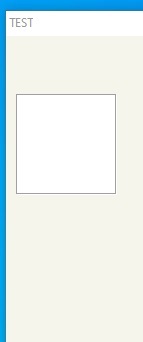


but not run ok
Since from 1991/1992 ( fw for clipper Rel. 14.4 - Momos)

I use : FiveWin for Harbour March-April 2024 - Harbour 3.2.0dev (harbour_bcc770_32_20240309) - Bcc7.70 - xMate ver. 1.15.3 - PellesC - mail: silvio[dot]falconi[at]gmail[dot]com
Posts: 10733
Joined: Sun Nov 19, 2006 05:22 AM
Re: make a rectangule with a brush
Posted: Mon Mar 27, 2023 02:32 AM
Code (fw): Select all Collapse
    DEFINE BRUSH hBrush    STYLE BDIAGONAL COLOR  Rgb(195,195,185)
     hOldBru := SelectObject( ::hDC, hBrush )
should be
Code (fw): Select all Collapse
    DEFINE BRUSH oBrush    STYLE BDIAGONAL COLOR  Rgb(195,195,185)
     hOldBru := SelectObject( ::hDC, oBrush:hBrush )
Regards


G. N. Rao.

Hyderabad, India
Posts: 10733
Joined: Sun Nov 19, 2006 05:22 AM
Re: make a rectangule with a brush
Posted: Mon Mar 27, 2023 02:58 AM
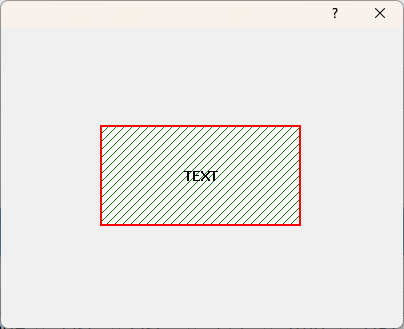
Or we can also do this with minimal code like this:
Code (fw): Select all Collapse
    DEFINE BRUSH oBrush STYLE BDIAGONAL COLOR CLR_GREEN
   oDlg:bPainted := { || oDlg:Box( 100,100,200,300, { CLR_HRED, 2 }, oBrush, "TEXT" ) }
Regards


G. N. Rao.

Hyderabad, India
Posts: 7318
Joined: Thu Oct 18, 2012 07:17 PM
Re: make a rectangule with a brush
Posted: Mon Mar 27, 2023 06:50 AM
nageswaragunupudi wrote:Or we can also do this with minimal code like this:
Code (fw): Select all Collapse
    DEFINE BRUSH oBrush STYLE BDIAGONAL COLOR CLR_GREEN
   oDlg:bPainted := { || oDlg:Box( 100,100,200,300, { CLR_HRED, 2 }, oBrush, "TEXT" ) }
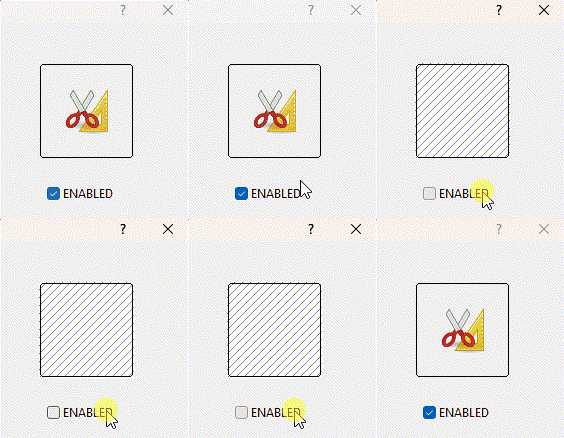
Thanks Rao , But I need it to replace a btnbmp when it's disabled, the problem is that a btnbmp when disabled looks ugly and behaves differently from a get or a say
Since from 1991/1992 ( fw for clipper Rel. 14.4 - Momos)

I use : FiveWin for Harbour March-April 2024 - Harbour 3.2.0dev (harbour_bcc770_32_20240309) - Bcc7.70 - xMate ver. 1.15.3 - PellesC - mail: silvio[dot]falconi[at]gmail[dot]com
Posts: 10733
Joined: Sun Nov 19, 2006 05:22 AM
Re: make a rectangule with a brush
Posted: Mon Mar 27, 2023 08:46 AM
the problem is that a btnbmp when disabled looks ugly
Depends on the program.
Regards


G. N. Rao.

Hyderabad, India
Posts: 10733
Joined: Sun Nov 19, 2006 05:22 AM
Re: make a rectangule with a brush
Posted: Thu Mar 30, 2023 11:33 AM
Code (fw): Select all Collapse
function test()

   local oDlg, oBtn, hBmp := LinesBmp()
   local lEnabled := .t.

   DEFINE DIALOG oDlg SIZE 200,200 PIXEL TRUEPIXEL

   @  40,60 BTNBMP oBtn ;
      FILE "..\bitmaps\pngs\image1.png", "", hBmp, "" ;
      SIZE 64,64 PIXEL FLAT GDIP WHEN lEnabled OF oDlg

   @ 130,60 CHECKBOX lEnabled PROMPT "ENABLED" ;
      SIZE 80,20 PIXEL OF oDlg


   ACTIVATE DIALOG oDlg CENTERED

return nil

//----------------------------------------------------------------------------//

static function LinesBmp()

   local hBmp, oBrush

   DEFINE BRUSH oBrush STYLE BDIAGONAL COLOR CLR_GRAY
   hBmp  := FW_MakeYourBitmap( 96,96, <|hDC,w,h|
            FillRect( hDC, { 0,0,95,95 }, oBrush:hBrush )
            return nil
            > )
   RELEASE BRUSH oBrush

return hBmp
Regards


G. N. Rao.

Hyderabad, India
Posts: 7318
Joined: Thu Oct 18, 2012 07:17 PM
Re: make a rectangule with a brush
Posted: Thu Mar 30, 2023 11:57 AM
nageswaragunupudi wrote:
Code (fw): Select all Collapse
function test()

   local oDlg, oBtn, hBmp := LinesBmp()
   local lEnabled := .t.

   DEFINE DIALOG oDlg SIZE 200,200 PIXEL TRUEPIXEL

   @  40,60 BTNBMP oBtn ;
      FILE "..\bitmaps\pngs\image1.png", "", hBmp, "" ;
      SIZE 64,64 PIXEL FLAT GDIP WHEN lEnabled OF oDlg

   @ 130,60 CHECKBOX lEnabled PROMPT "ENABLED" ;
      SIZE 80,20 PIXEL OF oDlg


   ACTIVATE DIALOG oDlg CENTERED

return nil

//----------------------------------------------------------------------------//

static function LinesBmp()

   local hBmp, oBrush

   DEFINE BRUSH oBrush STYLE BDIAGONAL COLOR CLR_GRAY
   hBmp  := FW_MakeYourBitmap( 96,96, <|hDC,w,h|
            FillRect( hDC, { 0,0,95,95 }, oBrush:hBrush )
            return nil
            > )
   RELEASE BRUSH oBrush

return hBmp
Good Mr Rao ....and the Border of Btbnbmp ? it is allways black
oBtn:nClrBorder := RGB( 245,245,235)
on init go ok then I wish modify it
Since from 1991/1992 ( fw for clipper Rel. 14.4 - Momos)

I use : FiveWin for Harbour March-April 2024 - Harbour 3.2.0dev (harbour_bcc770_32_20240309) - Bcc7.70 - xMate ver. 1.15.3 - PellesC - mail: silvio[dot]falconi[at]gmail[dot]com
Posts: 7318
Joined: Thu Oct 18, 2012 07:17 PM
Re: make a rectangule with a brush
Posted: Thu Mar 30, 2023 12:26 PM
Rao,
I modify your test inserting the gradient I use and the color of border
Code (fw): Select all Collapse
#include "fivewin.ch"


function test()

   local oDlg, oBtn, hBmp := LinesBmp()
   local lEnabled := .t.


   DEFINE DIALOG oDlg SIZE 200,200 PIXEL TRUEPIXEL

   @  40,60 BTNBMP oBtn ;
      FILE "C:\WORK\FWH\bitmaps\pngs\image1.png", "", hBmp, "" ;
      SIZE 64,64 PIXEL FLAT NOROUND GDIP WHEN lEnabled OF oDlg

   oBtn:nClrBorder := RGB(195,195,185)

    oBtn:bClrGrad = { | lInvert | If( ! lInvert,;
                    { { 0.25, RGB( 245,245,235),  RGB(250,250,245) },;
                      { 0.75,  RGB(250,250,245), RGB( 245,245,235) } },;
                    { { 0.25,  RGB(250,250,245), RGB( 245,245,235) }, ;
                      { 0.75, RGB( 245,245,235),  RGB(250,250,245) } } ) }


   @ 130,60 CHECKBOX lEnabled PROMPT "ENABLED" ;
      SIZE 80,20 PIXEL OF oDlg


   ACTIVATE DIALOG oDlg CENTERED

return nil

//----------------------------------------------------------------------------//

static function LinesBmp()

   local hBmp, oBrush

   DEFINE BRUSH oBrush STYLE BDIAGONAL COLOR CLR_GRAY
   hBmp  := FW_MakeYourBitmap( 96,96, <|hDC,w,h|
            FillRect( hDC, { 0,0,95,95 }, oBrush:hBrush )
            return nil
            > )

   RELEASE BRUSH oBrush

return hBmp


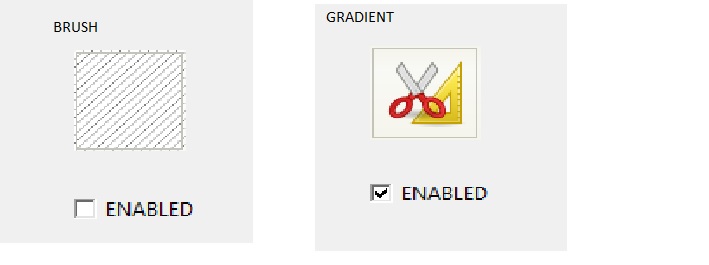
if you enlarge the button with a zoom you will see that there are problems which I've been asking for a long time
i.e. both the gradient and the oblique lines come out of the edge of the button
if you want to change the border online it is not possible because it is always black
Since from 1991/1992 ( fw for clipper Rel. 14.4 - Momos)

I use : FiveWin for Harbour March-April 2024 - Harbour 3.2.0dev (harbour_bcc770_32_20240309) - Bcc7.70 - xMate ver. 1.15.3 - PellesC - mail: silvio[dot]falconi[at]gmail[dot]com
Posts: 10733
Joined: Sun Nov 19, 2006 05:22 AM
Re: make a rectangule with a brush
Posted: Thu Mar 30, 2023 01:13 PM

Enlarge?

Pls provide an example.

Regards


G. N. Rao.

Hyderabad, India
Posts: 7318
Joined: Thu Oct 18, 2012 07:17 PM
Re: make a rectangule with a brush
Posted: Thu Mar 30, 2023 03:59 PM

Mr. Rao,

I meant that if you see well the button has problems when using the gradient or the brush with diagonal lines, in both cases they come out of the border when they shouldn't.

Since from 1991/1992 ( fw for clipper Rel. 14.4 - Momos)

I use : FiveWin for Harbour March-April 2024 - Harbour 3.2.0dev (harbour_bcc770_32_20240309) - Bcc7.70 - xMate ver. 1.15.3 - PellesC - mail: silvio[dot]falconi[at]gmail[dot]com
Posts: 10733
Joined: Sun Nov 19, 2006 05:22 AM
Re: make a rectangule with a brush
Posted: Tue Apr 04, 2023 06:01 AM
Silvio.Falconi wrote:Mr. Rao,
I meant that if you see well the button has problems when using the gradient or the brush with diagonal lines, in both cases they come out of the border when they shouldn't.
I see your point.
We will look into this.
Regards


G. N. Rao.

Hyderabad, India

Continue the discussion