FiveTech Support Forums

FiveWin / Harbour / xBase community
Board index FiveWin for Harbour/xHarbour xBrowse footer picture
Posts: 218
Joined: Mon Feb 07, 2022 09:54 PM
xBrowse footer picture
Posted: Mon Apr 03, 2023 10:27 AM
Hi all,

I've a problem with the picture clause of footers in my xBrowse.
My code :
Code (fw): Select all Collapse
   WITH OBJECT oBrwPos
      :bChange          := { || aBtn[ 3 ]:Update(), nTotal := oBrwPos:aCols[3]:nTotal + oBrwPos:aCols[5]:nTotal, oTotal:Refresh() }
      :nRowDividerStyle := 1
      :nColDividerStyle := 3
      :nMarqueeStyle    := MARQSTYLE_HIGHLROW
      :nStretchCol      := STRETCHCOL_LAST
      :nRowHeight       := 30
      :aCols[ 3 ]:nFooterType    := :aCols[ 5 ]:nFooterType    := AGGR_SUM
      :aCols[ 3 ]:cFooterPicture := :aCols[ 5 ]:cFooterPicture := '@E 999,999.99'
      :aCols[ 3 ]:nFootStrAlign  := :aCols[ 5 ]:nFootStrAlign  := AL_RIGHT
      :aCols[ 3 ]:cEditPicture   := :aCols[ 5 ]:cEditPicture   := '@E 999,999.99'
      .......     
      :aCols[ 3 ]:bClrHeader     := :aCols[ 5 ]:bClrHeader     := { ||{ CLR_MAGENTA, } }
      :aCols[ 3 ]:bClrFooter     := :aCols[ 5 ]:bClrFooter     := { ||{ CLR_MAGENTA, } }

      :MakeTotals()
   END
Result:

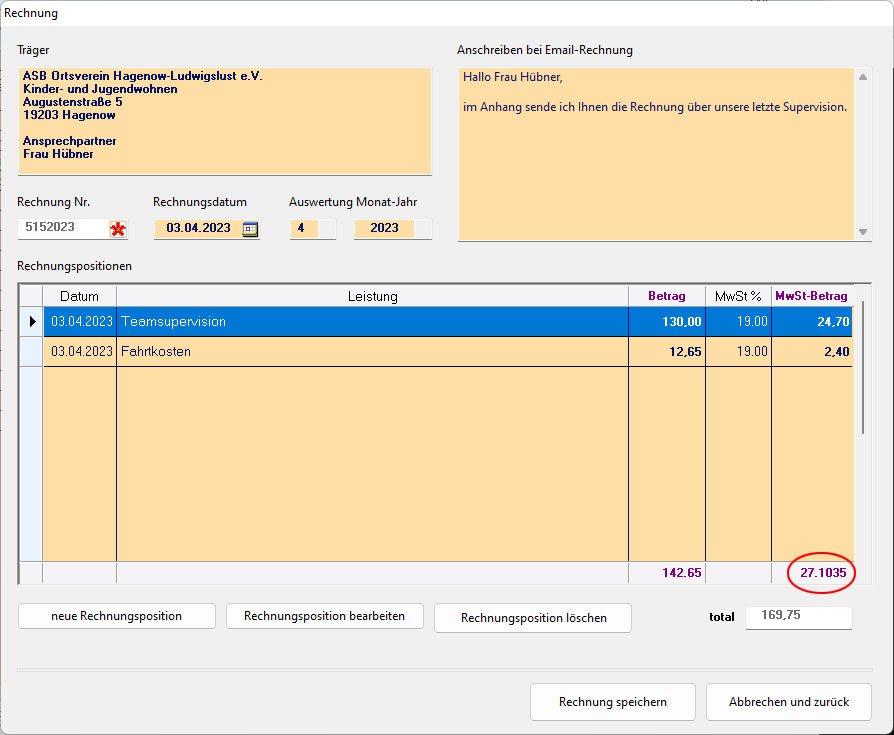
There are 4 decimals instead of only 2 and a decimal dot instead of comma.
What can i do to display the sums according the picture clause?

Regards, Detlef
Posts: 8523
Joined: Tue Dec 20, 2005 07:36 PM
Re: xBrowse footer picture
Posted: Mon Apr 03, 2023 10:59 AM
João Santos - São Paulo - Brasil - Phone: +55(11)95150-7341
Posts: 1487
Joined: Tue Jun 14, 2016 07:51 AM
Re: xBrowse footer picture
Posted: Mon Apr 03, 2023 11:23 AM

:aCols[ 3 ]:nFooterType := :aCols[ 5 ]:nFooterType := AGGR_SUM

Is this also hapening when you just use 1 of them ?

:aCols[ 5 ]:nFooterType := AGGR_SUM

and if you made 2 different with object oBrwpos and obrw....

Marc Venken

Using: FWH 23.08 with Harbour
Posts: 218
Joined: Mon Feb 07, 2022 09:54 PM
Re: xBrowse footer picture
Posted: Mon Apr 03, 2023 12:59 PM
karinha wrote:Look this:

https://forums.fivetechsupport.com/viewtopic.php?f=3&t=37938&p=226804

Regards, saludos.
I found this before I posted for help.
There was a promise that this will be fixed in some next version.
But it seems not yet to be fixed. I'm using FWH 22.10
Posts: 218
Joined: Mon Feb 07, 2022 09:54 PM
Re: xBrowse footer picture
Posted: Mon Apr 03, 2023 01:07 PM
Marc Venken wrote::aCols[ 3 ]:nFooterType := :aCols[ 5 ]:nFooterType := AGGR_SUM

Is this also hapening when you just use 1 of them ?

:aCols[ 5 ]:nFooterType := AGGR_SUM

and if you made 2 different with object oBrwpos and obrw....
Thanks Mac, for your idea.
I just tried it but no difference. The misbehavior is still the same.
Posts: 1487
Joined: Tue Jun 14, 2016 07:51 AM
Re: xBrowse footer picture
Posted: Mon Apr 03, 2023 02:01 PM

Postby nageswaragunupudi » Sun May 03, 2020 6:54 am

CODE: SELECT ALL EXPAND VIEW

          WITH OBJECT  oCol

              :nFooterType      := AGGR_SUM

              :cEditPicture     := "€ 99,999.99"

              :cDataType        := "N"

           END

In case of empty arrays we need to inform the datatype of the column by setting cDatatype

Or we wait for mr. Rao ))))

Marc Venken

Using: FWH 23.08 with Harbour
Posts: 218
Joined: Mon Feb 07, 2022 09:54 PM
Re: xBrowse footer picture
Posted: Mon Apr 03, 2023 02:07 PM
I found the cause of more than 2 decimals in the footer sum..

My column value was computed by multiplying a numeric value by a val( alltrim( cValue ) ).
The xBrowse column was showing correct values with 2 decimals according to the column picture clause.
But the footer picture clause "@E 99,999.99" was ignored.

I created a multiplication function where I transform the cValue to a real numeric value so that the result has only 2 decimals.

But the dot istead comma problem remains.
Posts: 1487
Joined: Tue Jun 14, 2016 07:51 AM
Re: xBrowse footer picture
Posted: Mon Apr 03, 2023 02:15 PM

What is your FWNumFormat setting ?

xbrNumFormat( "E", .T. ) // "E" for European, "A" for American and others // .t. for showing thousand separators

  • New function nStrToNum( cNumericVal, [lEuropean] ) --> nVal

Optional Parameter lEuropean defaults to FWNumFormat()[ 1 ] == "E".

Converts any number formatted as string using either European

notation or American notation, retaining the full precision of

the decimal part. In almost all cases the function decides

whether the format is European or not, by examining the number and

position of "," and ".". In cases of ambiguity (eg nn,nnn and nn.nnn)

format is interpreted according the value of lEuropean.

Eg:

c := "32,456.2359"

c1 := "32.456,2359"

? nStrToNum( c ), nStrToNum( c1 ) --> 32456.2359 31456.2359

? nStrToNum( "12,25%" ) --> 0.1225

Marc Venken

Using: FWH 23.08 with Harbour
Posts: 218
Joined: Mon Feb 07, 2022 09:54 PM
Re: xBrowse footer picture
Posted: Mon Apr 03, 2023 02:19 PM
Marc Venken wrote:Postby nageswaragunupudi » Sun May 03, 2020 6:54 am

CODE: SELECT ALL EXPAND VIEW


WITH OBJECT oCol
:nFooterType := AGGR_SUM
:cEditPicture := "€ 99,999.99"
:cDataType := "N"
END


In case of empty arrays we need to inform the datatype of the column by setting cDatatype

Or we wait for mr. Rao ))))
Many thanks, Marc!
:cDataType := "N" was the solution. :D

btw. I never heard before of the function FWNumFormat(). :oops:
I' still learning with my 70 years :wink:
Posts: 10733
Joined: Sun Nov 19, 2006 05:22 AM
Re: xBrowse footer picture
Posted: Tue Apr 04, 2023 02:40 AM
I tried with different versions of FWH, but it is always working correctly for me here.
This is my test program:
Code (fw): Select all Collapse
#include "fivewin.ch"

function Main()

   local aData := { { DATE(), "Teamsupervision", 130.00, 19, 0 }, ;
                    { DATE(), "Fahrtkosten",      12.65, 19, 0 } }

   local oDlg, oBrw, oFont, oSay, nCol

   SET DATE ITALIAN
   SET CENTURY ON
   SetGetColorFocus()

//   AEval( aData, { |a| a[ 5 ] := ROUND( a[ 3 ] * a[ 4 ] / 100, 2 ) } )

   DEFINE FONT oFont NAME "TAHOMA" SIZE 0,-18
   DEFINE DIALOG oDlg SIZE 700,210 PIXEL TRUEPIXEL FONT oFont TITLE FWVERSION

   @ 20,20 XBROWSE oBrw SIZE -20,170 PIXEL OF oDlg DATASOURCE aData ;
      AUTOCOLS HEADERS "Datum", "Leistung", "Betrag", "MwSt%", "MwSt-Betrag" ;
      COLSIZES 100,30,120,120,120 ;
      FOOTERS CELL LINES NOBORDER FASTEDIT

   WITH OBJECT oBrw
      :nStretchCol   := 2
      :aCols[ 5 ]:bEditValue := { || oBrw:aRow[ 5 ] := ROUND( oBrw:aRow[ 3 ] * oBrw:aRow[ 4 ] / 100, 2 ) }
      AEval( :aCols, { |o| o:cEditPicture := "@E 999,999.99" }, 3, 3 )
      AEval( :aCols, { |o| o:nEditType := EDIT_GET }, 1, 4 )

      :aCols[ 3 ]:nFooterType := :aCols[ 5 ]:nFooterType := AGGR_SUM

      // assigning cFooterPicture is Optional
      // Avoid when cEditPicture and cFooterPicure are same.
      :aCols[ 3 ]:cFooterPicture := :aCols[ 5 ]:cFooterPicture := "@E 999,999.99"

      :MakeTotals()
      :CreateFromCode()
   END

   ACTIVATE DIALOG oDlg CENTERED
   RELEASE FONT oFont

return nil
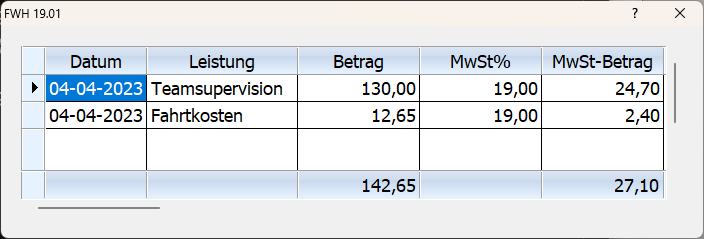
Result:


Can anybody modify the above code to reproduce the error reported?
Regards


G. N. Rao.

Hyderabad, India
Posts: 1387
Joined: Fri May 23, 2008 01:33 PM
Re: xBrowse footer picture
Posted: Tue Apr 04, 2023 11:02 AM
nageswaragunupudi wrote:I tried with different versions of FWH, but it is always working correctly for me here.
This is my test program:
Code (fw): Select all Collapse
#include "fivewin.ch"

function Main()

   local aData := { { DATE(), "Teamsupervision", 130.00, 19, 0 }, ;
                    { DATE(), "Fahrtkosten",      12.65, 19, 0 } }

   local oDlg, oBrw, oFont, oSay, nCol

   SET DATE ITALIAN
   SET CENTURY ON
   SetGetColorFocus()

//   AEval( aData, { |a| a[ 5 ] := ROUND( a[ 3 ] * a[ 4 ] / 100, 2 ) } )

   DEFINE FONT oFont NAME "TAHOMA" SIZE 0,-18
   DEFINE DIALOG oDlg SIZE 700,210 PIXEL TRUEPIXEL FONT oFont TITLE FWVERSION

   @ 20,20 XBROWSE oBrw SIZE -20,170 PIXEL OF oDlg DATASOURCE aData ;
      AUTOCOLS HEADERS "Datum", "Leistung", "Betrag", "MwSt%", "MwSt-Betrag" ;
      COLSIZES 100,30,120,120,120 ;
      FOOTERS CELL LINES NOBORDER FASTEDIT

   WITH OBJECT oBrw
      :nStretchCol   := 2
      :aCols[ 5 ]:bEditValue := { || oBrw:aRow[ 5 ] := ROUND( oBrw:aRow[ 3 ] * oBrw:aRow[ 4 ] / 100, 2 ) }
      AEval( :aCols, { |o| o:cEditPicture := "@E 999,999.99" }, 3, 3 )
      AEval( :aCols, { |o| o:nEditType := EDIT_GET }, 1, 4 )

      :aCols[ 3 ]:nFooterType := :aCols[ 5 ]:nFooterType := AGGR_SUM

      // assigning cFooterPicture is Optional
      // Avoid when cEditPicture and cFooterPicure are same.
      :aCols[ 3 ]:cFooterPicture := :aCols[ 5 ]:cFooterPicture := "@E 999,999.99"

      :MakeTotals()
      :CreateFromCode()
   END

   ACTIVATE DIALOG oDlg CENTERED
   RELEASE FONT oFont

return nil
Result:


Can anybody modify the above code to reproduce the error reported?
There is not any problem in fwh 22.12 version.

Is it possible to define ctooltip for footer on "142.5"?
Regards,


Hakan ONEMLI


Harbour & MSVC 2022 & FWH 23.06
Posts: 218
Joined: Mon Feb 07, 2022 09:54 PM
Re: xBrowse footer picture
Posted: Tue Apr 04, 2023 11:31 AM
Mr. Rao,

After setting :cDataType := "N" for the picture clauses of cells and footers everything showed up correct.
My problem was the the array was empty at the beginning of xBrowse. So the browse didn't know whether there are numeric values or not.

Regards,
Detlef

Continue the discussion