FiveTech Support Forums

FiveWin / Harbour / xBase community
Board index FiveWin for Harbour/xHarbour printer class printimage
Posts: 7317
Joined: Thu Oct 18, 2012 07:17 PM
printer class printimage
Posted: Tue Apr 18, 2023 10:27 AM
today I have this Error
Code (fw): Select all Collapse
Error occurred at: 18-04-2023, 12:22:49
   Error description: Error BASE/1004  No exported method: PRINTIMAGE
   Args:
     [   1] = U   
     [   2] = N   1.00
     [   3] = N   1.00
     [   4] = C   .\images\logo.jpg                       
     [   5] = N   9.50
     [   6] = N   4.50
     [   7] = L   .F.
     [   8] = O   TPRINTER
     [   9] = L   .F.
     [  10] = L   .F.
     [  11] = C   CM
     [  12] = C   R

Stack Calls
===========
   Called from:  => PRINTIMAGE( 0 )
   Called from: source\ut_preview.prg => PRNIMAGE( 409 )
I cal this method with

oPrn:PrintImage( nRow,nCol,cImage,nWidth,nBottom,;
lStretch, nAlpha, lTransp, lGray,;
cUnits, cAlign)


where is the error ?
Since from 1991/1992 ( fw for clipper Rel. 14.4 - Momos)

I use : FiveWin for Harbour March-April 2024 - Harbour 3.2.0dev (harbour_bcc770_32_20240309) - Bcc7.70 - xMate ver. 1.15.3 - PellesC - mail: silvio[dot]falconi[at]gmail[dot]com
Posts: 8515
Joined: Tue Dec 20, 2005 07:36 PM
Re: printer class printimage
Posted: Tue Apr 18, 2023 12:08 PM
Code (fw): Select all Collapse
// C:\FWH..\SAMPLES\PRNIMAG1.PRG

#include "FiveWin.ch"
#include "Image.ch"

FUNCTION Main()

   LOCAL oDlg, oImage, lSetAlpha := .T., cTitle, oFont

   // SetAlpha( .f. )

   SkinButtons()

   cTitle := FWDESCRIPTION + ": .JPG, .JIF, .GIF, .BMP, .DIB, .RLE, .TGA, .PCX."

   DEFINE FONT oFont  NAME "Ms Sans Serif"  SIZE 00, -12 BOLD

   DEFINE DIALOG oDlg FROM 0, 0 TO 22, 60 TITLE cTitle ;
      COLORS CLR_BLACK, CLR_WHITE TRANSPARENT FONT oFont

   oDlg:lHelpIcon := .F.

   @ 0, 0 IMAGE oImage SIZE 150, 150 OF oDlg SCROLL // ADJUST

   oImage:Progress( .F. )

   @ 1, 28 BUTTON "Select Image" SIZE 50, 10  ;
      OF oDlg ACTION GetImage( oImage )

   @ 2, 28 BUTTON "Print" SIZE 50, 10 OF oDlg ;
      ACTION PrintImage( oImage )

   @ 3, 28 BUTTON "Copy" SIZE 50, 10 OF oDlg  ;
      ACTION oImage:CopyToClipboard()

   @ 4, 28 BUTTON "Paste" SIZE 50, 10 OF oDlg ;
      ACTION ( oImage:LoadFromClipboard(), oImage:Refresh() )

   @ 5, 28 BUTTON "Save" SIZE 50, 10 OF oDlg  ;
      ACTION ( oImage:SaveImage( "SAVED.JPG", 2, 25 ), ;
               MsgInfo( "saved as saved.jpg" ) )

   @ 6, 28 BUTTON "Exit" SIZE 50, 10 OF oDlg ACTION( oDlg:End() ) CANCEL

   @ 10, 23 CHECKBOX oImage:lStretch PROMPT "Stretch" SIZE 50, 10 OF oDlg ;
      ON CHANGE ( oImage:ScrollAdjust(), oImage:Refresh() )

   @ 11, 23 CHECKBOX lSetAlpha PROMPT "Set Alpha Channel" SIZE 90, 10 OF oDlg ;
      ON CHANGE ( SetAlpha( lSetAlpha ), oImage:Refresh() )

   ACTIVATE DIALOG oDlg CENTERED

   oFont:End()

RETURN NIL

FUNCTION GetImage( oImage )

   LOCAL gcFile := cGetFile( "Bitmap (*.bmp)| *.bmp|" +         ;
                              "DIB   (*.dib)| *.dib|" +         ;
                              "PCX   (*.pcx)| *.pcx|" +         ;
                              "JPEG  (*.jpg)| *.jpg|" +         ;
                              "GIF   (*.gif)| *.gif|" +         ;
                              "TARGA (*.tga)| *.tga|" +         ;
                              "RLE   (*.rle)| *.rle|" +         ;
                              "All Files (*.*)| *.*"            ;
                            , "Please select a image file", 4 )

   IF .NOT. EMPTY( gcFile ) .AND. File( gcFile )

      oImage:LoadBmp( gcFile )

   ENDIF

   RETURN NIL

FUNCTION PrintImage( oImage )

   LOCAL oPrn

   PRINT oPrn NAME "Image Printing" PREVIEW MODAL

   oPrn:SetPage(9)
   oPrn:SetPortrait()

   PAGE

      oPrn:PrintImage( 50, 50, oImage )

      /*
      // oPrn:SayImage( nLinLogo, nColLogo, "LOGO.JPG", nLargLogo, nAltLogo )

      //@  nLinLogo, nColLogo PRINT TO oPrn IMAGE "LOGO.JPG" SIZE nLargLogo, nAltLogo LASTROW nRow
      */

   ENDPAGE

   ENDPRINT

RETURN NIL

// FIN / END
https://fivetechsoft.com/forums/viewtopic.php?f=3&t=39420&p=235319&hilit=PRINTIMAGE#p235319

https://fivetechsoft.com/forums/viewtopic.php?f=3&t=32881&p=193499&hilit=PRINTIMAGE#p193499

Regards, saludos.
João Santos - São Paulo - Brasil - Phone: +55(11)95150-7341
Posts: 10733
Joined: Sun Nov 19, 2006 05:22 AM
Re: printer class printimage
Posted: Wed Apr 19, 2023 03:43 AM
Note-1: We need not use oImage for printing. We can straight away use the image source, viz, filename, resource or any source of image.
Note-2: TImage requires 'freeimage.dll'. Better to use TBitmap or TXImage instead so that our application runs without freeimage.dll.

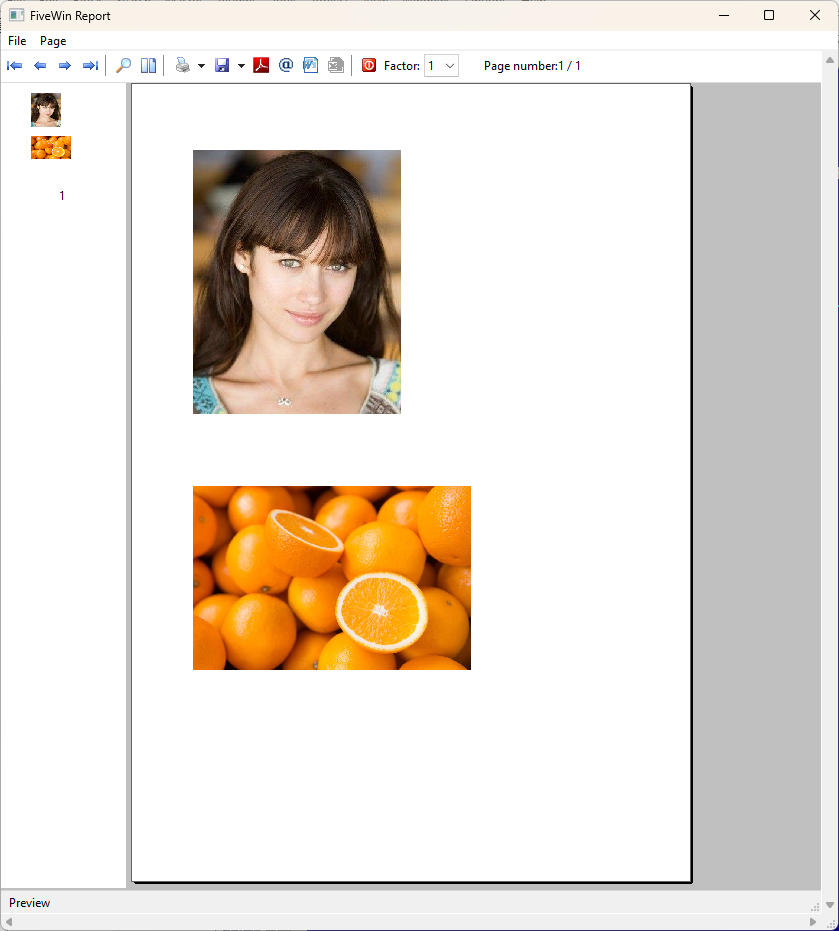
This is a simple sample to print images.
Code (fw): Select all Collapse
#include "fivewin.ch"
function Main()
   local oPrn

   PRINT oPrn PREVIEW
   PAGE
   @ 1,1 PRINT TO oPrn IMAGE ;
         "c:\fwh\bitmaps\olga1.jpg" ;
         SIZE 3,4 INCHES

   @ 5.3,1 PRINT TO oPrn IMAGE ;
         "https://www.jesmondfruitbarn.com.au/wp-content/uploads/2016/10/Jesmond-Fruit-Barn-Oranges.jpg" ;
         SIZE 4,4 INCHES

   ENDPAGE
   ENDPRINT

return nil
Regards


G. N. Rao.

Hyderabad, India
Posts: 8515
Joined: Tue Dec 20, 2005 07:36 PM
Re: printer class printimage
Posted: Wed Apr 19, 2023 10:38 AM

WOW() very good mister Rao.

Regards, saludos.

João Santos - São Paulo - Brasil - Phone: +55(11)95150-7341
Posts: 7317
Joined: Thu Oct 18, 2012 07:17 PM
Re: printer class printimage
Posted: Thu Apr 20, 2023 10:06 AM
nageswaragunupudi wrote:Note-1: We need not use oImage for printing. We can straight away use the image source, viz, filename, resource or any source of image.
Note-2: TImage requires 'freeimage.dll'. Better to use TBitmap or TXImage instead so that our application runs without freeimage.dll.

This is a simple sample to print images.
Code (fw): Select all Collapse
#include "fivewin.ch"
function Main()
   local oPrn

   PRINT oPrn PREVIEW
   PAGE
   @ 1,1 PRINT TO oPrn IMAGE ;
         "c:\fwh\bitmaps\olga1.jpg" ;
         SIZE 3,4 INCHES

   @ 5.3,1 PRINT TO oPrn IMAGE ;
         "https://www.jesmondfruitbarn.com.au/wp-content/uploads/2016/10/Jesmond-Fruit-Barn-Oranges.jpg" ;
         SIZE 4,4 INCHES

   ENDPAGE
   ENDPRINT

return nil

Sorry Nages
I need to print an Image with Border or not with Border and I have the x,y and sizes on cm

I made:

I have nTop,nLeft,nRight,nBottom on cm meausure
nTop:= 0.10
nLeft := 0.50
nRight:= 1
nBottom:=1

Code (fw): Select all Collapse
Function PrintImage(nTop,nLeft,nRight,nBottom,cFile,oPrn)
    local lStretch :=.f.
    local nAlpha:=0
    local lTransp:= .f.
    local lGray  := .f.

    local  aDes:=oPrn:Cmtr2Pix(nTop, nLeft)
    local  aHas:=oPrn:Cmtr2Pix(nBottom,nRight)

 oPrn:PrintImage( aDes[1], aDes[2],cFile,aDes[1],aDes[2], lStretch, nAlpha, lTransp, lGray )

  return nil

and I have this error


and I need to have the possibilty to show image with box or not
Since from 1991/1992 ( fw for clipper Rel. 14.4 - Momos)

I use : FiveWin for Harbour March-April 2024 - Harbour 3.2.0dev (harbour_bcc770_32_20240309) - Bcc7.70 - xMate ver. 1.15.3 - PellesC - mail: silvio[dot]falconi[at]gmail[dot]com
Posts: 7317
Joined: Thu Oct 18, 2012 07:17 PM
Re: printer class printimage
Posted: Thu Apr 20, 2023 10:39 AM
Sorry my error :)


Corrected!!!


How make Image with Box ?
Since from 1991/1992 ( fw for clipper Rel. 14.4 - Momos)

I use : FiveWin for Harbour March-April 2024 - Harbour 3.2.0dev (harbour_bcc770_32_20240309) - Bcc7.70 - xMate ver. 1.15.3 - PellesC - mail: silvio[dot]falconi[at]gmail[dot]com
Posts: 10733
Joined: Sun Nov 19, 2006 05:22 AM
Re: printer class printimage
Posted: Fri Apr 21, 2023 02:10 AM

If you need to use CM, you just use "CM" instead of "INCHES" in the above command.

There is no need to create new functions for this.

Regards


G. N. Rao.

Hyderabad, India
Posts: 7317
Joined: Thu Oct 18, 2012 07:17 PM
Re: printer class printimage
Posted: Fri Apr 21, 2023 09:37 AM
nageswaragunupudi wrote:If you need to use CM, you just use "CM" instead of "INCHES" in the above command.
There is no need to create new functions for this.
ok How I can make to insert an image on a box


sample I use for a text
Code (fw): Select all Collapse
IF lBorder
         oPrn:Box(X, Y, Z, K,;
                { nColorBordo, SetBorder(nSizeBordo) }, nBackcolor, ;
                {cText,  oFnt, nColorFont, SetAlign(nAlignOriz,nAlignVert) }, ;
                 "CM" )
      else
          oPrn:Box(X, Y, Z, K,;
                { CLR_WHITE, 1 }, CLR_WHITE, ;
                {cText,  oFnt, nColorFont, SetAlign(nAlignOriz,nAlignVert) }, ;
                 "CM" )
        endif
How Make the same for the image ?
Since from 1991/1992 ( fw for clipper Rel. 14.4 - Momos)

I use : FiveWin for Harbour March-April 2024 - Harbour 3.2.0dev (harbour_bcc770_32_20240309) - Bcc7.70 - xMate ver. 1.15.3 - PellesC - mail: silvio[dot]falconi[at]gmail[dot]com

Continue the discussion