FiveTech Support Forums

FiveWin / Harbour / xBase community
Board index FiveWin for Harbour/xHarbour Xbrowse : Delete and autoshift left .or. Drag/Drop
Posts: 1487
Joined: Tue Jun 14, 2016 07:51 AM
Xbrowse : Delete and autoshift left .or. Drag/Drop
Posted: Mon Apr 24, 2023 12:05 PM


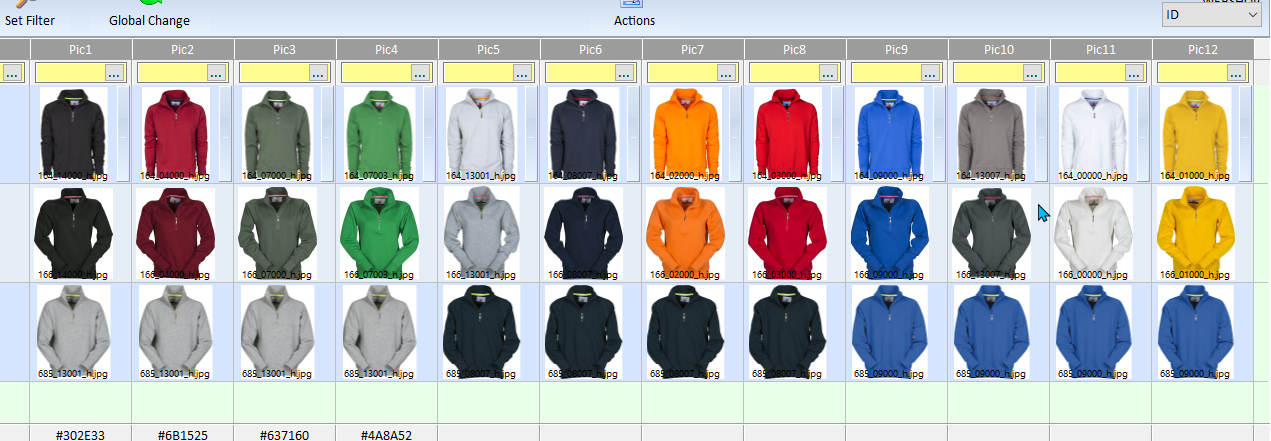
In this browse I have 12 pics on a row ( Pic1 - Pic2 - Pic3 .... )

I need to do folowing 2 things and hope to get some idea's how to do it in Xbrowse.

1.
When I delete pic 2 the pictures from Pic3 to Pic12 should shift to left and become the Pic2 position so there is no empty cel. the empty cel is going to be the last one,
most right on the last free position. Pic 12 would be the empty cell.

2. Is drag and drop possible within the same row ? So drag pic 5 and drop on pic 2, pic2 and all others shift to the right and the dragged pic become the pic2.

Or for point 2 better to create a dialog with 2 xbrowse and drag/drop on that dialog and copy back to complete the modifications ?
Marc Venken

Using: FWH 23.08 with Harbour
Posts: 1392
Joined: Mon May 14, 2007 09:49 AM
Re: Xbrowse : Delete and autoshift left .or. Drag/Drop
Posted: Mon Apr 24, 2023 02:15 PM
You can try this
1.
Code (fw): Select all Collapse
adel(oBrw:aArrayData[nn], 2)
   atail(oBrw:aArrayData[nn])=NIL
   oBrw:DrawSelect()
2
Code (fw): Select all Collapse
for st=1 to nn 
     oBrw:aCols[st]:bRClickData:=&('{||Out_Elm('+ltrim(str(st))+')}')
     oBrw:aCols[st]:bLDClickData:=&('{||Ins_Elm('+ltrim(str(st))+')}')
  next

  procedure Out_Elm(col)
  local row:=oBrw:nArrayAt
     oBrw:Cargo:=oBrw:aArrayData[row,col]
     adel(oBrw:aArrayData[row], col)
  return

 procedure Ins_Elm(col)
     ains(oBrw:aArrayData[row], oBrw:Cargo, col)
     oBrw:DrawSelect()
 return
Posts: 1487
Joined: Tue Jun 14, 2016 07:51 AM
Re: Xbrowse : Delete and autoshift left .or. Drag/Drop
Posted: Mon Apr 24, 2023 06:31 PM

Forgot to mention that I use DBF file with xbrowse.

Looking into the code, but all new to me ))))

Marc Venken

Using: FWH 23.08 with Harbour
Posts: 10733
Joined: Sun Nov 19, 2006 05:22 AM
Re: Xbrowse : Delete and autoshift left .or. Drag/Drop
Posted: Mon Apr 24, 2023 07:32 PM
1.
When I delete pic 2 the pictures from Pic3 to Pic12 should shift to left and become the Pic2 position so there is no empty cel. the empty cel is going to be the last one,
most right on the last free position. Pic 12 would be the empty cell.

2. Is drag and drop possible within the same row ? So drag pic 5 and drop on pic 2, pic2 and all others shift to the right and the dragged pic become the pic2.

Or for point 2 better to create a dialog with 2 xbrowse and drag/drop on that dialog and copy back to complete the modifications ?
Both 1 and 2 are quite possible inside a single browse.

I guess you want the field data in the dbf also to be changed. Right?
Regards


G. N. Rao.

Hyderabad, India
Posts: 1487
Joined: Tue Jun 14, 2016 07:51 AM
Re: Xbrowse : Delete and autoshift left .or. Drag/Drop
Posted: Mon Apr 24, 2023 07:34 PM
nageswaragunupudi wrote:
1.
When I delete pic 2 the pictures from Pic3 to Pic12 should shift to left and become the Pic2 position so there is no empty cel. the empty cel is going to be the last one,
most right on the last free position. Pic 12 would be the empty cell.

2. Is drag and drop possible within the same row ? So drag pic 5 and drop on pic 2, pic2 and all others shift to the right and the dragged pic become the pic2.

Or for point 2 better to create a dialog with 2 xbrowse and drag/drop on that dialog and copy back to complete the modifications ?
Both 1 and 2 are quite possible inside a single browse.

I guess you want the field data in the dbf also to be changed. Right?
Yes, Indeed. Afther changes, I will upload to a API webshop
Marc Venken

Using: FWH 23.08 with Harbour
Posts: 1487
Joined: Tue Jun 14, 2016 07:51 AM
Re: Xbrowse : Delete and autoshift left .or. Drag/Drop
Posted: Wed Apr 26, 2023 07:38 PM
nageswaragunupudi wrote:
1.
When I delete pic 2 the pictures from Pic3 to Pic12 should shift to left and become the Pic2 position so there is no empty cel. the empty cel is going to be the last one,
most right on the last free position. Pic 12 would be the empty cell.

2. Is drag and drop possible within the same row ? So drag pic 5 and drop on pic 2, pic2 and all others shift to the right and the dragged pic become the pic2.

Or for point 2 better to create a dialog with 2 xbrowse and drag/drop on that dialog and copy back to complete the modifications ?
Both 1 and 2 are quite possible inside a single browse.

I guess you want the field data in the dbf also to be changed. Right?
Can you give me a hint, so that I can hunt for samples in the forum ? Many thanks
Marc Venken

Using: FWH 23.08 with Harbour

Continue the discussion