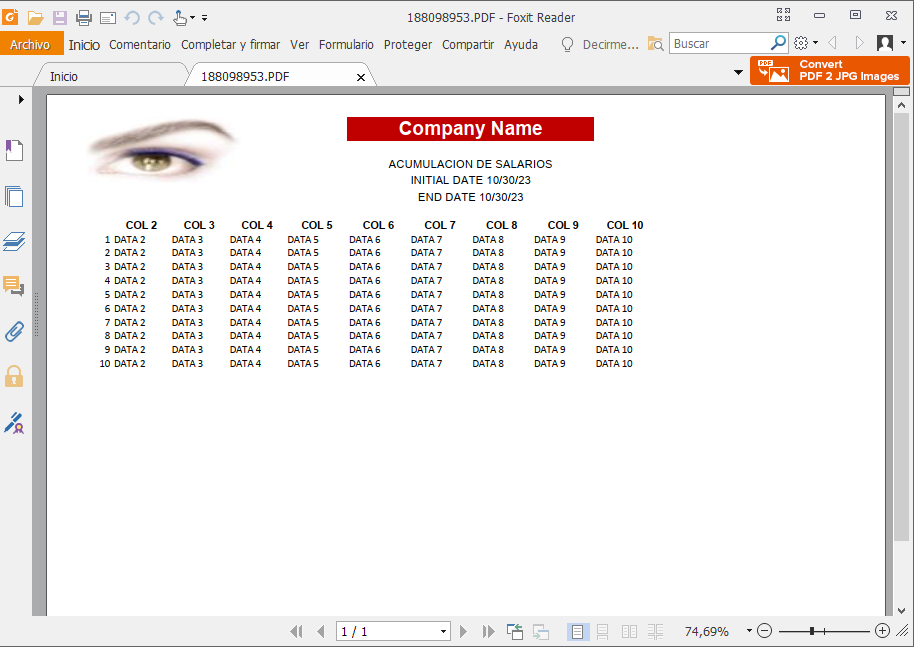
buildh xlstopdf
#include <fivewin.ch>

#DEFINE xlPortrait 1
#DEFINE xlLandscape 2

STATIC oClip
STATIC cFileXls
STATIC cText
STATIC cHoja1
STATIC nSize
STATIC nPasteRow
STATIC nFormat

FUNCTION Main()
   WITH OBJECT XlsFileToPdf()
      :New()
   END OBJECT
RETURN (NIL)

CLASS XlsFileToPdf
   data oExcel, oSheet, oBook, nRow
   METHOD New()
   METHOD InitObjectXls()
   METHOD SendToExcel()
   METHOD InitObjectXls()
   METHOD BuildData()
   METHOD EndObjectXls()
   METHOD LoadLogo()
   METHOD Headers1()
   METHOD Headers2()
   METHOD SaveToPdf()
ENDCLASS

METHOD New() CLASS XlsFileToPdf
   if !File( ".\tmp" )
      lMkDir( ".\tmp" )
   endif
   MSGRUN( "send to xls and PDF... ", "User", {|| ::SendToExcel() } )
RETURN (NIL)

METHOD SendToExcel() CLASS XlsFileToPdf

   cFileXls := cTempFile(  "\"+CurDir()+'\tmp\'  , ".xlsx" )
   cText := ''
   nPasteRow := 0
   nFormat := 0

   ::InitObjectXls()

   nSize := 11

   ::LoadLogo()
   ::Headers1()
   ::Headers2()
   ::BuildData()

   ::EndObjectXls()

   ::SaveToPdf()


RETURN NIL

METHOD InitObjectXls() CLASS XlsFileToPdf
   LOCAL oRange

   cHoja1 := "DATA"

   cFileXls := cTempFile(  "\"+CurDir()+'\tmp\'  , ".xlsx" )

   ::nRow := 1
   ::oExcel := CREATEOBJECT( "Excel.Application" )

   ::oBook  := ::oExcel:WorkBooks:Add()
   ::oSheet := ::oBook:Worksheets(1)
   nFormat     :=   ::oBook:Get("FileFormat")

   ::oSheet:name := cHoja1

   ::oExcel:Sheets( cHoja1  ):Select()

   ::oSheet := ::oExcel:Get( "ActiveSheet" )

   ::oSheet:PageSetup:PaperSize   := 1 //carta
   ::oSheet:PageSetup:Orientation := xlPortrait
   ::oSheet:PageSetup:Zoom = 100

   ::oSheet:PageSetup:LeftMargin    := 0.5
   ::oSheet:PageSetup:RightMargin   := 0.75
   ::oSheet:PageSetup:TopMargin     := 1.5
   ::oSheet:PageSetup:BottomMargin  := 2.5
   ::oSheet:PageSetup:HeaderMargin  := 0.5
   ::oSheet:PageSetup:FooterMargin  := 0.5
   ::oSheet:PageSetup:FitToPagesWide := 1
   ::oSheet:PageSetup:FitToPagesTall := .F.

   oRange := ::oSheet:Range("A1")

RETURN (NIL)

METHOD LoadLogo() CLASS XlsFileToPdf
   LOCAL cRange,oRange
   local cFile :=  "\"+CurDir()+'\fivetech.jpg'
   IF file(cFile)
      cRange :=  "A2:C2"
      oRange := ::oSheet:Range( cRange )
      ::oSheet:Shapes:AddPicture(cFile,.F., .T., oRange:Left, oRange:top, 150, 70 )
   ENDIF

RETURN (NIL)

METHOD EndObjectXls() CLASS XlsFileToPdf
   LOCAL nFor
   LOCAL cRange, oRange
   ::oExcel:Sheets( cHoja1  ):Select()
   ::oSheet := ::oExcel:Get( "ActiveSheet" )

   ::oSheet:Columns("A:A"):ColumnWidth := 4
   ::oSheet:Columns("B:B"):ColumnWidth := 10
   ::oSheet:Columns("C:C"):ColumnWidth := 10
   ::oSheet:Columns("D:D"):ColumnWidth := 10


   /*FOR nFor := 1 TO 40
      cRange :=  "A" + ALLTRIM(CSTR( nFor )) + ":" + "F"+ALLTRIM(CSTR( nFor ))
      oRange := ::oSheet:Range( cRange )
      oRange:Font:Name  := "Arial"
      oRange:Font:Size  := 8
   NEXT*/

  // --------------------------------------------------
   ::oExcel:Range( "9:9" ):Select() //despues de los titulos hace un freeze
   //::oSheet:Columns( "E:AE" ):AutoFit()
   ::oExcel:Application:ActiveWindow:FreezePanes := .T.

   TRY
      ::oBook:saveAS( cFileXls, nFormat )
   CATCH
   END

   ::oExcel:Quit()
RETURN NIL

METHOD SaveToPdf() CLASS XlsFileToPdf
   LOCAL cFilePdf := cTempFile(  "\"+CurDir()+'\tmp\'  , ".PDF" )
   ::oExcel := CREATEOBJECT( "Excel.Application" )
   ::oExcel:WorkBooks:Open( cFileXls )
   ::oExcel:Sheets( cHoja1  ):Select()
   ::oSheet := ::oExcel:Get( "ActiveSheet" )
   ::oSheet:PageSetup:PaperSize   := 1 //::oSheet:PageSetup:Set( "PaperSize" , nPage )
   ::oSheet:PageSetup:Orientation := 2 //::oSheet:PageSetup:Set("Orientation",2 )
   ::oSheet:ExportAsFixedFormat(0, cFilePdf, 0, .t., .f. )
   ::oExcel:Quit()
   MSGRUN( "Exportando a PDF, por favor espere un momento: ", "Usuario", {|| Shellexecute( 0,"open", cFilePDF )  } )
RETURN (NIL)

METHOD Headers1() CLASS XlsFileToPdf
   LOCAL nRowIni
   LOCAL cRange, oRange

   ::nRow++
   ::oSheet:Rows(::nRow):RowHeight = 25
   ::oSheet:Cells( ::nRow, 6 ):Value = "Company Name"

   cRange :=  "F" + alltrim(CSTR(::nRow )) + ":" + "I"+alltrim(CSTR( ::nRow ))
   oRange := ::oSheet:Range( cRange )
   oRange:Interior:Color:= RGB(192,0,0)
   oRange:Font:Color    := CLR_WHITE
   oRange:Font:Name := "Arial"
   oRange:Font:Bold     := .t.
   oRange:Font:Size     := 20
   oRange:HorizontalAlignment := 7 //CENTRA EL RANGO DE CELDAS

   ::nRow+=2
   nRowIni := ::nRow
   ::oSheet:Rows(::nRow):RowHeight = 18
   ::oSheet:Cells( ::nRow, 6 ):Value = "ACUMULACION DE SALARIOS"

   ::nRow++
   ::oSheet:Rows(::nRow):RowHeight = 18
   ::oSheet:Cells( ::nRow, 6 ):Value = "INITIAL DATE " + dtoc( date() )

   ::nRow++
   ::oSheet:Rows(::nRow):RowHeight = 18
   ::oSheet:Cells( ::nRow, 6 ):Value = "END DATE " + dtoc( date() )

   cRange :=  "F" + alltrim(CSTR(nRowIni )) + ":" + "I"+alltrim(CSTR( ::nRow ) )
   oRange := ::oSheet:Range( cRange )
   // oRange:Interior:Color:= RGB(192,0,0)
   //oRange:Font:Color    := CLR_WHITE
   oRange:Font:Name := "Arial"
   //oRange:Font:Bold     := .t.
   oRange:Font:Size     := 12
   oRange:HorizontalAlignment := 7 //CENTRA EL RANGO DE CELDAS
   ::nRow+=2

RETURN (nil)

METHOD Headers2() CLASS XlsFileToPdf
   LOCAL nRowIni := ::nRow
   LOCAL nCol
   LOCAL cRange, oRange

   FOR nCol := 2 TO 10
      ::oSheet:Cells( ::nRow, nCol ):Value = "COL " + alltrim(cstr(nCol))
   NEXT

   cRange :=  "A" + alltrim(CSTR(nRowIni )) + ":" + "U"+alltrim(CSTR( ::nRow ))
   oRange := ::oSheet:Range( cRange )
   oRange:Font:Name := "Arial"
   oRange:Font:Bold     := .t.
   oRange:Font:Size     := nSize
   oRange:HorizontalAlignment := -4108
   ::nRow++

RETURN (nil)

METHOD BuildData() CLASS XlsFileToPdf
   LOCAL nRowIni := ::nRow
   LOCAL nCol,i
   LOCAL cRange, oRange

   nPasteRow := ::nRow
   oClip := TClipBoard():New()
   cText := ""


   FOR i := 1 TO 10
      FOR nCol := 1 TO 10
         IF nCol=1
            cText +=   cstr(i)
         else
            cText +=  CHR(9) + "DATA "+alltrim(cstr(nCol))
         ENDIF
      NEXT
      cText += CRLF
      ::nRow ++

   NEXT

  if ! Empty( cText )
      oClip:SetText( cText )
      ::oSheet:Cells( nPasteRow, 1 ):Select()
      ::oSheet:Paste()
      oClip:Clear()
      cText    := ""
   endif


RETURN (nil)
se puede mejorar
saludos


