


BUILD ERROR:
Using this with Harbour64, and MSVC 2022 -
Error when trying to build the application in:
Profile.c ( 24,19) cannot convert from 'void' to 'BYTE'
The program was fine building with the previous FWH 64 release.
BUILD ERROR:
Using this with Harbour64, and MSVC 2022 -
Error when trying to build the application in:
Profile.c ( 24,19) cannot convert from 'void' to 'BYTE'
The program was fine building with the previous FWH 64 release.
Dear Tim,
This is the right code:
BYTE * bBuffer = ( BYTE * ) hb_xgrab( BUFSIZE );
but you may have got a warning, not an error
Just curiosity: why have you recompiled profile.c ?
I actually don't know why it was in that set of source files. I removed it and the application now builds correctly.
I see we have still NOT addressed the long standing issue with PRINT and RTF files. I have been reassured many times that it was a high priority and would be handled, and yet all of these other new features keep getting added, and the one item that has not worked for several years continues to not be resolved.
Again, when using the tPRINTER class, and printing an RTF text, it is not possible to do a correct page break. If the RTF is 20 lines long, and we need a page break after line 8, it is not possible. We can work with RTF files on screen, save them properly, but when it comes to printing them, we can't do it. In my output of an invoice, the starting and ending of text is never consistent, although the content remains the same. It is not a problem using regular text, counting the position after each line, and properly sending a page break when the end of the printable space is attained. However, that cannot be done with RTF text.
It's been almost two years since I first brought this up ...
The new functions in this version
jSonView
Xbrowse tree
Xbrowse toArray
Will the Xbrowse function ToArray be able to get ALL the individual data from a hasH or the Json file with has subarrays ?
I still struggle of getting all data from the complex Json files.
JsonView( cJson )XBROWSER HashTree( hb_jsonDecode( cJson ) )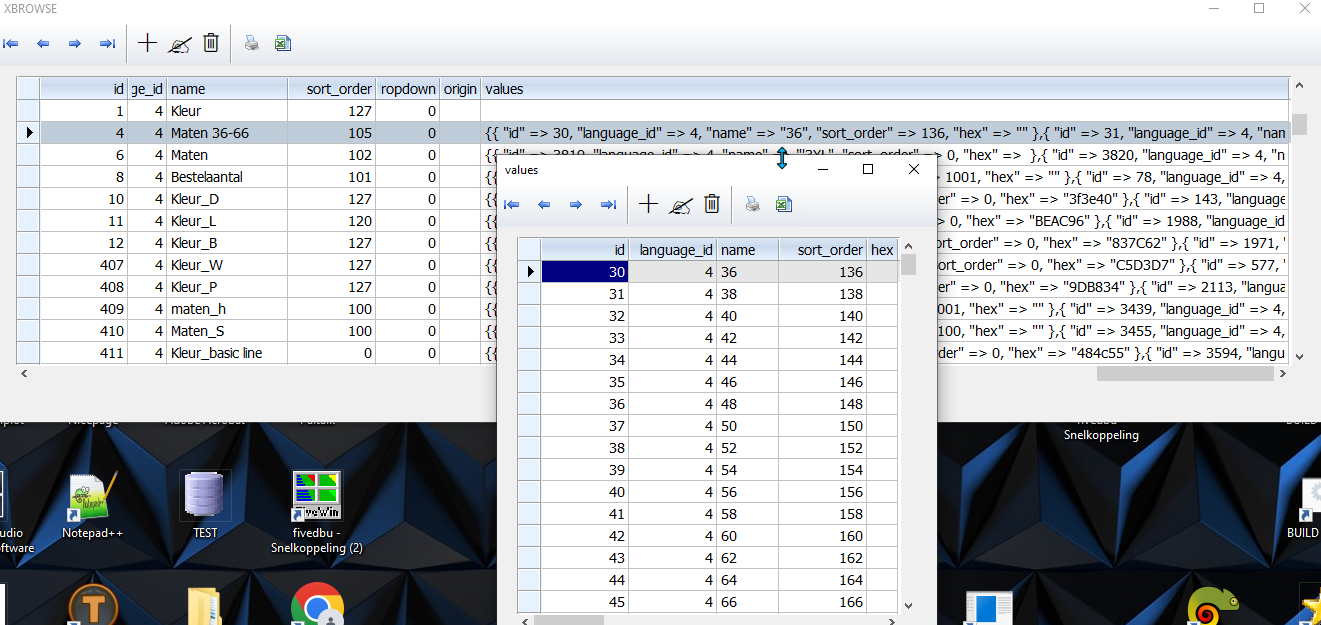
I have the xbrowse now in a array, so array element 3 = the complex part (see picture)
I want the data from that cell also like xbrowse is showing it, so then I can process them to a dbf. I managed with xbrowse itself, but also want to know how the array can be converted.
aData[1][3] = the complex value like you see on pic
I tried Arrtranspose, but not succeded.
Kleur
Maten
Kleur_D
Kleur_L
That is the idea indeed.
I do see that some groups have other data inside. Like KLEUR has a HEX column.
Maybe 1 master dbf would become complex with many fields, separate dfb's is just as good for this project.
From this array I will loop and generated the data for eacht in a separate dbf for now. Problem is that Xbrowse is needed because I can't split it (not enough knowledge)
If you could assist that the complex Json string can go to a multi dim array, I would be able to build the needed dbf's.
#include "FiveWin.ch"

function Main()

   local hJson

   hb_jsonDecode( memoRead( "jason.txt" ), @hJson )

   XBROWSER HashToArray( hJson )

return nil

function HashToArray( hData )

   local aData := {}, xItem

   for each xItem in hData
      if ValType( xItem ) $ "HA"
         AAdd( aData, HashToArray( xItem ) )
      else
         AAdd( aData, xItem )
      endif
   next

return aDataline 407 shows empty and line 1 get values...
there may be something wrong
#include "fivewin.ch"

STATIC oWnd, oBmp, oSay, oBrush

FUNCTION Main()

Json_dbfs()     //  make a dbf for each group
Json_onedbf()   //  make one dbf and name a field as group

msginfo("Done")

RETURN NIL


function Json_dbfs()

   local hJson, h, I, aCols
   Local uResponse, aTest, aData

   //  This is how I read a Jason
   //cLink = "https://domain.be/api/v2/options?token=cToken"
   //MsgRun( cLink, "READING FORUM PAGE", { || uResponse := WebPageContents( cLink, .t. ) } )
   //St := memowrit("c:\fwharb\samples\Jason.txt",uResponse)

   hb_jsonDecode( memoRead( "Jason.txt" ), @h )

   aTest:= HashToArray( h )
   xbrowser(aTest)title "aTest"
   // In this browse you see how many fields are needed.  Or you make a function to autocreate the dbf

   // of you hard code it like below.

   for i = 1 to len(aTest)
     cDbf = lower(left(aTest[i][3],8))+"_"+alltrim(str(i))
     aData:= HashToArray( aTest[i][7] )
       //xbrowser(aData) title aTest[i][3]   // If you want to see each group before making
     makedbf(cDbf)

     FW_ArrayToDBF( aData )

     //DBEVAL : could not get this working ....
     //DBEVAL( { || If( empty(DTA->TYPE) ,DTA->TYPE = aTest[i][3]),NIL) } )
     //DBEVAL( { || If( empty(DTA->TYPE),DTA->TYPE = "TEST",,NIL) } )
     //DBEVAL( { || DTA->TYPE = "TEST"  } )

     DTA->(dbgotop())
     do while !dta->(eof())
       if empty(DTA->type)
          DTA->type = aTest[i][3]
       endif
       dta->(dbskip())
     enddo
     XBROWSER "DTA" title cDbf
     CLOSE DTA
   next
return nil

function HashToArray( hData )

   local aData := {}, xItem

   for each xItem in hData
      if ValType( xItem ) $ "HA"
         AAdd( aData, HashToArray( xItem ) )
      else
         AAdd( aData, xItem )
      endif
   next
return aData

function MakeDbf(cDbf)

  aCols := { { "ID",   "N",  6, 0 }, ;
             { "TAAL", "N",  1, 0 }, ;
             { "NAAM", "C", 20, 0 }, ;
             { "Sort", "N",  5, 0 }, ;
             { "HEX",  "C",  8, 0 }, ;
             { "TYPE", "C", 25, 0 }  }

  cDBF     := cDbf + ".DBF"
  cDBF     := TrueName( cDBF )

  DBCREATE( cDBF, aCols, "DBFCDX", .T., "DTA" )
return NIL

function Json_onedbf()

   local hJson, h
   Local uResponse, aTest, aData

   //cLink = "https://domain.be/api/v2/options?token=cToken"
   //MsgRun( cLink, "READING FORUM PAGE", { || uResponse := WebPageContents( cLink, .t. ) } )
   //St := memowrit("c:\fwharb\samples\Jason.txt",uResponse)

   hb_jsonDecode( memoRead( "jason.txt" ), @h )

   makedbf("jasondata")
   aTest:= HashToArray( h )
   xbrowser(aTest)title "aTest"

   for i = 1 to len(aTest)
     aData:= HashToArray( aTest[i][7] )
     xbrowser(aData) title aTest[i][3]
     FW_ArrayToDBF( aData )

     //DBEVAL( { || If( empty(DTA->TYPE) ,DTA->TYPE = aTest[i][3]),NIL) } )
     //DBEVAL( { || If( empty(DTA->TYPE),DTA->TYPE = "TEST",,NIL) } )
     //DBEVAL( { || DTA->TYPE = "TEST"  } )

     DTA->(dbgotop())
     do while !dta->(eof())
       if empty(DTA->type)
          DTA->type = aTest[i][3]
       endif
       dta->(dbskip())
     enddo

   next
   XBROWSER "DTA"
   CLOSE DTA
return nil
