FiveTech Support Forums

FiveWin / Harbour / xBase community
Board index FiveWin for Harbour/xHarbour How to set Brush size?
Posts: 1598
Joined: Fri Oct 07, 2005 05:56 PM
How to set Brush size?
Posted: Fri May 05, 2023 08:04 AM

Dear All,

I need to use BRUSH for background image but how can I set the size (area) of Brush, not full WINDOW/DIALOG?

Thanks in advance,

Dutch

Regards,

Dutch


FWH 2304 / xHarbour Simplex 1.2.3 / BCC73 / Pelles C / UEStudio

FWPPC 10.02 / Harbour for PPC (FTDN)

ADS V.9 / MySql / MariaDB

R&R 12 Infinity / Crystal Report XI R2

(Thailand)
Posts: 1392
Joined: Mon May 14, 2007 09:49 AM
Re: How to set Brush size?
Posted: Fri May 05, 2023 03:50 PM

DEFINE BRUSH oBh COLOR 0xF0F0F0

FillRect(oDlg:hDc, {100,100,200,200}, oBh:hBrush)

oDlg:Refresh()

Posts: 1598
Joined: Fri Oct 07, 2005 05:56 PM
Re: How to set Brush size?
Posted: Sat May 06, 2023 09:37 AM
Dear Natter,

May I have a example, if you could?
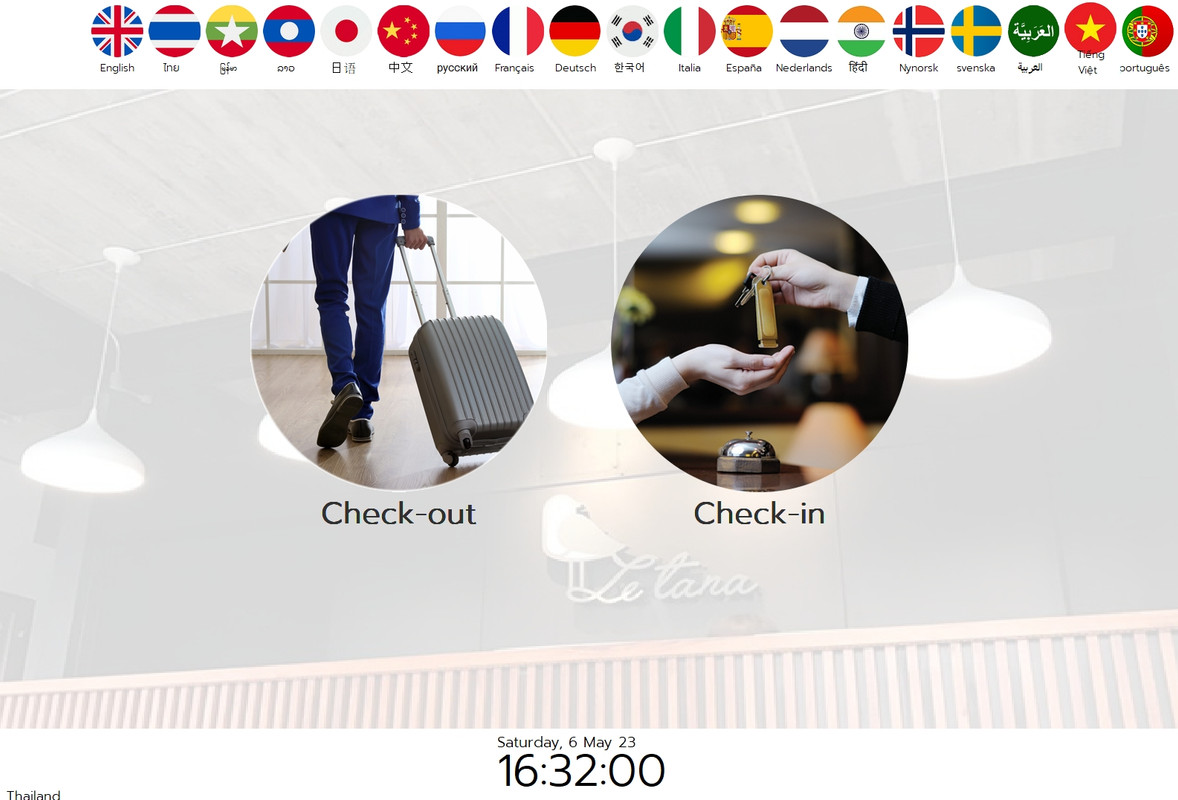
I would like to get the BRUSH background as this picture (not full client screen, left top and bottom area).
Natter wrote:DEFINE BRUSH oBh COLOR 0xF0F0F0

FillRect(oDlg:hDc, {100,100,200,200}, oBh:hBrush)

oDlg:Refresh()
Regards,

Dutch


FWH 2304 / xHarbour Simplex 1.2.3 / BCC73 / Pelles C / UEStudio

FWPPC 10.02 / Harbour for PPC (FTDN)

ADS V.9 / MySql / MariaDB

R&R 12 Infinity / Crystal Report XI R2

(Thailand)
Posts: 10733
Joined: Sun Nov 19, 2006 05:22 AM
Re: How to set Brush size?
Posted: Sat May 06, 2023 11:48 AM
Image brushes
Code (fw): Select all Collapse
DEFINE BRUSH oBrush FILE/RESOURCE <imageflle/resource> RESIZE / STRETCH
oWnd:SetBrush( oBrush )
This is all that is enough.

The image can be bmp,png,jpg or any other image type
It can be a file or resource.

You try both STRETCH and RESIZE clauses separately and decide what you prefer.
I personally prefer RESIZE and recommend instead of STRETCH.

The entire window is covered by the brush and will automatically resize when the window is resized.
Do not write any extra code more than what I suggested.
Regards


G. N. Rao.

Hyderabad, India
Posts: 1598
Joined: Fri Oct 07, 2005 05:56 PM
Re: How to set Brush size?
Posted: Sat May 06, 2023 05:03 PM
Dear Master Rao & Natter,

I got an idea now.

Thank you so much,
nageswaragunupudi wrote:Image brushes
Code (fw): Select all Collapse
DEFINE BRUSH oBrush FILE/RESOURCE <imageflle/resource> RESIZE / STRETCH
oWnd:SetBrush( oBrush )
This is all that is enough.

The image can be bmp,png,jpg or any other image type
It can be a file or resource.

You try both STRETCH and RESIZE clauses separately and decide what you prefer.
I personally prefer RESIZE and recommend instead of STRETCH.

The entire window is covered by the brush and will automatically resize when the window is resized.
Do not write any extra code more than what I suggested.
Regards,

Dutch


FWH 2304 / xHarbour Simplex 1.2.3 / BCC73 / Pelles C / UEStudio

FWPPC 10.02 / Harbour for PPC (FTDN)

ADS V.9 / MySql / MariaDB

R&R 12 Infinity / Crystal Report XI R2

(Thailand)
Continue the discussion