Hello Silvio,
It possibile have the border only on bottom and not on top ?
Maybe the solution You are looking for ?
You can use any colour, pensize or transparent level.
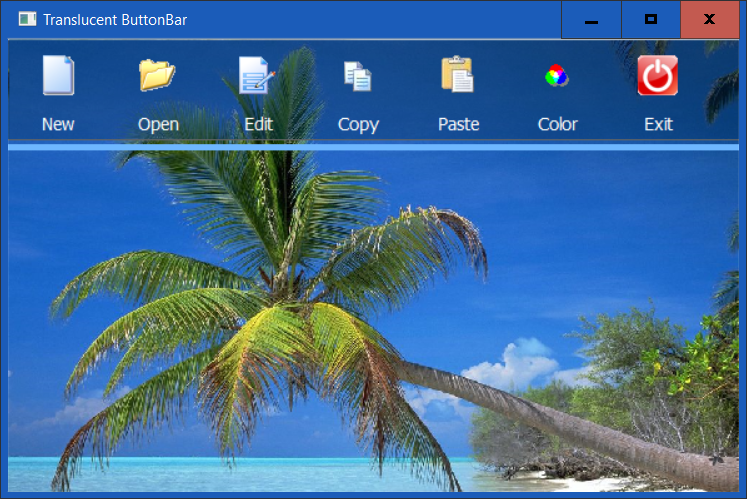
// Translucent ButtonBar and Buttons

#include "fivewin.ch"

FUNCTION MAIN()
local oWnd, oBar, oMsgBar, oBtn, oBrush, oFont, nActual := 0, oMeter, lBorder := .T.
local nAlpha := 0x60
local nBarClr  := RGB( 0, 0x2E, 0x5C )

DEFINE BRUSH oBrush FILE ".\bitmaps\sea.bmp" RESIZE
DEFINE FONT oFont NAME "TAHOMA" SIZE 0,-14

DEFINE WINDOW oWnd FROM 0,0 TO 400,600 PIXEL BRUSH oBrush TITLE "Translucent ButtonBar"

DEFINE BUTTONBAR oBar OF oWnd SIZE 80, 80 2007
oBar:SetFont( oFont )
oBar:SetColor( { |l,o| If( l, CLR_BLACK, CLR_WHITE ) }, oWnd:nClrPane )
oBar:bClrGrad := { |lInvert| If( lInvert, nArgb( 96, CLR_WHITE ), nArgb( nAlpha % 256, nBarClr ) ) }

oBar:GoTop()
//oBar:GoDown()
// oBar:GoLeft()
// oBar:GoRight()
// oBar:Float()

DEFINE BUTTON oBtn OF oBar PROMPT "New"    FILE ".\bitmaps\new.bmp"
DEFINE BUTTON oBtn OF oBar PROMPT "Open"   FILE ".\bitmaps\open.bmp"
DEFINE BUTTON oBtn OF oBar PROMPT "Edit"   FILE ".\bitmaps\edit.bmp"
DEFINE BUTTON oBtn OF oBar PROMPT "Copy"   FILE ".\bitmaps\copy.bmp"
DEFINE BUTTON oBtn OF oBar PROMPT "Paste"  FILE ".\bitmaps\paste.bmp"
DEFINE BUTTON oBtn OF oBar PROMPT "Color"  FILE ".\bitmaps\colors.bmp" ;
      ACTION ( nBarClr := ChooseColor( RGB( 0, 0x2E, 0x5C ) ), oBar:Refresh() )
DEFINE BUTTON oBtn OF oBar PROMPT "Exit"  FILE ".\bitmaps\Exit.bmp" ;
      ACTION ( nBarClr := ChooseColor( RGB( 0, 0x2E, 0x5C ) ), oBar:Refresh() )

//DEFINE MSGBAR oMsgBar OF oWnd PROMPT "Transp. Slider ->" NOINSET
//oMsgBar:SetFont( oFont )

//oMsgBar:nHeight := 50


ACTIVATE WINDOW oWnd CENTERED // ;
//ON INIT  oWnd:nOpacity := 150

RELEASE BRUSH oBrush
RELEASE FONT oFont

RETURN NIL

// --------------

FUNCTION DRAW_BORDER(Object, hDC, nColor, nPensize, nRound, nTransp )
LOCAL oGraphics, oPen, nRed, nGreen, nBlue
LOCAL n, nLEFT, nTOP, nWIDTH, nHEIGHT, nPen

oGraphics   := Graphics():New( hDC )
nRed            := nRGBRed( nColor )
nGreen        := nRGBGreen( nColor )
nBlue           := nRGBBlue( nColor )

nTOP            := Object:nTop - nPensize
nLEFT           := Object:nLeft - nPensize
nWIDTH        := Object:nWidth + 2 * nPensize
nHEIGHT     := Object:nHeight + 2 * nPensize

oPen := Pen():New( nTransp, nRed, nGreen, nBlue, nPensize, .T. )
oGraphics:DrawRoundRect( oPen,  ,nLeft, nTop, nWidth, nHeight, nRound )

oPen:Destroy()
oGraphics:Destroy()

RETURN NIL
best regards
Uwe :?:


