FiveTech Support Forums

FiveWin / Harbour / xBase community
Board index FiveWin for Harbour/xHarbour Numeric alignment with oPrn:SayText( )
Posts: 3022
Joined: Fri Oct 07, 2005 01:45 PM
Numeric alignment with oPrn:SayText( )
Posted: Tue May 16, 2023 09:26 PM
Using the tPrinter class, with font Calibri.

Consider the values
125.99
25.99
5.99

With the code:
Code (fw): Select all Collapse
oPrn:SayText( nRow, nCsp * 56, TRANSFORM( oPrintParts:parchg,"999,999.99") ,,, oFnorp )
The output of the numbers is center aligned, and not right aligned. I need to get all of the numbers to align right.

This is not, in it's current format, documented. I have looked at the source code, include file, and samples. Nothing explains valid values for ALIGN ( which would be the next variable after the font ). I have tried several but do not get the desired result. I am working with numbers in columns, and they should all align based on the right-most digit.

Based on the release notes, L, R, T, B should work to align the output. However, R does not right align the output, and in fact, it is not addressed in the source code as a useable value.

It would be nice if this worked. The only way it will properly format is to use a FIXED font like COURIER NEW, but that has presented a separate issue ( for the last few versions it does not properly fit and causes printers to do a CRLF ) . For example, a page is 85 columns wide. Using a Font size of 10, with COURIER NEW, a number, expressed as STR( numbr, 10, 2 ), placed at column 65, should fit properly, but it does the CRLF. This has been occuring since the later releases in 2022. Prior to that it was not a problem.

So ... if align would work in the above example ( in the above example, it would be ...., oFnorp, "R" ) , then the problem would be solved.
Tim Stone
http://www.MasterLinkSoftware.com
http://www.autoshopwriter.com
timstone@masterlinksoftware.com
Using: FWH 23.10 with Harbour 3.2.0 / Microsoft Visual Studio Community 2022-24 32/64 bit
Posts: 218
Joined: Mon Feb 07, 2022 09:54 PM
Re: Numeric alignment with oPrn:SayText( )
Posted: Wed May 17, 2023 09:51 AM
Hi Tim,
I also suffer from the lack of an up to date documentation about FWH.
Code (fw): Select all Collapse
#xcommand @ <nRow>, <nCol> PRINT TO <prn> TEXT <cText> ;
      [SIZE <nWidth> [,<nHeight>] ] ;
      [<unit: PIXEL,MM,CM,INCHES,SCREEN>] ;
      [FONT <fnt>] ;
      [ALIGN <aln>] ;
      [COLOR <nTxt> [,<nBck> ] ] ;
      [OUTLINE <nClr> SIZE <nSize> ] ;
      [LASTROW <lrow>] ;
   => ;
      [<lrow> := ] <prn>:SayText( <nRow>, <nCol>, <cText>, [<nWidth>], [<nHeight>], ;
            [<fnt>], [<aln>], [<nTxt>], [<nBck>], [<(unit)>], [<nClr>], [<nSize>] )
Please, look at this what Mr. Rao answered to me last week concernibg oPrn:SayText:
cAlign is Char type

Default is TL ( topleft )
TR : Top Right
BL, BR -> BottomLeft, BottomRight
"" Center
Perhaps this may help you?
Regards, Detlef
Posts: 1487
Joined: Tue Jun 14, 2016 07:51 AM
Re: Numeric alignment with oPrn:SayText( )
Posted: Wed May 17, 2023 10:40 AM

From Whatnew

  • TWindow Method SayText( cText, aRect, cAlign, oFont, nClrText, nClrBack, lBorder )

Applies to all derived classes like dialogs and controls

To be used in o:bPainted.

function FW_SayText( hDC or oWnd, cText, aRect, cAlign, oFont, nClrText, nClrBack, lBorder )

 Can be used with Printer DC also


           FW_SayText( hDC, cText, { 0, 0, h-30, w }, "B", { oLarg, oFont } )

           FW_SayText( hDC, "FWH Image Functions", { 30, 0, h, w }, "T", oSmal )

Parameters:

  1. cText. ANSI/Unicode single or multi-line text

  2. aRect : { nTop, nLeft, nBottom, nRight } in pixels

    Defaults to ClientRect

    All co-ordinates are relative to Client Rect.

    Coordinates:

    nil --> default to the border

    >= 1 --> Pixels from Top or Left as the case may be

    >0 & < 1 --> Percentage of width or height

    < 0 : Pixels from right or bottom

  3. cAlign : Default Vertical and Horizontal Center

    Meaningful Combination of L,R,T,B to indicate Left, Right, etc.

  4. oFont: Default window font.

    • Can include vertical fonts also

    • Array of Fonts: If an array of fonts (not vertical fonts)

    is specified and if cText is an array or mult-line text

    delimited by CRLF, each line is displayed with each font

    in the array

  5. nClrText: Defaults to Window's nClrText

    • Can be an array of colors in which case each line of

    multi-line text is painted with different colors.

    • Can also be a single Alpha Color of pointer to GDI+ brush.

    In such cases GDI+ is used to render the text with the brush.

  6. nClrBack: By default, the painting is transparent.

    • RGB color. Used as back color for text

    • ARGB color. Used to fill the aRect

    • TBrush object: used to fill the aRect

  7. lBorder: Default .F.

    If .t., single line border is drawn

Marc Venken

Using: FWH 23.08 with Harbour
Posts: 1344
Joined: Wed Nov 16, 2005 09:14 PM
Re: Numeric alignment with oPrn:SayText( )
Posted: Wed May 17, 2023 11:44 AM
The seventh parameter is the alignment
Code (fw): Select all Collapse
oPrn:SayText( nRow, nCsp * 56, TRANSFORM( oPrintParts:parchg,"999,999.99") ,,, oFnorp, "R" )
Posts: 1487
Joined: Tue Jun 14, 2016 07:51 AM
Re: Numeric alignment with oPrn:SayText( )
Posted: Wed May 17, 2023 11:48 AM
Maybe my post will only be for images .... (not sure anymore) . Sorry then .... :roll:
Marc Venken

Using: FWH 23.08 with Harbour
Posts: 10733
Joined: Sun Nov 19, 2006 05:22 AM
Re: Numeric alignment with oPrn:SayText( )
Posted: Wed May 17, 2023 12:50 PM
Marc Venken wrote:Maybe my post will only be for images .... (not sure anymore) . Sorry then .... :roll:
Your post is for Text and is relevant in the sense, it explains cAlign.
On screen, cAlign defaults to VCenter and HCenter.
On printer it defaults to "TL" top left. and this parameter is next to oFont.
In the present case we may consider using "TR". and allow adequate width.
Regards


G. N. Rao.

Hyderabad, India
Posts: 10733
Joined: Sun Nov 19, 2006 05:22 AM
Re: Numeric alignment with oPrn:SayText( )
Posted: Thu May 18, 2023 10:52 AM
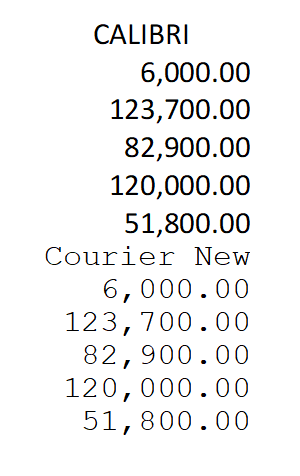
I made this small test.
Please see if this is useful to you.
Code (fw): Select all Collapse
#include "fivewin.ch"

function Main()

   local oPrn, aFont[ 2 ]
   local nWidth, nHeight, nRow, nCol, nColWidth, n, f
   local cUnits   := "INCHES"
   local cPic     := "999,999.99"
   local aVals := {6000.00,123700.00,82900.00,120000.00,51800.00, ;
                   20400.00,145300.00,118900.00,123700.00,96700.00}

   PRINT oPrn PREVIEW

   DEFINE FONT aFont[ 1 ] NAME "CALIBRI"     SIZE 0,-10 OF oPrn
   DEFINE FONT aFont[ 2 ] NAME "Courier New" SIZE 0,-10 OF oPrn

   nWidth   := oPrn:PageWidth(  cUnits )
   nHeight  := oPrn:PageHeight( cUnits )
   nColWidth:= Max( oPrn:GetTextWidth( "99" + cPic, aFont[ 1 ], cUnits ), ;
                    oPrn:GetTextWidth( "99" + cPic, aFont[ 2 ], cUnits ) )

   nRow  := nHeight * 0.1

   PAGE

   for f := 1 to 2

   nColWidth:= oPrn:GetTextWidth( "9" + cPic, aFont[ f ], cUnits )
   nCol     := nWidth * 7/8 - nColWidth
   nRow     := oPrn:SayText( nRow, nCol, aFont[ f ]:cFaceName, ;
                  nColWidth,nil,aFont[ f ], "TL", nil, nil, cUnits )
   for n := 1 to 5
      nRow  := oPrn:SayText( nRow, nCol, TRANSFORM( aVals[ n ], cPic ), ;
                  nColWidth, , aFont[ f ], "TR", nil, nil, cUnits )

   next
   next

   ENDPAGE
   ENDPRINT

   RELEASE FONT aFont[ 1 ], aFont[ 2 ]

RETURN NIL
Regards


G. N. Rao.

Hyderabad, India
Posts: 3022
Joined: Fri Oct 07, 2005 01:45 PM
Re: Numeric alignment with oPrn:SayText( )
Posted: Thu May 18, 2023 04:35 PM

Here is what I found:

When specifying the text ( including numbers ), it is very important to specify the WIDTH of the value. With that in place, I can set align to "TR" as you suggested, and everything lines up perfectly.

I prefer Calibri as a font because it is easier to read than the old Courier New I used previously.

So far all is progressing well. I am completely updating the output of my invoices, and since I now have full RTF capability for essential areas, my clients will be extremely pleased with the result.

One last question. What is the proper value for specifying the FONT COLOR ? It appears to be numeric ? Also do we have a color selection popup that we can use for the values ?

Thank you. I love making positive enhancements.

Tim Stone
http://www.MasterLinkSoftware.com
http://www.autoshopwriter.com
timstone@masterlinksoftware.com
Using: FWH 23.10 with Harbour 3.2.0 / Microsoft Visual Studio Community 2022-24 32/64 bit
Posts: 44162
Joined: Thu Oct 06, 2005 05:47 PM
Re: Numeric alignment with oPrn:SayText( )
Posted: Fri May 19, 2023 08:09 AM

Dear Tim,

> Also do we have a color selection popup that we can use for the values ?

ChooseColor( [ nInitialRGBColor ] ) --> nRGBColor

regards, saludos

Antonio Linares
www.fivetechsoft.com

Continue the discussion