

hi,
ah, ok understand
is there a Way to find out what ADO Component are installed :?:
ah, ok understand
is there a Way to find out what ADO Component are installed :?:
greeting,
Jimmy
Jimmy
now i want to "FASTEDIT" Sheet but how to configure XBROWSE and/or "ADODB.Recordset" :?:This is easier with Excel Range.
function EditExcelRange()

   local oRange   := GetExcelRange( TrueName( "test3.xlsx" ) )

   BrowseIt( oRange )

return nil

static function BrowseIt( u )

   local oWnd, oBrw

   DEFINE WINDOW oWnd TITLE "Edit ExcelRange " + FWVERSION
   @ 0,0 XBROWSE oBrw SIZE 0,0 PIXEL DATASOURCE u ;
      AUTOCOLS FASTEDIT CELL LINES NOBORDER
   WITH OBJECT oBrw
      :nEditTypes := { 1,1,1 }
      :CreateFromCode()
   END
   oWnd:oClient   := oBrw
   ACTIVATE WINDOW oWnd CENTERED

return nil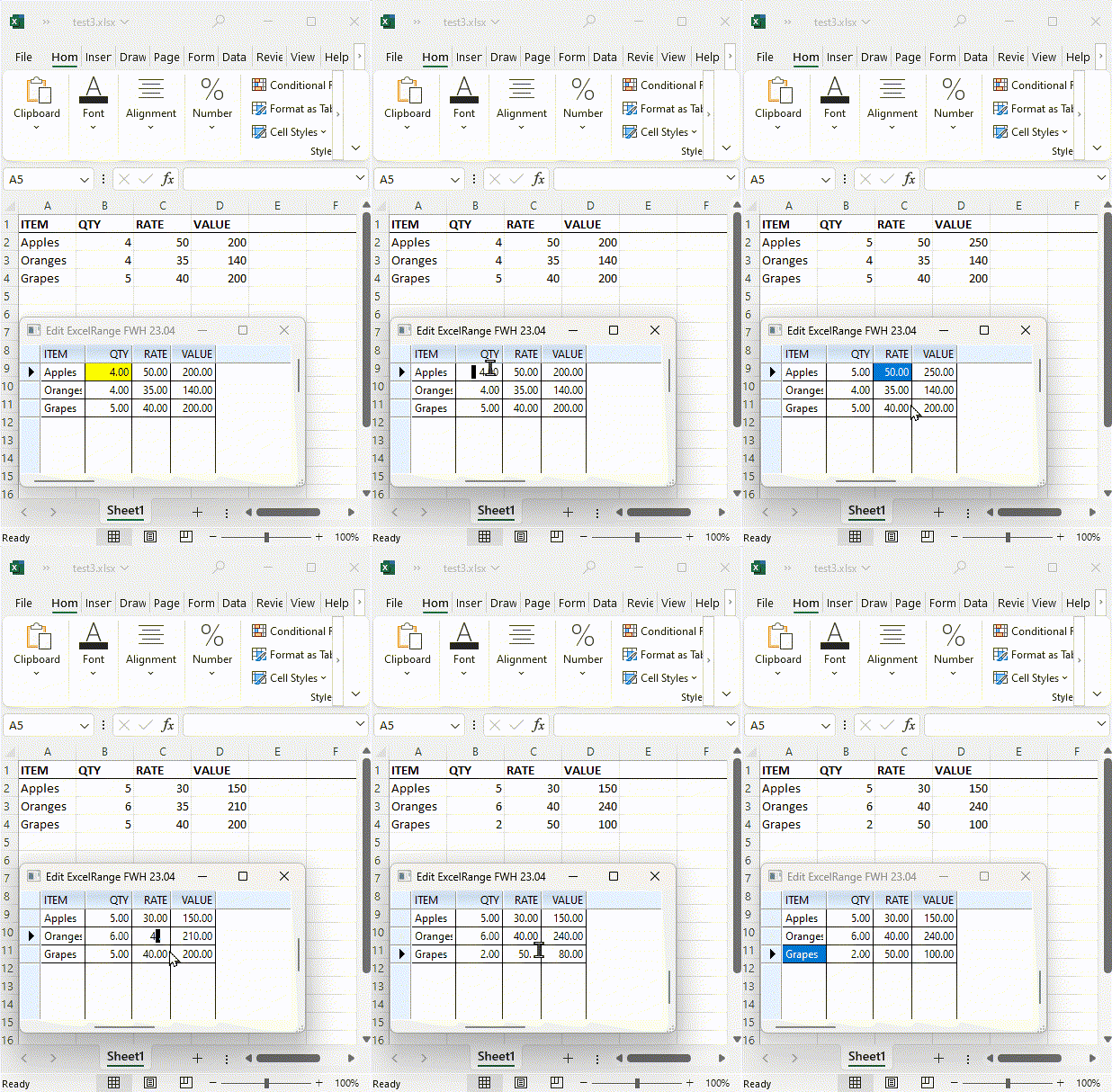
:nEditTypes := { 1,1,1 } :nEditTypes := EDIT_GETwhat isoBrw:anydatas := uVal is a a short cut for
Code:
:nEditTypes := { 1,1,1 }
i "normal" knew
Code:
:nEditTypes := EDIT_GET
so what is Array mean :?:
AEval( oBrw:aCols, { |o| o:anydata := uVal } )for n := 1 to Len( aValues )
oBrw:oCol( n ):anydata := aValues[ n ]
nextoBrw:oCol( c ) // --> oCol whose header is "c"
oBrw:oCol( "anydata", uVal ) --> oCol where oCol:anydata is uVal
oBrw:oCol( {|o|cond} ) --> oCol which satisfies the condition in the codeblockaSortOrders := oBrw:cSortOrders
? aSortOrdersbut it does not work for me with "big" *.XLSx ... (work only with small Sample)What 'big' size are you referring to? (rows,cols)?
i wonder "how" GetExcelRange() will work as it "only" Return oRange, not Recorsd-Set :?:GetExcelRange() returns oRange object of oExcel
what i´m doing now

1.) Connection -> FW_OpenADOExcelBook() -> return oCn
2.) Record-Set -> FW_OpenADOExcelSheet() -> return oRsExcelRange Vs ADO
Use ExceRange for reasonable sized ranges. The data need not be organized like a table, can contain formulas and can be or ragged size.
Planned improvements in future: Will soon provide editing excel formulas in xbrowse itself.
Use ADO for organized larger tables. We can use for "Named" tables also if the Excel File has named tables.
In other cases, the data in the table should be organized like a table. Same number of columns in all rows and continuous rows, with same data types.
In both cases, modifications made in the XBrowse are properly written to the underlying Excel File.
FUNCTION ADOsheet( cFile )
LOCAL cTitle := cFile
LOCAL objRS, oBrw, jj, aEdit := {}
LOCAL cSheet, cRange, lHeaders := .T.
LOCAL oFont, oDlg

   objRS := FW_OpenADOExcelSheet( cFile, cSheet, cRange, lHeaders )

   FOR jj := 0 TO objRS:Fields:Count - 1  // FIELDs are zero-based
      AADD(aEdit, EDIT_GET)
   NEXT

   SET CENTURY ON
   SET DATE GERMAN

   DEFINE FONT oFont NAME "Segoe UI" SIZE 0, - 18
      ACTIVATE FONT oFont
   END FONT

   DEFINE DIALOG oDlg SIZE 1280, 1024 PIXEL FONT oFont TITLE cTitle COLOR BFcolor, BGcolor ;
         STYLE nOR( DS_MODALFRAME, WS_POPUP, WS_CAPTION, WS_SYSMENU, WS_MAXIMIZEBOX, WS_MINIMIZEBOX, WS_THICKFRAME )

      @  1,  1 XBROWSE oBrw SIZE - 1, - 1 PIXEL OF oDlg ;
              RECORDSET objRS ;
              AUTOCOLS ;
              CELL LINES NOBORDER FASTEDIT UPDATE ;
              FONT oFont COLOR BFcolor, BGcolor

      oBrw:nEditTypes := aEdit

      oBrw:CreateFromCode()

   END DIALOG

   ACTIVATE DIALOG oDlg CENTERED

   objRS:Close()
   RELEASE FONT oFont

RETURN nil FOR jj := 0 TO objRS:Fields:Count - 1 // FIELDs are zero-based
AADD(aEdit, EDIT_GET)
NEXT
//
//
oBrw:nEditTypes := aEditoBrw:nEditTypes := EDIT_GETwant to build a Tool which can "read/write" *.XLSx without EXCELYou want to run your software on PCs where Office is not installed. For this reason, you want to use ADO.
but i must install ADO "Pack" ( Microsoft.ACE.OLEDB.12.0 ) else FW_OpenADOExcelSheet() will fail
CODE run fine using BCC7 32 Bit but with MSVC 64 Bit XBROWSE is not "refresh" after "edit" :shock:ACE OLEDB installed on the target computer can be 32-bits version or 64-bits version.
how to get "Inline Edit?"Inline Edit" is the inbuilt way of editing XBrowse cells. This is available at all times.
can i use oBrowse:EditSource() with Record-Set ? ( Header as "Structure" ? )Yes.
can i "seek" in XBROWSE when use a Record-Set ?Yes.
how do i get active ROW / COL where Cursor are ?oBrw:nRowSel
nageswaragunupudi wrote:This is not necessary:ah, ok
This single line is enough:oBrw:nEditTypes := EDIT_GET
nageswaragunupudi wrote:ACE OLEDB installed on the target computer can be 32-bits version or 64-bits version.on 32 Bit OS i use ADO 32 Bit and BCC7 32 Bit and XBNROWSE "refresh" fine after "edit"
If our application is 32bits, it can use only ACE 32-bit provider only.
To use 64-bit ACE provider, we need to build our application in 64-bits.
So which application we distribute? Our 32/64 bit application?
nageswaragunupudi wrote:ifyou talk about oCol but i use oBro ...
oCol:nEditType is > 0 and
oCol:lReadOnly is .F. ( default ) and
oCol:bEditWhen is NIL (default ) or Evaluates to .T.
Inline Edit of the cell is automatically available (whether oBrw:lFastEdit is .T. or .F. )
   oBrw:nEditTypes := EDIT_GET    // work

   oBrw:lReadOnly := .F.         // no Effect ?
   oBrw:bEditWhen := {|| .T. }   // no Effect ?

   oBrw:CreateFromCode()