FiveTech Support Forums

FiveWin / Harbour / xBase community
Board index FiveWin for Harbour/xHarbour FW_SetUnicode( .T. ) 2-Byte characters
Posts: 392
Joined: Tue Mar 10, 2009 11:54 AM
Re: FW_SetUnicode( .T. ) 2-Byte characters
Posted: Mon Jun 26, 2023 04:45 PM
karinha,

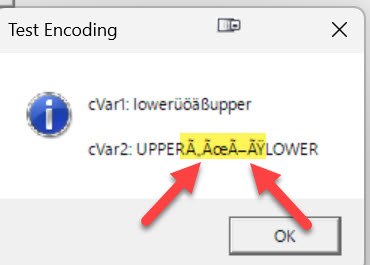
nothing changed, the chars ÄÜÖß are misinterpreted:
Windows 11 Pro 22H2 22621.1848

Microsoft (R) Windows (R) Resource Compiler Version 10.0.10011.16384

Harbour 3.2.0dev (r2008190002)

FWH 23.10 x86
Posts: 1772
Joined: Thu Sep 05, 2019 05:32 AM
Re: FW_SetUnicode( .T. ) 2-Byte characters
Posted: Mon Jun 26, 2023 09:18 PM
hi,

as i can say you need to set Codepage for "Controls" AND for DBF

i do set in MAIN
Code (fw): Select all Collapse
LOCAL cLangCode    := "DE"
LOCAL cCodepage    := "DEWIN"

   FW_SetUnicode( .T. )                                               // use UniCode
   hb_LangSelect( cLangCode )
   hb_CDPSELECT( cCodepage )
now when open DBF it will be default DEWIN, but when have OEM (Cl*pper) DBF i need to switch Codepage to DE850
Code (fw): Select all Collapse
PROCEDURE DoSetNewCP( cPathcFile, cCodepage, cAlias, oBrw )
LOCAL cVia

   IF EMPTY( cAlias )
      hb_CDPSELECT( TRIM( cCodepage ) )
      oBrw:Refresh()
   ELSE
      IF SP_cInxExt() = "CDX"
         cVia := "DBFCDX"
      ELSE
         cVia := "DBFNTX"
      ENDIF
      CLOSE

      IF SP_lShared()
         USE (cPathcFile) VIA (cVia) NEW SHARED ALIAS (cAlias) CODEPAGE TRIM(cCodepage)
      ELSE
         USE (cPathcFile) VIA (cVia) NEW EXCLUSIVE ALIAS (cAlias) CODEPAGE TRIM(cCodepage)
      ENDIF
   ENDIF
RETURN
p.s. when "hardcode Umlaute" you must use a Unicode Editor like "Notepad ++"

---

wir können uns auch in Deutsch unterhalten. schreibe mir eine Email an "AUGE unterstrich OHR at WEB dot DE"
greeting,

Jimmy
Posts: 392
Joined: Tue Mar 10, 2009 11:54 AM
Re: FW_SetUnicode( .T. ) 2-Byte characters
Posted: Tue Jun 27, 2023 04:58 AM
Hello Jimmy,

thank you for the helpful information.
But in the context of this thread, the CP settings do not change the misinterpretation of these 2-byte characters.

Greetings from Ostwestfalen (Rietberg) to Hamburg

Frank
Windows 11 Pro 22H2 22621.1848

Microsoft (R) Windows (R) Resource Compiler Version 10.0.10011.16384

Harbour 3.2.0dev (r2008190002)

FWH 23.10 x86
Posts: 392
Joined: Tue Mar 10, 2009 11:54 AM
Re: FW_SetUnicode( .T. ) 2-Byte characters
Posted: Tue Jun 27, 2023 06:35 AM
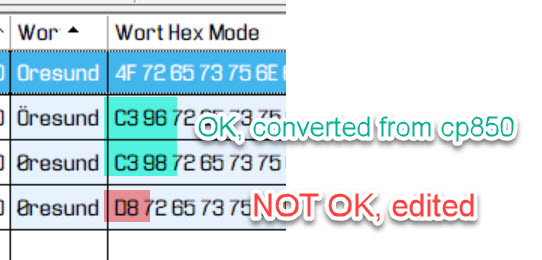
When editing 2-Byte chars they are converted to there Unicode equivalent, NOT to UTF-8

Example - https://www.charset.org/utf-8:
Code (fw): Select all Collapse
Dec      Hex   UTF-8 Char  Unicode description
---------------------------------------------------------------------------------------
216   U+00D8   C3 98   Ø   Latin Capital Letter O With Stroke


As you can see, xBrowse tolerates this and displays the Unicode characters correctly, which is amazing but also a bit confusing!
IMHO it would be better, to show � instead.

This happens in TGet(), TEdit and TMultiGet()!
Windows 11 Pro 22H2 22621.1848

Microsoft (R) Windows (R) Resource Compiler Version 10.0.10011.16384

Harbour 3.2.0dev (r2008190002)

FWH 23.10 x86
Posts: 392
Joined: Tue Mar 10, 2009 11:54 AM
Re: FW_SetUnicode( .T. ) 2-Byte characters
Posted: Tue Jun 27, 2023 12:48 PM
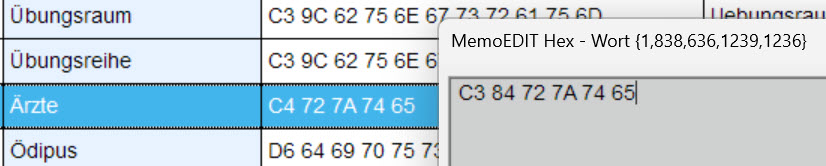
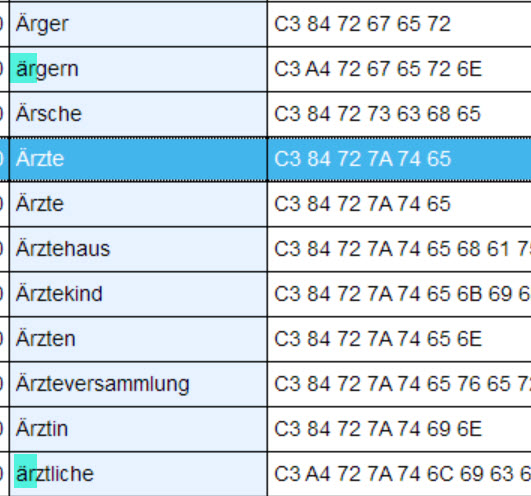
The following images demonstrate the change of Unicode Ä (0xC4) to UTF-8 Ä (0xC3 84) via Hex codes:

Before change, the new hex code is already in the MemoEdit:


Due to the Unicode code 0xC4 the sorting is not ok.

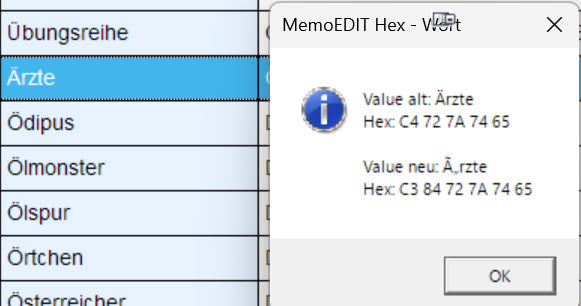
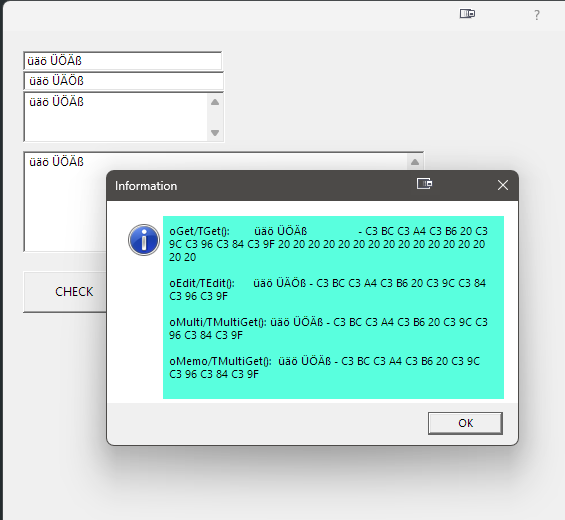
MsgInfo() to control what to change:


The UTF-8 Ä (0xC3 84) ist misinterpreted.

After the change:


The sorting is now correct and case insensitive thanks to the new function U82Upper()!

When opened in a dialog, the full term is displayed correctly if it contains UTF-8 codes only..
Windows 11 Pro 22H2 22621.1848

Microsoft (R) Windows (R) Resource Compiler Version 10.0.10011.16384

Harbour 3.2.0dev (r2008190002)

FWH 23.10 x86
Posts: 392
Joined: Tue Mar 10, 2009 11:54 AM
Re: FW_SetUnicode( .T. ) 2-Byte characters
Posted: Tue Jun 27, 2023 06:11 PM
frose wrote:
same Prob here with unicode

I want move to Harbour from xHarbour

My getfield blocks if itype "Müller" t stops at "Mü"

U.diemer using ads Server 12.2
cannot confirm this behavior for Harbour.
Uwe, try example from this thread
Can confirm this behavior for Harbour.
When opened in a dialog, the full term is displayed correctly if it contains UTF-8 codes only.
Windows 11 Pro 22H2 22621.1848

Microsoft (R) Windows (R) Resource Compiler Version 10.0.10011.16384

Harbour 3.2.0dev (r2008190002)

FWH 23.10 x86
Posts: 1772
Joined: Thu Sep 05, 2019 05:32 AM
Re: FW_SetUnicode( .T. ) 2-Byte characters
Posted: Wed Jun 28, 2023 11:37 PM

hi,

i have use your last Sample

when start and "direct" press Check Button you are right

but try this :

after start press TAB until reach Button and press SPACE Bar

now in Msginfo() all "Umlaute" are ok

i do not know what is going on but it "seems" GET must have Focus

greeting,

Jimmy
Posts: 392
Joined: Tue Mar 10, 2009 11:54 AM
Re: FW_SetUnicode( .T. ) 2-Byte characters
Posted: Thu Jun 29, 2023 07:12 AM
yes, this issue (bug) is very confusing. To better understand what is happening, I have adjusted the sample again:
Code (fw): Select all Collapse
function Main()

   local oDlg
   local oGet
   local oEdit
   local oMulti
   local oMemo
   local cVar1 := "üäö"
   local cVar2 := "üäö"
   local cVar3 := "üäö"
   local cVar4 := "üäö"

   REQUEST HB_CODEPAGE_UTF8
   HB_CDPSELECT( "UTF8" )
   FW_SetUnicode( .T. )
   
   DEFINE DIALOG oDlg SIZE 600, 600 PIXEL TRUEPIXEL
   
   @  20, 20 GET oGet VAR cVar1 SIZE 200,20 PIXEL OF oDlg VARCHAR 20
   
   @  40,20 EDIT oEdit VAR cVar2 SIZE 200,20 PIXEL OF oDlg
   
   @  60, 20 GET oMulti VAR cVar3 MULTILINE SIZE 200, 50 PIXEL OF oDlg

   @ 120, 20 GET oMemo VAR cVar4 MEMO OF oDlg PIXEL SIZE 400, 100
  
   @ 240, 20 BUTTON "CHECK" SIZE 100,40 PIXEL OF oDlg ;
      ACTION MsgInfo( ;
         "oGet/TGet():        " + cVar1 + " - " + StrToHex( cVar1, " " ) + CRLF + CRLF + ;
         "oEdit/TEdit():      " + cVar2 + " - " + StrToHex( cVar2, " " ) + CRLF + CRLF + ;
         "oMulti/TMultiGet(): " + cVar3 + " - " + StrToHex( cVar3, " " ) + CRLF + CRLF + ;
         "oMemo/TMultiGet():  " + cVar4 + " - " + StrToHex( cVar4, " " ) ;
         )
 
   ACTIVATE DIALOG oDlg CENTERED
 RETURN NIL
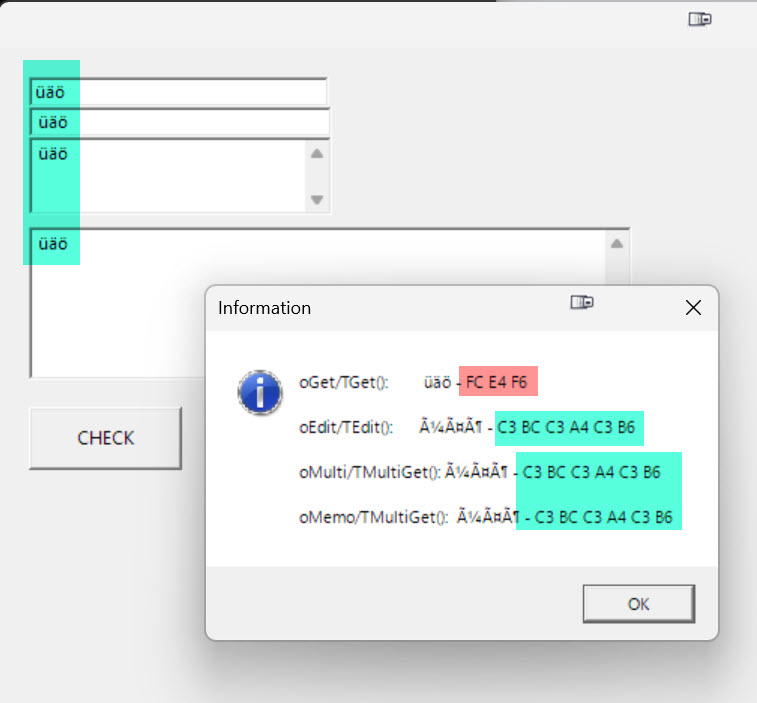
Screenshot before editing:
Screenshot after editing:
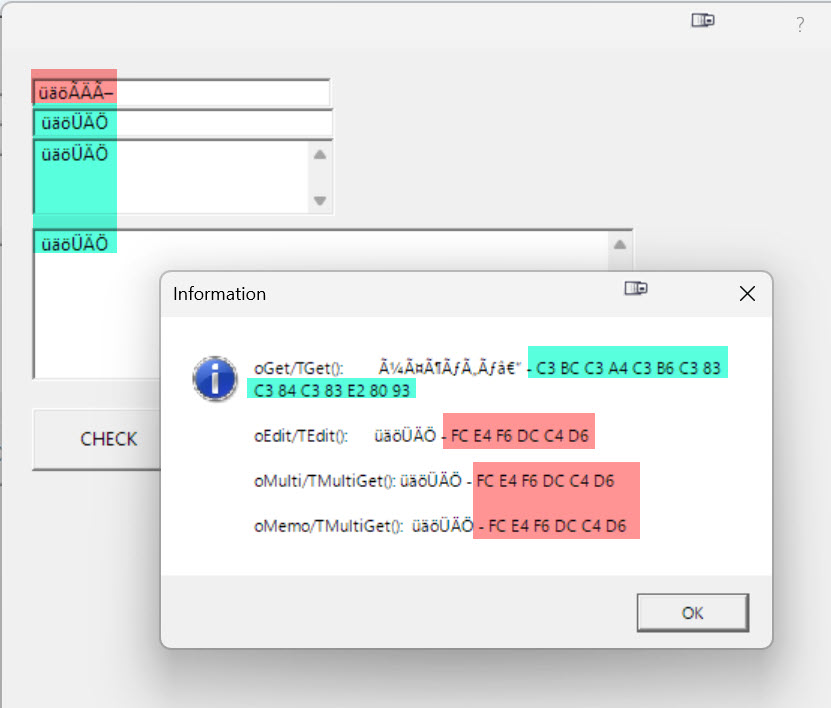

I marked the results I think are correct in green, the wrong ones in red.

As already mentioned above, the UTF-8 codes in MsgInfo() are also misinterpreted.

The hex codes marked in red are the Unicode equivalents to the corresponding characters. It can be assumed that the characters are incorrectly converted (not to UTF-8) by FWH in several places in the source.
Windows 11 Pro 22H2 22621.1848

Microsoft (R) Windows (R) Resource Compiler Version 10.0.10011.16384

Harbour 3.2.0dev (r2008190002)

FWH 23.10 x86
Posts: 10733
Joined: Sun Nov 19, 2006 05:22 AM
Re: FW_SetUnicode( .T. ) 2-Byte characters
Posted: Tue Jul 25, 2023 12:38 PM

These issues with Umlauts is fixed in FWH2307 soon to be released.

Regards


G. N. Rao.

Hyderabad, India
Posts: 392
Joined: Tue Mar 10, 2009 11:54 AM
Re: FW_SetUnicode( .T. ) 2-Byte characters
Posted: Tue Jul 25, 2023 03:26 PM
:D
Windows 11 Pro 22H2 22621.1848

Microsoft (R) Windows (R) Resource Compiler Version 10.0.10011.16384

Harbour 3.2.0dev (r2008190002)

FWH 23.10 x86
Posts: 392
Joined: Tue Mar 10, 2009 11:54 AM
Re: FW 23.07 SOLVED
Posted: Sun Sep 10, 2023 08:38 AM
tested with:
Code (fw): Select all Collapse
#include "fivewin.ch"

function Main()

   local oDlg
   local oGet
   local oEdit
   local oMulti
   local oMemo
   local cVar1 := "üäö" + Replicate( " ", 25 )
   local cVar2 := "üäö"
   local cVar3 := "üäö"
   local cVar4 := "üäö"

   REQUEST HB_CODEPAGE_UTF8
   HB_CDPSELECT( "UTF8" )
   FW_SetUnicode( .T. )

   DEFINE DIALOG oDlg SIZE 600, 600 PIXEL TRUEPIXEL
   @  20, 20 GET oGet VAR cVar1 SIZE 200,20 PIXEL OF oDlg

   @  40, 20 EDIT oEdit VAR cVar2 SIZE 200,20 PIXEL OF oDlg

   @  60, 20 GET oMulti VAR cVar3 MULTILINE SIZE 200, 50 PIXEL OF oDlg

   @ 120, 20 GET oMemo VAR cVar4 MEMO OF oDlg PIXEL SIZE 400, 100

   @ 240, 20 BUTTON "CHECK" SIZE 100,40 PIXEL OF oDlg ;
      ACTION MsgInfo( ;
         "oGet/TGet():        " + cVar1 + " - " + StrToHex( cVar1, " " ) + CRLF + CRLF + ;
         "oEdit/TEdit():      " + cVar2 + " - " + StrToHex( cVar2, " " ) + CRLF + CRLF + ;
         "oMulti/TMultiGet(): " + cVar3 + " - " + StrToHex( cVar3, " " ) + CRLF + CRLF + ;
         "oMemo/TMultiGet():  " + cVar4 + " - " + StrToHex( cVar4, " " ) ;
         )

   ACTIVATE DIALOG oDlg CENTERED

RETURN NIL


SOLVED, thanks to Rao
Windows 11 Pro 22H2 22621.1848

Microsoft (R) Windows (R) Resource Compiler Version 10.0.10011.16384

Harbour 3.2.0dev (r2008190002)

FWH 23.10 x86

Continue the discussion