FiveTech Support Forums

FiveWin / Harbour / xBase community
Board index FiveWin for Harbour/xHarbour DBF to Excel Sheet, without Excel, using ADO ?
Posts: 1772
Joined: Thu Sep 05, 2019 05:32 AM

DBF to Excel Sheet, without Excel, using ADO ?

Posted: Tue Aug 08, 2023 06:37 AM
hi

METHOD ToExcel() need Excel
MsgAlert( FWString( "Excel not installed" ), FWString( "Alert" ) )
did Fivewin already have a Function to use ADO to "create" a XLSx Sheet :?:

---

Idea :!:

it seem function FW_OpenADOExcelBook( cFile, lHeaders ) return a "Connection" so after create Structure
Code (fw): Select all Collapse
   CREATE TABLE XXX ( ...
i want to do this
Code (fw): Select all Collapse
   oRs   := FW_OpenRecordSet( oCn, "XXX" )

   USE CUSTOMER NEW ALIAS CUST SHARED READONLY VIA 'DBFCDX'

   do while ! eof() 
      oRs:AddNew( { "CUSTNAME", "MARRIED", "AGE", "SALARY" }, ;
                  { Left( Trim( CUST->FIRST ) + ' ' + Trim( CUST->LAST ), 30 ), ;
                    CUST->MARRIED, CUST->AGE, CUST->SALARY } )
      SKIP
   enddo

   CLOSE CUST
   oRs:Close()
will this work :?:
greeting,

Jimmy
Posts: 1772
Joined: Thu Sep 05, 2019 05:32 AM

Re: DBF to Excel Sheet, without Excel, using ADO ?

Posted: Tue Aug 08, 2023 11:36 AM
hi,

does FW_AdoImportFromDBF() work when use
Code (fw): Select all Collapse
   cTable := LOWER( cFileNoExt( cDbf ) )

   oCon    := TOleAuto() :New( "ADODB.Connection" )
   oCon:Open( "Provider=Microsoft.ACE.OLEDB.12.0;Data Source=" + ;
                   cTable + ';Extended Properties="Excel 12.0;HDR=' + ;
                   If( lHeaders, 'Yes";', 'No";' ) )

   FW_AdoImportFromDBF(oCon, cDbf, cTable, cColPrefix, nMultiRowSize, aFields, cAutoIncFld )
greeting,

Jimmy
Posts: 10733
Joined: Sun Nov 19, 2006 05:22 AM

Re: DBF to Excel Sheet, without Excel, using ADO ?

Posted: Tue Aug 08, 2023 04:24 PM
does FW_AdoImportFromDBF() work when use
Did you not try?

Well, this works:
Code (fw): Select all Collapse
function foo()

   local oCn, oRs

   oCn   := FW_OpenADOExcelBook( TrueName( "some.xlsx" ) )
   if oCn == nil
      ? "failed to open"
      return nil
   else
      if FW_AdoImportFromDBF( oCn, "states.dbf", , , 1, , .f. )
         oRs   := FW_OpenADOExcelSheet( oCn, "states" )
         XBROWSER oRs
         oRs:Close()
      else
         ? "failed to create new sheet"
      endif
      oCn:Close()
   endif

return nil
Values 1 and .f. for parameters 5 and 7 are important.
Regards


G. N. Rao.

Hyderabad, India
Posts: 10733
Joined: Sun Nov 19, 2006 05:22 AM

Re: DBF to Excel Sheet, without Excel, using ADO ?

Posted: Tue Aug 08, 2023 05:00 PM
METHOD ToExcel() need Excel
Did you try on a PC, where Excel is not installed, if these two functions FW_OpenADOExcelBook(...) and FW_OpenADOExcelSheet(...) are working?
If they are not working and if you have access to a PC where Excel is not installed can you please do this test?
We are now using these command strings
Code (fw): Select all Collapse
         if lAce
            AAdd( aStr, "Provider=Microsoft.ACE.OLEDB.12.0;Data Source=" + ;
                        cFile + ';Extended Properties="Excel 12.0;HDR=' + ;
                        If( lHeaders, 'Yes";', 'No";' ) )
            if cExt == "xlsm"
               aStr[ 1 ] := StrTran( aStr[ 1 ], "12.0;HDR", "12.0 Macro;HDR" )
            elseif cExt == "xlsx"
               aStr[ 1 ] := StrTran( aStr[ 1 ], "12.0;HDR", "12.0 Xml;HDR" )
            endif
         endif

         if cExt == "xls"
            AAdd( aStr, "Provider=Microsoft.Jet.OLEDB.4.0;Data Source=" + ;
                        cFile + ';Extended Properties="Excel 8.0;HDR=' + ;
                        If( lHeaders, 'Yes";', 'No";' ) )
         endif
Can you try any alternative connection string to make it work on a PC, where Excel is not installed?
Regards


G. N. Rao.

Hyderabad, India
Posts: 1772
Joined: Thu Sep 05, 2019 05:32 AM

Re: DBF to Excel Sheet, without Excel, using ADO ?

Posted: Wed Aug 09, 2023 02:02 AM
hi,

thx for Answer
nageswaragunupudi wrote:Well, this works:

Values 1 and .f. for parameters 5 and 7 are important.
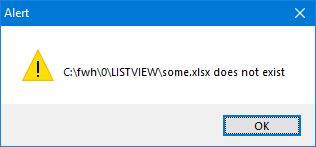
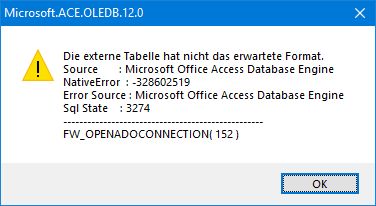
using your Sample i got


---

than i create "some.xlsx" but with 0-Byte and i got "wrong Structure"


---

so i try to create Structure of Table, using DbStruct(), but go next Error about Structure of Excel Table
Code (fw): Select all Collapse
   cQuery := "CREATE TABLE " + cTable + " ( "

   iMax := LEN( aDbfStruct )
   i = 1
   FOR i = 1 TO iMax
      cQuery += aDbfStruct[ i, DBS_NAME ]

      DO CASE
         CASE aDbfStruct[ i, DBS_TYPE ] = "C"
            cQuery += " character(" + ALLTRIM( STR( aDbfStruct[ i, DBS_LEN ] ) ) + "), "

         CASE aDbfStruct[ i, DBS_TYPE ] = "N"
            cQuery += " numeric(" + ALLTRIM( STR( aDbfStruct[ i, DBS_LEN ] ) ) + ',' + ALLTRIM( STR( aDbfStruct[ i, DBS_DEC ] ) ) + "), "

         CASE aDbfStruct[ i, DBS_TYPE ] = "D"
            cQuery += " date, "

         CASE aDbfStruct[ i, DBS_TYPE ] = "M"
            // IF lUseBlob = .T.
            //    cQuery += " bytea, "
            // ELSE
            cQuery += " text, "
            // ENDIF

         CASE aDbfStruct[ i, DBS_TYPE ] = "L"
            cQuery += " boolean, "

         CASE aDbfStruct[ i, DBS_TYPE ] = "V"
            // store as HEX String
            cQuery += " bytea, "
      ENDCASE
   NEXT
   cQuery += " )"

fwlog cQuery

   Try
      oCon:Execute( cQuery )
   Catch oError
      MsgInfo( oError:Description, cTable )
      Return .F.
   End try
---

than i open a existing *.XLSx and look at Structure
Code (fw): Select all Collapse
   objRS := FW_OpenADOExcelSheet( cPathcFile, cSheet, cRange, lHeaders )
   aStruct := FWAdoStruct( objRS )
fwlog var2char(aStruct)
and got
var2char(aStruct) = "{{ARTNR, C, 255, 0, 202, .T.},
{ARTIKEL, C, 255, 0, 202, .T.},
{VERPACKUNG, C, 255, 0, 202, .T.},
{EINHEIT, C, 255, 0, 202, .T.},
{APREIS, N, 17, 2, 5, .T.},
{BESTAND, N, 17, 2, 5, .T.},
{DATLETZAB, C, 255, 0, 202, .T.},
{WARENGRUPE, N, 17, 2, 5, .T.},
{MWST, N, 17, 2, 5, .T.},
{VKGESAMT, N, 17, 2, 5, .T.},
{EPREIS, N, 17, 2, 5, .T.},
{DATLETZZU, C, 255, 0, 202, .T.},
{KKPREIS, N, 17, 2, 5, .T.},
{STEINH, C, 255, 0, 202, .T.},
{STSTUECK, N, 17, 2, 5, .T.},
{STPREIS, N, 17, 2, 5, .T.},
{CODE, C, 255, 0, 202, .T.},
{GEWICHT, N, 17, 2, 5, .T.},
{ORGBESTAND, N, 17, 2, 5, .T.},
{DIFF, N, 17, 2, 5, .T.},
{WERT, N, 17, 2, 5, .T.},
{NEUBESTAND, N, 17, 2, 5, .T.},
{BPREIS1, N, 17, 2, 5, .T.},
{BPREIS2, N, 17, 2, 5, .T.},
{BPREIS3, N, 17, 2, 5, .T.},
{LAGEREIN, N, 17, 2, 5, .T.},
{LAGERAUS, N, 17, 2, 5, .T.},
{KTKGEGAL, L, 1, 0, 11, .T.},
{LASTREF, C, 255, 0, 202, .T.},
{CHINAART, C, 255, 0, 202, .T.},
{MINDEST, N, 17, 2, 5, .T.},
{AUFMONATE, N, 17, 2, 5, .T.},
{LASTPLATZ, C, 255, 0, 202, .T.},
{LASTMHD, D, 8, 0, 7, .T.}}"
it have 5th Element ??? and 6th Element .T. :shock:

---

where does 202 = "C", 5 = "N", 11 = "L" and 7 = "D" come from :?:
how can i "add" Column to DbStruct() to get FWAdoStruct() Format :?:

so how to create Table to use with Excel :?:
greeting,

Jimmy
Posts: 1772
Joined: Thu Sep 05, 2019 05:32 AM

Re: DBF to Excel Sheet, without Excel, using ADO ?

Posted: Wed Aug 09, 2023 03:38 AM
hi,

found
Code (fw): Select all Collapse
#define adDouble                        5
#define adDate                          7
#define adBoolean                       11
#define adVarWChar                      202
but how to use these Constant to create Table for Excel ...
greeting,

Jimmy
Posts: 10733
Joined: Sun Nov 19, 2006 05:22 AM

Re: DBF to Excel Sheet, without Excel, using ADO ?

Posted: Wed Aug 09, 2023 07:40 AM
using your Sample i got
Obviously the file should be an existing and valid xlsx file. Otherwise with what ADO connects?
If the file is a valid xlsx file, FW_AdoImportFromDBF() works.
Regards


G. N. Rao.

Hyderabad, India
Posts: 10733
Joined: Sun Nov 19, 2006 05:22 AM

Re: DBF to Excel Sheet, without Excel, using ADO ?

Posted: Wed Aug 09, 2023 07:46 AM
Please try using FWH built-in function and save your time.
Code (fw): Select all Collapse
FWAdoCreateTable( cTable, aStruct, oCn, .f. ) // --> lSuccess
Let us leave the drudgery of converting DBF structure to ADO structure to FWH, instead of wasting our time and energies.
Regards


G. N. Rao.

Hyderabad, India
Posts: 10733
Joined: Sun Nov 19, 2006 05:22 AM

Re: DBF to Excel Sheet, without Excel, using ADO ?

Posted: Wed Aug 09, 2023 07:51 AM

Notes:

  1. I do not have access to PC without Excel installed. I like somebody to test if these functions work on such a PC.

I remember Mr. Vilian worked on it long before.

Mr. Vilian, If you see this post, can you share your experiences?

  1. To the best of my knowledge we can not create a valid xlsx file on our own, without Excel. Or that may be very difficult.

I suggest creating one blank xlsx file and then copy it and use it to create our ado tables as sheets

Regards


G. N. Rao.

Hyderabad, India
Posts: 1487
Joined: Tue Jun 14, 2016 07:51 AM

Re: DBF to Excel Sheet, without Excel, using ADO ?

Posted: Wed Aug 09, 2023 09:35 AM

I can test, but have you a version that can be compiled in samples ?

Marc Venken

Using: FWH 23.08 with Harbour
Posts: 1487
Joined: Tue Jun 14, 2016 07:51 AM

Re: DBF to Excel Sheet, without Excel, using ADO ?

Posted: Wed Aug 09, 2023 09:45 AM
nageswaragunupudi wrote: I suggest creating one blank xlsx file and then copy it and use it to create our ado tables as sheets
Interesting .... Maybe code inside the sample ?
Marc Venken

Using: FWH 23.08 with Harbour
Posts: 1772
Joined: Thu Sep 05, 2019 05:32 AM

Re: DBF to Excel Sheet, without Excel, using ADO ?

Posted: Wed Aug 09, 2023 10:20 AM
hi,

i have try Fivewin Function like
Code (fw): Select all Collapse
    FWAdoCreateTable( cTable, aStruct, oCn, .f. ) // --> lSuccess
but it is not for Excel
it have to with "Datatype" which Excel use
https://learn.microsoft.com/en-us/sql/odbc/microsoft/microsoft-excel-data-types?view=sql-server-ver16

---

i "think" i got it for Type "C","N","D" and "L"
Code (fw): Select all Collapse
   cQuery := "CREATE TABLE " + cTable + " ( "
   iMax := LEN( aDbfStruct )
   FOR i = 1 TO iMax
      cQuery += aDbfStruct[ i, DBS_NAME ]
      DO CASE
         CASE aDbfStruct[ i, DBS_TYPE ] = "C"
            cQuery += " VARCHAR(" + ALLTRIM( STR( aDbfStruct[ i, DBS_LEN ] ) ) + ") "
         CASE aDbfStruct[ i, DBS_TYPE ] = "N"
            IF aDbfStruct[ i, DBS_DEC ] = 0
               cQuery += " INT "
            ELSE
               cQuery += " DOUBLE "
            ENDIF
         CASE aDbfStruct[ i, DBS_TYPE ] = "D"
            cQuery += " DATE "
         CASE aDbfStruct[ i, DBS_TYPE ] = "L"
            cQuery += " BIT "
      ENDCASE

      IF  i <> iMax
         cQuery += ", "
      ENDIF
   NEXT
   cQuery += " )"

   Try
      oCon:Execute( cQuery )
   Catch oError
      MsgInfo( oError:Description, cTable )
      Return .F.
   End try

   oRs := FW_OpenRecordSet( oCon, cTable )
   do while ! eof()
      oRs:AddNew( aFields , GetRecordValue(aFields,aDbfStruct) )
      SKIP
   enddo
   oRs:Close()
cQuery = "CREATE TABLE testtype ( TEST_C VARCHAR(10) , TEST_N INT , TEST_D DATE , TEST_L BIT )"
---

instead of *.XLSX i got *.XLSB ... :?
Excel can load it but i´m not sure if "other" can use it
greeting,

Jimmy
Posts: 1772
Joined: Thu Sep 05, 2019 05:32 AM

Re: DBF to Excel Sheet, without Excel, using ADO ?

Posted: Thu Aug 10, 2023 05:49 AM
hi,

have found other Constant which seem to work "better"
Code (fw): Select all Collapse
        Case adBoolean                                       // 11
            sSQL = sSQL & "LOGICAL"
        Case adDBTimeStamp, adDate, adDBDate, adDBTime      // 135, 7, 133, 134
            sSQL = sSQL & "DATETIME"
        Case adBigInt, adInteger, adSmallInt, adTinyInt, _  // 3, 2, 15
                adUnsignedBigInt, adUnsignedInt, adUnsignedSmallInt, adUnsignedTinyInt, _ // 21, 19, 18, 17
                adDouble, adSingle, _                       // 5, 4
                adDecimal, adNumeric, adCurrency            // 14, 131, 6
            sSQL = sSQL & "NUMBER"
        Case Else
            sSQL = sSQL & IIf(oFld.DefinedSize > 255 Or oFld.DefinedSize < 0, "MEMO", "TEXT")
        End Select
---

have import DBF ( 66 MB ) with 26 FIELDs into Excel *.XLSB under 32 Bit OS
cIn = "records in dbf: 351287"
cIn = "imported recs: 351287"
cIn = "Sec 00:07:17"
cIn = "Rec/Sec 803.08"
*.XLSB are only 20 MB :!: while *.XLSX are 53 MB
greeting,

Jimmy
Posts: 1772
Joined: Thu Sep 05, 2019 05:32 AM

Re: DBF to Excel Sheet, without Excel, using ADO ?

Posted: Sat Aug 12, 2023 03:49 PM

hi,

have found out that TDataRow():New() does not like Type DATETIME, only DATE

greeting,

Jimmy
Posts: 10733
Joined: Sun Nov 19, 2006 05:22 AM

Re: DBF to Excel Sheet, without Excel, using ADO ?

Posted: Sat Aug 12, 2023 11:05 PM
Jimmy wrote:hi,

have found out that TDataRow():New() does not like Type DATETIME, only DATE
Is it?

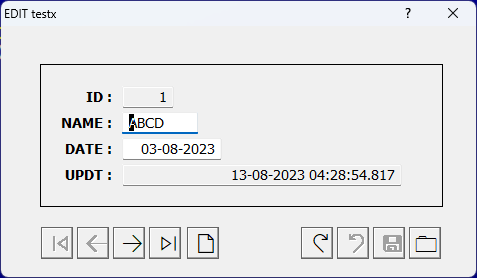
Test:
Code (fw): Select all Collapse
#include "fivewin.ch"

function Main()

   DBCREATE( "testx.dbf", { ;
      { "ID", "+", 4, 0 }, { "NAME", "C", 4, 0 }, ;
      { "DATE", "D", 8, 0 }, { "UPDT", "=", 8, 0 } }, ;
      "DBFCDX", .T., "TESTX" )

   FW_ArrayToDBF( { { "ABCD", DATE()-10 }, { "DEFG", DATE() } }, ;
                  "NAME,DATE" )

   GO TOP

   XEDIT()

return nil


Still think so?
Regards


G. N. Rao.

Hyderabad, India