FiveTech Support Forums

FiveWin / Harbour / xBase community
Board index FiveWin for Harbour/xHarbour Question about xBrowse
Posts: 3358
Joined: Fri Oct 07, 2005 08:20 PM
Question about xBrowse
Posted: Sun Aug 20, 2023 08:40 PM
kindly friends:

With the code below I know the current value of the cell
Code (fw): Select all Collapse
:bOnChange  := { |oCol, uOldVal| VerSaldo(uOldVal) }
Now how do I know the new value after editing the cell?

I must compare the old content against the new content
and I must know if the new content is empty

With best regards
SOI, s.a. de c.v.
estbucarm@gmail.com
http://www.soisa.mex.tl/
http://sqlcmd.blogspot.com/
Tel. (722) 174 44 45
Carpe diem quam minimum credula postero
Posts: 10733
Joined: Sun Nov 19, 2006 05:22 AM
Re: Question about xBrowse
Posted: Mon Aug 21, 2023 03:32 AM
Now how do I know the new value after editing the cell?
Code (fw): Select all Collapse
oCol:Value
Notes:
Do not use this for validation. This is called when the modified data is already written and also if the old data is different from the new data written.
This codeblock is meant for taking consequential action after modification of data in the cell but not for validation.
Regards


G. N. Rao.

Hyderabad, India
Posts: 3358
Joined: Fri Oct 07, 2005 08:20 PM
Re: Question about xBrowse
Posted: Mon Aug 21, 2023 03:49 AM

Mr. Rao:

Thanks so much, I understood.

By the way, is it possible to paste what I have on the clipboard into a cell with just one mouse click?

Best regards

SOI, s.a. de c.v.
estbucarm@gmail.com
http://www.soisa.mex.tl/
http://sqlcmd.blogspot.com/
Tel. (722) 174 44 45
Carpe diem quam minimum credula postero
Posts: 1487
Joined: Tue Jun 14, 2016 07:51 AM
Re: Question about xBrowse
Posted: Mon Aug 21, 2023 07:20 AM
Code (fw): Select all Collapse
    

 oBrwmail:bRClicked := { || placemail() }

function placemail
    cText = oClp:getText()  //  This is content of clipboard
    testmail->(dbappend())
    testmail->email = cText
    obrwmail:refresh()
return
You can also use the varput and do it in Xbrowse itself
Marc Venken

Using: FWH 23.08 with Harbour
Posts: 10733
Joined: Sun Nov 19, 2006 05:22 AM
Re: Question about xBrowse
Posted: Mon Aug 21, 2023 10:22 AM
Marc Venken wrote:
Code (fw): Select all Collapse
    

 oBrwmail:bRClicked := { || placemail() }

function placemail
    cText = oClp:getText()  //  This is content of clipboard
    testmail->(dbappend())
    testmail->email = cText
    obrwmail:refresh()
return
You can also use the varput and do it in Xbrowse itself
Dear Friend.
With FWH you do not have to write long code like this at all.
Regards


G. N. Rao.

Hyderabad, India
Posts: 10733
Joined: Sun Nov 19, 2006 05:22 AM
Re: Question about xBrowse
Posted: Mon Aug 21, 2023 10:25 AM
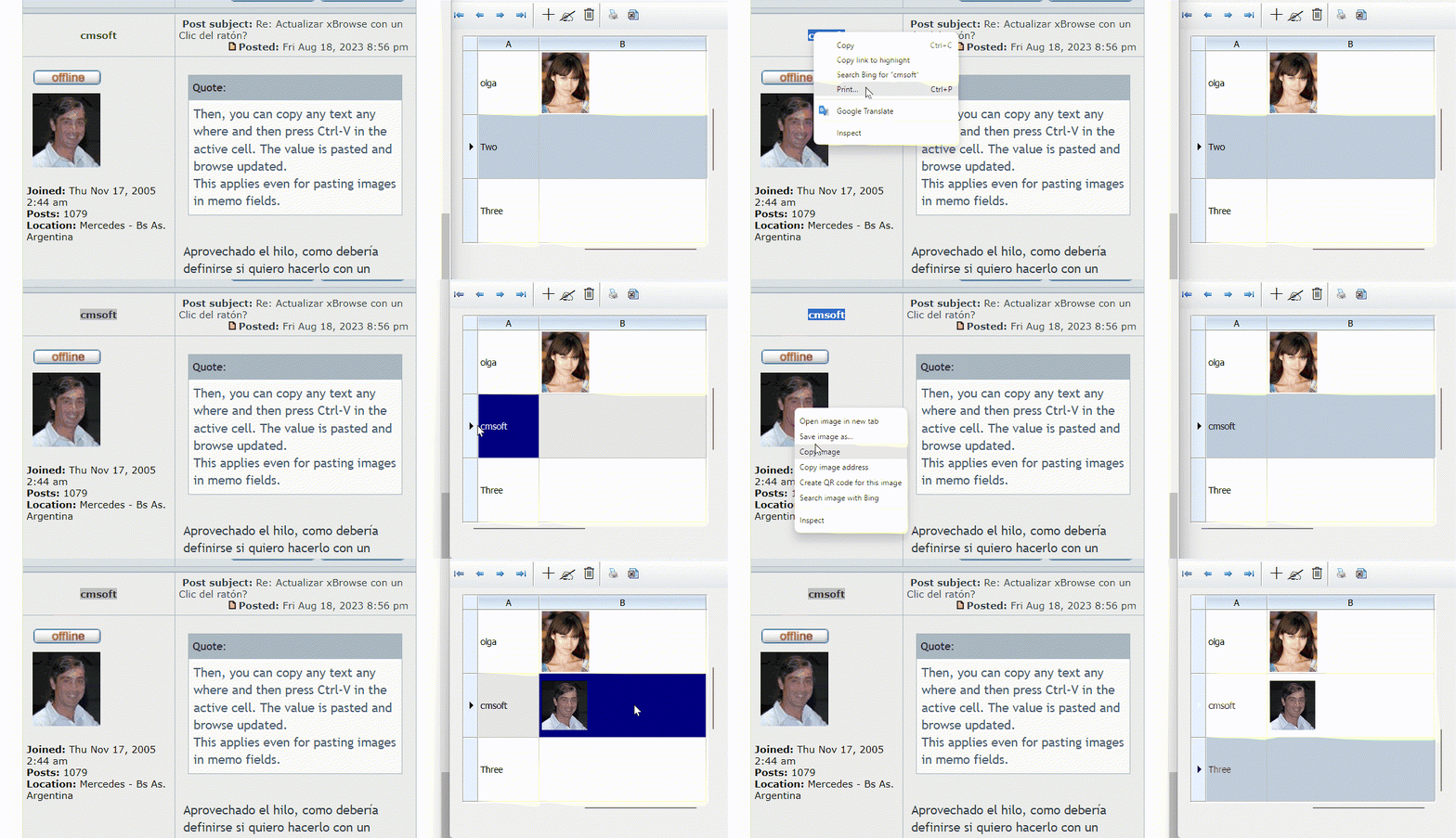
By the way, is it possible to paste what I have on the clipboard into a cell with just one mouse click?
Yes.
Just by clicking Ctrl-V.

For this we first need to set
Code (fw): Select all Collapse
oBrw:lCanPaste := .t.
We can paste text into text fields and even images into Image fields.
All by just one click Ctrl-V.

Code (fw): Select all Collapse
function XbrPaste()

   local aData := { { "olga     ", MEMOREAD( "c:\fwh\bitmaps\olga1.jpg" ) }, ;
                    { "Two      ", "" }, { "Three      ", "" } }

   XBROWSER aData FASTEDIT SETUP ( ;
      oBrw:lCanPaste    := .t., ;
      oBrw:nRowHeight   := 100, ;
      oBrw:aCols[ 2 ]:cDataType:= "P" )

return nil
Regards


G. N. Rao.

Hyderabad, India
Posts: 3358
Joined: Fri Oct 07, 2005 08:20 PM
Re: Question about xBrowse
Posted: Mon Aug 21, 2023 04:31 PM

Mr. Rao:

Thanks a lot.

Regards

SOI, s.a. de c.v.
estbucarm@gmail.com
http://www.soisa.mex.tl/
http://sqlcmd.blogspot.com/
Tel. (722) 174 44 45
Carpe diem quam minimum credula postero

Continue the discussion