

A great contribution to Harbour/xHarbour from Master Charles Kwon:
http://www.charleskwon.com/?page_id=956
Don't miss it!
http://www.charleskwon.com/?page_id=956
Don't miss it!
Hi Charles Know
Really thank you, it's a really missing tool !!!.
i already downloaded it and it worked without problems Fwh 23.07 BBC 7.0.
Today I continue with the tests
Tia Maurizio Menabue
Thank you!!
Is source code available?
Will fwh use it for preview and xBrowse?
mgsoft wrote:Thank you!!
Is source code available?
Will fwh use it for preview and xBrowse?
Hi Charles,
the program has just been presented and I immediately ask if you have in mind
the possibility of adding two methods, one to manage the height of the lines,
the other to be able to modify the method : sayimage in order to possibly resize
the image to be printed.
TIA
Maurizio Menabue
Thank you. Will you sell the full source code?
I do not use external libs without its full sources.
mgsoft wrote:Thank you. Will you sell the full source code?
I do not use external libs without its full sources.
mauri.menabue wrote:Hi Charles,
the program has just been presented and I immediately ask if you have in mind
the possibility of adding two methods, one to manage the height of the lines,
the other to be able to modify the method : sayimage in order to possibly resize
the image to be printed.
TIA
Maurizio Menabue
hi,
i open OEM DBF and try to use oXlsx:Say() or oXlsx:WriteString()
but i have Problem with DrXlsx32.lib and German Umlaute ( äöüÄÖÜß )
have try FW_SetUnicode( .T./.F. ) and hb_cdpSelect( "DE850" / "DEWIN" )
need a Tip what else i can try
#include "fivewin.ch"

function Main()

   local oXlsx, cFile, cUmlaut

   FW_SetUnicode( .F. )

   cFile    := "uml.xlsx"
   cUmlaut := "üüüüü"
   ? cUmlaut

   oXlsx    := TDrXlsx():New()
   WITH OBJECT oXlsx
      :CreateFile( cFile )
      :Say( 1, 0, "UMLAUT" )
      :Say( 1, 1, cUmlaut )
      :Close()
   END

   ShellExecute( 0, "Open", cFile )

return nil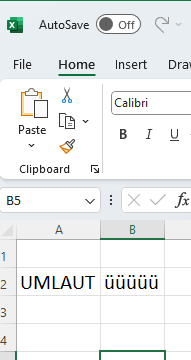
#include "fivewin.ch"

function Main()

   local oXlsx, cFile, cUmlaut

   FW_SetUnicode( .F. )

   cFile    := "uml.xlsx"

   cUmlaut  := Space( 10 )
   MsgGet( "Enter:", "UMLAUT", @cUmlaut )
   cUmlaut  := Trim( cUmlaut )

   oXlsx    := TDrXlsx():New()
   WITH OBJECT oXlsx
      :CreateFile( cFile )
      :Say( 1, 0, "UMLAUT" )
      :Say( 1, 1, strToUtf8( cUmlaut ) )
      :Close()
   END

   ShellExecute( 0, "Open", cFile )

return nil
//-------------
static function StrToUtf8( c ); return UTF16TOUTF8( strToWide( c ) )Records = 59780 Time = 41.74 1432.23 Rec/SecXLSwriter
Records = 59780 Time = 8.20+ 7285.80 Rec/Secso XLSwriter is 500 % faster :!:
Records = 351287 Time = 288.54 1217.47 Rec/SecXLSwriter
RECNO() = 109571 MEMORY( 3 ) = 31044 // have set Limit at 32 Kbit is just before available Memory "crash" so leave loop
cIn = "records in dbf: 351287"XLSwriter
cIn = "imported recs: 351287"
cIn = "Std 00:06:13"
cIn = "Rec/Sec 940.51"
nReccount = 351287 nRecLast = 351288 % = 100 nTime = 71.06 4943.40 Rec/Secthis was 32 Bit App
nOEM = 107712 nANSI = 17642 nELSE = 5821450
nReccount = 351287 nRecLast = 109571 % = 31 nTime = 50.96 2150.14 Rec/Secbtw. when RAM decrease also APP Speed decrease using 32 Bit App
nOEM = 39715 nANSI = 4747 nELSE = 1811139
Jimmy wrote:hi,so XLSwriter is 500 % faster :!:
i have try to make some Sample to "test" Speed
using a 32 Bit Apps
ADORecords = 59780 Time = 41.74 1432.23 Rec/SecXLSwriterRecords = 59780 Time = 8.20+ 7285.80 Rec/Sec
Records = 351287 Time = 288.54 1217.47 Rec/SecXLSwriter
RECNO() = 109571 MEMORY( 3 ) = 31044 // have set Limit at 32 Kbit is just before available Memory "crash" so leave loop
cIn = "records in dbf: 351287"XLSwriter
cIn = "imported recs: 351287"
cIn = "Std 00:06:13"
cIn = "Rec/Sec 940.51"
nReccount = 351287 nRecLast = 351288 % = 100 nTime = 71.06 4943.40 Rec/Secthis was 32 Bit App
nOEM = 107712 nANSI = 17642 nELSE = 5821450
nReccount = 351287 nRecLast = 109571 % = 31 nTime = 50.96 2150.14 Rec/Secbtw. when RAM decrease also APP Speed decrease using 32 Bit App
nOEM = 39715 nANSI = 4747 nELSE = 1811139


