FiveTech Support Forums

FiveWin / Harbour / xBase community
Board index FiveWin para Harbour/xHarbour PlaceHolder HARBOUR
Posts: 851
Joined: Sun Nov 09, 2014 05:01 PM
PlaceHolder HARBOUR
Posted: Tue Oct 03, 2023 02:54 PM
Saludos Amigos.

Mientras Usé xHarbour, el placeholder en los gets me funcionó perfecto:
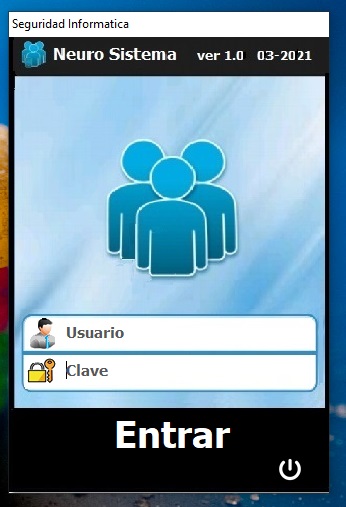


Desde que migré a HARBOUR, dejó de funcionar:
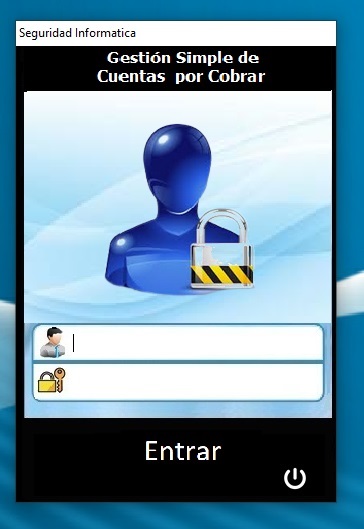


Es el mismo código que uso desde años, solo copio el PRG hacia la carpeta del nuevo proyecto y listo. No toco el código.

Code (fw): Select all Collapse
Redefine get _oGetUserNick  Var _cUsuarioActivoNick   Id 106  of  oDlg  PLACEHOLDER  'Usuario'
y la RC es la misma,

¿qué cambió?
"Los errores en programación, siempre están entre la silla y el teclado..."


Fwh 19.06 32 bits + Harbour 3.2 + Borland 7.4 + MariaDB + TDolphin


Carora, Estado Lara, Venezuela.
Posts: 8515
Joined: Tue Dec 20, 2005 07:36 PM
Re: PlaceHolder HARBOUR
Posted: Tue Oct 03, 2023 04:33 PM

PLACEHOLDER? Que hace esto? Ejemplo? No hay que cambiar el TGET.PRG?

Regards, saludos.

João Santos - São Paulo - Brasil - Phone: +55(11)95150-7341
Posts: 8515
Joined: Tue Dec 20, 2005 07:36 PM
Re: PlaceHolder HARBOUR
Posted: Tue Oct 03, 2023 04:59 PM
OK,
Code (fw): Select all Collapse
#xcommand REDEFINE GET [ <oGet> VAR ] <uVar> ;
             [ SUBSCRIPT <nSub,...> ] ;
             [ ID <nId> ] ;
             [ <dlg: OF, WINDOW, DIALOG> <oDlg> ] ;
             [ <help:HELPID, HELP ID> <nHelpId> ] ;
             [ VALID   <ValidFunc> ]       ;
             [ <pict: PICT, PICTURE> <cPict> ] ;
             [ <color:COLOR,COLORS> <nClrFore> [,<nClrBack>] ] ;
             [ FONT <oFont> ] ;
             [ CURSOR <oCursor> ] ;
             [ MESSAGE <cMsg> ] ;
             [ <update: UPDATE> ] ;
             [ WHEN <uWhen> ] ;
             [ ON CHANGE <uChange> ] ;
             [ <readonly: READONLY, NO MODIFY> ] ;
             [ <spin: SPINNER> [BUTTONS <bmp1>,<bmp2> ] [ON UP <SpnUp>] [ON DOWN <SpnDn>] [MIN <Min>] [MAX <Max>] ] ;
             [ <lR2L: RIGHTTOLEFT> ] ;
             [ ACTION <uAction> ] ;
             [ BITMAP <cBmpName> ] ;
             [ <cuebanner: CUEBANNER, PLACEHOLDER> <cCueText> ]  <=========

Lo entiendo, ESTO NUNCA FUNCIONÓ, ni con HARBOUR ni con xHARBOUR. Nunca he podido hacer que CUEBANNER funcione.

No hay ningún ejemplo en \samples que sea una señal de que algo no está bien con el comando.

Regards, saludos.
João Santos - São Paulo - Brasil - Phone: +55(11)95150-7341
Posts: 6755
Joined: Wed Feb 15, 2012 08:25 PM
Re: PlaceHolder HARBOUR
Posted: Tue Oct 03, 2023 05:24 PM
Para que funcione has de incluir en tu .RC el Manifest
Code (fw): Select all Collapse
#ifndef __64__
  1 24 "WinXP\WindowsXP.Manifest"
#endif

#ifdef __64__
  1 24 "WinXP\WindowsXP.Manifest64"
#endif
Cristobal Navarro

Hay dos tipos de personas: las que te hacen perder el tiempo y las que te hacen perder la noción del tiempo

El secreto de la felicidad no está en hacer lo que te gusta, sino en que te guste lo que haces
Posts: 8515
Joined: Tue Dec 20, 2005 07:36 PM
Re: PlaceHolder HARBOUR
Posted: Tue Oct 03, 2023 05:53 PM
cnavarro wrote:Para que funcione has de incluir en tu .RC el Manifest
Code (fw): Select all Collapse
#ifndef __64__
  1 24 "WinXP\WindowsXP.Manifest"
#endif

#ifdef __64__
  1 24 "WinXP\WindowsXP.Manifest64"
#endif
NO FUNCIONA:
Code (fw): Select all Collapse
// Testing GETs - C:\FWH..\SAMPLES\TESTGET.PRG y TESTGET.RC

#include "FiveWin.ch"

function Main()

   LOCAL oDlg, oGet
   LOCAL cCad := "Testing    " // pad("Testing Gets",40)
   LOCAL nNum := 0
   LOCAL dDat := Date()

   Set century On
   Set Date Ansi
   Set Date format "mm/dd/yyyy"

   SET _3DLOOK ON

   DEFINE DIALOG oDlg TITLE "TGet from " + FWDESCRIPTION

   @ 1,    2 SAY "Text..:" OF oDlg

   @ 1,    6 GET oGet VAR cCad OF oDlg SIZE 60, 10 COLOR "W/G" PICTURE "@K" ;
      PLACEHOLDER "CueBanner" // NO FUNCIONA.

   @ 1.8,  2 SAY "Number:" OF oDlg
   @ 2,    6 GET oGet VAR nNum OF oDlg SIZE 60, 10 PICTURE "9999999.99"
   @ 2.6,  2 SAY "Date:" OF oDlg
   @ 3,    6 GET oGet VAR dDat PICTURE "@E" OF oDlg SIZE 60, 10  // "@D"
   @ 3,    7 BUTTON "&Ok" OF oDlg SIZE 30, 12 ACTION oDlg:End()
   @ 3,   16 BUTTON "&Cancel" SIZE 30, 12 OF oDlg ACTION oDlg:End() CANCEL
   
   // TGet():SetColorFocus( nRGB( 200, 120, 120 ) )

   ACTIVATE DIALOG oDlg CENTERED

return nil

//------------------------------------------------------------------------//

procedure appsys // XBase++ requirement
return

/*
// TESTGET.RC
#ifndef __64__
  1 24 "C:\FWH1905\SAMPLES\winxp\WindowsXP.Manifest"
#endif

#ifdef __64__
  1 24 "winxp\WindowsXP.Manifest64"
#endif 

*/
Regards, saludos.
João Santos - São Paulo - Brasil - Phone: +55(11)95150-7341
Posts: 851
Joined: Sun Nov 09, 2014 05:01 PM
Re: PlaceHolder HARBOUR
Posted: Tue Oct 03, 2023 08:54 PM
cnavarro wrote:Para que funcione has de incluir en tu .RC el Manifest
Code (fw): Select all Collapse
#ifndef __64__
  1 24 "WinXP\WindowsXP.Manifest"
#endif

#ifdef __64__
  1 24 "WinXP\WindowsXP.Manifest64"
#endif
Saludos Cristobal,

tengo el manifest incluido:
Code (fw): Select all Collapse
-hbexe
-inc
#-compr
#-static
#-fullstatic
#-trace
#-run
-beep

-gtgui

-prgflag=/n /m /d__FLAT__ -gc0  -w1 -es2
-resflag=-D__FLAT__

Prg\Cuentas32.PRG
Prg\About.PRG
Prg\CrearMapas.PRG
Prg\Clientes.PRG
Prg\ClienteNuevo.PRG
Prg\ClienteNuevo_Mundo.PRG
Prg\ClienteConsulta.PRG
Prg\ClienteConsultaMundo.PRG
Prg\ClienteEditar.PRG
Prg\ClienteEditarMundo.PRG
Prg\ClienteEliminar.PRG
Prg\ChequeoDiario.PRG
Prg\Empresa.PRG
Prg\EstadosCiudades.PRG
Prg\ExportToExcel.PRG
Prg\ExportToSms.PRG
Prg\Facturas.PRG
Prg\Grafico3Meses.PRG
Prg\Zonas.PRG
Prg\Libs_Ja.PRG
Prg\Libs_Msg.PRG
Prg\Mapas.PRG
Prg\MapasUsuarios.PRG
Prg\Manual.PRG
Prg\Menus.PRG
Prg\NewCredito.PRG
Prg\Usuarios.PRG
Prg\Prueba.PRG
Prg\Parametros.PRG
Prg\Proveedores.PRG
Prg\ReactivarClientes.PRG
Prg\ReactivarProveedor.PRG
Prg\NewPagos.PRG
Prg\Reportes.PRG
Prg\Respaldo.PRG
Prg\Restore.PRG
Prg\Rpt_Detallada.PRG
Prg\Rpt_Emit2Fechas.PRG
Prg\Rpt_EstadoDeCuenta.PRG
Prg\Rpt_EdoCtaxDoc.PRG
Prg\Rpt_ResumenSaldos.PRG
Prg\Rpt_Vcdo2Fechas.PRG
Prg\Rpt_VencidosEntre2Dias.PRG
Prg\Rpt_306090.PRG
Prg\Smtp.PRG
Prg\SendMail.PRG
Prg\ValidRif.PRG
Prg\WhatsNew.PRG
Prg\Trsay.PRG
Prg\FastReph.PRG
Prg\MyFunc.PRG

-Ic:\xCompiler\32bits\fwh19.06\include
-I.\Include2

-Lc:\xCompiler\32bits\fwh19.06\lib
-L.\Lib2

-ldolphin2
-llibmysql
-ltwbrowse
-lfiveh
-lfivehc


rc\Cuentas32.rc
rc\Cuentas32_Jpg1.rc
rc\Manifest.rc

hbct.hbc
xhb.hbc
hbziparc.hbc
hbwin.hbc
hbmzip.hbc

Joao amigo,

He usado el placeholder por años, algún detalle esta impidiendo que te funcione, como a mí, en esta oportunidad.
"Los errores en programación, siempre están entre la silla y el teclado..."


Fwh 19.06 32 bits + Harbour 3.2 + Borland 7.4 + MariaDB + TDolphin


Carora, Estado Lara, Venezuela.
Posts: 851
Joined: Sun Nov 09, 2014 05:01 PM
Re: PlaceHolder HARBOUR
Posted: Tue Oct 03, 2023 09:25 PM
Listo Cristóbal, Muchas Gracias !!

Incluí el ManifestXP dentro de la RC principal y funcionó. Lo estaba haciendo mal

Ahora si esta bien

"Los errores en programación, siempre están entre la silla y el teclado..."


Fwh 19.06 32 bits + Harbour 3.2 + Borland 7.4 + MariaDB + TDolphin


Carora, Estado Lara, Venezuela.
Posts: 851
Joined: Sun Nov 09, 2014 05:01 PM
Re: PlaceHolder HARBOUR
Posted: Tue Oct 03, 2023 09:33 PM
Code (fw): Select all Collapse
// Testing GETs - C:\FWH..\SAMPLES\TESTGET.PRG y TESTGET.RC

#include "FiveWin.ch"

function Main()

   LOCAL oDlg, oGet
   LOCAL cCad := "Testing    " // pad("Testing Gets",40)
   LOCAL nNum := 0
   LOCAL dDat := Date()

   Set century On
   Set Date Ansi
   Set Date format "mm/dd/yyyy"

   SET _3DLOOK ON

   DEFINE DIALOG oDlg TITLE "TGet from " + FWDESCRIPTION

   @ 1,    2 SAY "Text..:" OF oDlg

   @ 1,    6 GET oGet VAR cCad OF oDlg SIZE 60, 10 COLOR "W/G" PICTURE "@K" ;
      PLACEHOLDER "CueBanner" // NO FUNCIONA.

   @ 1.8,  2 SAY "Number:" OF oDlg
   @ 2,    6 GET oGet VAR nNum OF oDlg SIZE 60, 10 PICTURE "9999999.99"
   @ 2.6,  2 SAY "Date:" OF oDlg
   @ 3,    6 GET oGet VAR dDat PICTURE "@E" OF oDlg SIZE 60, 10  // "@D"
   @ 3,    7 BUTTON "&Ok" OF oDlg SIZE 30, 12 ACTION oDlg:End()
   @ 3,   16 BUTTON "&Cancel" SIZE 30, 12 OF oDlg ACTION oDlg:End() CANCEL
   
   // TGet():SetColorFocus( nRGB( 200, 120, 120 ) )

   ACTIVATE DIALOG oDlg CENTERED

return nil

João, vejo dois detalhes no seu código,

Primeiro: você está usando um único objeto GET (oGet) para todos os seus get, deve ser um para cada (oGet1, oGet2, oGet3...)
Segundo: o FOCUS na hora de carregar o formulário não pode estar em nenhum GET, tente colocar no botão de saída (BOTÃO "&Cancelar")

ATIVAR DIALOG oDlg CENTRADO no Init (BOTÃO "&Cancelar"; SetFocus())

Lembre-se que o PLACEHOLDER desaparece quando o controle tem FOCUS

Espero que funcione para você


Joao, veo dos detalles en tu código,

Primero: estas usando un solo objeto GET (oGet) para todos tus gets, debe ser uno para cada uno (oGet1, oGet2, oGet3...)
Segundo: el FOCUS al momento de cargar el formulario, no puede estar en ningún GET, prueba colocándoselo al botón de salida (BUTTON "&Cancel")
Code (fw): Select all Collapse
ACTIVATE DIALOG oDlg CENTERED on Init (BUTTON "&Cancel" : SetFocus() )
Recuerda que el PLACEHOLDER desaparece cuando el control tiene el FOCUS

Espero te funcione


USANDO TRADUCTOR DE GOOGLE
"Los errores en programación, siempre están entre la silla y el teclado..."


Fwh 19.06 32 bits + Harbour 3.2 + Borland 7.4 + MariaDB + TDolphin


Carora, Estado Lara, Venezuela.
Posts: 8515
Joined: Tue Dec 20, 2005 07:36 PM
Re: PlaceHolder HARBOUR
Posted: Sat Oct 07, 2023 04:38 PM
Gracias José, funcionó perfecto!
Code (fw): Select all Collapse
// Testing GETs - C:\FWH..\SAMPLES\TESTGET.PRG y TESTGET.RC

#include "FiveWin.ch"

function Main()

   LOCAL oDlg, oGet, oGet2, oGet3, oGet4
   LOCAL cCad := "Testing    " // pad("Testing Gets",40)
   LOCAL cText := "                "
   LOCAL nNum := 0
   LOCAL dDat := Date()

   Set century On
   Set Date Ansi
   Set Date format "mm/dd/yyyy"

   SET _3DLOOK ON

   DEFINE DIALOG oDlg TITLE "TGet from " + FWDESCRIPTION

   @ 1,    2 SAY "Text..:" OF oDlg

   @ 1,    6 GET oGet VAR cCad OF oDlg SIZE 60, 10 COLOR "W/G" PICTURE "@K" ;
      PLACEHOLDER "CueBanner" // NO FUNCIONA.

   @ 1.8,  2 SAY "Number:" OF oDlg

   @ 2,    6 GET oGet2 VAR nNum OF oDlg SIZE 60, 10 PICTURE "9999999.99"

   @ 2.6,  2 SAY "Date:" OF oDlg

   @ 3,    6 GET oGet3 VAR dDat PICTURE "@E" OF oDlg SIZE 60, 10  // "@D"

   @ 4,    2 SAY "Text..:" OF oDlg

   @ 4,    6 GET oGet4 VAR cText PICTURE "@!" OF oDlg SIZE 80, 10   ;
      PLACEHOLDER "CueBanner" // FUNCIONA.

   @ 5,    7 BUTTON "&Ok" OF oDlg SIZE 30, 12 ACTION oDlg:End()
   @ 5,   16 BUTTON "&Cancel" SIZE 30, 12 OF oDlg ACTION oDlg:End() CANCEL
   
   // TGet():SetColorFocus( nRGB( 200, 120, 120 ) )

   ACTIVATE DIALOG oDlg CENTERED

return nil

//------------------------------------------------------------------------//

procedure appsys // XBase++ requirement
return

/*
// TESTGET.RC
#ifndef __64__
  1 24 "C:\FWH1905\SAMPLES\winxp\WindowsXP.Manifest"
#endif

#ifdef __64__
  1 24 "winxp\WindowsXP.Manifest64"
#endif 

*/
Regards, saludos.
João Santos - São Paulo - Brasil - Phone: +55(11)95150-7341
Posts: 212
Joined: Wed Apr 07, 2021 03:56 PM
Re: PlaceHolder HARBOUR
Posted: Sun May 12, 2024 03:44 PM

HolaJosé. Buenos dias.

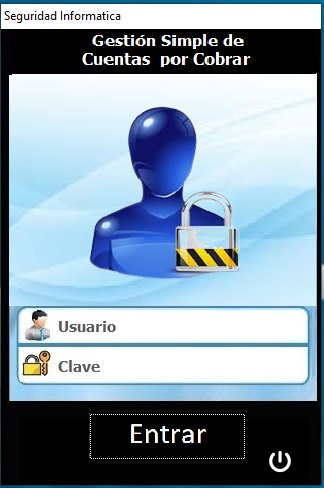
Por favor. me puedes indicar como logras el formato de esos GET en la pantalla donde pides el usuario y clave? que version de FW se necesita como asi tambien para usar la CLAUSULA PLACEHOLDER.?

Muchas Gracias

Posts: 8515
Joined: Tue Dec 20, 2005 07:36 PM
Re: PlaceHolder HARBOUR
Posted: Mon May 13, 2024 11:32 AM
José Camilo wrote:HolaJosé. Buenos dias.
Por favor. me puedes indicar como logras el formato de esos GET en la pantalla donde pides el usuario y clave? que version de FW se necesita como asi tambien para usar la CLAUSULA PLACEHOLDER.?
Muchas Gracias
https://forums.fivetechsupport.com/viewtopic.php?f=16&t=36338&p=216835&hilit=CUEBANNER&sid=73a031390efb8f73c55a7db5cf202215&sid=018954bae69dd379aa9325dfed486f17#p216835

Regards, saludos.
João Santos - São Paulo - Brasil - Phone: +55(11)95150-7341

Continue the discussion