nageswaragunupudi wrote: @ 200, 20 BTNBMP oBtn PROMPT "Prompt" SIZE 100,40 PIXEL OF oDlg FLAT
oBtn:nClrBorder := CLR_HRED
Nages,
at init run ok then If I wish change the border on line it not run ok
I explain you
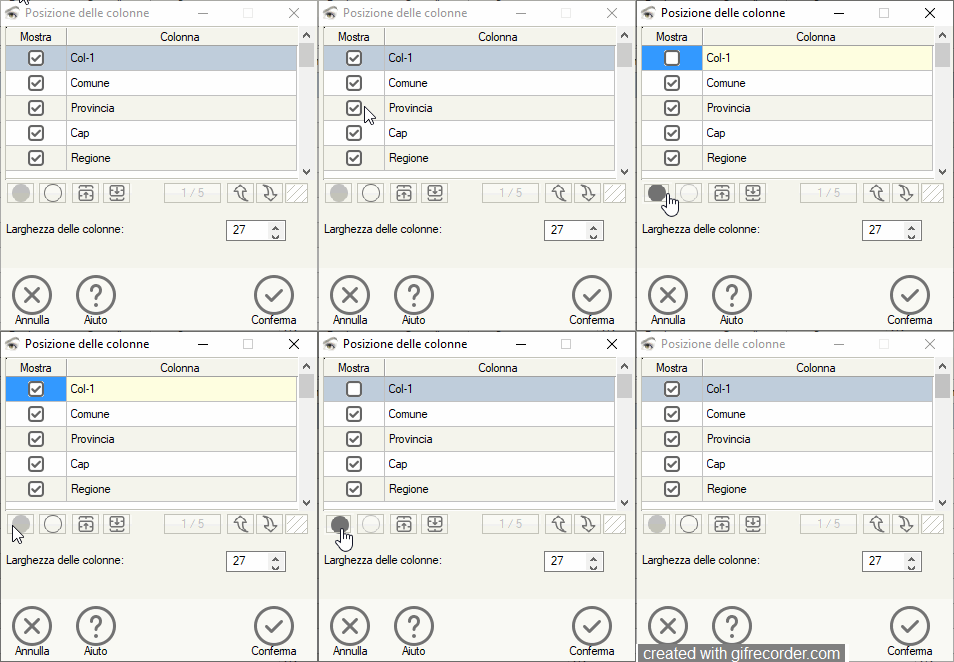
I need this procedure to hide or show a column or change the position of the columns in the main xbrowse
using a small table with the xbrowse fields I select which column I want to show to the main xbrowse, under this table I have two BTNBMP controls. ( button with circles at left of the dialog)
1 Hide
2. Show
when I click on a field and then remove the check I change the display of the btnbmp controls, that is, I remove the image and disable the control, and so on.
Now compiling with the new version I no longer have the problem of bad display of btnbmp when they are disabled.
But I would like to transform the button as I do for the last one (the one you see on the right with the lines), and by doing this I also have to modify the border because it is deleted when I create the brush with the lines and I have to recreate it when I reinsert the image previous
Since from 1991/1992 ( fw for clipper Rel. 14.4 - Momos)
I use : FiveWin for Harbour March-April 2024 - Harbour 3.2.0dev (harbour_bcc770_32_20240309) - Bcc7.70 - xMate ver. 1.15.3 - PellesC - mail: silvio[dot]falconi[at]gmail[dot]com


