FiveTech Support Forums

FiveWin / Harbour / xBase community
Board index FiveWin for Harbour/xHarbour load png from rpreview
Posts: 7317
Joined: Thu Oct 18, 2012 07:17 PM
load png from rpreview
Posted: Wed Nov 15, 2023 01:16 PM

I need to coverte this function to use on rpreview to load my png images

oBtn:hBitmap1 = FWBitmap2( "EXCEL" )

it run but the image is compress so is not compatible with png

STATIC FUNCTION FWBitmap2( cResname )

LOCAL oBitmap

DEFINE BITMAP oBitmap RESNAME cResname

IF HB_IsObject( oBitmap )

  RETURN oBitmap:hBitmap

ENDIF

RETURN 0

Since from 1991/1992 ( fw for clipper Rel. 14.4 - Momos)

I use : FiveWin for Harbour March-April 2024 - Harbour 3.2.0dev (harbour_bcc770_32_20240309) - Bcc7.70 - xMate ver. 1.15.3 - PellesC - mail: silvio[dot]falconi[at]gmail[dot]com
Posts: 10733
Joined: Sun Nov 19, 2006 05:22 AM
Re: load png from rpreview
Posted: Wed Nov 15, 2023 03:34 PM
to use on rpreview to load my png images
Do you want to use png images on the buttonbar for rpreview?
Regards


G. N. Rao.

Hyderabad, India
Posts: 10733
Joined: Sun Nov 19, 2006 05:22 AM
Re: load png from rpreview
Posted: Wed Nov 15, 2023 03:56 PM
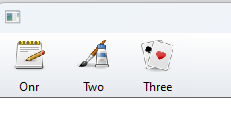
To use png images on any buttonbar
Code (fw): Select all Collapse
   DEFINE BUTTONBAR oBar OF oWnd SIZE 64,64 2010
   DEFINE BUTTON OF oBar FILE "..\bitmaps\pngs\image7.png(32x32)" PROMPT "Onr"
   DEFINE BUTTON OF oBar FILE "..\bitmaps\pngs\image8.png(32x32)" PROMPT "Two"
   DEFINE BUTTON OF oBar FILE "..\bitmaps\pngs\image9.png(32x32)" PROMPT "Three"
Regards


G. N. Rao.

Hyderabad, India
Posts: 7317
Joined: Thu Oct 18, 2012 07:17 PM
Re: load png from rpreview
Posted: Wed Nov 15, 2023 09:00 PM
nageswaragunupudi wrote:To use png images on any buttonbar
Code (fw): Select all Collapse
   DEFINE BUTTONBAR oBar OF oWnd SIZE 64,64 2010
   DEFINE BUTTON OF oBar FILE "..\bitmaps\pngs\image7.png(32x32)" PROMPT "Onr"
   DEFINE BUTTON OF oBar FILE "..\bitmaps\pngs\image8.png(32x32)" PROMPT "Two"
   DEFINE BUTTON OF oBar FILE "..\bitmaps\pngs\image9.png(32x32)" PROMPT "Three"
Yes of course but Then i have problems with zoom buttons because have two pngs
Hbitmap1 and hbitmap2
Since from 1991/1992 ( fw for clipper Rel. 14.4 - Momos)

I use : FiveWin for Harbour March-April 2024 - Harbour 3.2.0dev (harbour_bcc770_32_20240309) - Bcc7.70 - xMate ver. 1.15.3 - PellesC - mail: silvio[dot]falconi[at]gmail[dot]com
Posts: 7317
Joined: Thu Oct 18, 2012 07:17 PM
Re: load png from rpreview
Posted: Thu Nov 16, 2023 07:47 AM

oPreview:oZoom:hBitmap1 = FWBitmap( "Zoom2" )

  oPreview:oZoom:hBitmap2 = FWBitmap( "OnePage2"  )

  oPreview:oZoom:bBmpNo   = { || If( oPreview:lZoom, 2, 1 ) }

How I can converte it ? How I can change the images with mine pngs ?

Since from 1991/1992 ( fw for clipper Rel. 14.4 - Momos)

I use : FiveWin for Harbour March-April 2024 - Harbour 3.2.0dev (harbour_bcc770_32_20240309) - Bcc7.70 - xMate ver. 1.15.3 - PellesC - mail: silvio[dot]falconi[at]gmail[dot]com
Posts: 10733
Joined: Sun Nov 19, 2006 05:22 AM
Re: load png from rpreview
Posted: Thu Nov 16, 2023 09:56 AM
Code (fw): Select all Collapse
oPreview:oZoom:hBitmap1 = FW_ReadImage( nil, "aa.png(32x32)" )[ 1 ]
oPreview:oZoom:hBitmap2 = FW_ReadImage( nil, "bb.png(32x32)" )[ 1 ]
oPreview:oZoom:bBmpNo = { || If( oPreview:lZoom, 2, 1 ) }
Regards


G. N. Rao.

Hyderabad, India
Posts: 7317
Joined: Thu Oct 18, 2012 07:17 PM
Re: load png from rpreview
Posted: Thu Nov 16, 2023 12:47 PM

Now Run ok

Since from 1991/1992 ( fw for clipper Rel. 14.4 - Momos)

I use : FiveWin for Harbour March-April 2024 - Harbour 3.2.0dev (harbour_bcc770_32_20240309) - Bcc7.70 - xMate ver. 1.15.3 - PellesC - mail: silvio[dot]falconi[at]gmail[dot]com

Continue the discussion