FiveTech Support Forums

FiveWin / Harbour / xBase community
Board index FiveWin for Harbour/xHarbour Excell to xbrowse ?
Posts: 1387
Joined: Fri May 23, 2008 01:33 PM
Excell to xbrowse ?
Posted: Mon Nov 20, 2023 03:30 PM

Hi,

Is it possible to copy selected area from excel to xbrowse? If yes, any example?

Thanks.

Regards,


Hakan ONEMLI


Harbour & MSVC 2022 & FWH 23.06
Posts: 1392
Joined: Mon May 14, 2007 09:49 AM
Re: Excell to xbrowse ?
Posted: Mon Nov 20, 2023 04:12 PM
If I understood the question correctly
Code (fw): Select all Collapse
dim:=oExc:Sheets(1):Range("A1:H100"):value
Then insert the dim array into the xBrowse
Posts: 1387
Joined: Fri May 23, 2008 01:33 PM
Re: Excell to xbrowse ?
Posted: Mon Nov 20, 2023 05:50 PM
Natter wrote:If I understood the question correctly
Code (fw): Select all Collapse
dim:=oExc:Sheets(1):Range("A1:H100"):value
Then insert the dim array into the xBrowse
Thank you very much for your reply, Natter. I guess I didn't explain my problem.

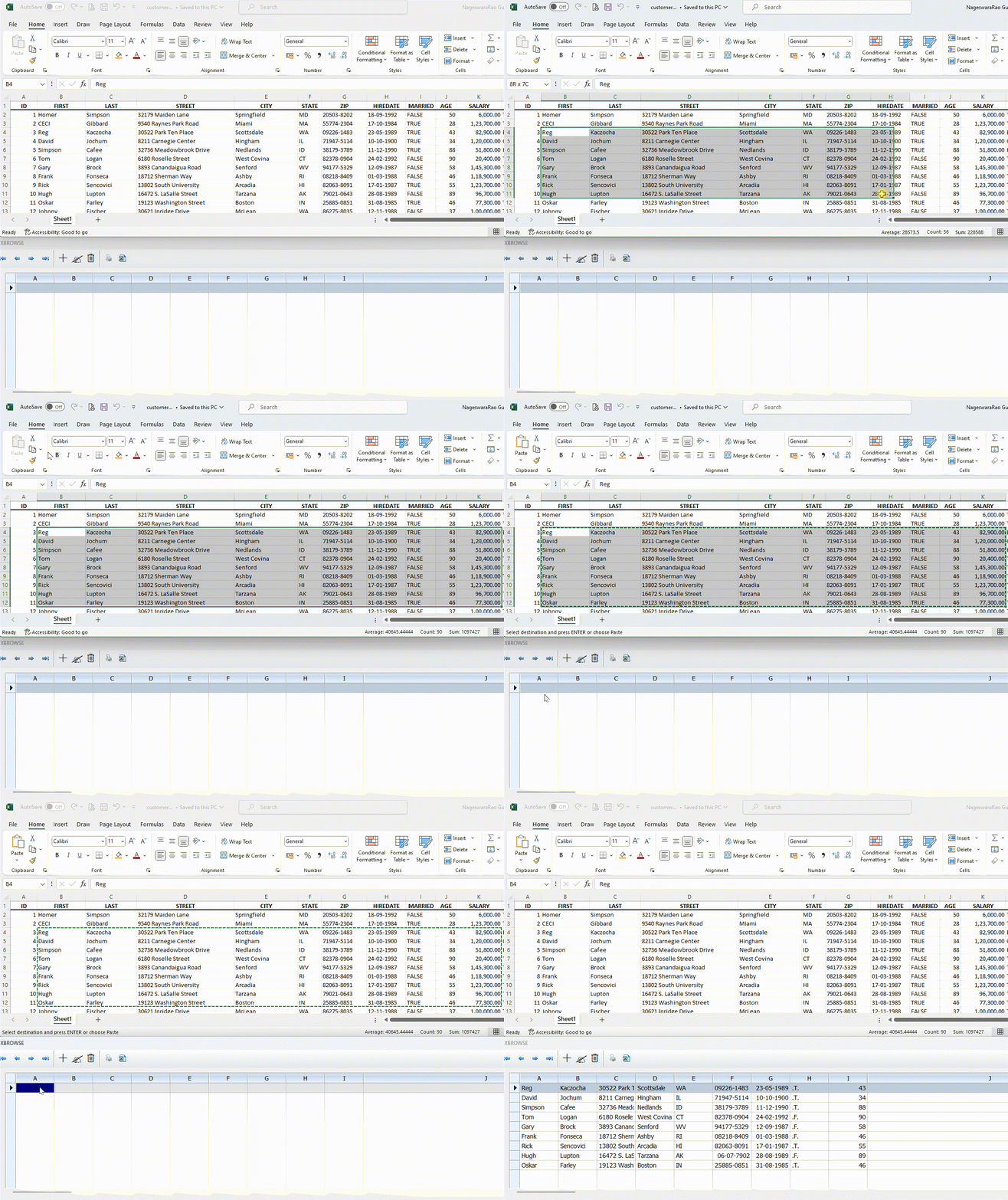
I have a file opened in Microsoft Excel and I marked some of it and copied it to the clipboard. Can I paste the part I copied to the clipboard into xbrowse with Ctrl-V?
Regards,


Hakan ONEMLI


Harbour & MSVC 2022 & FWH 23.06
Posts: 1392
Joined: Mon May 14, 2007 09:49 AM
Re: Excell to xbrowse ?
Posted: Mon Nov 20, 2023 06:42 PM
The highlighted fragment is ":Selection". Basically so
Code (fw): Select all Collapse
dim:=oExc:Sheets(1):Selection:Range:value
Posts: 10733
Joined: Sun Nov 19, 2006 05:22 AM
Re: Excell to xbrowse ?
Posted: Mon Nov 20, 2023 06:49 PM


Code (fw): Select all Collapse
XBROWSER Array( 1, 10 ) SETUP ( oBrw:nEditTypes := 1, oBrw:lCanPaste := .t. )
Regards


G. N. Rao.

Hyderabad, India
Posts: 1387
Joined: Fri May 23, 2008 01:33 PM
Re: Excell to xbrowse ?
Posted: Mon Nov 20, 2023 08:20 PM

Thank you Mr. Rao.

It works.

Regards,


Hakan ONEMLI


Harbour & MSVC 2022 & FWH 23.06

Continue the discussion