

Dear João,
it's difficult in a foreign language.
I just wanted to say that one shouldn't see and hear everything during full moon times.
It's not a criticism of you.
With kind regards,
Otto
Dear João,
it's difficult in a foreign language.
I just wanted to say that one shouldn't see and hear everything during full moon times.
It's not a criticism of you.
With kind regards,
Otto
Otto wrote:Dear João,
it's difficult in a foreign language.
I just wanted to say that one shouldn't see and hear everything during full moon times.
It's not a criticism of you.
With kind regards,
Otto
#include"fivewin.ch"

Function test()
local aGet:=array(2)
local oDlg
local cGet1:=space(60)
local cGet2:=space(60)
local lSave:=.f.
local bCheck
local oBtn1,oBtn2

DEFINE DIALOG oDlg SIZE 400,300
@ 10,10 GET aGet[1] VAR cGet1 SIZE 100,10 PIXEL of oDlg
@ 40,10 GET aGet[2] VAR cGet2 SIZE 100,10 PIXEL of oDlg
 @  80,  55  BUTTON oBtn1 Prompt "&OK" SIZE  45,  10 PIXEL  OF oDlg ACTION  ( oDlg:end( IDOK ) )
 @  80,  107 BUTTON oBtn2  Prompt "&EXIT"  SIZE  45,  10 PIXEL  OF oDlg ACTION  (oDlg:end( IDCANCEL ) )
ACTIVATE DIALOG oDlg
return nil//aGet
lAsk:= Aeval( aGet, { | o | o:lChanged } )
or
Aeval( aGet, { | o | if(o:lChanged,lAsk := .t.,.f.) } )
give me error
Error description: Error BASE/1004 No exported method: LCHANGED
Args:
[ 1] = U
Stack Calls
===========
Called from: => LCHANGED( 0 )
Called from: test.prg => (b)SALIDA2( 894 )
Give me an error , how I can resolve to check all gets ?
nageswaragunupudi wrote:I tried to found the result of oGet:lchanged and give me no exist
Code:
Error occurred at: 27-11-2023, 11:06:45
Error description: Error BASE/1004 Metodo non disponibile: LCHANGED
Args:
[ 1] = U
This error means that oGet is NIL
#include"fivewin.ch"

Function test()
local aGet:=array(2)
local oDlg
local cGet1:=space(60)
local cGet2:=space(60)
local lSave:=.f.
local bCheck
local oBtn1,oBtn2

DEFINE DIALOG oDlg SIZE 400,300
@ 10,10 GET aGet[1] VAR cGet1 SIZE 100,10 PIXEL of oDlg
@ 40,10 GET aGet[2] VAR cGet2 SIZE 100,10 PIXEL of oDlg
 @  80,  55  BUTTON oBtn1 Prompt "&OK" SIZE  45,  10 PIXEL  OF oDlg ACTION  ( oDlg:end( IDOK ) )
 @  80,  107 BUTTON oBtn2  Prompt "&EXIT"  SIZE  45,  10 PIXEL  OF oDlg ACTION  (oDlg:end( IDCANCEL ) )
ACTIVATE DIALOG oDlg;
            VALID Salida2( .F., , ,aGet )
return nil
FUNCTION Salida2( lEsc, lAsk, cMsg,aGet )
    DEFAULT lEsc := .f., lAsk := .f., cMsg := ""
       if getkeystate( VK_ESCAPE )
          Return( lEsc )
       endif

       //aGet

       Aeval(  aGet, { | o | if(o != nil .and. o:IsKindOf( "TGET" ) .and. o:lChanged,lAsk := .t.,.f.) } )  //this give me allways .t.

       ?  lAsk

       If lAsk
          If Empty( cMsg )
             cMsg := "Desideri uscire da questa operazione...?"
          End
          If !MsgNoyes(cMsg,"Conferma per favore...")
             Return .f.
          End
       End
return .T.Si no cambio los valores de los gets, a mi me devuelve falso esa funcion
el valor .t siempre me resulta extraño.
Silvio.Falconi wrote:el valor .t siempre me resulta extraño.Please let us know the FWH version
#include "fivewin.ch"

function Main()

   local oDlg, oFont, oGet1, oGet2, oGet3, oBtn
   local cVar1 := PadR( "ABC", 20 )
   local cVar2 := PadR( "DEF", 20 )
   local nVar  := 30000
   local lSave := .f.

   SetGetColorFocus()

   DEFINE FONT oFont NAME "Segoe UI" SIZE 0,-14
   DEFINE DIALOG oDlg SIZE 300,200 PIXEL TRUEPIXEL TITLE FWVERSION ;
      FONT oFont

   @  20, 20 GET oGet1 VAR cVar1 SIZE 150,24 PIXEL OF oDlg ;
         VALID ( oDlg:Update(), .t. )

   @  20,180 SAY If( oGet1:lChanged, "MODIFIED", "no change" ) ;
      COLOR { || If( oGet1:lChanged, CLR_HRED, CLR_BLACK ) } ;
      SIZE 80,22 PIXEL OF oDlg UPDATE

   @  55, 20 GET oGet2 VAR cVar2 SIZE 150,24 PIXEL OF oDlg  ;
         VALID ( oDlg:Update(), .t. )

   @  55,180 SAY If( oGet2:lChanged, "MODIFIED", "no change" ) ;
      COLOR { || If( oGet2:lChanged, CLR_HRED, CLR_BLACK ) } ;
      SIZE 80,22 PIXEL OF oDlg UPDATE

   @  90, 20 GET oGet3 VAR nVar  SIZE 150,24 PIXEL OF oDlg ;
         VALID ( oDlg:Update(), .t. )

   @  90,180 SAY If( oGet3:lChanged, "MODIFIED", "no change" ) ;
      COLOR { || If( oGet3:lChanged, CLR_HRED, CLR_BLACK ) } ;
      SIZE 80,22 PIXEL OF oDlg UPDATE

   @ 140, 29 BTNBMP oBtn PROMPT ;
      { || If( lSave := DlgModified( oDlg ), "SAVE", "CLOSE" ) } ;
      SIZE 80,40 PIXEL OF oDlg FLAT UPDATE ;
      COLOR { || If( DlgModified( oDlg ), CLR_HRED, CLR_BLACK ) } ;
      ACTION ( If( lSave, MsgInfo( "Save" ), ), oDlg:End() )

   ACTIVATE DIALOG oDlg CENTERED
   RELEASE FONT oFont

return nil

function DlgModified( oDlg )
return AScan( oDlg:aControls, { |o| o:IsKindOf( "TGET" ) .and. o:lChanged } ) > 0
nageswaragunupudi wrote:I tested with this program and oGet:lChanged is working well.
#include "fivewin.ch"

function Main()

   local oDlg, oFont, oGet1, oGet2, oGet3, oBtn
   local cVar1 := PadR( "ABC", 20 )
   local cVar2 := PadR( "DEF", 20 )
   local nVar  := 30000
   local lSave := .f.

   SetGetColorFocus()

   DEFINE FONT oFont NAME "Segoe UI" SIZE 0,-14
   DEFINE DIALOG oDlg SIZE 300,200 PIXEL TRUEPIXEL TITLE FWVERSION ;
      FONT oFont

   @  20, 20 GET oGet1 VAR cVar1 SIZE 150,24 PIXEL OF oDlg ;
         VALID ( oDlg:Update(), .t. )

   @  20,180 SAY If( oGet1:lChanged, "MODIFIED", "no change" ) ;
      COLOR { || If( oGet1:lChanged, CLR_HRED, CLR_BLACK ) } ;
      SIZE 80,22 PIXEL OF oDlg UPDATE

   @  55, 20 GET oGet2 VAR cVar2 SIZE 150,24 PIXEL OF oDlg  ;
         VALID ( oDlg:Update(), .t. )

   @  55,180 SAY If( oGet2:lChanged, "MODIFIED", "no change" ) ;
      COLOR { || If( oGet2:lChanged, CLR_HRED, CLR_BLACK ) } ;
      SIZE 80,22 PIXEL OF oDlg UPDATE

   @  90, 20 GET oGet3 VAR nVar  SIZE 150,24 PIXEL OF oDlg ;
         VALID ( oDlg:Update(), .t. )

   @  90,180 SAY If( oGet3:lChanged, "MODIFIED", "no change" ) ;
      COLOR { || If( oGet3:lChanged, CLR_HRED, CLR_BLACK ) } ;
      SIZE 80,22 PIXEL OF oDlg UPDATE

   @ 140, 29 BTNBMP oBtn PROMPT ;
      { || If( lSave := DlgModified( oDlg ), "SAVE", "CLOSE" ) } ;
      SIZE 80,40 PIXEL OF oDlg FLAT UPDATE ;
      COLOR { || If( DlgModified( oDlg ), CLR_HRED, CLR_BLACK ) } ;
      ACTION ( If( lSave, MsgInfo( "Save" ), ), oDlg:End() )

   ACTIVATE DIALOG oDlg CENTERED
   RELEASE FONT oFont

return nil

function DlgModified( oDlg )
return AScan( oDlg:aControls, { |o| o:IsKindOf( "TGET" ) .and. o:lChanged } ) > 0
@ r,c BUTTON .......... ;
ACTION If( DlgModified( oDlg ), ID_OK, ID_CANCEL )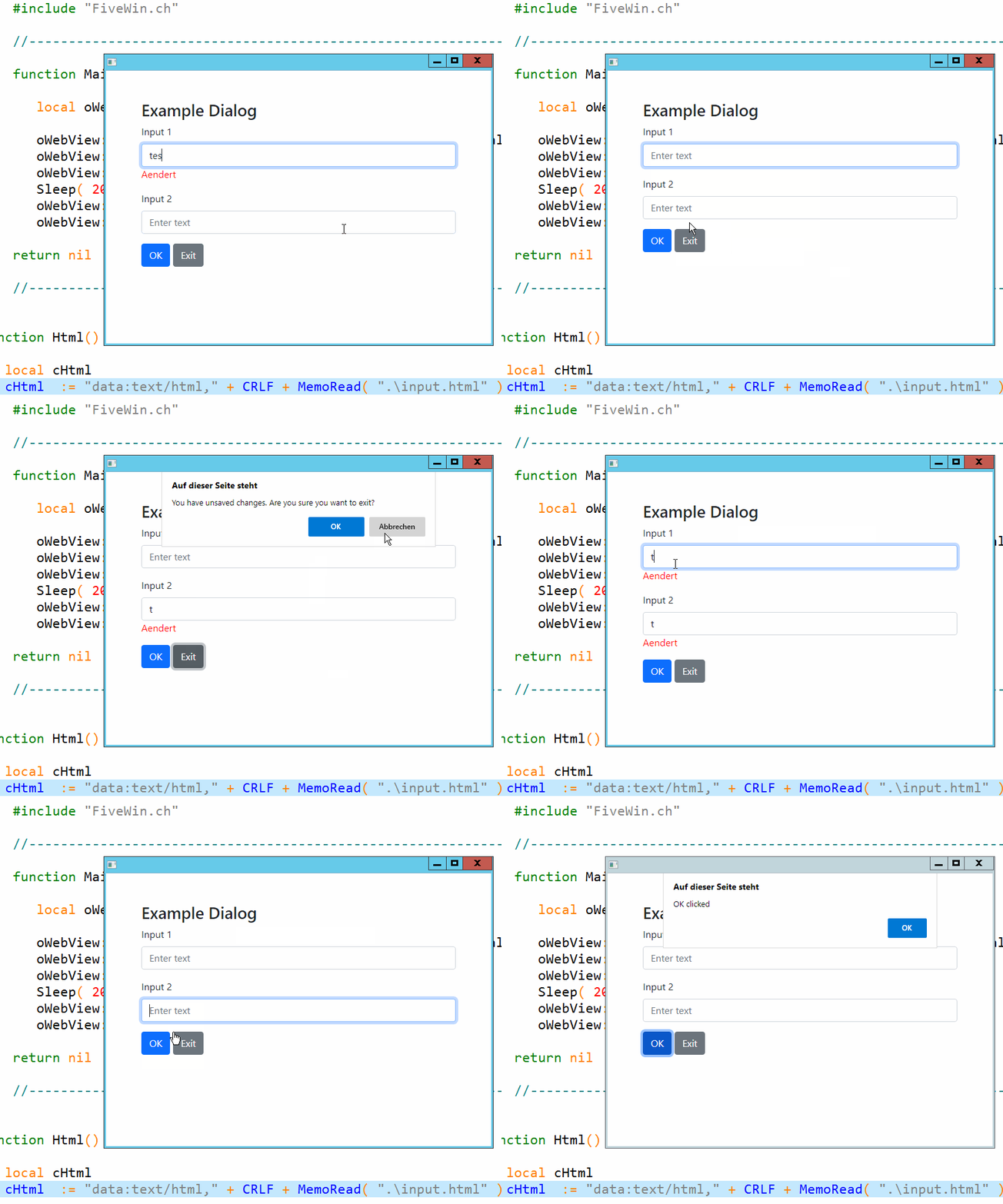
 #include "FiveWin.ch"

    //----------------------------------------------------------------------------//

    function Main()

       local oWebView := TWebView():New()

       oWebView:bOnBind = { | cJson, nCalls | MsgInfo( cJson, nCalls ) }
       oWebView:Bind( "SendToFWH" )
       oWebView:Navigate( Html() )
       Sleep( 200 )
       oWebView:Run()
       oWebView:Destroy()

    return nil

    //----------------------------------------------------------------------------//


function Html()

   local cHtml
   cHtml  := "data:text/html," + CRLF + MemoRead( ".\input.html" )

Return cHtml

//----------------------------------------------------------------------------//<!DOCTYPE html>
<html lang="en">
<head>
<meta charset="UTF-8">
<meta name="viewport" content="width=device-width, initial-scale=1.0">
<title>Dialog Example</title>
<link href="https://cdn.jsdelivr.net/npm/bootstrap@5.1.0/dist/css/bootstrap.min.css" rel="stylesheet">
</head>
<body>
<div class="container mt-5">
<h2>Example Dialog</h2>
<form id="exampleForm">
<div class="mb-3">
<label for="input1" class="form-label">Input 1</label>
<input type="text" class="form-control" id="input1" placeholder="Enter text">
</div>
<div class="mb-3">
<label for="input2" class="form-label">Input 2</label>
<input type="text" class="form-control" id="input2" placeholder="Enter text">
</div>
<button type="button" class="btn btn-primary" id="okButton">OK</button>
<button type="button" class="btn btn-secondary" id="exitButton">Exit</button>
</form>
</div>
<script src="https://cdn.jsdelivr.net/npm/bootstrap@5.1.0/dist/js/bootstrap.bundle.min.js"></script>
<script>
document.addEventListener('DOMContentLoaded', () => {
const form = document.getElementById('exampleForm');
const originalValues = {};
form.addEventListener('focusin', (event) => {
const target = event.target;
if (target.tagName === 'INPUT' && !(target.id in originalValues)) {
originalValues[target.id] = target.value;
}
});
form.addEventListener('input', (event) => {
const target = event.target;
let changedLabel = target.nextElementSibling;
if (originalValues[target.id] !== target.value) {
if (!changedLabel || changedLabel.className !== 'changed-label') {
changedLabel = document.createElement('label');
changedLabel.className = 'changed-label';
changedLabel.innerText = 'Aendert';
changedLabel.style.color = 'red';
target.parentNode.insertBefore(changedLabel, target.nextSibling);
}
} else {
if (changedLabel && changedLabel.className === 'changed-label') {
changedLabel.remove();
}
}
});
// Exit Button
document.getElementById('exitButton').addEventListener('click', () => {
let hasUnsavedChanges = false;
for (const id in originalValues) {
if (originalValues[id] !== document.getElementById(id).value) {
hasUnsavedChanges = true;
break;
}
}
if (hasUnsavedChanges) {
if (confirm('You have unsaved changes. Are you sure you want to exit?')) {
window.close();
}
} else {
window.close();
}
});
// OK button
document.getElementById('okButton').addEventListener('click', () => {
alert('OK clicked');
});
});
</script>
</body>
</html>Nice
Otto wrote:Dear Mr. Rao,
I have recreated the example with webview. Perhaps we could enhance it with the function
var s = SendToFWH(evt.target.id, evt.type, someData)
.then(s => {
alert(s.result);
})
We could then build a UI with the webview as a template.
Just an idea.
Kind regards,
Otto
input.htm#include "FiveWin.ch" //----------------------------------------------------------------------------// function Main() local oWebView := TWebView():New() oWebView:bOnBind = { | cJson, nCalls | MsgInfo( cJson, nCalls ) } oWebView:Bind( "SendToFWH" ) oWebView:Navigate( Html() ) Sleep( 200 ) oWebView:Run() oWebView:Destroy() return nil //----------------------------------------------------------------------------// function Html() local cHtml cHtml := "data:text/html," + CRLF + MemoRead( ".\input.html" ) Return cHtml //----------------------------------------------------------------------------//<!DOCTYPE html> <html lang="en"> <head> <meta charset="UTF-8"> <meta name="viewport" content="width=device-width, initial-scale=1.0"> <title>Dialog Example</title> <link href="https://cdn.jsdelivr.net/npm/bootstrap@5.1.0/dist/css/bootstrap.min.css" rel="stylesheet"> </head> <body> <div class="container mt-5"> <h2>Example Dialog</h2> <form id="exampleForm"> <div class="mb-3"> <label for="input1" class="form-label">Input 1</label> <input type="text" class="form-control" id="input1" placeholder="Enter text"> </div> <div class="mb-3"> <label for="input2" class="form-label">Input 2</label> <input type="text" class="form-control" id="input2" placeholder="Enter text"> </div> <button type="button" class="btn btn-primary" id="okButton">OK</button> <button type="button" class="btn btn-secondary" id="exitButton">Exit</button> </form> </div> <script src="https://cdn.jsdelivr.net/npm/bootstrap@5.1.0/dist/js/bootstrap.bundle.min.js"></script> <script> document.addEventListener('DOMContentLoaded', () => { const form = document.getElementById('exampleForm'); const originalValues = {}; form.addEventListener('focusin', (event) => { const target = event.target; if (target.tagName === 'INPUT' && !(target.id in originalValues)) { originalValues[target.id] = target.value; } }); form.addEventListener('input', (event) => { const target = event.target; let changedLabel = target.nextElementSibling; if (originalValues[target.id] !== target.value) { if (!changedLabel || changedLabel.className !== 'changed-label') { changedLabel = document.createElement('label'); changedLabel.className = 'changed-label'; changedLabel.innerText = 'Aendert'; changedLabel.style.color = 'red'; target.parentNode.insertBefore(changedLabel, target.nextSibling); } } else { if (changedLabel && changedLabel.className === 'changed-label') { changedLabel.remove(); } } }); // Exit Button document.getElementById('exitButton').addEventListener('click', () => { let hasUnsavedChanges = false; for (const id in originalValues) { if (originalValues[id] !== document.getElementById(id).value) { hasUnsavedChanges = true; break; } } if (hasUnsavedChanges) { if (confirm('You have unsaved changes. Are you sure you want to exit?')) { window.close(); } } else { window.close(); } }); // OK button document.getElementById('okButton').addEventListener('click', () => { alert('OK clicked'); }); }); </script> </body> </html>


