FiveTech Support Forums

FiveWin / Harbour / xBase community
Board index FiveWin for Harbour/xHarbour Convert a print to Rtf or doc
Posts: 7318
Joined: Thu Oct 18, 2012 07:17 PM
Re: Convert a print to Rtf or doc
Posted: Fri Dec 01, 2023 10:02 AM
I don't want to cause controversy but as is always done in this forum... we start from a topic for example "..how do I save a print preview in Word docx..." and then there are people who don't want to impose everything 'other such as the html language for example

Please let's get back to the Title of this topic
Since from 1991/1992 ( fw for clipper Rel. 14.4 - Momos)

I use : FiveWin for Harbour March-April 2024 - Harbour 3.2.0dev (harbour_bcc770_32_20240309) - Bcc7.70 - xMate ver. 1.15.3 - PellesC - mail: silvio[dot]falconi[at]gmail[dot]com
Posts: 6984
Joined: Fri Oct 07, 2005 07:07 PM
Re: Convert a print to Rtf or doc
Posted: Fri Dec 01, 2023 10:41 AM

Let me say it again: With the free developer resources we have here and the priorities - for example, variable column height in xBrowse - it's not possible.

Posts: 7318
Joined: Thu Oct 18, 2012 07:17 PM
Re: Convert a print to Rtf or doc
Posted: Fri Dec 01, 2023 01:20 PM

I remember a long time ago there was someone who had created a class or a function to convert printouts to RTF or Doc, I should have those functions in my hard disks but I would have to search for days, I know the guy was German or Austrian but many years have passed

Since from 1991/1992 ( fw for clipper Rel. 14.4 - Momos)

I use : FiveWin for Harbour March-April 2024 - Harbour 3.2.0dev (harbour_bcc770_32_20240309) - Bcc7.70 - xMate ver. 1.15.3 - PellesC - mail: silvio[dot]falconi[at]gmail[dot]com
Posts: 6984
Joined: Fri Oct 07, 2005 07:07 PM
Re: Convert a print to Rtf or doc
Posted: Fri Dec 01, 2023 11:27 PM
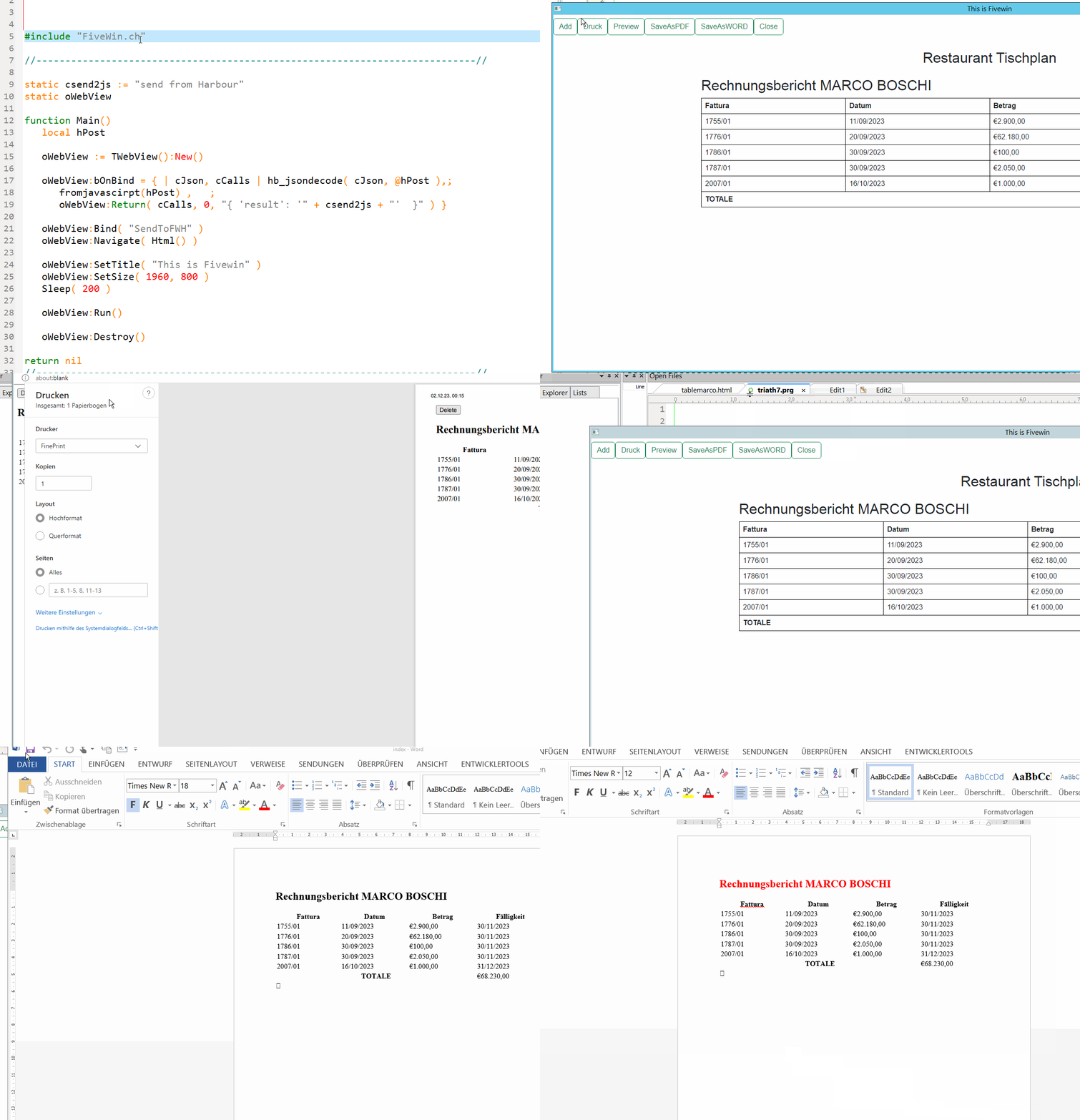
I did some tests with WEBVIEW.
I create the report - the buttonbar is inside the preview - theses are html buttons!
reading the preview
let printContents = document.getElementById('tischplanPreview').innerHTML;
SendToFWH()

Code (fw): Select all Collapse
document.getElementById('edit-btn').addEventListener('click', editbtn);
      function editbtn(evt) {
        let printContents = document.getElementById('tischplanPreview').innerHTML;
         const data = {
        text: printContents,
        btn: ''
        };
         var someData = { 'param1': data };
         var s = SendToFWH( evt.target.id, evt.type, someData )
        .then(s => {
        alert(s.result);
         })
      }

Continue the discussion