

the user has to enter the numbers quickly without stopping but finds it difficult and always has to go back to check the get controls because I made them this way but they don't work
@ 70, 20 GET aGet[5] VAR nTop OF oDlg SIZE 28, 12 PIXEL FONT oFont PICTURE "@Z 999.99" UPDATE
@ 70, 82 GET aGet[6] VAR nLeft OF oDlg SIZE 28, 12 PIXEL FONT oFont PICTURE "@Z 999.99" UPDATE
@ 70, 245 GET aGet[7] VAR nWidth OF oDlg SIZE 28, 12 PIXEL FONT oFont PICTURE "@Z 999.99" UPDATE
@ 70, 245 GET aGet[8] VAR nHeight OF oDlg SIZE 28, 12 PIXEL FONT oFont PICTURE "@Z 999.99" UPDATE
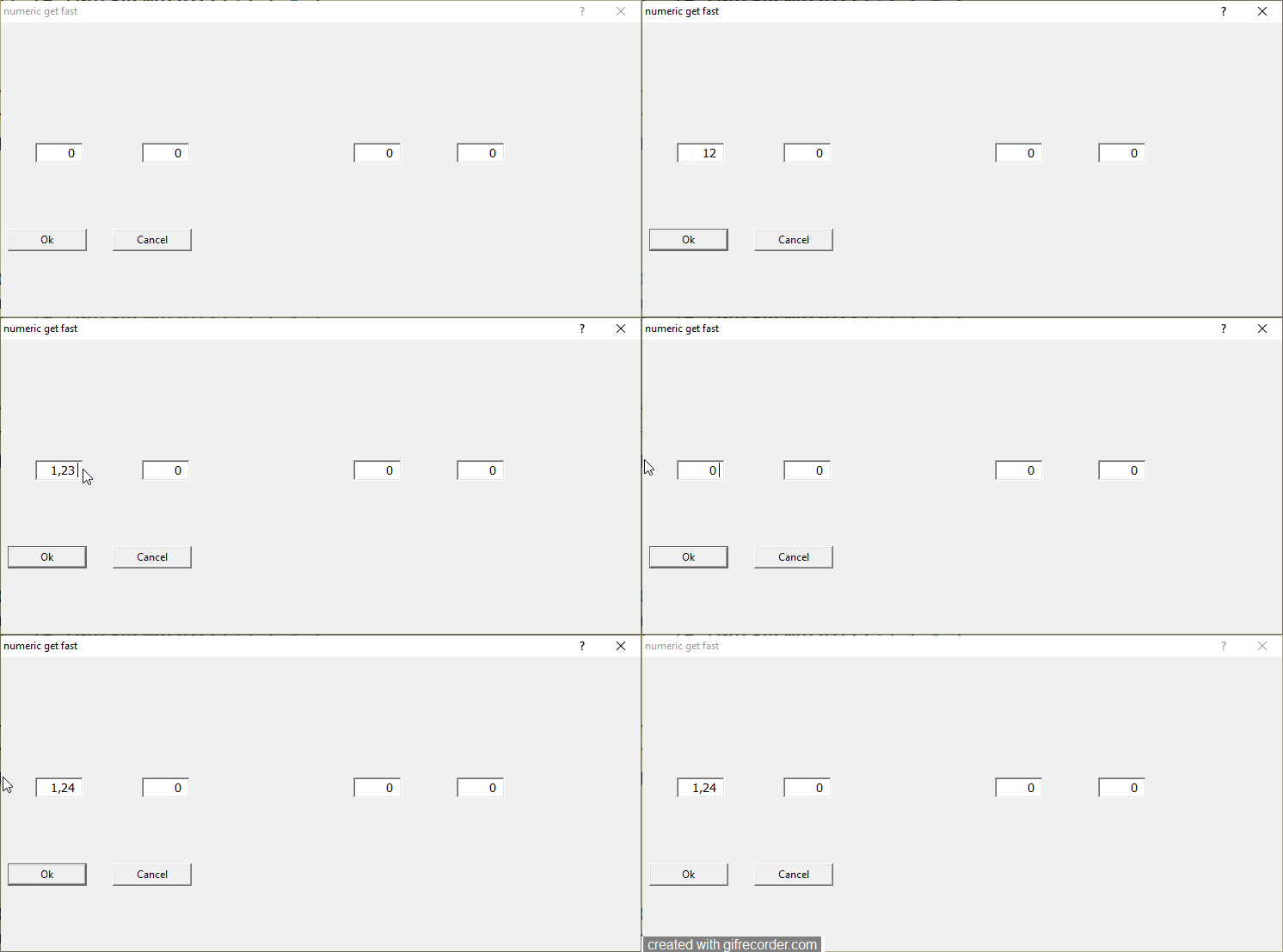
the user must enter for example
in the first 12.3
in the second 1
in the third 1.8
in the quarter 0.5
sample test
maybe the PICTURE are wrong?
I tried also with
make a test
insert
first 12.3
second 5.5
third 1.5
four 0.5
not run ok and allway the user must return back with the mouse to insert the right numbers
@ 70, 20 GET aGet[5] VAR nTop OF oDlg SIZE 28, 12 PIXEL FONT oFont PICTURE "@Z 999.99" UPDATE
@ 70, 82 GET aGet[6] VAR nLeft OF oDlg SIZE 28, 12 PIXEL FONT oFont PICTURE "@Z 999.99" UPDATE
@ 70, 245 GET aGet[7] VAR nWidth OF oDlg SIZE 28, 12 PIXEL FONT oFont PICTURE "@Z 999.99" UPDATE
@ 70, 245 GET aGet[8] VAR nHeight OF oDlg SIZE 28, 12 PIXEL FONT oFont PICTURE "@Z 999.99" UPDATE
the user must enter for example
in the first 12.3
in the second 1
in the third 1.8
in the quarter 0.5
sample test
#include "FiveWin.ch"

//----------------------------------------------------------------------------//

function Main()

      local oDlg, aGet:= array(4), oBtn,oFont
      local nWd  := GetSysMetrics(0) * .58
      local nHt  := (GetSysMetrics(1) / 3 )


    local nTop    := 0
    local nLeft   := 0
    local nWidth  := 0
    local nHeight := 0
    local cPic  := "@ 999,99"

   SET _3DLOOK ON

   DEFINE FONT oFont NAME "TAHOMA" SIZE 0,-14
   DEFINE DIALOG oDlg TITLE "numeric get fast" ;
     SIZE nWd,nHt

   @ 70, 20  GET aGet[1] VAR nTop    OF oDlg SIZE 28, 12 PIXEL FONT oFont PICTURE cPic UPDATE  RIGHTTOLEFT
   @ 70, 82  GET aGet[2] VAR nLeft   OF oDlg SIZE 28, 12 PIXEL FONT oFont PICTURE cPic UPDATE  RIGHTTOLEFT
   @ 70, 205 GET aGet[3] VAR nWidth  OF oDlg SIZE 28, 12 PIXEL FONT oFont PICTURE cPic UPDATE  RIGHTTOLEFT
   @ 70, 265 GET aGet[4] VAR nHeight OF oDlg SIZE 28, 12 PIXEL FONT oFont PICTURE cPic UPDATE  RIGHTTOLEFT


   @ 120.5, 4 BUTTON oBtn PROMPT "&Ok" SIZE 45, 12 PIXEL OF oDlg ;
      ACTION ( oDlg:End(), MsgInfo( nTest ) ) DEFAULT

   @ 120.5, 65 BUTTON "&Cancel" SIZE 45, 12 PIXEL OF oDlg ;
      ACTION ( oDlg:End(), MsgInfo( nTest ) )

   ACTIVATE DIALOG oDlg CENTERED

return nilI tried also with
   @ 70, 20  GET aGet[1] VAR nTop    OF oDlg SIZE 28, 12 PIXEL FONT oFont PICTURE "999.99" UPDATE  RIGHTTOLEFT
   @ 70, 82  GET aGet[2] VAR nLeft   OF oDlg SIZE 28, 12 PIXEL FONT oFont PICTURE "999.99" UPDATE  RIGHTTOLEFT
   @ 70, 205 GET aGet[3] VAR nWidth  OF oDlg SIZE 28, 12 PIXEL FONT oFont PICTURE "999.99" UPDATE  RIGHTTOLEFT
   @ 70, 265 GET aGet[4] VAR nHeight OF oDlg SIZE 28, 12 PIXEL FONT oFont PICTURE "999.99" UPDATE  RIGHTTOLEFT
make a test
insert
first 12.3
second 5.5
third 1.5
four 0.5
not run ok and allway the user must return back with the mouse to insert the right numbers
Since from 1991/1992 ( fw for clipper Rel. 14.4 - Momos)
I use : FiveWin for Harbour March-April 2024 - Harbour 3.2.0dev (harbour_bcc770_32_20240309) - Bcc7.70 - xMate ver. 1.15.3 - PellesC - mail: silvio[dot]falconi[at]gmail[dot]com
I use : FiveWin for Harbour March-April 2024 - Harbour 3.2.0dev (harbour_bcc770_32_20240309) - Bcc7.70 - xMate ver. 1.15.3 - PellesC - mail: silvio[dot]falconi[at]gmail[dot]com