FiveTech Support Forums

FiveWin / Harbour / xBase community
Board index FiveWin for Harbour/xHarbour Transparent area becomes black when use BUTTON...ADJUST
Posts: 1096
Joined: Fri Oct 28, 2005 02:27 AM
Transparent area becomes black when use BUTTON...ADJUST
Posted: Tue Dec 05, 2023 09:42 AM
I created the button with this command
Code (fw): Select all Collapse
DEFINE BUTTON oBtnWhatsnew RESOURCE "whatsnewg","","","whatsnew"   OF oBar ADJUST
The image is alpha-blend image.
If I don't use ADJUST clause, the image is not resized but transparent area displays ok.
If I use ADJUST clause, the image's size is nice but the transparent area of the image becomes black like below
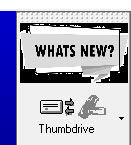


How do I fix this? Using HArbour+FWH1912
The bar is repositioned before display using the command oBar:GoRight()

TIA
FWH 11.08/FWH 19.12

BCC5.82/BCC7.3

xHarbour/Harbour
Posts: 8515
Joined: Tue Dec 20, 2005 07:36 PM
Re: Transparent area becomes black when use BUTTON...ADJUST
Posted: Tue Dec 05, 2023 12:05 PM
see if it helps. calls to resources are in SILVBMP.RC. Doubts? Ask.

mira si ayuda. las llamadas a recursos están en SILVBMP.RC. ¿Dudas?, pregunta.

Look,

Download complete:

https://mega.nz/file/ZZsUBZoK#AQu8t1Ru2f6PrsWZ8a6OJkzk6LakRrBbvvMv9JnFhR0

Regards, saludos.
João Santos - São Paulo - Brasil - Phone: +55(11)95150-7341
Posts: 10733
Joined: Sun Nov 19, 2006 05:22 AM
Re: Transparent area becomes black when use BUTTON...ADJUST
Posted: Tue Dec 05, 2023 01:59 PM
hua wrote:I created the button with this command
Code (fw): Select all Collapse
DEFINE BUTTON oBtnWhatsnew RESOURCE "whatsnewg","","","whatsnew"   OF oBar ADJUST
The image is alpha-blend image.
If I don't use ADJUST clause, the image is not resized but transparent area displays ok.
If I use ADJUST clause, the image's size is nice but the transparent area of the image becomes black like below


How do I fix this? Using HArbour+FWH1912
The bar is repositioned before display using the command oBar:GoRight()

TIA
Can i see the rc file entries for whatsnew.bmp?

Suggested format
Code (fw): Select all Collapse
WHATSNEW 10 "whatsnew.bmp"
but not
Code (fw): Select all Collapse
WHATSNEW BITMAP "whatsnew.bmp"
Regards


G. N. Rao.

Hyderabad, India
Posts: 10733
Joined: Sun Nov 19, 2006 05:22 AM
Re: Transparent area becomes black when use BUTTON...ADJUST
Posted: Tue Dec 05, 2023 02:57 PM
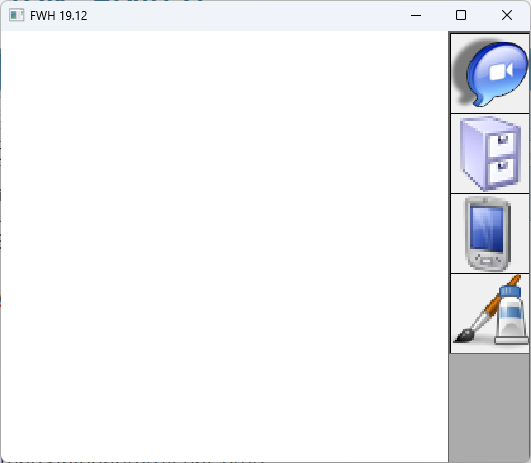
This is working fine for me here with FWH1912
Code (fw): Select all Collapse
#include "fivewin.ch"

function btnbar()

   local oWnd, oBar

   DEFINE WINDOW oWnd TITLE FWVERSION
   DEFINE BUTTONBAR oBar OF oWnd SIZE 80,80 RIGHT //2007
   DEFINE BUTTON OF oBar RESOURCE "ICHAT"    ADJUST
   DEFINE BUTTON OF oBar RESOURCE "FILES"    ADJUST
   DEFINE BUTTON OF oBar RESOURCE "POCKETPC" ADJUST
   DEFINE BUTTON OF oBar RESOURCE "IMAGE8"   ADJUST

   ACTIVATE WINDOW oWnd CENTERED

return nil
rc file
Code (fw): Select all Collapse
ICHAT    10 "..\bitmaps\alphabmp\ichat.bmp"
FILES    10 "..\bitmaps\alphabmp\files.bmp"
POCKETPC 10 "..\bitmaps\alphabmp\pocketpc.bmp"
IMAGE8   10 "..\bitmaps\pngs\image8.png"
Regards


G. N. Rao.

Hyderabad, India
Posts: 1096
Joined: Fri Oct 28, 2005 02:27 AM
Re: Transparent area becomes black when use BUTTON...ADJUST
Posted: Wed Dec 06, 2023 03:29 AM

Thanks for the sample João

FWH 11.08/FWH 19.12

BCC5.82/BCC7.3

xHarbour/Harbour
Posts: 1096
Joined: Fri Oct 28, 2005 02:27 AM
Re: Transparent area becomes black when use BUTTON...ADJUST
Posted: Wed Dec 06, 2023 03:31 AM
nageswaragunupudi wrote: Can i see the rc file entries for whatsnew.bmp?

Suggested format
Code (fw): Select all Collapse
WHATSNEW 10 "whatsnew.bmp"
but not
Code (fw): Select all Collapse
WHATSNEW BITMAP "whatsnew.bmp"
I coded it this way
Code (fw): Select all Collapse
WHATSNEW RCDATA "whatsnew2.png"
WHATSNEWG RCDATA "whatsnew2g.png"
FWH 11.08/FWH 19.12

BCC5.82/BCC7.3

xHarbour/Harbour
Posts: 1096
Joined: Fri Oct 28, 2005 02:27 AM
Re: Transparent area becomes black when use BUTTON...ADJUST
Posted: Wed Dec 06, 2023 03:33 AM
nageswaragunupudi wrote:This is working fine for me here with FWH1912
Thank you for taking your time to create the sample.
I managed to create a reduced self-contained example that still shows the bug on my pc. Can you see whether that is the case or not on yours?
https://drive.google.com/file/d/1704KUUwkl5Jqtejrr_OeiRI7flmatC02/view?usp=drive_link


Thank you
FWH 11.08/FWH 19.12

BCC5.82/BCC7.3

xHarbour/Harbour
Posts: 10733
Joined: Sun Nov 19, 2006 05:22 AM
Re: Transparent area becomes black when use BUTTON...ADJUST
Posted: Wed Dec 06, 2023 07:53 AM
This is your definition of the buttonbar
Code (fw): Select all Collapse
  DEFINE BUTTONBAR oBar OF oWnd 3D size 110,66
1) Remove "3D" clause. This is creating problem of transparency. If you remove this clause, the images will be transparent.
But resizing makes the image ragged.

2) Add "GDIP" clause. This makes the resized image smooth.

Recommended code:
Code (fw): Select all Collapse
  DEFINE BUTTONBAR oBar OF oWnd GDIP SIZE 110,66 RIGHT
Please make this small change in buttonbar definition and let us know.
Code (fw): Select all Collapse
#include "fivewin.ch"

PROCEDURE main()

  local oBar, oBtnWhatsNew
  local oWnd

  DEFINE WINDOW oWnd TITLE "Test png in bar " + FWVERSION

  DEFINE BUTTONBAR oBar OF oWnd /*3D*/ GDIP RIGHT SIZE 110,66

  DEFINE BUTTON oBtnWhatsnew RESOURCE "WHATSNEWG","","","WHATSNEW"   OF oBar ;
      ADJUST FLAT

//  oBar:GoRight()

  ACTIVATE WINDOW oWnd CENTERED //MAXIMIZED

return
Regards


G. N. Rao.

Hyderabad, India
Posts: 1096
Joined: Fri Oct 28, 2005 02:27 AM
Re: Transparent area becomes black when use BUTTON...ADJUST
Posted: Wed Dec 06, 2023 09:37 AM

Thanks Rao! That solves it

FWH 11.08/FWH 19.12

BCC5.82/BCC7.3

xHarbour/Harbour

Continue the discussion