FiveTech Support Forums

FiveWin / Harbour / xBase community
Board index FiveWin for Harbour/xHarbour Small buttonbar at x,y
Posts: 7317
Joined: Thu Oct 18, 2012 07:17 PM
Small buttonbar at x,y
Posted: Wed Dec 06, 2023 08:40 PM
How is it possible that I can't view the buttons in a ButtonBar?

I wish Use the sample samples\barchange.prg, developed by Cristobal Navarro
but the buttonbar must be insert down a xbrowse
so I use Newat() method


barchange.prg with Newat() Method of oBar
Code (fw): Select all Collapse
// developed by Cristobal Navarro

#include 'fivewin.ch'
#include 'xbrowse.ch'
#include "constant.ch"

Function test()

   local oDlg,oDbf,oFont
   local oBar

   local  nBottom   := 27.2
   local  nRight    := 89
   local  nWd       := Max( nRight * DLG_CHARPIX_W, 180 )
   local  nHt       := nBottom * DLG_CHARPIX_H

   aData    := {}
   for n := 1 to 10
      AAdd( aData, { n, "Item-" + StrZero( n, 2 ), ;
         HB_RandomInt( 1, 999 ), HB_RandomInt( 1, 9999 ), ;
         Space( 5 ), ;
         HB_RandomInt( 1, 9999 ) } )
   next


   DEFINE DIALOG oDlg SIZE nWd, nHt PIXEL TRUEPIXEL;
         TiTle "test"
      oDlg:lHelpIcon := .F.


   @ 30,10 XBROWSE oBrw SIZE -10,-220 PIXEL OF oDlg ;
      DATASOURCE aData ;
      AUTOCOLS HEADERS { "SlNo", "Item" } ;
      COLSIZES 40 ;
      CELL LINES FOOTERS NOBORDER FASTEDIT

       oBrw:CreateFromCode()


   @ 250,  10 Button "Second bar" size 100,18 PIXEL OF oDlg action Btnbar(2,oDlg:oBar,oDlg,oBrw)
   @ 250, 200 Button "First bar"  size 100,18 PIXEL OF oDlg action Btnbar(1,oDlg:oBar,oDlg,oBrw)

   ACTIVATE DIALOG oDlg  CENTER  ;
          ON INIT ( Btnbar(0,oBar,oDlg,oBrw), Btnbar(1,oDlg:oBar,oDlg,oBrw) )
RETURN NIL

//----------------------------------------------------------------------------//

Function Btnbar(nBar,oBar,oDlg,oBrw)  // ,aBtnBar

   local aBtnBar
   local x

   if Valtype( oBar ) = "O"
      For x := Len( oBar:aControls ) to 1 step - 1
         oBar:Del( x )
      Next x
   endif

  Do case
  case nbar = 0
   *  DEFINE BUTTONBAR oBar OF oDlg  SIZE 80,70  TOP NOBORDER  2015

    oBar:= TBar():NewAt(  oBrw:nbottom+1, oBrw:nLeft, oBrw:nWidth-120, 25, 80, 25, oDlg, .f.,;
              , , .t., .f., .f., .t., .f., ;
              , , , , , .t. )
     oBar:bClrGrad := { | lPressed | If( ! lPressed,;
                 { { 1, RGB( 250,250,245), RGB( 250,250,245)} },;
                 { { 1, RGB( 245,245,235), RGB( 245,245,235)} } ) }


  case nbar = 1
   aBtnBar := array(6)
   DEFINE BUTTON aBtnBar[1] OF oBar PROMPT "New"       action msginfo()
   DEFINE BUTTON aBtnBar[2] OF oBar PROMPT "Modify"    action msginfo()
   DEFINE BUTTON aBtnBar[3] OF oBar PROMPT "Duplicate" action msginfo()
   DEFINE BUTTON aBtnBar[4] OF oBar PROMPT "Del"       action msginfo()
   DEFINE BUTTON aBtnBar[5] OF oBar PROMPT "Print"     action msginfo()
   DEFINE BUTTON aBtnBar[6] OF oBar PROMPT "Help"      action msginfo("Help")

  case nbar = 2
   aBtnBar := array(2)
   DEFINE BUTTON aBtnBar[1] OF oBar PROMPT "Del"       action msginfo("Del")
   DEFINE BUTTON aBtnBar[2] OF oBar PROMPT "Print"     action msginfo("Print")
  
  endcase

return oBar

//----------------------------------------------------------------------------/
Error
Code (fw): Select all Collapse
   Time from start: 0 hours 0 mins 0 secs 
   Error occurred at: 12/06/23, 21:48:52
   Error description: Error BASE/1004  No exported method: ISKINDOF
   Args:
     [   1] = U   
     [   2] = C   TBAR

Stack Calls
===========
   Called from:  => ISKINDOF( 0 )
   Called from: C:\Work\fwh\source\classes\btnbmp.prg => TBTNBMP:NEWBAR( 491 )
   Called from: barchange.prg => BTNBAR( 76 )
   Called from: barchange.prg => (b)TEST( 45 )
Since from 1991/1992 ( fw for clipper Rel. 14.4 - Momos)

I use : FiveWin for Harbour March-April 2024 - Harbour 3.2.0dev (harbour_bcc770_32_20240309) - Bcc7.70 - xMate ver. 1.15.3 - PellesC - mail: silvio[dot]falconi[at]gmail[dot]com
Posts: 7317
Joined: Thu Oct 18, 2012 07:17 PM
Re: Small buttonbar at x,y
Posted: Wed Dec 06, 2023 09:08 PM
Perhaps I resolve with

oBar:Move( oBrw:nbottom+1, oBrw:nLeft )

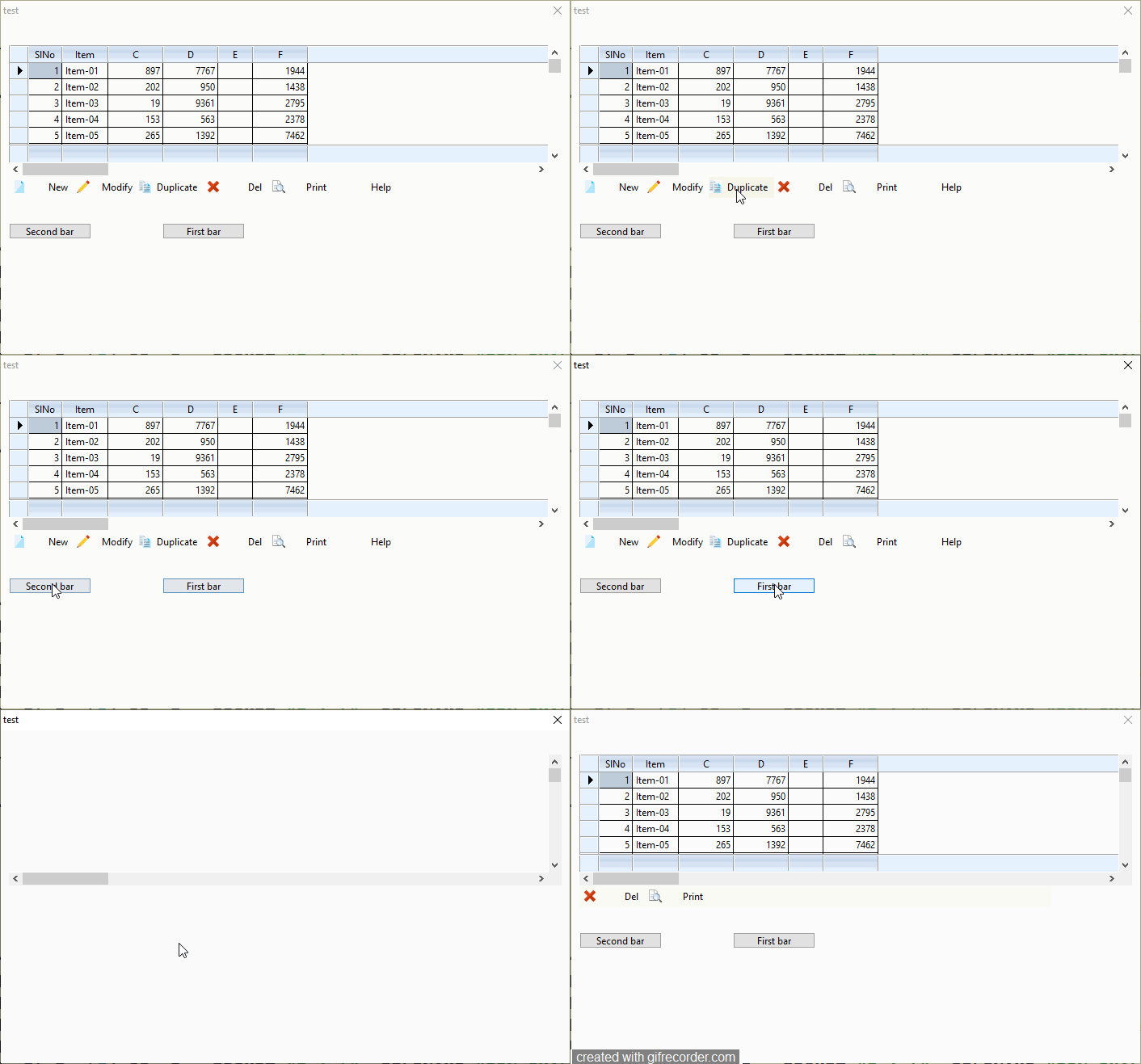
when I change from one menu to another there is a flashing throughout the dialog and the xbrowse watch this video

Since from 1991/1992 ( fw for clipper Rel. 14.4 - Momos)

I use : FiveWin for Harbour March-April 2024 - Harbour 3.2.0dev (harbour_bcc770_32_20240309) - Bcc7.70 - xMate ver. 1.15.3 - PellesC - mail: silvio[dot]falconi[at]gmail[dot]com
Posts: 6755
Joined: Wed Feb 15, 2012 08:25 PM
Re: Small buttonbar at x,y
Posted: Thu Dec 07, 2023 04:48 AM
Silvio, OK, it's one possible solution, but in this case, please add
Code (fw): Select all Collapse
   oBar:oWnd:oTop := nil
and try
Cristobal Navarro

Hay dos tipos de personas: las que te hacen perder el tiempo y las que te hacen perder la noción del tiempo

El secreto de la felicidad no está en hacer lo que te gusta, sino en que te guste lo que haces
Posts: 7317
Joined: Thu Oct 18, 2012 07:17 PM
Re: Small buttonbar at x,y
Posted: Thu Dec 07, 2023 08:31 AM
cnavarro wrote:Silvio, OK, it's one possible solution, but in this case, please add
Code (fw): Select all Collapse
   oBar:oWnd:oTop := nil
and try
Make the same flash all
Since from 1991/1992 ( fw for clipper Rel. 14.4 - Momos)

I use : FiveWin for Harbour March-April 2024 - Harbour 3.2.0dev (harbour_bcc770_32_20240309) - Bcc7.70 - xMate ver. 1.15.3 - PellesC - mail: silvio[dot]falconi[at]gmail[dot]com
Posts: 6983
Joined: Fri Oct 07, 2005 07:07 PM
Re: Small buttonbar at x,y
Posted: Thu Dec 07, 2023 10:10 AM
Silvio,
Maybe this will help
topic:
https://forums.fivetechsupport.com/viewtopic.php?f=3&t=17885&p=207288&hilit=flicker&sid=b97da231a3f07dfa7b59bf1f92c0e7b6#p207288

I will post the entire source again.

Regards,
Otto
Posts: 7317
Joined: Thu Oct 18, 2012 07:17 PM
Re: Small buttonbar at x,y
Posted: Thu Dec 07, 2023 11:42 AM
Otto wrote:Silvio,
Maybe this will help
topic:
https://forums.fivetechsupport.com/viewtopic.php?f=3&t=17885&p=207288&hilit=flicker&sid=b97da231a3f07dfa7b59bf1f92c0e7b6#p207288

I will post the entire source again.

Regards,
Otto
do U have try the test ?
Since from 1991/1992 ( fw for clipper Rel. 14.4 - Momos)

I use : FiveWin for Harbour March-April 2024 - Harbour 3.2.0dev (harbour_bcc770_32_20240309) - Bcc7.70 - xMate ver. 1.15.3 - PellesC - mail: silvio[dot]falconi[at]gmail[dot]com
Posts: 6983
Joined: Fri Oct 07, 2005 07:07 PM
Re: Small buttonbar at x,y
Posted: Thu Dec 07, 2023 03:11 PM

Silvio, which test?

Regards,

Otto

Posts: 10733
Joined: Sun Nov 19, 2006 05:22 AM
Re: Small buttonbar at x,y
Posted: Thu Dec 07, 2023 06:29 PM
This sample is not flickering for me
Code (fw): Select all Collapse
#include "fivewin.ch"

function Main()

   local oDlg, oBrw, oBar1, oBar2, aRow, aData := Array( 8, 6 )

   for each aRow in aData
      AEval( aRow, { |u,i| aRow[ i ] := HB_RandomInt( 100,500 ) } )
   next

   DEFINE DIALOG oDlg SIZE 600,400 PIXEL TRUEPIXEL

   @  20, 20 XBROWSE oBrw SIZE 480,200 PIXEL OF oDlg ;
      DATASOURCE aData AUTOCOLS CELL LINES NOBORDER
   oBrw:CreateFromCode()

   oDlg:bInit := <||

      @ 220,20 BUTTONBAR oBar1 OF oDlg SIZE 480,32 BUTTONSIZE 100,32
      oBar1:l2007 := .t.
      DEFINE BUTTON OF oBar1 PROMPT "ONE" CENTER
      DEFINE BUTTON OF oBar1 PROMPT "TWO" CENTER
      DEFINE BUTTON OF oBar1 PROMPT "THREE" CENTER
      oBar1:Hide()

      @ 220,20 BUTTONBAR oBar2 OF oDlg SIZE 480,32 BUTTONSIZE 100,32
      oBar2:l2007 := .t.
      DEFINE BUTTON OF oBar2 PROMPT "JAN" CENTER
      DEFINE BUTTON OF oBar2 PROMPT "FEB" CENTER
      DEFINE BUTTON OF oBar2 PROMPT "MARCH" CENTER

      return nil
      >

   @ 280, 20 BUTTON "FIRST BAR" SIZE 150,40 PIXEL OF oDlg ;
      WHEN oBar2:lVisible ACTION ( oBar2:Hide(), oBar1:Show() )
   @ 280,200 BUTTON "SECOND BAR" SIZE 150,40 PIXEL OF oDlg ;
      WHEN oBar1:lVisible ACTION ( oBar1:Hide(), oBar2:Show() )

   ACTIVATE DIALOG oDlg CENTERED

return nil
Regards


G. N. Rao.

Hyderabad, India

Continue the discussion