FiveTech Support Forums

FiveWin / Harbour / xBase community
Board index FiveWin for Harbour/xHarbour Create a Panel width a text
Posts: 7317
Joined: Thu Oct 18, 2012 07:17 PM
Create a Panel width a text
Posted: Fri Dec 22, 2023 11:20 AM
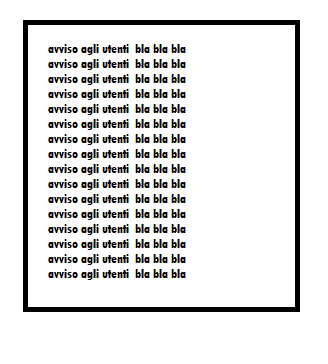
I would like to create a Panel in a dialog with a large border and insert some text
the text is given by a memo field variable
and depending on the length of the memo the panel must be uniform, i.e. high for how many lines make up the memo

type this


I thought about creating a panel
but I didn't understand how to create a large border and at the same time update the height if the memo field is large compared to the initial space
Since from 1991/1992 ( fw for clipper Rel. 14.4 - Momos)

I use : FiveWin for Harbour March-April 2024 - Harbour 3.2.0dev (harbour_bcc770_32_20240309) - Bcc7.70 - xMate ver. 1.15.3 - PellesC - mail: silvio[dot]falconi[at]gmail[dot]com
Posts: 218
Joined: Mon Feb 07, 2022 09:54 PM
Re: Create a Panel width a text
Posted: Fri Dec 29, 2023 02:15 PM
If you call the function MLCount() you know before how many lines your memo has.
Posts: 7317
Joined: Thu Oct 18, 2012 07:17 PM
Re: Create a Panel width a text
Posted: Thu Jan 04, 2024 10:42 PM
Detlef wrote:If you call the function MLCount() you know before how many lines your memo has.


DEFINE BRUSH oBrushshadow GRADIENT aGrad //shadow
DEFINE BRUSH oBrushtext GRADIENT aGradtext //text


nTotRows:= MLCount(Alltrim(cmessage),250)

oPanel1 is a ttaskpanel

//the shadow
oItem1:=Tpanel():New( oPanel1:nTitleHeight +10, 10,;
oPanel1:nBottom-30,oPanel1:nWidth-40, oPanel1 )
oItem1:SetBrush( oBrushshadow )

//panel for the text
oItem2:=Tpanel():New( 2, 2,;
oItem1:nBottom-45,oItem1:nWidth-4, oItem1)
oItem2:SetBrush( oBrushtext )

//the text
@ 5,o10 SAY oMemo VAR cMessageMemo of oItem2 ;
SIZE oItem2:nwidth-40,oItem2:nBottom-10 PIXEL ;
FONT oFontText TRANSPARENT UPDATE


How I can calculate the nbottom of all tpanels with nTotRows ?
Since from 1991/1992 ( fw for clipper Rel. 14.4 - Momos)

I use : FiveWin for Harbour March-April 2024 - Harbour 3.2.0dev (harbour_bcc770_32_20240309) - Bcc7.70 - xMate ver. 1.15.3 - PellesC - mail: silvio[dot]falconi[at]gmail[dot]com
Posts: 44158
Joined: Thu Oct 06, 2005 05:47 PM
Re: Create a Panel width a text
Posted: Fri Jan 05, 2024 07:45 AM

Dear Silvio,

You can use Windows API DrawText() using the flag DT_CALCRECT to calculate the dimensions of the text rectangle without actually drawing the text.

it will take into account the font you are using, etc.

The resulting width and height are stored in the rect structure.

Please look for DT_CALCRECT in FWH *.prg source code for code examples

regards, saludos

Antonio Linares
www.fivetechsoft.com
Posts: 7317
Joined: Thu Oct 18, 2012 07:17 PM
Re: Create a Panel width a text
Posted: Fri Jan 05, 2024 10:27 AM
Antonio Linares wrote:Dear Silvio,

You can use Windows API DrawText() using the flag DT_CALCRECT to calculate the dimensions of the text rectangle without actually drawing the text.
it will take into account the font you are using, etc.

The resulting width and height are stored in the rect structure.

Please look for DT_CALCRECT in FWH *.prg source code for code examples
yes,

I allredy found

DrawTextEx( ::hDC, cMessage , {nTop,nLeft,nBottom,nRight} )


but when I have the new cMessage ( edited) I must modify 3 controls on line

1. the TaskPanel
2. the first panel ( shadow)
3. the second Panel where is the text cmessage

and it is too hard
Since from 1991/1992 ( fw for clipper Rel. 14.4 - Momos)

I use : FiveWin for Harbour March-April 2024 - Harbour 3.2.0dev (harbour_bcc770_32_20240309) - Bcc7.70 - xMate ver. 1.15.3 - PellesC - mail: silvio[dot]falconi[at]gmail[dot]com
Posts: 7317
Joined: Thu Oct 18, 2012 07:17 PM
Re: Create a Panel width a text
Posted: Fri Jan 05, 2024 12:06 PM
at init the Ttaspanel have the oPanel1:nBodyHeight = 100

If I made
Code (fw): Select all Collapse
Function RinfrescaPanel(cMessageMemo,oPanel1,oMemo)
   local nLineswidth:= 250
   local nTotRows:= MLCount(Alltrim(cMessageMemo),nLineswidth)
   local oItem
   local old_Height:= oPanel1:nBodyHeight


   oPanel1:nBodyHeight := (old_Height*nTotRows)/4

   for n = 1 to Len( oPanel1:aControls )
      oItem = oPanel1:aControls[ n ]
        if oItem:ClassName == "TTaskPanel"  .OR. oItem:ClassName == "TPanel"
         oItem:nBottom:=  (old_Height*nTotRows)/4
         oItem:refresh()
      Endif

      next

   oPanel1:refresh()
   return nil


why not refresh the oPanel1 ?


here the test
Code (fw): Select all Collapse
#include "FiveWin.ch"
#define DT_WORDBREAK                0x00000010
#define DT_CALCRECT                 0x00000400

//----------------------------------------------------------------------------//

function Main()

   local oWnd, oExBar, oPanel1, oPanel2, oPanel3, oPanel4

   local aSections :=  {{ "One", "..\bitmaps\32x32\people.bmp",.t. },;
                        { "Two", "..\bitmaps\32x32\case.bmp",.f. },;
                        { "Three", "..\bitmaps\32x32\graphics.bmp",.t. },;
                        { "Four", "..\bitmaps\32x32\people.bmp",.t. }     }

   local cMessageMemo:="Notice to users  bla bla bla"+CRLF+;
                        "Notice to users  bla bla bla"+CRLF+;
                        "Notice to users  bla bla bla"+CRLF+;
                        "Notice to users  bla bla bla"+CRLF+;
                        "Notice to users  bla bla bla"+CRLF+;
                        "Notice to users  bla bla bla"+CRLF+;
                        "Notice to users  bla bla bla"+CRLF+;
                        "Notice to users  bla bla bla"


   local bClick := { | o | change_array(@aSections,oExBar)  }

   local oFontText

   DEFINE FONT oFontText    NAME "Segoe UI Light" SIZE 0, -12
   DEFINE WINDOW oWnd TITLE "FWH Class TExplorerBar"

   oWnd:SetSize( 350, 600 )

   oExBar = TExplorerBar():New()

   oPanel1 = oExBar:AddPanel( "One", "..\bitmaps\32x32\people.bmp",100 )
   oPanel1:lSpecial = .T.

     If aSections[2][3]
        oPanel2 = oExBar:AddPanel( "Two", "..\bitmaps\32x32\case.bmp" )
     Endif

   oPanel3 = oExBar:AddPanel( "Three", "..\bitmaps\32x32\graphics.bmp" )
   oPanel3:AddLink( "Add Panel 2", bClick, "..\bitmaps\16x16\additem.bmp" )

   oPanel4 = oExBar:AddPanel( "Four" )


    // sections
   Section_Advice(oPanel1,oFontText,oWnd,cMessageMemo,oPanel3)

   oWnd:oClient = oExBar

   ACTIVATE WINDOW oWnd

return nil

//----------------------------------------------------------------------------//
function change_array(aSections,oExBar)
   aSections[2][3]:= .t.
   oExBar:refresh()
   return nil
//----------------------------------------------------------------------------//

Function RinfrescaPanel(cMessageMemo,oPanel1,oMemo)
   local nLineswidth:= 250
   local nTotRows:= MLCount(Alltrim(cMessageMemo),nLineswidth)
   local oItem
   local old_Height:= oPanel1:nBodyHeight


   oPanel1:nBodyHeight := (old_Height*nTotRows)/4

   for n = 1 to Len( oPanel1:aControls )
      oItem = oPanel1:aControls[ n ]
      if oItem:ClassName == "TTaskPanel"  .OR. oItem:ClassName == "TPanel"
         oItem:nBottom:=  (old_Height*nTotRows)/4
         oItem:refresh()
      Endif

      next

    AEval( oExbar:aPanels, { | o | o:Refresh() } )


    oMemo:settext(cMessageMemo)
 // oPanel1:refresh()
   return nil

//---------------------------------------------------------------------------//

 Function Section_Advice(oPanel1,oFontText,oWnd,cMessageMemo,oPanel3)


   local oImageAdvice,oMemo,oBoxAdvice

   local oItem1,oItem2
   local nLineswidth:= 250
   local nTotRows:= MLCount(Alltrim(cMessageMemo),nLineswidth)
   local oBrushshadow,oBrushtext

   local aGrad  := { rgb(224,224,224),rgb(224,224,224)   }
   local aGradtext:= {  rgb(248,248,248),rgb(248,248,248)  }
   local nMaxHeight
   local badvise  := { | o | (Msgget( "edit",,@cMessageMemo),;
                               RinfrescaPanel(cMessageMemo,oPanel1,oMemo)) }


DEFINE BRUSH oBrushshadow GRADIENT aGrad //shadow
DEFINE BRUSH oBrushtext GRADIENT aGradtext //text


oPanel3:AddLink( "Edit advise", badvise, "..\bitmaps\16x16\additem.bmp" )


    //the shadow
oItem1:=Tpanel():New( oPanel1:nTitleHeight +2, 10,;
oPanel1:nBottom-10,oPanel1:nWidth-40, oPanel1 )
oItem1:SetBrush( oBrushshadow )

//panel for the text
oItem2:=Tpanel():New( 2, 2,;
oItem1:nBottom-45,oItem1:nWidth-4, oItem1)
oItem2:SetBrush( oBrushtext )

//the text
@ 5,10 SAY oMemo VAR cMessageMemo of oItem2 ;
SIZE oItem2:nwidth-40,oItem2:nBottom-10 PIXEL ;
FONT oFontText TRANSPARENT UPDATE


return nil
//------------------------------------------------------------------------------//
//mSGGET MODIFIED
 function MsgGet( cTitle, cText, uVar, cBmpFile, cResName, lPassword, bAction )

   local oDlg, oBmp
   local oGet, uTemp := uVar
   local lOk   := .f.

   DEFAULT cText := "", lPassword := .F.


   if CenterMsgs( "?" )
      SetAsMsgBox()
   endif

   DEFINE DIALOG oDlg FROM 10, 20 TO 26, 59.5 TITLE cTitle
   oDlg:lTruePixel := .f.

   if ! Empty( cBmpFile ) .or. ! Empty( cResName )
      if ! Empty( cBmpFile )
         @ 1, 1 BITMAP oBmp FILENAME cBmpFile SIZE 20, 20 NO BORDER OF oDlg
      endif

      if ! Empty( cResName )
         @ 1, 1 BITMAP oBmp RESOURCE cResName SIZE 20, 20 NO BORDER OF oDlg
      endif

      @ 0.5, 6 SAY cText OF oDlg SIZE 250, 10

      if ! lPassword
         if Empty( bAction )
            @ 0.6, 4 GET uTemp SIZE 120, 40 OF oDlg
         else
            @ 0.6, 4 GET oGet VAR uTemp ;
               ACTION oGet:SetText( uTemp := Eval( bAction ) ) ;
               SIZE 120, 60 OF oDlg
         endif
      else
         @ 0.6, 4 GET oGet VAR uTemp  SIZE 120, 12 OF oDlg PASSWORD ACTION ( oGet:lShowPassword := !oGet:lShowPassword )
      endif
   else
      @ 0.5, 3.3 SAY cText OF oDlg SIZE 250, 10
      if ! lPassword
         if Empty( bAction )
            @ 0.6, 2.3 GET uTemp SIZE 120, 60      MEMO OF oDlg
         else
            @ 0.6, 2.3 GET oGet VAR uTemp ;
               ACTION oGet:SetText( uTemp := Eval( bAction ) ) ;
               SIZE 120, 60 OF oDlg
         endif
      else
         @ 0.6, 2.3 GET oGet VAR uTemp SIZE 120, 12 OF oDlg PASSWORD ACTION ( oGet:lShowPassword := !oGet:lShowPassword )
      endif
   endif

   @ 4.25, 7.5 - If( oBmp == nil, 2, 0 ) BUTTON FWString( "&Ok" ) ;
      OF oDlg SIZE 35, 12 ;
      ACTION ( oDlg:End(), lOk := .t. ) DEFAULT

   @ 4.25, 16.5 - If( oBmp == nil, 2, 0 ) BUTTON FWString( "&Cancel" ) ;
      OF oDlg SIZE 35, 12 ;
      ACTION ( oDlg:End(), lOk := .f. )

   ACTIVATE DIALOG oDlg CENTERED

   if lOk
      uVar := uTemp
   endif

return lOk
//-----------------------------------------------------------------------------//
Since from 1991/1992 ( fw for clipper Rel. 14.4 - Momos)

I use : FiveWin for Harbour March-April 2024 - Harbour 3.2.0dev (harbour_bcc770_32_20240309) - Bcc7.70 - xMate ver. 1.15.3 - PellesC - mail: silvio[dot]falconi[at]gmail[dot]com
Posts: 7317
Joined: Thu Oct 18, 2012 07:17 PM
Re: Create a Panel width a text
Posted: Sat Jan 06, 2024 02:17 PM
I tried also with

oPanel1:bPainted := { |hDc| Mostra_testo_boxed(cMessageMemo,oPanel1) }
Code (fw): Select all Collapse
Function Mostra_testo_Boxed(cMessageMemo,oPanel1)
   local oItem1,oItem2
   local old_Height:= oPanel1:nBodyHeight
   local nLineswidth:= 250
   local nTotRows:= MLCount(Alltrim(cMessageMemo),nLineswidth)
   local oFontText

    DEFINE FONT oFontText    NAME "Segoe UI Light" SIZE 0, -12

   IF  oItem1 !=Nil

      oItem1:destroy()
      oItem2:destroy()
      oMemo:destroy()

   else

      //change the size of oPanel1
     oPanel1:nBodyHeight := (old_Height*nTotRows)/4


     //the shadow
oItem1:=Tpanel():New( oPanel1:nTitleHeight +2, 10,;
oPanel1:nBottom-10,oPanel1:nWidth-40, oPanel1 )
oItem1:SetBrush( oBrushshadow )

//panel for the text
oItem2:=Tpanel():New( 2, 2,;
oItem1:nBottom-45,oItem1:nWidth-4, oItem1)
oItem2:SetBrush( oBrushtext )

//the text
@ 5,10 SAY oMemo VAR cMessageMemo of oItem2 ;
SIZE oItem2:nwidth-40,oItem2:nBottom-10 PIXEL ;
FONT oFontText TRANSPARENT UPDATE


Endif
 RETURN NIL
//----------------------------------------------------------------------//
but there is bpainted also on exlorerbar and not on single panels
Since from 1991/1992 ( fw for clipper Rel. 14.4 - Momos)

I use : FiveWin for Harbour March-April 2024 - Harbour 3.2.0dev (harbour_bcc770_32_20240309) - Bcc7.70 - xMate ver. 1.15.3 - PellesC - mail: silvio[dot]falconi[at]gmail[dot]com
Posts: 44158
Joined: Thu Oct 06, 2005 05:47 PM
Re: Create a Panel width a text
Posted: Sat Jan 06, 2024 04:27 PM
Code (fw): Select all Collapse
#include "FiveWin.ch"
#include "ribbon.ch"

//----------------------------------------------------------------------------//
function Main()

   local oWnd, oExBar, oPanel1, oPanel2, oPanel3, oPanel4
   local bClick := { | o | MsgInfo( o:GetText() ) }
   local uVar, oBrw, oPanel, aDim, oFont
   local aArray := { {"one",time(),DATE()},;
                  {"two",time(),DATE()},;
                  {"three",time(),DATE()},;
                  {"four",time(),DATE()},;
                  {"five",time(),DATE()} }
      
   local cMsg := "Notice to users  bla bla bla" + CRLF + ;
      "Notice to users  bla bla bla" + CRLF + ; 
      "Notice to users  bla bla bla" + CRLF + ;
      "Notice to users  bla bla bla" + CRLF + ;
      "Notice to users  bla bla bla" + CRLF + ;
      "Notice to users  bla bla bla" + CRLF + ;
      "Notice to users  bla bla bla" + CRLF + ;
      "Notice to users  bla bla bla"

   DEFINE WINDOW oWnd TITLE "FWH Class TExplorerBar"
   
   oWnd:SetSize( 350, 600 )

   oExBar = TExplorerBar():New()

   oPanel1 = oExBar:AddPanel( "One", "..\bitmaps\32x32\people.bmp" )
   oPanel1:lSpecial = .T.
   oPanel1:AddLink( "First item", bClick, "..\bitmaps\16x16\additem.bmp" )
   oPanel1:AddLink( "Second item", bClick, "..\bitmaps\16x16\copy.bmp" )
      
   oPanel2 = oExBar:AddPanel( "Two", "..\bitmaps\32x32\case.bmp", 200 )
   DEFINE FONT oFont NAME "Verdana" SIZE 0, -16
   aDim = GetLabelDim( oPanel2:hWnd, cMsg, oFont:hFont )
   @ 30, 10 PANEL oPanel SIZE aDim[ 1 ] + 60, aDim[ 2 ] + 50 of oPanel2
   oPanel:SetColor( "N/W*" )
   oPanel:bPainted = { | hDC | DrawTextTransparent( hDC, cMsg, { 10, 10, aDim[ 1 ] + 100, aDim[ 2 ] + 100 }, 1 ) }

   oWnd:oClient = oExBar

   ACTIVATE WINDOW oWnd CENTERED

return nil

//----------------------------------------------------------------------------//
regards, saludos

Antonio Linares
www.fivetechsoft.com
Posts: 7317
Joined: Thu Oct 18, 2012 07:17 PM
Re: Create a Panel width a text
Posted: Sat Jan 06, 2024 05:29 PM
Antonio Linares wrote:
Code (fw): Select all Collapse
#include "FiveWin.ch"
#include "ribbon.ch"

//----------------------------------------------------------------------------//

function Main()

   local oWnd, oExBar, oPanel1, oPanel2, oPanel3, oPanel4
   local bClick := { | o | MsgInfo( o:GetText() ) }
   local uVar, oBrw, oPanel, aDim, oFont
   local aArray := { {"one",time(),DATE()},;
                  {"two",time(),DATE()},;
                  {"three",time(),DATE()},;
                  {"four",time(),DATE()},;
                  {"five",time(),DATE()} }
      
   local cMsg := "Notice to users  bla bla bla" + CRLF + ;
      "Notice to users  bla bla bla" + CRLF + ; 
      "Notice to users  bla bla bla" + CRLF + ;
      "Notice to users  bla bla bla" + CRLF + ;
      "Notice to users  bla bla bla" + CRLF + ;
      "Notice to users  bla bla bla" + CRLF + ;
      "Notice to users  bla bla bla" + CRLF + ;
      "Notice to users  bla bla bla"

   DEFINE WINDOW oWnd TITLE "FWH Class TExplorerBar"
   
   oWnd:SetSize( 350, 600 )

   oExBar = TExplorerBar():New()

   oPanel1 = oExBar:AddPanel( "One", "..\bitmaps\32x32\people.bmp" )
   oPanel1:lSpecial = .T.
   oPanel1:AddLink( "First item", bClick, "..\bitmaps\16x16\additem.bmp" )
   oPanel1:AddLink( "Second item", bClick, "..\bitmaps\16x16\copy.bmp" )
      
   oPanel2 = oExBar:AddPanel( "Two", "..\bitmaps\32x32\case.bmp", 200 )
   DEFINE FONT oFont NAME "Verdana" SIZE 0, -16
   aDim = GetLabelDim( oPanel2:hWnd, cMsg, oFont:hFont )
   @ 30, 10 PANEL oPanel SIZE aDim[ 1 ] + 60, aDim[ 2 ] + 50 of oPanel2
   oPanel:SetColor( "N/W*" )
   oPanel:bPainted = { | hDC | DrawTextTransparent( hDC, cMsg, { 10, 10, aDim[ 1 ] + 100, aDim[ 2 ] + 100 }, 1 ) }

   oWnd:oClient = oExBar

   ACTIVATE WINDOW oWnd CENTERED

return nil

//----------------------------------------------------------------------------//
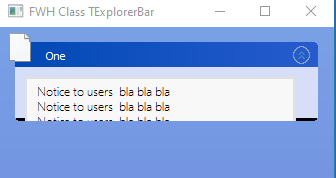
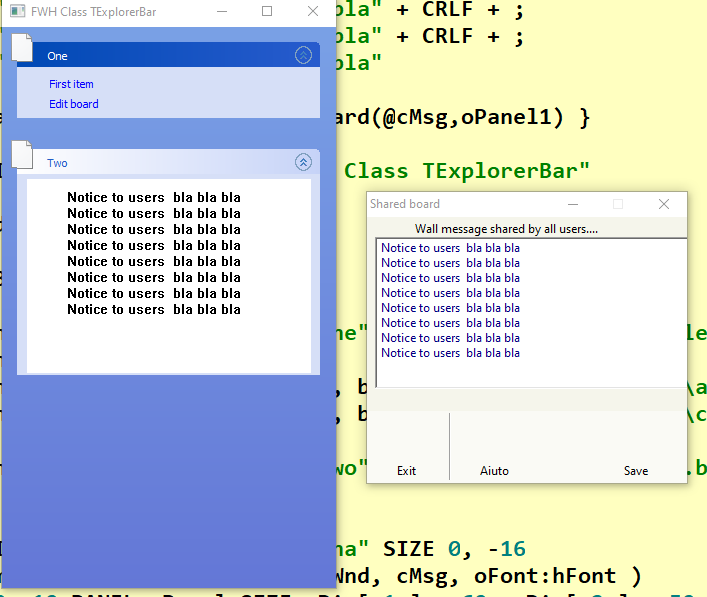
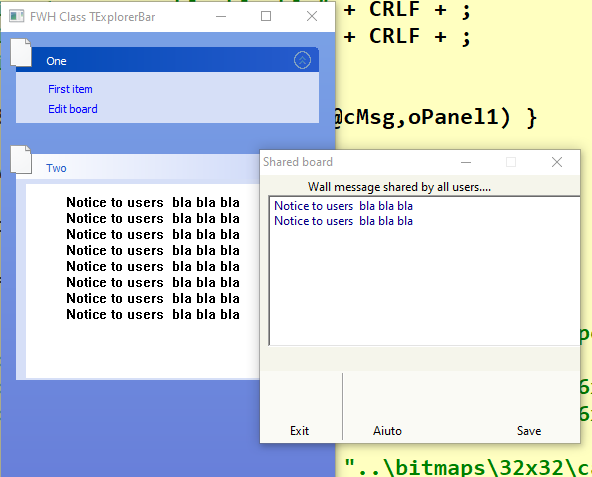
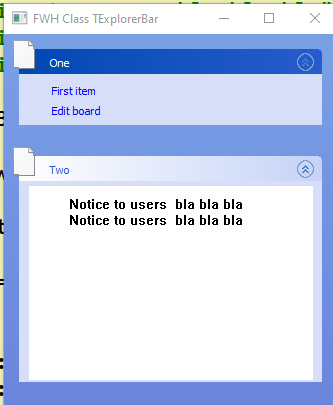
Antonio,I must change the text od cMsg with shareBoard() function and it run ok because the cmsg is refreshed but
if the cMsg is smaller I wish chane also the size of Panel ( PANEL oPanel ) and the taskPanel (oPanel2) of oExBar but not run

pass1


pass2


pass3


this the test changed
Code (fw): Select all Collapse
#include "FiveWin.ch"
//#include "ribbon.ch"

//----------------------------------------------------------------------------//
function Main()

   local oWnd, oExBar, oPanel1, oPanel2, oPanel3, oPanel4
   local bClick := { | o | MsgInfo( o:GetText() ) }


   local uVar, oBrw, oPanel, aDim, oFont
   local aArray := { {"one",time(),DATE()},;
                  {"two",time(),DATE()},;
                  {"three",time(),DATE()},;
                  {"four",time(),DATE()},;
                  {"five",time(),DATE()} }

   local cMsg := "Notice to users  bla bla bla" + CRLF + ;
      "Notice to users  bla bla bla" + CRLF + ;
      "Notice to users  bla bla bla" + CRLF + ;
      "Notice to users  bla bla bla" + CRLF + ;
      "Notice to users  bla bla bla" + CRLF + ;
      "Notice to users  bla bla bla" + CRLF + ;
      "Notice to users  bla bla bla" + CRLF + ;
      "Notice to users  bla bla bla"

   local bBoard := { | | ShareBoard(@cMsg,oPanel2, oPanel,oFont) }

   DEFINE WINDOW oWnd TITLE "FWH Class TExplorerBar"

   oWnd:SetSize( 350, 600 )

   oExBar = TExplorerBar():New()

   oPanel1 = oExBar:AddPanel( "One", "..\bitmaps\32x32\people.bmp" )
   oPanel1:lSpecial = .T.
   oPanel1:AddLink( "First item", bClick, "..\bitmaps\16x16\additem.bmp" )
   oPanel1:AddLink( "Edit board", bBoard, "..\bitmaps\16x16\copy.bmp" )

   oPanel2 = oExBar:AddPanel( "Two", "..\bitmaps\32x32\case.bmp", 200 )


   DEFINE FONT oFont NAME "Verdana" SIZE 0, -16
   aDim = GetLabelDim( oPanel2:hWnd, cMsg, oFont:hFont )
   @ 30, 10 PANEL oPanel SIZE aDim[ 1 ] + 60, aDim[ 2 ] + 50 of oPanel2
   oPanel:SetColor( "N/W*" )
   oPanel:bPainted = { | hDC | DrawTextTransparent( hDC, cMsg, { 10, 10, aDim[ 1 ] + 100, aDim[ 2 ] + 100 }, 1 ) }

   oWnd:oClient = oExBar

   ACTIVATE WINDOW oWnd CENTERED

return nil

//----------------------------------------------------------------------------//
    Function ShareBoard(cMessage,oPanel2, oPanel,oFont)
   local oDlgBacheca
   local oBar

   local oBold
   local nWd  := GetSysMetrics(0) * .25
   local nHt  := (GetSysMetrics(1) / 3 )
   local oBtn := array(3)

  local adim
    local nTotRows


   IF Empty(cMessage)
      cMessage:= "Notice to users  bla bla bla"
   Endif

   DEFINE DIALOG oDlgBacheca SIZE nWd, nHt PIXEL ;   //TRUEPIXEL
       TITLE  "Shared board" ;
       FONT oFont   COLOR CLR_BLACK,  RGB( 245,245,235) ;
       STYLE nOR( DS_MODALFRAME, WS_POPUP, WS_CAPTION, WS_SYSMENU, ;
                  WS_MINIMIZEBOX)   //ICON oIcon

    //----------------------------------------------------------------------------//
       DEFINE BUTTONBAR oBar OF oDlgBacheca  SIZE 80,70  BOTTOM NOBORDER  2015

         oBar:bClrGrad := { | lPressed | If( ! lPressed,;
                 { { 1, RGB( 250,250,245), RGB( 250,250,245)} },;
                 { { 1, RGB( 245,245,235), RGB( 245,245,235)} } ) }

      DEFINE BUTTON oBtn[1] OF oBar  ;
      FILENAME "DLG_NO";
      PROMPT "Exit" TOOLTIP "Esci" ;
      ACTION   ( oDlgBacheca:end( IDCANCEL ) )

      DEFINE BUTTON oBtn[2] OF oBar  ;
      FILENAME "HLP_DLG";
      PROMPT "Aiuto" TOOLTIP "Aiuto" ;
      ACTION NIL   GROUP

      DEFINE BUTTON oBtn[3] OF oBar  BTNRIGHT  ;
      FILENAME "DLG_OK";
      PROMPT "Save" ;
      TOOLTIP "Conferma i dati" ;
      ACTION   ( oDlgBacheca:end( IDOK ) )
 //----------------------------------------------------------------------------//
       @ 0, 4  SAY "Wall message shared by all users...."  OF  oDlgBacheca TRANSPARENT
       @  10,   4  GET oText VAR cMessage  OF   oDlgBacheca MEMO  COLOR CLR_BLUE  SIZE 280,  75 PIXEL

     ACTIVATE DIALOG oDlgBacheca CENTERED ;
       ON INIT (  oDlgBacheca:resize(),   ChangeButtons( oBar ) )

 IF oDlgBacheca:nresult == IDOK
    aDim = GetLabelDim( oPanel2:hWnd, cMessage , oFont:hFont )
   oPanel:setsize(aDim[ 1 ] + 60, aDim[ 2 ] + 50)
   oPanel:SetColor( "N/W*" )
   oPanel:bPainted = { | hDC | DrawTextTransparent( hDC, cMessage , { 10, 10, aDim[ 1 ] + 100, aDim[ 2 ] + 100 }, 1 ) }
 ENDIF
 return nil

 //----------------------------------------------------------------------------//
function ChangeButtons( oBar )
   AEval( oBar:aControls, { | oCtrl | oCtrl:nTop += 4, oCtrl:nHeight -= 4 } )
return .T.
//----------------------------------------------------------------------------//

on pass picture the cmsg is refreshed but the panel and the taskpanel not
Since from 1991/1992 ( fw for clipper Rel. 14.4 - Momos)

I use : FiveWin for Harbour March-April 2024 - Harbour 3.2.0dev (harbour_bcc770_32_20240309) - Bcc7.70 - xMate ver. 1.15.3 - PellesC - mail: silvio[dot]falconi[at]gmail[dot]com
Posts: 7317
Joined: Thu Oct 18, 2012 07:17 PM
Re: Create a Panel width a text
Posted: Sat Jan 06, 2024 06:02 PM

If I made

IF oDlgBacheca:nresult == IDOK

aDim = GetLabelDim( oPanel2:hWnd, cMessage , oFont:hFont )

oPanel:setsize(aDim[ 1 ] + 60, aDim[ 2 ] + 50)

oPanel:SetColor( "N/W*" )

oPanel:bPainted = { | hDC | DrawTextTransparent( hDC, cMessage , { 10, 10, aDim[ 1 ] + 100, aDim[ 2 ] + 100 }, 1 ) }

ENDIF

the Panel is modified and also the cMsg but the ttaskPanel is not refresh()

Since from 1991/1992 ( fw for clipper Rel. 14.4 - Momos)

I use : FiveWin for Harbour March-April 2024 - Harbour 3.2.0dev (harbour_bcc770_32_20240309) - Bcc7.70 - xMate ver. 1.15.3 - PellesC - mail: silvio[dot]falconi[at]gmail[dot]com
Posts: 44158
Joined: Thu Oct 06, 2005 05:47 PM
Re: Create a Panel width a text
Posted: Sat Jan 06, 2024 07:36 PM

Dear Silvio,

You have to modify the oTaskBarPanel:nBodyHeight and call oTaskBarPanel:UpdateRegion()

regards, saludos

Antonio Linares
www.fivetechsoft.com
Posts: 7317
Joined: Thu Oct 18, 2012 07:17 PM
Re: Create a Panel width a text
Posted: Sat Jan 06, 2024 08:42 PM
Antonio Linares wrote:Dear Silvio,

You have to modify the oTaskBarPanel:nBodyHeight and call oTaskBarPanel:UpdateRegion()
tried but it not refresh
if I collapse then it refresh


oPanel2:nBodyHeight:= aDim[ 2 ] + 50
oPanel2:CoorsUpdate()
oPanel2:UpdateRegion()
oPanel2:refresh()

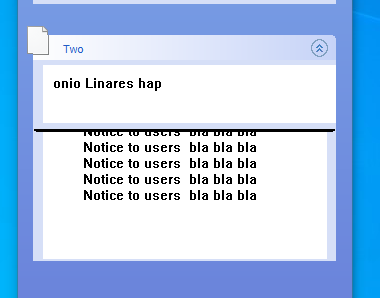
result


also the text is not good i.e. is broken
Since from 1991/1992 ( fw for clipper Rel. 14.4 - Momos)

I use : FiveWin for Harbour March-April 2024 - Harbour 3.2.0dev (harbour_bcc770_32_20240309) - Bcc7.70 - xMate ver. 1.15.3 - PellesC - mail: silvio[dot]falconi[at]gmail[dot]com
Posts: 7317
Joined: Thu Oct 18, 2012 07:17 PM
Re: Create a Panel width a text
Posted: Mon Jan 08, 2024 09:49 AM

any solution Please ?

Since from 1991/1992 ( fw for clipper Rel. 14.4 - Momos)

I use : FiveWin for Harbour March-April 2024 - Harbour 3.2.0dev (harbour_bcc770_32_20240309) - Bcc7.70 - xMate ver. 1.15.3 - PellesC - mail: silvio[dot]falconi[at]gmail[dot]com
Posts: 7317
Joined: Thu Oct 18, 2012 07:17 PM
Re: Create a Panel width a text
Posted: Mon Jan 08, 2024 09:47 PM
Perhaps I found a solution
Code (fw): Select all Collapse
    oPanel2:nHeight     :=  aDim[ 2 ] + 50
    oPanel2:nBodyHeight := oPanel2:nHeight - oPanel2:nTitleHeight
    oPanel2:CoorsUpdate()
    oPanel2:UpdateRegion()
the Panel seems to change its size but if there is another panel after the modified one, if the dimensions are small a large space is formed between the panels, if the modified panel has a larger space it is drawn above the panel that follows
Since from 1991/1992 ( fw for clipper Rel. 14.4 - Momos)

I use : FiveWin for Harbour March-April 2024 - Harbour 3.2.0dev (harbour_bcc770_32_20240309) - Bcc7.70 - xMate ver. 1.15.3 - PellesC - mail: silvio[dot]falconi[at]gmail[dot]com
Posts: 44158
Joined: Thu Oct 06, 2005 05:47 PM
Re: Create a Panel width a text
Posted: Mon Jan 08, 2024 10:16 PM

Dear Silvio,

Please post a screenshot, thanks

regards, saludos

Antonio Linares
www.fivetechsoft.com