FiveTech Support Forums

FiveWin / Harbour / xBase community
Board index FiveWin for Harbour/xHarbour Creating table with Trichedit
Posts: 7318
Joined: Thu Oct 18, 2012 07:17 PM
Creating table with Trichedit
Posted: Mon Jan 22, 2024 09:57 AM

Using InsertTable( nRows, nCols )method of Trichedit

How insert data info on each cells?

For a sample I have an array aschema is 3 rows with 10 columns

How create a table on Rtf with this array ?

Since from 1991/1992 ( fw for clipper Rel. 14.4 - Momos)

I use : FiveWin for Harbour March-April 2024 - Harbour 3.2.0dev (harbour_bcc770_32_20240309) - Bcc7.70 - xMate ver. 1.15.3 - PellesC - mail: silvio[dot]falconi[at]gmail[dot]com
Posts: 1335
Joined: Fri Jun 13, 2008 11:04 AM
Re: Creating table with Trichedit
Posted: Wed Jan 24, 2024 09:47 AM
Please try this code. Modify it according to your requirements.
Code (fw): Select all Collapse
 Function CreateRtf()
    LOCAL nRow, nCol
    LOCAL cFileName := "table.rtf"
    LOCAL oFile := FCreate(cFileName, 0)

    // RTF Header
    FWrite(oFile, "{\rtf1\ansi")

    FOR nRow := 1 TO 4
        // Start a new row
        FWrite(oFile, "{\trowd")
        // Define cell positions and borders for 10 columns
        FOR nCol := 1 TO 10
            FWrite(oFile, "\clbrdrt\brdrw10\brdrs")
            FWrite(oFile, "\clbrdrl\brdrw10\brdrs")
            FWrite(oFile, "\clbrdrr\brdrw10\brdrs")
            FWrite(oFile, "\clbrdrb\brdrw10\brdrs")
            FWrite(oFile, "\cellx" + LTrim(Str(nCol * 1000)))
        NEXT
    
        // Fill cells with data
        FOR nCol := 1 TO 10
            FWrite(oFile, "\intbl Cell " + LTrim(Str(nRow)) + "-" + LTrim(Str(nCol)) + "\cell")
        NEXT
    
        // End of the row
        FWrite(oFile, "\row}")
    NEXT    
    

    // RTF Footer
    FWrite(oFile, "}")

    // Close the file
    FClose(oFile)
    ? "RTF file created:", cFileName
RETURN
Posts: 7318
Joined: Thu Oct 18, 2012 07:17 PM
Re: Creating table with Trichedit
Posted: Wed Jan 24, 2024 01:16 PM
anserkk wrote:Please try this code. Modify it according to your requirements.
Code (fw): Select all Collapse
 Function CreateRtf()
    LOCAL nRow, nCol
    LOCAL cFileName := "table.rtf"
    LOCAL oFile := FCreate(cFileName, 0)

    // RTF Header
    FWrite(oFile, "{\rtf1\ansi")

    FOR nRow := 1 TO 4
        // Start a new row
        FWrite(oFile, "{\trowd")
        // Define cell positions and borders for 10 columns
        FOR nCol := 1 TO 10
            FWrite(oFile, "\clbrdrt\brdrw10\brdrs")
            FWrite(oFile, "\clbrdrl\brdrw10\brdrs")
            FWrite(oFile, "\clbrdrr\brdrw10\brdrs")
            FWrite(oFile, "\clbrdrb\brdrw10\brdrs")
            FWrite(oFile, "\cellx" + LTrim(Str(nCol * 1000)))
        NEXT
    
        // Fill cells with data
        FOR nCol := 1 TO 10
            FWrite(oFile, "\intbl Cell " + LTrim(Str(nRow)) + "-" + LTrim(Str(nCol)) + "\cell")
        NEXT
    
        // End of the row
        FWrite(oFile, "\row}")
    NEXT    
    

    // RTF Footer
    FWrite(oFile, "}")

    // Close the file
    FClose(oFile)
    ? "RTF file created:", cFileName
RETURN
Nice job!!
I wish insert a row ( with two column) before of the 4 rows you inserted and write some texts
Where I can found command as insert picture,fonts, colors ?
I 'm thinked Rtf file perhaps is more used and it can be opened also with no Office/openoffice computer.
Since from 1991/1992 ( fw for clipper Rel. 14.4 - Momos)

I use : FiveWin for Harbour March-April 2024 - Harbour 3.2.0dev (harbour_bcc770_32_20240309) - Bcc7.70 - xMate ver. 1.15.3 - PellesC - mail: silvio[dot]falconi[at]gmail[dot]com
Posts: 1335
Joined: Fri Jun 13, 2008 11:04 AM
Re: Creating table with Trichedit
Posted: Thu Jan 25, 2024 04:29 AM
To insert a paragraph before the table in the RTF document, you can simply write the text before starting the table construction in the RTF code. In RTF, paragraphs are generally marked by the \par control word.
Code (fw): Select all Collapse
    // Insert a paragraph
    FWrite(oFile, "This is a sample paragraph containing whatever text you want to add.\par")

    // Table start
To use different color and fonts in the RTF file, you need to define color and fonts
Code (fw): Select all Collapse
    // RTF Header with font table and color table
    FWrite(oFile, "{\rtf1\ansi")
    FWrite(oFile, "{\fonttbl{\f0 Arial;}}")     // Font table definition, Arial is at index 0
    FWrite(oFile, "{\colortbl;\red0\green0\blue255;}") // Color table definition, Blue color is at index 1

    // Insert a paragraph with specific font and color
    FWrite(oFile, "\f0\cf1 This is a sample paragraph in Arial font and blue color.\par")

    // Reset to default font and color
    FWrite(oFile, "\f0\cf0 ")
I understand that to insert an image file, first, you need to convert the image file to a Hexa decimal string and then insert it.
Code (fw): Select all Collapse
// For BMP
FWrite(oFile, "\intbl{\pict\wmetafile8\picw" + LTrim(Str(nImageWidth)) + "\pich" + LTrim(Str(nImageHeight)) + "\picwgoal" + LTrim(Str(nImageWidthGoal)) + "\pichgoal" + LTrim(Str(nImageHeightGoal)) + " " + cHexImage + "}\cell")

//For JPG
FWrite(oFile, "\intbl{\pict\jpegblip\picw" + LTrim(Str(nImageWidth)) + "\pich" + LTrim(Str(nImageHeight)) + "\picwgoal" + LTrim(Str(nImageWidthGoal)) + "\pichgoal" + LTrim(Str(nImageHeightGoal)) + " " + cHexImage + "}\cell")
Posts: 7318
Joined: Thu Oct 18, 2012 07:17 PM
Re: Creating table with Trichedit
Posted: Thu Jan 25, 2024 08:43 AM
anserkk wrote:To insert a paragraph before the table in the RTF document, you can simply write the text before starting the table construction in the RTF code. In RTF, paragraphs are generally marked by the \par control word.
Code (fw): Select all Collapse
    // Insert a paragraph
    FWrite(oFile, "This is a sample paragraph containing whatever text you want to add.\par")

    // Table start
To use different color and fonts in the RTF file, you need to define color and fonts
Code (fw): Select all Collapse
    // RTF Header with font table and color table
    FWrite(oFile, "{\rtf1\ansi")
    FWrite(oFile, "{\fonttbl{\f0 Arial;}}")     // Font table definition, Arial is at index 0
    FWrite(oFile, "{\colortbl;\red0\green0\blue255;}") // Color table definition, Blue color is at index 1

    // Insert a paragraph with specific font and color
    FWrite(oFile, "\f0\cf1 This is a sample paragraph in Arial font and blue color.\par")

    // Reset to default font and color
    FWrite(oFile, "\f0\cf0 ")
I understand that to insert an image file, first, you need to convert the image file to a Hexa decimal string and then insert it.
Code (fw): Select all Collapse
// For BMP
FWrite(oFile, "\intbl{\pict\wmetafile8\picw" + LTrim(Str(nImageWidth)) + "\pich" + LTrim(Str(nImageHeight)) + "\picwgoal" + LTrim(Str(nImageWidthGoal)) + "\pichgoal" + LTrim(Str(nImageHeightGoal)) + " " + cHexImage + "}\cell")

//For JPG
FWrite(oFile, "\intbl{\pict\jpegblip\picw" + LTrim(Str(nImageWidth)) + "\pich" + LTrim(Str(nImageHeight)) + "\picwgoal" + LTrim(Str(nImageWidthGoal)) + "\pichgoal" + LTrim(Str(nImageHeightGoal)) + " " + cHexImage + "}\cell")

Hexa decimal string ?? and How ?
Since from 1991/1992 ( fw for clipper Rel. 14.4 - Momos)

I use : FiveWin for Harbour March-April 2024 - Harbour 3.2.0dev (harbour_bcc770_32_20240309) - Bcc7.70 - xMate ver. 1.15.3 - PellesC - mail: silvio[dot]falconi[at]gmail[dot]com
Posts: 7318
Joined: Thu Oct 18, 2012 07:17 PM
Re: Creating table with Trichedit
Posted: Thu Jan 25, 2024 10:00 AM
Anserk,
it gives me a corrupt file error and office won rd doesn't open table.rtf for me

I explain you


I have a Do while loop

Function Print_Schedule()
Local aTable,a1,n,aTemp,x,aFlags:={}
local c1,c2
local cFileName := "table.rtf"
local oFile := FCreate(cFileName, 0)

aTable := {}

Do while (!oTemp4:Eof())
*
If Empty(oTemp4:Nome)
oTemp4:skip()
Loop
Endif
.......................
c1:="Cartella n."+ Trim(oTemp4:codice)
c2:=alltrim(oTemp4:nome)
procedure to Create atable from oTemp4
........................

then call CreateRtf(aTable,c1,c2,oFile)


c1:=""
c2:=""
aTable := {}
Enddo
oTemp4:gotop()


this is the function ( it must vreate the table on the same file rtf )
Code (fw): Select all Collapse
Function CreateRtf(aTable,c1,c2,oFile)
    LOCAL nRow, nCol

    // RTF Header
    FWrite(oFile, "{\rtf1\ansi")

    // RTF Header with font table and color table
    FWrite(oFile, "{\fonttbl{\f0 Arial;}}")     // Font table definition, Arial is at index 0

    // Insert a paragraph
    FWrite(oFile, c1+"\par")
    // Insert a paragraph with specific font and color
    FWrite(oFile, "\f0\cf1 "+c2+"\par")

   // Color table definition, Blue color is at index 1
   FWrite(oFile, "{\colortbl;\red0\green0\blue255;}")
   FWrite(oFile,"\f"+"Arial"+"\fs"+"50")
    FOR nRow := 1 TO 3
        // Start a new row
        FWrite(oFile, "{\trowd")
        // Define cell positions and borders for 10 columns
        FOR nCol := 1 TO 9
            FWrite(oFile, "\clbrdrt\brdrw10\brdrs")
            FWrite(oFile, "\clbrdrl\brdrw10\brdrs")
            FWrite(oFile, "\clbrdrr\brdrw10\brdrs")
            FWrite(oFile, "\clbrdrb\brdrw10\brdrs")
            FWrite(oFile, "\cellx" + LTrim(Str(nCol * 1000)))
        NEXT

        // Fill cells with data
        FOR nCol := 1 TO 9
           FWrite(oFile, "\intbl  " +aTable[nRow][nCol]  + "\cell")
        NEXT
         // Reset to default font and color
        FWrite(oFile, "\f0\cf0 ")

        // End of the row
        FWrite(oFile, "\row}")
     NEXT


RETURN

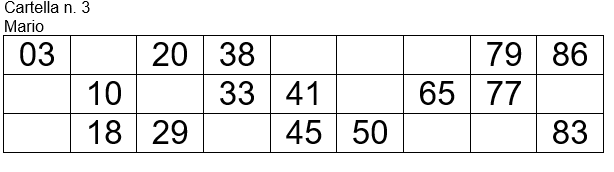
I have this result ( test only one schedule)


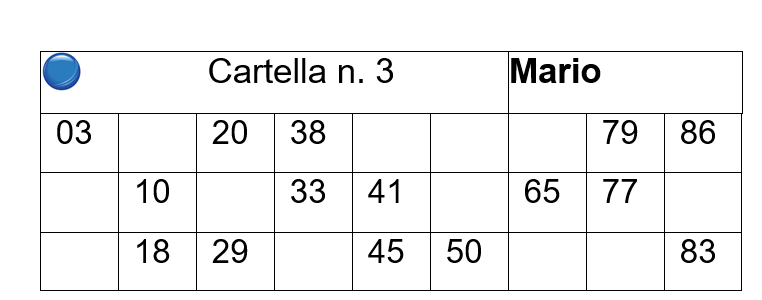
I wish insert the text Cartella n. 3 Mario on Table before the numbers on two columns
and insert a small Bmp on the left as this : ( more big)


where is the error ?
Since from 1991/1992 ( fw for clipper Rel. 14.4 - Momos)

I use : FiveWin for Harbour March-April 2024 - Harbour 3.2.0dev (harbour_bcc770_32_20240309) - Bcc7.70 - xMate ver. 1.15.3 - PellesC - mail: silvio[dot]falconi[at]gmail[dot]com
Posts: 16
Joined: Thu Jan 22, 2009 06:24 AM
Re: Creating table with Trichedit
Posted: Sat Jan 27, 2024 09:08 AM

Twenty seven years ago Thomas R. Marchione wrote a class for creation rtf of files

// Copyright: (C) 01/28/97 1997, Thomas R. Marchione

oRTF := SetRT( cOutFile )

// Use this to write an entire paragraph, with optional formatting.

NEW PARAGRAPH oRTF TEXT 'OOO «Text in aligned left»';

    FONTNUMBER 1 ;

    APPEARANCE BOLD_OFF+ITALIC_OFF+CAPS_OFF;

    FONTSIZE 12 ;

    FONTCOLOR CLR_WHITE,CLR_NBLUE ;

    ALIGN LEFT ;

    SPACEBEFORE .12 ;

    SETDEFAULT

// Use this to begin a new table

    DEFINE NEWTABLE oRTF ;        // Specify the RTF object

    ALIGN LEFT ;                  // Center table horizontally on page

    FONTNUMBER 2 ;                // Use font #2 for the body rows

    FONTSIZE 10 ;                 // Use 10 Pt. font for the body rows

    CELLAPPEAR BOLD_OFF ;         // Normal cells unbolded

    CELLHALIGN LEFT ;             // Text in normal cells aligned left

    COLUMNS 10 ;                   // Table has n Columns

    CELLWIDTHSээ ancho1 ;           // Array of column widths

    ROWHEIGHT .25 ;               // Minimum row height is .25"

    ROWBORDERS DOTTED ;

    CELLBORDERS SINGLE ;          // Outline cells with thin border

    COLSHADE aMarc1;              // Sombras en columnas

    HEADERROWS 1;                 // dos lineas

    HEADER {"","","Cartella n. 3","","","","","Mario","","" };

    HEADERAPPEAR BOLD_ON;

    HEADERHALIGN CENTER ;

    HEADERFONTSIZE 10

    HEADERSHADE 0;

    HEADERJOIN {{1,6},{7,9} },{};   // Aqui cascaba el MSWORD. Las celdas

    DEFINE CELL FORMAT oRTF ;

    CELLSHADE aMarc1

    lFormato:=.F.

// Use this to write the next cell in a table

For i=1 to 3

WRITE NEWCELL oRTF TEXT "cell 1" ALIGN CENTER

WRITE NEWCELL oRTF TEXT "cell 2" ALIGN RIGHT FONTCOLOR CLR_RED,CLR_WHITE

. . . . . . . . . . . . . . .

WRITE NEWCELL oRTF TEXT "cell 10" ALIGN CENTER

Next

END TABLE oRTF

CLOSE RTF oRtf

Puti:=MSWORD_PATH()

WinExec(puti+" "+ cOutFile)

Posts: 7318
Joined: Thu Oct 18, 2012 07:17 PM
Re: Creating table with Trichedit
Posted: Sat Jan 27, 2024 09:36 AM
MMK wrote:Twenty seven years ago Thomas R. Marchione wrote a class for creation rtf of files
// Copyright: (C) 01/28/97 1997, Thomas R. Marchione
oRTF := SetRT( cOutFile )

// Use this to write an entire paragraph, with optional formatting.
NEW PARAGRAPH oRTF TEXT 'OOO «Text in aligned left»';
FONTNUMBER 1 ;
APPEARANCE BOLD_OFF+ITALIC_OFF+CAPS_OFF;
FONTSIZE 12 ;
FONTCOLOR CLR_WHITE,CLR_NBLUE ;
ALIGN LEFT ;
SPACEBEFORE .12 ;
SETDEFAULT

// Use this to begin a new table
DEFINE NEWTABLE oRTF ; // Specify the RTF object
ALIGN LEFT ; // Center table horizontally on page
FONTNUMBER 2 ; // Use font #2 for the body rows
FONTSIZE 10 ; // Use 10 Pt. font for the body rows
CELLAPPEAR BOLD_OFF ; // Normal cells unbolded
CELLHALIGN LEFT ; // Text in normal cells aligned left
COLUMNS 10 ; // Table has n Columns
CELLWIDTHSээ ancho1 ; // Array of column widths
ROWHEIGHT .25 ; // Minimum row height is .25"
ROWBORDERS DOTTED ;
CELLBORDERS SINGLE ; // Outline cells with thin border
COLSHADE aMarc1; // Sombras en columnas
HEADERROWS 1; // dos lineas
HEADER {"","","Cartella n. 3","","","","","Mario","","" };
HEADERAPPEAR BOLD_ON;
HEADERHALIGN CENTER ;
HEADERFONTSIZE 10
HEADERSHADE 0;
HEADERJOIN {{1,6},{7,9} },{}; // Aqui cascaba el MSWORD. Las celdas
DEFINE CELL FORMAT oRTF ;
CELLSHADE aMarc1
lFormato:=.F.

// Use this to write the next cell in a table
For i=1 to 3
WRITE NEWCELL oRTF TEXT "cell 1" ALIGN CENTER
WRITE NEWCELL oRTF TEXT "cell 2" ALIGN RIGHT FONTCOLOR CLR_RED,CLR_WHITE
. . . . . . . . . . . . . . .
WRITE NEWCELL oRTF TEXT "cell 10" ALIGN CENTER
Next

END TABLE oRTF
CLOSE RTF oRtf

Puti:=MSWORD_PATH()
WinExec(puti+" "+ cOutFile)
it's a Fwh class package ? I not found it ....so not have the support
Since from 1991/1992 ( fw for clipper Rel. 14.4 - Momos)

I use : FiveWin for Harbour March-April 2024 - Harbour 3.2.0dev (harbour_bcc770_32_20240309) - Bcc7.70 - xMate ver. 1.15.3 - PellesC - mail: silvio[dot]falconi[at]gmail[dot]com
Posts: 7318
Joined: Thu Oct 18, 2012 07:17 PM
Re: Creating table with Trichedit
Posted: Sun Jan 28, 2024 05:32 PM
MMK wrote:Twenty seven years ago Thomas R. Marchione wrote a class for creation rtf of files
// Copyright: (C) 01/28/97 1997, Thomas R. Marchione
oRTF := SetRT( cOutFile )

// Use this to write an entire paragraph, with optional formatting.
NEW PARAGRAPH oRTF TEXT 'OOO «Text in aligned left»';
FONTNUMBER 1 ;
APPEARANCE BOLD_OFF+ITALIC_OFF+CAPS_OFF;
FONTSIZE 12 ;
FONTCOLOR CLR_WHITE,CLR_NBLUE ;
ALIGN LEFT ;
SPACEBEFORE .12 ;
SETDEFAULT

// Use this to begin a new table
DEFINE NEWTABLE oRTF ; // Specify the RTF object
ALIGN LEFT ; // Center table horizontally on page
FONTNUMBER 2 ; // Use font #2 for the body rows
FONTSIZE 10 ; // Use 10 Pt. font for the body rows
CELLAPPEAR BOLD_OFF ; // Normal cells unbolded
CELLHALIGN LEFT ; // Text in normal cells aligned left
COLUMNS 10 ; // Table has n Columns
CELLWIDTHSээ ancho1 ; // Array of column widths
ROWHEIGHT .25 ; // Minimum row height is .25"
ROWBORDERS DOTTED ;
CELLBORDERS SINGLE ; // Outline cells with thin border
COLSHADE aMarc1; // Sombras en columnas
HEADERROWS 1; // dos lineas
HEADER {"","","Cartella n. 3","","","","","Mario","","" };
HEADERAPPEAR BOLD_ON;
HEADERHALIGN CENTER ;
HEADERFONTSIZE 10
HEADERSHADE 0;
HEADERJOIN {{1,6},{7,9} },{}; // Aqui cascaba el MSWORD. Las celdas
DEFINE CELL FORMAT oRTF ;
CELLSHADE aMarc1
lFormato:=.F.

// Use this to write the next cell in a table
For i=1 to 3
WRITE NEWCELL oRTF TEXT "cell 1" ALIGN CENTER
WRITE NEWCELL oRTF TEXT "cell 2" ALIGN RIGHT FONTCOLOR CLR_RED,CLR_WHITE
. . . . . . . . . . . . . . .
WRITE NEWCELL oRTF TEXT "cell 10" ALIGN CENTER
Next

END TABLE oRTF
CLOSE RTF oRtf

Puti:=MSWORD_PATH()
WinExec(puti+" "+ cOutFile)

Please I made a test but not run ok can you help me ?

Code (fw): Select all Collapse
#include "fivewin.ch"
 #include "richtext.ch"

// need the  RichText class of Thomas R. Marchione 

Function RftDemo()
   local cOutFile := "RTFDEMO.RTF"
   local oRTF := SetupRTF( cOutFile )
   local aTable:={}

   AaDd(aTable,{1,,23,,44,,61,,80} )
   AaDd(aTable,{,16,,36,,59,68,,89} )
   AaDd(aTable,{,,28,,49,58,,71,84} )


   MakeTable( oRTF, cFile, lLandScape,aTable )

  //      Close the output file
   CLOSE RTF oRTF

  FW_MemoEdit( cOutFile, "test", 10, 10, 50, 100, .t., , .t. )
RETURN NIL


STATIC FUNCTION SetupRTF( cOutFile)
LOCAL oRTF

DEFINE RTF oRTF FILE cOutFile ;
   FONTS "Times New Roman Cyr", "Arial Cyr", "Courier New Cyr" ;
   FONTSIZE 12 ;
   TWIPFACTOR 1440

// Trim trailing spaces from data, to save file space.
oRTF:lTrimSpaces := .T.

DEFINE PAGESETUP oRTF MARGINS 1.75, 1.75, 1, 1 ;
   TABWIDTH .5 ;
   ALIGN CENTER

BEGIN HEADER oRTF
   NEW PARAGRAPH oRTF TEXT "Sample RTF Output" ;
      FONTSIZE 14 ;
      ALIGN CENTER
END HEADER oRTF

BEGIN FOOTER oRTF
   NEW PARAGRAPH oRTF TEXT DTOC( DATE() ) ;
      FONTSIZE 12 ;
      ALIGN CENTER
END HEADER oRTF

RETURN oRTF


STATIC FUNCTION MakeTable( oRTF, cFile, lLandScape,aTable )
LOCAL i, nWidth
LOCAL nTotWidth := 0, cName
local nRow,ncol

// Begin a new section of the document

IF lLandScape
   NEW SECTION oRTF ;
      LANDSCAPE ;
      PAGEWIDTH 11 ;
      PAGEHEIGHT 8.5 ;
      MARGINS .5, .5, .5, .5 ;
      ALIGN CENTER ;
      SETDEFAULT
ELSE
   NEW SECTION oRTF ;
      PAGEWIDTH 8.5 ;
      PAGEHEIGHT 11 ;
      MARGINS .5, .5, .5, .5 ;
      ALIGN CENTER ;
      SETDEFAULT
ENDIF

// Define the table

DEFINE TABLE oRTF ;              // Specify the RTF object
   ALIGN CENTER ;                // Center table horizontally on page
   FONTNUMBER 2 ;                // Use font #2 for the body rows
   FONTSIZE 50 ;                  // Use 9 Pt. font for the body rows
   CELLAPPEAR BOLD_OFF ;         // Normal cells unbolded
   CELLHALIGN LEFT ;             // Text in normal cells aligned left
   COLUMNS 9 ;      // Table has n Columns
   CELLWIDTHS 20 ;        // Array of column widths
   ROWHEIGHT .25 ;               // Minimum row height is .25"
   CELLBORDERS SINGLE           // Outline cells with thin border

// Write the data rows
For nRow= 1 to Len(aTable)
   FOR nCol := 1 TO oRTF:nTblColumns
      WRITE CELL oRTF TEXT aTable[nRow][nCol]
   NEXT
  next

// Close the table
CLOSE TABLE oRTF

RETURN NIL
***********************  END OF DBFToRTF()  *********************
Since from 1991/1992 ( fw for clipper Rel. 14.4 - Momos)

I use : FiveWin for Harbour March-April 2024 - Harbour 3.2.0dev (harbour_bcc770_32_20240309) - Bcc7.70 - xMate ver. 1.15.3 - PellesC - mail: silvio[dot]falconi[at]gmail[dot]com
Posts: 16
Joined: Thu Jan 22, 2009 06:24 AM
Re: Creating table with Trichedit
Posted: Mon Jan 29, 2024 11:49 AM

//You made everything well. Small inaccuracies. There is a working example

INCLUDE "FiveWin.ch"

include "richtext.ch"


Function RftDemo()


Local anchos,j,lFormato:=.F.

//Local Mas_n:={}

local aTable:={}

local nRow,ncol

Local oRtf,aMarca, cOutFile :="Plata.RTF", Sob1

Local aFldNames:= {" Ok ", " 2", " 3", "4","5","6", "7", "8", "9"}

AaDd(aTable,{1,,23,,44,,61,,80} )

AaDd(aTable,{,16,,36,,59,68,,89} )

AaDd(aTable,{,,28,,49,58,,71,84} )

oRTF := SetRT( cOutFile )

NEW PARAGRAPH oRTF TEXT "Sample RTF Output" ;

  FONTNUMBER 1 ;

  APPEARANCE BOLD_ON+ITALIC_OFF+CAPS_OFF;

  FONTSIZE 12 ;

  ALIGN CENTER ;

  SPACEBEFORE .12 ;

  SETDEFAULT

NEW PARAGRAPH oRTF TEXT "" ;

  APPEARANCE BOLD_OFF+ITALIC_OFF+CAPS_OFF

SETDATE oRtf FORMAT LONGFORMAT

NEW PARAGRAPH oRTF TEXT "" SETDEFAULT

aMarca=ARRAY(9)

AFILL(aMarca,0)

  DEFINE NEWTABLE oRTF ;              // Specify the RTF object

     ALIGN CENTER   ;              // Center table horizontally on page

     FONTNUMBER 1 ;              // Use font #2 for the body rows

     FONTSIZE 10 ;               // Use 9 Pt. font for the body rows

     CELLAPPEAR BOLD_OFF ;       // Normal cells unbolded

     CELLHALIGN LEFT ;           // Text in normal cells aligned left

     COLUMNS 9 ;             // Table has n Columns

     CELLWIDTHS {0.4,0.5,0.5,0.8,0.9,0.9,0.9,0.5,0.5} ;  // Array of column widths

     ROWHEIGHT .2 ;              // Minimum row height is .25"

     CELLBORDERS SINGLE ;        // Outline cells with thin border

     COLSHADE aMarca;            // Sombras en columnas

     HEADERROWS 1;               // dos lineas de titulos

     HEADER aFldNames;

     HEADERFONTSIZE 10;

     HEADERAPPEAR BOLD_ON;

     HEADERHALIGN CENTER //;

DEFINE CELL FORMAT oRTF ;

CELLSHADE aMarca

          lFormato:=.F.

For nRow= 1 to Len(aTable)

FOR nCol := 1 TO oRTF:nTblColumns

  WRITE NEWCELL oRTF TEXT aTable[nRow][nCol]  ALIGN CENTER

NEXT

next

END TABLE oRTF

CLOSE RTF oRtf

/*

Go top

Puti:=MSWORD_PATH()

WinExec(puti+" "+ cOutFile)

*/

Return .T.


FUNCTION SetRT(cOutFile)


LOCAL oRTF

Public oPrinter,aSize

DEFINE RTF oRTF FILE cOutFile ;

FONTS "Times New Roman", "Courier New", "Arial Cyr" ;

FONTFAMILY "froman","fswiss","fmodern";

    CHARSET 0,0,10;

FONTSIZE 8 ;

TWIPFACTOR 1440

oRTF:lTrimSpaces := .T.

DEFINE PAGESETUP oRTF MARGINS 0.5,0.5, 0.3, 0.3 ; // ---, ---, сверху,----

ALIGN TOP ;

PAGEWIDTH 8.5 ;

PAGEHEIGHT 11

RETURN oRTF

Posts: 6984
Joined: Fri Oct 07, 2005 07:07 PM
Re: Creating table with Trichedit
Posted: Mon Jan 29, 2024 11:55 AM

Hello,

Where do we find richtext.ch?

Best regards,

Otto

Posts: 7318
Joined: Thu Oct 18, 2012 07:17 PM
Re: Creating table with Trichedit
Posted: Mon Jan 29, 2024 02:26 PM
Otto wrote:Hello,
Where do we find richtext.ch?
Best regards,
Otto
I hope you are joking
Since from 1991/1992 ( fw for clipper Rel. 14.4 - Momos)

I use : FiveWin for Harbour March-April 2024 - Harbour 3.2.0dev (harbour_bcc770_32_20240309) - Bcc7.70 - xMate ver. 1.15.3 - PellesC - mail: silvio[dot]falconi[at]gmail[dot]com
Posts: 16
Joined: Thu Jan 22, 2009 06:24 AM
Re: Creating table with Trichedit
Posted: Mon Jan 29, 2024 02:55 PM

Where to lay out or send this file?

Posts: 6984
Joined: Fri Oct 07, 2005 07:07 PM
Re: Creating table with Trichedit
Posted: Mon Jan 29, 2024 02:57 PM

C:\fwh2023\samples\tblrtf.prg(2) Error F0029 Can't open #include file: 'richtext.ch'

On my system there is no richtext.ch. I have richedit.ch but no richtext.ch

Posts: 7318
Joined: Thu Oct 18, 2012 07:17 PM
Re: Creating table with Trichedit
Posted: Mon Jan 29, 2024 03:12 PM
Otto wrote:C:\fwh2023\samples\tblrtf.prg(2) Error F0029 Can't open #include file: 'richtext.ch'

On my system there is no richtext.ch. I have richedit.ch but no richtext.ch
Linares told me that I have to learn from you Mr. Otto, but you are wrong, the class in question is not included among the fivewin classes, it is an old version from 1997 by Tom Marchione and in the class there is also the include file
Since from 1991/1992 ( fw for clipper Rel. 14.4 - Momos)

I use : FiveWin for Harbour March-April 2024 - Harbour 3.2.0dev (harbour_bcc770_32_20240309) - Bcc7.70 - xMate ver. 1.15.3 - PellesC - mail: silvio[dot]falconi[at]gmail[dot]com