FiveTech Support Forums

FiveWin / Harbour / xBase community
Board index FiveWin for Harbour/xHarbour SAPI : change Voice
Posts: 34
Joined: Tue Mar 20, 2012 11:06 PM
Re: SAPI : change Voice
Posted: Sat Feb 10, 2024 10:38 PM
hello Jimmy
Jimmy wrote:hi,
Code (fw): Select all Collapse
   oSpVoice:EventInterests := SVEAllEvents + SVEAudioLevel
but how to get Event to call Function like in MSDN Sample ?
https://learn.microsoft.com/en-us/previous-versions/windows/desktop/ms723593(v=vs.85)
I am reading and reading about how to know that the "Word" event has happened, just for now I am interested in the phoneme or word
applying
Code (fw): Select all Collapse
oNarrator                := CreateObject( "Sapi.SPVoice" , "WithEvents" ) 
oNarrator:EventInterests := SVEPhoneme
oNarrator:Speak( Main.RichEdit_1.VALUE, SVSFlagsAsync)
While ..
...
end
When sending the text to the TTS engine it should know if that event happened but I can't find a way to know yet since there is no real example of how it works.
Posts: 44158
Joined: Thu Oct 06, 2005 05:47 PM
Re: SAPI : change Voice
Posted: Sun Feb 11, 2024 09:05 AM
Dear Jimmy,

Those are the different events info!

Please post here the exact code you are using and I will help you to process them
regards, saludos

Antonio Linares
www.fivetechsoft.com
Posts: 44158
Joined: Thu Oct 06, 2005 05:47 PM
Re: SAPI : change Voice
Posted: Sun Feb 11, 2024 09:33 AM
Never mind, I got the events working here! :-D

Now lets analize them...
regards, saludos

Antonio Linares
www.fivetechsoft.com
Posts: 9020
Joined: Thu Oct 06, 2005 08:17 PM
Posts: 44158
Joined: Thu Oct 06, 2005 05:47 PM
Re: SAPI : change Voice
Posted: Sun Feb 11, 2024 09:40 AM

Simply add this line at the top:

static aEvents := {}

and then use this:

oVoice:__hSink = __axRegisterHandler( oVoice:__hObj, { | ... | AAdd( aEvents, { ... } ) } )

Finally, after the dialog, do:

XBrowser( aEvents )

regards, saludos

Antonio Linares
www.fivetechsoft.com
Posts: 44158
Joined: Thu Oct 06, 2005 05:47 PM
Re: SAPI : change Voice
Posted: Sun Feb 11, 2024 09:42 AM
IMO the reason why we were not getting the events was that we were not using a window/dialog in the example

As soon as we have tested it with a dialog, the events arrive! :-D
regards, saludos

Antonio Linares
www.fivetechsoft.com
Posts: 1772
Joined: Thu Sep 05, 2019 05:32 AM
Re: SAPI : change Voice
Posted: Sun Feb 11, 2024 10:10 AM
hi,

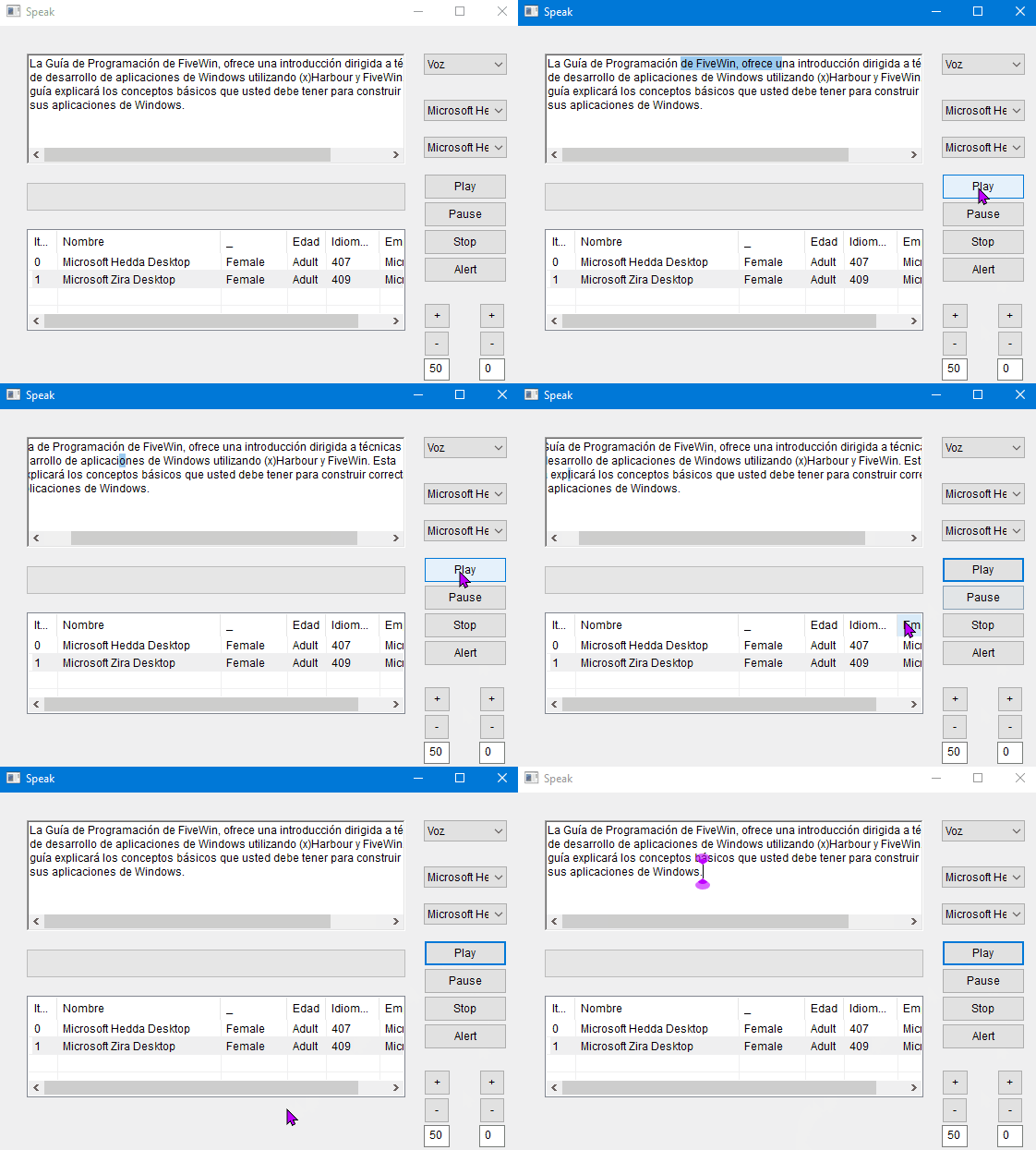
i "think" we need a RTF Control to use
Code (fw): Select all Collapse
   oGetText:SetSel({StreamPosition , StreamPosition + Length})
   oGetText:SetFocus()
to get this Effect ( not perfect ) using HMG Syntax and RTF

a Get / MGet will highlight hole Control when get Focus

but i do not know how to change *.RC from EDITTEXT into RTF (?)
who can help me please
greeting,

Jimmy
Posts: 44158
Joined: Thu Oct 06, 2005 05:47 PM
Re: SAPI : change Voice
Posted: Sun Feb 11, 2024 10:34 AM

Dear Jimmy,

Can you share the RC for your example ? In case you are using a RC file...

My mistake: the difference with events is NOT a handle of a window. The difference is to play in ASYNC mode !!!

oVoice:Speak( "harbour and xharbour", 1 ) // that 1 uses Async mode and thus events arrive to us !!!

regards, saludos

Antonio Linares
www.fivetechsoft.com
Posts: 9020
Joined: Thu Oct 06, 2005 08:17 PM
Re: SAPI : change Voice
Posted: Sun Feb 11, 2024 10:53 AM

Can I see a working sample, please?

Posts: 44158
Joined: Thu Oct 06, 2005 05:47 PM
Re: SAPI : change Voice
Posted: Sun Feb 11, 2024 11:58 AM
Dear Enrico,

Here you have it:
Code (fw): Select all Collapse
#include "FiveWin.ch"

static aEvents := {}

function Main()

    local oVoice := TOleAuto():New( "Sapi.SPVoice" )
    
    oVoice:__hSink = __axRegisterHandler( oVoice:__hObj, { | ... | AAdd( aEvents, { ... } ) } )
 
    oVoice:Speak( "hello my friend", 1 )  // 1 means asynch so events can arrive. Instead of 1, 3 can be used to cancel what is being said and start again in asynch mode
    MsgInfo( "waiting" ) // we wait and process windows messages so events can arrive

    XBrowser( aEvents )
 
 return nil
regards, saludos

Antonio Linares
www.fivetechsoft.com
Posts: 44158
Joined: Thu Oct 06, 2005 05:47 PM
Re: SAPI : change Voice
Posted: Sun Feb 11, 2024 12:04 PM
Events and meanings:

1 --> Start
3 --> An OLE object is received, probably self OLE object ?
5 --> Word, 4th param is position, 5th param is length
6 --> ???
7 --> Sentence, 4th param is position, 5th param is length
8 --> ???
2 --> End

https://learn.microsoft.com/en-us/previous-versions/windows/desktop/ms723587(v=vs.85)
regards, saludos

Antonio Linares
www.fivetechsoft.com
Posts: 9020
Joined: Thu Oct 06, 2005 08:17 PM
Posts: 34
Joined: Tue Mar 20, 2012 11:06 PM
Re: SAPI : change Voice
Posted: Sun Feb 11, 2024 11:24 PM
Jimmy wrote:hi Antonio,

thx for the Idea.

Result is same like using Property "Voice"
Error description: (DOS Error -2147352573) WINOLE/1007 Argument error: VOICE
Args:
[ 1] = O

Stack Calls
===========
Called from: => TOLEAUTO:VOICE( 0 )
Called from: main.prg => CHANGEVOICE( 125 )
Called from: main.prg => (b)MAIN( 43
mi solunción
Code (fw): Select all Collapse
Function ChangeVoice()  //cambiar voz desde un doble click sobre la lista de narradores
local nGrid   := Main.List_1.Value 
local cName := aAvoice [ nGrid , 1 ]
Local oVoice
 /* oNarrator:voice   := oNarrator:GetVoices():Item( nGrid - 1)  // Fumciona
    oNarrator:Speak( "Narrador " + cName, SVSFlagsAsync )          */
  For Each oVoice In oNarrator:GetVoices()                       
     If (oVoice:GetDescription(0) == Main.List_1.item(Main.List_1.Value))
      oNarrator:voice := oVoice        
      oNarrator:Speak( "Narrador " + cName, SVSFlagsAsync ) 
     endif
  Next  

RETURN
Posts: 34
Joined: Tue Mar 20, 2012 11:06 PM
Re: SAPI : change Voice
Posted: Mon Feb 12, 2024 03:09 AM
Hola Jimmy :
Leyendo creo que se necesita la propiedad "Status" https://learn.microsoft.com/en-us/previous-versions/windows/desktop/ms723612(v=vs.85)
pero no consigo descifrar bien el uso aqui https://learn.microsoft.com/en-us/previous-versions/windows/desktop/ms722534(v=vs.85)
Code (fw): Select all Collapse
Function Play() 
local  nStreamNumber , nStreamPosition , nCharacterPosition, nLength , ISpeechVoiceStatus
 oNarrator:EventInterests := SVEPhoneme
 
 oNarrator:Speak( Main.RichEdit_1.VALUE, SVSFlagsAsync)
 ISpeechVoiceStatus := oNarrator:Status  
      
      DO WHILE .not. ISpeechVoiceStatus:RunningState == SRSEDone 
               
               nCharacterPosition := ISpeechVoiceStatus:InputWordPosition
               nLength            := ISpeechVoiceStatus:InputWordLength
               Main.RichEditBox_1.CaretPos     := nCharacterPosition
               Main.RichEdit_1.SelectRange     := { nCharacterPosition, nLength }
               
      ENDDO
 
Return
el codigo para iluminar el tenxto del control Richtedit deberia ser parecido a esto en VBA
Code (fw): Select all Collapse
    V.Speak "this is stream number<bookmark mark='2two'/> two.", SVSFlagsAsync + SVSFIsXML
    List1.AddItem "LastStreamNumberQueued is " & V.Status.LastStreamNumberQueued
    DoEvents

    Do
        V.WaitUntilDone (500) 'Wait for 0.5 second so we won't get too many outputs

        List1.AddItem ""
        List1.AddItem "LastStreamNumberQueued is " & V.Status.LastStreamNumberQueued
        List1.AddItem "CurrentStreamNumber is " & V.Status.CurrentStreamNumber
        List1.AddItem "InputSentenceLength is " & V.Status.InputSentenceLength
        List1.AddItem "InputSentencePosition is " & V.Status.InputSentencePosition
        List1.AddItem "InputWordLength is " & V.Status.InputWordLength
        List1.AddItem "InputWordPosition is " & V.Status.InputWordPosition
        List1.AddItem "RunningState is " & V.Status.RunningState
        List1.AddItem "LastBookmark is " & V.Status.LastBookmark
        List1.AddItem "LastBookmarkId is " & V.Status.LastBookmarkId
        List1.AddItem "VisemeId is " & V.Status.VisemeId
        List1.AddItem "PhonemeId is " & V.Status.PhonemeId
        List1.AddItem "LastHResult is " & V.Status.LastHResult
        DoEvents

    Loop Until V.Status.RunningState = SRSEDone 'Exit when voice stops
Posts: 1772
Joined: Thu Sep 05, 2019 05:32 AM
Re: SAPI : change Voice
Posted: Mon Feb 12, 2024 06:02 AM
hi Antonio,
Antonio Linares wrote:Events and meanings:

1 --> Start
3 --> An OLE object is received, probably self OLE object ?
5 --> Word, 4th param is position, 5th param is length
6 --> ???
7 --> Sentence, 4th param is position, 5th param is length
8 --> ???
2 --> End
thx for your List f Event meaning, now it work (almost) perfect
Code (fw): Select all Collapse
  oSpVoice:__hSink := __axRegisterHandler( oSpVoice:__hObj, { | a,b,c,d,e | OnEvent( a,b,c,d,e ) } )


FUNCTION OnEvent()
LOCAL iMax  := PCOUNT()
LOCAL i
LOCAL aPara := ARRAY(5)

   FOR i := 1 TO iMax
     aPara[i] := PValue( i ) ) )
   NEXT

   DO CASE
     CASE aPara[1] = 2
         OffSet := aPara[3]
         oSpVoice_Word(aPara[2],aPara[3],0, 0)
      CASE aPara[1] = 5
         oSpVoice_Word(aPara[2],aPara[3],aPara[4], aPara[5])
   ENDCASE
RETURN NIL

PROCEDURE oSpVoice_Word(StreamNumber, StreamPosition , CharacterPosition , Length )
   oGetText:SetSel({CharacterPosition , CharacterPosition + Length})
   oGetText:SetFocus()
   SYSRefresh()
RETURN
but as i say : it need a RTF in *.RC to show highlight Word
greeting,

Jimmy