

Hello friends,
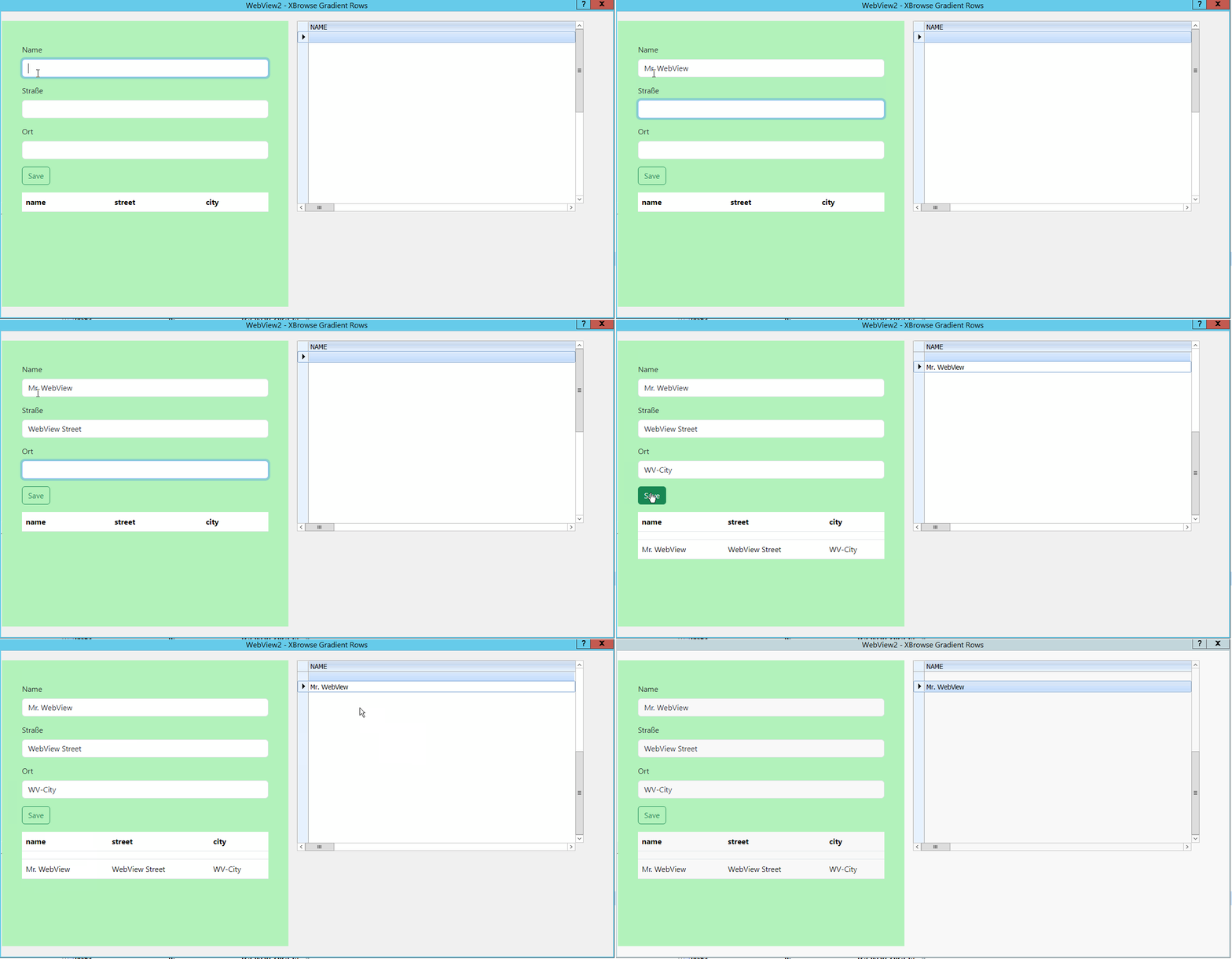
In the green section, you see an oSay containing a WebView2. Inside this WebView2, there is an HTML form and a table.
On the right side is an XBrowse. You can see how WebView2 is updating the XBrowse.
Best regards,
Otto
hw_xbrw.prg
address.html
In the green section, you see an oSay containing a WebView2. Inside this WebView2, there is an HTML form and a table.
On the right side is an XBrowse. You can see how WebView2 is updating the XBrowse.
Best regards,
Otto
hw_xbrw.prg
#include "FiveWin.ch"
#include "Splitter.ch"

static oWnd
static h := {=>}
static csend2js := "send from Harbour"
static oWebView, oWebView2
static oBrw
//----------------------------------------------------------------------------//

function Main()
   local oDlg, oSay1, oBtn
    local oFont

    start_sample()

   USE ( "address" ) SHARED NEW ALIAS CUST

   DEFINE FONT oFont NAME 'Tahoma' SIZE 0, -14


   DEFINE DIALOG oDlg SIZE 1280,640 PIXEL ;
      FONT oFont TITLE 'WebView2 - XBrowse Gradient Rows'

          @ 10,1 ;
         SAY oSay1 ;
      PROMPT "oSay1" ;
       PIXEL ;
        SIZE 300, 300


 @ 10,310 ;
     XBROWSE oBrw ;
          OF oDlg ;
       PIXEL ;
        SIZE 300, 200 ;
  DATASOURCE "CUST" ;
    AUTOCOLS ;
    NOBORDER

    @ 200,60 ;
      BUTTON oBtn ;
      PROMPT "&Cancel" ;
        SIZE 40, 12 ;
      ACTION oDlg:END() ;
          OF oDlg ;
       PIXEL


    oBrw:nMarqueeStyle    = MARQSTYLE_HIGHLWIN7
   oBrw:CreateFromCode()

     @ 200,0 ;
      BUTTON oBtn ;
      PROMPT "&WebView" ;
        SIZE 40, 12 ;
      ACTION webshow( 1, oSay1:hWnd,1) ;
          OF oDlg ;
       PIXEL

     ACTIVATE DIALOG oDlg ;
          CENTERED ;
             VALID ( oWebView:Terminate(), oWebView:Destroy(), .T. ) ;
          ON PAINT webshow( 1, oSay1:hWnd,1)


return nil

//----------------------------------------------------------------------------//

function webshow(console,hWnd, nlink)
   local hPost := {}
   local cHtmlOrUrl :=  "C:\fwh2023\samples\address.html"

   oWebView := TWebView():New( , hWnd )
   oWebView:bOnBind = { | cJson, cCalls | ;
      hb_jsondecode( cJson, @hPost ), fromjavascript(hPost) ,   ;
      oWebView:Return( cCalls, 0, "{ 'result': '" + csend2js + "'  }" ) }

   oWebView:Bind( "SendToFWH" )
   oWebView:Navigate( cHtmlOrUrl  )
   oWebView:SetTitle( "This is Fivewin 2024" )
   oWebView:Run()

return oWebView

//-----------------------------------------------------------------------------//


function fromjavascript(hPost)
   local hTemp, aTemp
   local hTemp1
   local aParameters := {}
   local nIdx := 0
   local aNames := {}

   if len(hPost) > 0
      aParameters :=  hPost
      // xbrowse(hPost)
      FOR nIdx := 1 to len( aParameters )
         //    xbrowse(   aParameters[ nIdx ]  )
      next
   endif

   if len(hPost)= 0
      //      oWebView:SetSize( 1260, 800 )
   else

      aTemp := hPost[3]
      hTemp :=  aTemp['param1']

      USE (  "address" ) SHARED NEW
      APPEND BLANK
      address->name   := hTemp['name']
      address->street := hTemp['street']
      address->city   := hTemp['city']


      h['response']  := "["
      select address
      go top
      do while .not. eof()
         h['response']  += "{" + '"name":' + '"' + ALLTRIM( address->name ) + '",'
         h['response']  += '"street":' +  '"' + ALLTRIM( address->street ) +  '",'
         h['response']  += '"city":' +  '"' + ALLTRIM( address->city ) +  '" },'

         skip
      enddo
      h['response'] := left( h['response'] , len(h['response'] )-1 ) + "]"

    //   h['response'] :=    FW_DbfToJson()


      dbCloseArea()
        oBrw:gobottom()
        oBrw:update()

      csend2js :=  h['response']
   endif

return nil
//----------------------------------------------------------------------------//

FUNCTION  start_sample()

CheckTables()

return nil
//----------------------------------------------------------------------------//

function CheckTables()

   if ! File(   "address.dbf" )
      DbCreate( "address.dbf",;
         {  {"name", "C", 100, 0 },;
                {"street", "C", 100, 0 },;
                {"city", "C", 100, 0 },;
                {"postCode", "C", 100, 0 },;
                {"ctryCode", "C", 100, 0 },;
                {"numIn1", "N", 10, 2 },;
                {"numIn2", "N", 10, 2 },;
                {"numIn3", "N", 10, 2 },;
                {"numIn4", "N", 10, 2 } } )
   endif
    use('address') NEW
    APPEND BLANK
    use

return nil

//----------------------------------------------------------------------------//<!DOCTYPE html>
<html lang="de">
<head>
<head>
<title>Bootstrap Example</title>
<meta charset="utf-8">
<meta name="viewport" content="width=device-width, initial-scale=1">
<link href="https://cdn.jsdelivr.net/npm/bootstrap@5.3.2/dist/css/bootstrap.min.css" rel="stylesheet">
<script src="https://cdn.jsdelivr.net/npm/bootstrap@5.3.2/dist/js/bootstrap.bundle.min.js"></script>
</head>
<body style="background-color: #b2f2bb;">
<div class="container mt-5">
<div class="mb-3">
<label for="name" class="form-label">Name</label>
<input type="text" class="form-control" id="name" >
</div>
<div class="mb-3">
<label for="street" class="form-label">Straße</label>
<input type="text" class="form-control" id="street" >
</div>
<div class="mb-3">
<label for="city" class="form-label">Ort</label>
<input type="text" class="form-control" id="city" >
</div>
<button id="edit-btn" class="btn btn-outline-success" >Save</button>
<!-- Tabelle -->
<table class="table mt-3">
<thead>
<tr>
<th scope="col">name</th>
<th scope="col">street</th>
<th scope="col">city</th>
</tr>
</thead>
<tbody id="tableBody">
<!-- Zeilen werden hier über JavaScript hinzugefügt -->
</tbody>
</table>
</div>
<!-- JavaScript Logik -->
<script>
document.getElementById('edit-btn').addEventListener('click', editbtn);
function editbtn(evt) {
var name = document.getElementById('name').value
var street =document.getElementById('street').value
var city =document.getElementById('city').value
const data = {
text: 'editbtn button clicked',
name: name,
street: street,
city: city,
btn: 'anfrageformular'
};
var someData = { 'param1': data };
var s = SendToFWH(evt.target.id, evt.type, someData)
.then(s => {
const jsonString = s.result;
// alert(jsonString);
console.log('Type:', typeof jsonString);
console.log('Length:', jsonString.length);
console.log('Content:', jsonString);
const resultArray = JSON.parse(jsonString);
const resultObject = JSON.parse(s.result);
console.log(resultObject);
const tableBody = document.getElementById("tableBody");
resultArray.forEach(item => {
const row = tableBody.insertRow();
Object.keys(item).forEach((key, index) => {
const cell = row.insertCell(index);
cell.textContent = item[key];
});
});
});
}
</script>
</body>
</html>


