FiveTech Support Forums

FiveWin / Harbour / xBase community
Board index FiveWin for Harbour/xHarbour Problem with FiveWin and PDF995 on Windows 11.
Posts: 408
Joined: Sun Nov 06, 2005 03:55 PM

Problem with FiveWin and PDF995 on Windows 11.

Posted: Tue Feb 13, 2024 12:13 AM

I have an application where several users utilize it every day. The IT Department just upgraded all the workstations from Windows 10 to Windows 11. Now on the reports which print to the PDF995 driver the fonts are reduced to a really small size. If they print directly to the printer the fonts look like they should. I found that if you print to the printer but preview, then in preview press the Acrobat button, that PDF is correct. I looked through the rpreview.prg and found I believe it uses FWSavePreviewToPDF(), is this code around because it seems to work better the PDF995. Or is there a way to save to PDF from the printer commands. Thanks,

Thanks,

Byron Hopp

Matrix Computer Services
Posts: 408
Joined: Sun Nov 06, 2005 03:55 PM

Re: Problem with FiveWin and PDF995 on Windows 11.

Posted: Tue Feb 13, 2024 12:29 AM

Update, I found prv2pdf.prg and will start playing with it. Hopefully I can eliminate PDF995.

Thanks,

Byron Hopp

Matrix Computer Services
Posts: 10733
Joined: Sun Nov 19, 2006 05:22 AM

Re: Problem with FiveWin and PDF995 on Windows 11.

Posted: Tue Feb 13, 2024 01:56 PM
It is not only easier but also desirable to depend on FWH for generation of PDFs

Very easy:
If you are using TPRINTER
Code (fw): Select all Collapse
PRINT oPrn FILE "test.pdf"
This will create "test.pdf" instead of showing preview or print to printer.
Code (fw): Select all Collapse
PRINT oPrn PREVIEW FILE "test.pdf:
This will create "test.pdf" and then open the pdf file for viewing.

If you are using REPORT object:
Code (fw): Select all Collapse
REPORT oRep TO FILE "test.pdf"
// or
REPORT oRep PRVIEW TO FILE "test.pdf"
Please do not use any FWH internal functions directly.

How does FWH create PDFs?

DEFAULT:
if MS Word is installed on the PC, fwh uses MS Word to create PDF and if not
uses its own internal function FWSavePreviewToPDF().

BEST OPTION
is to use HaruPDF.

Add these lines to your program:
Code (fw): Select all Collapse
REQUEST FWHARU

function Main()

  TPrinter():lUseHaruPDF := .T.
Now, FWH uses harupdf to generate all pdf files.

This is best option and we recommend this option.
Regards


G. N. Rao.

Hyderabad, India
Posts: 408
Joined: Sun Nov 06, 2005 03:55 PM

Re: Problem with FiveWin and PDF995 on Windows 11.

Posted: Tue Feb 13, 2024 04:31 PM

Thank you Mr. Rao, modifying my code at this moment. Very complete. Byron ...

Thanks,

Byron Hopp

Matrix Computer Services
Posts: 408
Joined: Sun Nov 06, 2005 03:55 PM

Re: Problem with FiveWin and PDF995 on Windows 11.

Posted: Tue Feb 13, 2024 04:51 PM

I placed "Request FWHARU" at the top of my program, then I get many link errors that start with "HB_FUN_HPDF".

Do I need a newer version of FiveWin?

Do I need a change in my mak file?

define FWVERSION "FWH 23.07"

define FW_VersionNo 23070

Thanks,

Thanks,

Byron Hopp

Matrix Computer Services
Posts: 10733
Joined: Sun Nov 19, 2006 05:22 AM

Re: Problem with FiveWin and PDF995 on Windows 11.

Posted: Tue Feb 13, 2024 05:09 PM
Do I need a newer version of FiveWin?
No.
Available from FWH1909.
Do I need a change in my mak file?
Always you read fwh\samples\buildh.bat and make sure all the libs linked in that bat file are linked in your link script also.

for examples check if your link script includes
Code (fw): Select all Collapse
echo %hdirl%\hbhpdf.lib + >> b32.bc
echo %hdirl%\libhpdf.lib + >> b32.bc
Regards


G. N. Rao.

Hyderabad, India
Posts: 408
Joined: Sun Nov 06, 2005 03:55 PM

Re: Problem with FiveWin and PDF995 on Windows 11.

Posted: Tue Feb 13, 2024 05:14 PM

Got it, Thanks,

Thanks,

Byron Hopp

Matrix Computer Services
Posts: 408
Joined: Sun Nov 06, 2005 03:55 PM

Re: Problem with FiveWin and PDF995 on Windows 11.

Posted: Tue Feb 13, 2024 08:14 PM

I have tried a couple of ways, one:

Print oPrn Name cReport File cFile to cPrinter

oPrn:lUseHaruPDF := .t.

Creates a perfectly great PDF, but during the process it pops up the preview screen and immediately takes it down.

Can I eliminate the popup of the screen, it seems it would be distracting to the user.

Thanks,

Thanks,

Byron Hopp

Matrix Computer Services
Posts: 408
Joined: Sun Nov 06, 2005 03:55 PM

Re: Problem with FiveWin and PDF995 on Windows 11.

Posted: Tue Feb 13, 2024 10:59 PM

I have been testing with the following code:

Function TestHaru()

Local oPrn  := nil

Local oFont := nil

Local cFile := Mcs_AppPath() + "TestPdf" + nAllTrim( Seconds()) + ".Pdf"

Print oPrn File cFile

Define Font oFont Name "Arial"  Size 0,-14 of oPrn

oPrn:lUseHaruPDF := TRUE

Page

   oPrn:InchSay( 1,1, "Hello World", oFont,,,,, )

Endpage

EndPrint

Return nil

When I run this the second time I get:

Error description: Error BASE/1005 Message not found: FWPDF:_LUSEHARUPDF

Args:

[ 1] = O FWPDF

If I quit my program and restart I can print it once again. Am I not resetting something that may cause this problem.

Thanks,

Thanks,

Byron Hopp

Matrix Computer Services
Posts: 10733
Joined: Sun Nov 19, 2006 05:22 AM

Re: Problem with FiveWin and PDF995 on Windows 11.

Posted: Wed Feb 14, 2024 01:47 AM
As we suggested above, use
Code (fw): Select all Collapse
TPrinter():lUseHarufPDF := .t.
before executing PRINT command.
Not inside PRINT/ENDPRINT

Also please try to use later methods of Tprinter.

Please try this sample as it is:
Code (fw): Select all Collapse
#include "fivewin.ch"

REQUEST FWHARU

function Main()

   TPrinter():lUseHaruPDF := .t.

   TestHaru()

return nil

Function TestHaru()

   local oPrn, oFont
   local cFile := "TestPdf" + cValToChar( Int( Seconds() ) ) + ".pdf"

   PRINT oPrn FILE cFile
   DEFINE FONT oFont NAME "ARIAL" SIZE 0,-30 OF oPrn
   PAGE
   @ 1, 1 PRINT TO oPrn TEXT "Hello World" SIZE 7,1 INCHES FONT oFont
   ENDPAGE
   ENDPRINT
   RELEASE FONT oFont

   ShellExecute( 0, "Open", cFile )

return nil
This works correctly
Regards


G. N. Rao.

Hyderabad, India
Posts: 408
Joined: Sun Nov 06, 2005 03:55 PM

Re: Problem with FiveWin and PDF995 on Windows 11.

Posted: Wed Feb 14, 2024 05:45 PM

I will try your suggestion, but I do have several "Extend Class TPrinter with Data" and "with Message", can this be the problem? I use this everywhere I print, if this is the problem, can I rename the class and solve the problem?

Thanks,

Byron Hopp

Matrix Computer Services
Posts: 1818
Joined: Wed Oct 26, 2005 02:49 PM

Re: Problem with FiveWin and PDF995 on Windows 11.

Posted: Wed Feb 14, 2024 07:32 PM
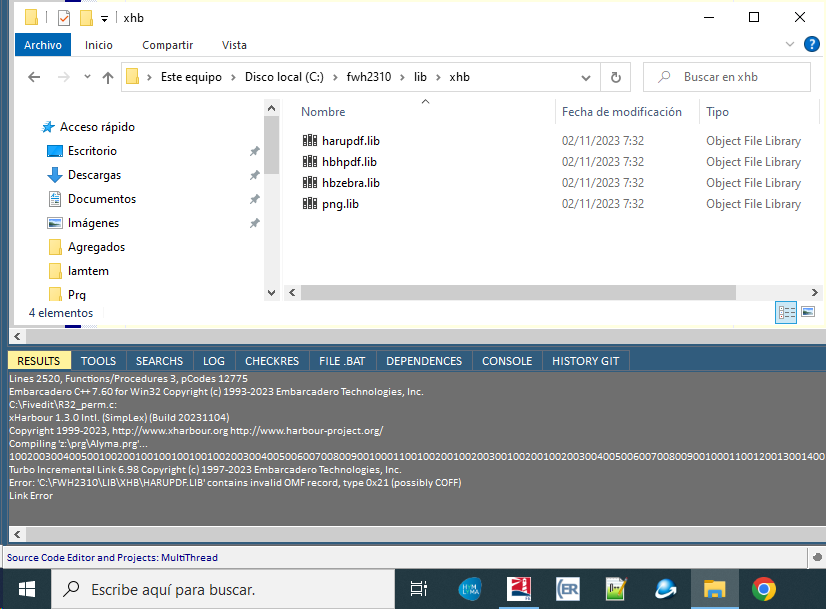
Hola buenas tardes para todos.

Al intentar agregar las librerías para usar harupdf en nuestra aplicación, nos devuelve un error al intentar compilar.

Estamos usando la librería que viene con la distribución de FW2310.
Code (fw): Select all Collapse
Turbo Incremental Link 6.98 Copyright (c) 1997-2023 Embarcadero Technologies, Inc.
Error: 'C:\FWH2310\LIB\XHB\HARUPDF.LIB' contains invalid OMF record, type 0x21 (possibly COFF)
Link Error
Saludos
LEANDRO AREVALO
Bogotá (Colombia)
https://hymlyma.com
https://hymplus.com/
leandroalfonso111@gmail.com
leandroalfonso111@hotmail.com

[ Turbo Incremental Link64 6.98 Embarcadero 7.70 ] [ FiveWin 25.01 ] [ xHarbour 64 bits) ]
Posts: 408
Joined: Sun Nov 06, 2005 03:55 PM

Re: Problem with FiveWin and PDF995 on Windows 11.

Posted: Wed Feb 14, 2024 07:53 PM

"before executing PRINT command."

"Not inside PRINT/ENDPRINT"

I don't exactly understand how this work. But it does. Does this flag (lUseHaruPDF) stay true until it is set back to false, or do you need to set it everytime. Why does it not get set back to false when you initiate the "Print oPrn..." command?

Byron ...

Thanks,

Byron Hopp

Matrix Computer Services
Posts: 8523
Joined: Tue Dec 20, 2005 07:36 PM

Re: Problem with FiveWin and PDF995 on Windows 11.

Posted: Wed Feb 14, 2024 07:56 PM
Leandro, intenta con estas, pls.

https://mega.nz/file/RIlSAB6J#L4qDeL8lY6fmAh0B0oMZ5wQZ5dR9BgpZ9zhezinPT2w

Regards, saludos.
João Santos - São Paulo - Brasil - Phone: +55(11)95150-7341
Posts: 9022
Joined: Thu Oct 06, 2005 08:17 PM

Re: Problem with FiveWin and PDF995 on Windows 11.

Posted: Wed Feb 14, 2024 08:44 PM
byron.hopp wrote:"before executing PRINT command."
"Not inside PRINT/ENDPRINT"

I don't exactly understand how this work. But it does. Does this flag (lUseHaruPDF) stay true until it is set back to false, or do you need to set it everytime. Why does it not get set back to false when you initiate the "Print oPrn..." command?

Byron ...
lUseHaruPDF is a CLASSDATA that is similar to a STATIC variable. You can access it through the class itself, while a DATA can accessed only through an instance of the class.