FiveTech Support Forums

FiveWin / Harbour / xBase community
Board index FiveWin for Harbour/xHarbour FW_SaveImage
Posts: 1392
Joined: Mon May 14, 2007 09:49 AM
FW_SaveImage
Posted: Tue Feb 13, 2024 01:38 PM
Hi,

I create an image in A2 format.
Code (fw): Select all Collapse
hBmp :=FW_MakeYour Bitmap(7016, 4961, {|hDc|FW_DrawImage(),..})
Then I save it to file
Code (fw): Select all Collapse
FW_SaveImage(bmp, "myfile")
Everything is fine.

I create an image in A1 format.
Code (fw): Select all Collapse
hBmp:=FW_MakeYour Bitmap(9933, 7016, {|hDc|FW_DrawImage(),..})
When saving it to a file, the program terminates without an error. I understand that there is not enough memory. What can be predicted ?
Posts: 10733
Joined: Sun Nov 19, 2006 05:22 AM
Re: FW_SaveImage
Posted: Tue Feb 13, 2024 02:40 PM
When saving it to a file, the program terminates without an error. I understand that there is not enough memory.
Possible.
But I tried with the same size it is working for me quite well.
This is my sample program
Code (fw): Select all Collapse
function LargeBmp()

   local hBmp

   ? "start"

   hBmp  := FW_MakeYourBitmap(9933, 7016, <|hDc,w,h|
      local aBmp
      aBmp  := FW_ReadImage( nil, "..\bitmaps\sea.bmp", , .t. )
      FW_DrawImage( hDC, aBmp[ 1 ],              { 0, 0, 768*4, 1024*4, 1 } )
      FW_DrawImage( hDC, "..\bitmaps\olga1.jpg", { 0, 1024*4, 450*7, 1024*4 + 352*7, 1 } )
      FW_DrawImage( hDC, aBmp[ 1 ],              { 3200, 0, 3200+768*4, 1024*4, 1 } )
      FW_DrawImage( hDC, "..\bitmaps\olga1.jpg", { 3200, 1024*4, 3200+450*7, 1024*4 + 352*7, 1 } )
      PalBmpFree( aBmp )
      return nil
      > )

   ? hbmp

   FW_SaveImage( hBmp, "large.png" )
   DeleteObject( hBmp )

   ? "saved"

   XImage( "large.png" )

return nil
I am able to see the image well.
If you want I can also post a screenshot
Regards


G. N. Rao.

Hyderabad, India
Posts: 10733
Joined: Sun Nov 19, 2006 05:22 AM
Re: FW_SaveImage
Posted: Thu Feb 15, 2024 12:51 AM

Did you try my sample program?

Regards


G. N. Rao.

Hyderabad, India
Posts: 1392
Joined: Mon May 14, 2007 09:49 AM
Re: FW_SaveImage
Posted: Thu Feb 15, 2024 11:39 AM
Yes, your example works well. But files in A1 and A0 format do not want to be saved from my program :cry:

I am trying to make an option with the creation of several bitmap files and their subsequent gluing.
Is it possible to split hBmp into several parts and save them as separate files ?
Posts: 10733
Joined: Sun Nov 19, 2006 05:22 AM
Re: FW_SaveImage
Posted: Thu Feb 15, 2024 03:22 PM
Yes, your example works well. But files in A1 and A0 format do not want to be saved from my program.
How can I help you?
Can you send me a test program of yours to my personal email?
nageswaragunupudi [at] gmail [dot] com
I am trying to make an option with the creation of several bitmap files and their subsequent gluing.
For gluing, you can use the function
Code (fw): Select all Collapse
FW_StitchImages( uImage1, uImage2, [cSide], [cType] ) --> newImage
uImage1 and uImage2: can be hBitmap or any image-file or any image-buffer of any type.
cSide: Can be "R" or "B". R for Right and B for bottom. Default Bottom
cType: If the parameter is nil, the result is hBitmap
if cType is "bmp", "jpg", "png" the result is an image buffer of the type speicified, which can be saved to a file directly wih MEMOWRIT
if cType is .T., then the result type is the type of the first image.
Is it possible to split hBmp into several parts and save them as separate files ?
Code (fw): Select all Collapse
FW_TransformBitmap( hBmp, aCrop ) --> hCroppedBmp
Regards


G. N. Rao.

Hyderabad, India
Posts: 1392
Joined: Mon May 14, 2007 09:49 AM
Re: FW_SaveImage
Posted: Thu Feb 15, 2024 03:41 PM

Thank you, Rao, very interesting functions - FW_StitchImages and FW_TransformBitmap. I'll try with them

Posts: 1392
Joined: Mon May 14, 2007 09:49 AM
Re: FW_SaveImage
Posted: Fri Feb 16, 2024 09:29 AM
I wanted to divide the hBmp into 3 parts - 33%, 33% and 34%
How can I do this using the FW_Transform Bitmap function ?
Posts: 10733
Joined: Sun Nov 19, 2006 05:22 AM
Re: FW_SaveImage
Posted: Fri Feb 16, 2024 03:46 PM
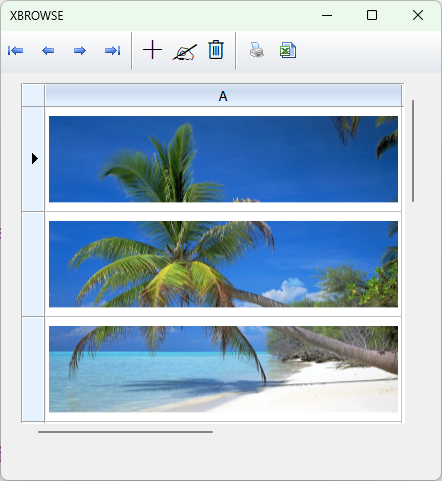
Try this sample which splits and again glues together
Code (fw): Select all Collapse
#include "fivewin.ch"

function Main()

   local cSource  := "\fwh\bitmaps\sea.bmp"
   local aSave
   local hSource, aBmp
   local nWidth, nHeight, h, n, c, nTop, nBot
   local nParts   := 3

   hSource  := FW_ReadImage( nil, cSource )[ 1 ] // hBitmap
   nWidth   := GetBmpWidth(  hSource )
   nHeight  := GetBmpHeight( hSource )
   h        := Int( nHeight / nParts )

   nTop        := 0
   aBmp        := Array( nParts )

   for n := 1 to nParts
      nBot  := If( n == nParts, nHeight, nTop + h )
      aBmp[ n ]   := FW_TransformBitmap( hSource, { nTop, 0, nBot, nWidth } )
      nTop  := nBot
   next

   DeleteObject( hSource )

   // SaveAs png files
   aSave    := Array( nParts )
   for n := 1 to nParts
      aSave[ n ] := BeforAtNum( ".", cSource ) + cValToStr( n ) + ".png"
      FW_SaveImage( aBmp[ n ], aSave[ n ] )
      DeleteObject( aBmp[ n ] )
   next

   // View all the saved parts
   xbrowser aSave SETUP ( ;
      oBrw:aCols[ 1 ]:cDataType := "F", ;
      oBrw:nMarqueeStyle := 0 )

   // Let us now glue all the parts and view the reconstructed full image

   c  := aSave[ 1 ]
   for n := 2 to nParts
      c  := FW_StitchImages( c, aSave[ n ], , "png" )
   next

   // save the glued image to file
   MEMOWRIT( "new.png", c )
   XImage( "new.png" )

return aSave
Regards


G. N. Rao.

Hyderabad, India
Posts: 1392
Joined: Mon May 14, 2007 09:49 AM
Re: FW_SaveImage
Posted: Fri Feb 16, 2024 04:31 PM

I think the problem is not saving large formats through the FW_SaveImage function.

To get a larger format, I expanded the dialog box to the desired size (oDld:Move()). Further, moving this dialog according to the specified algorithm, I received the device context of the screen. It used to work, now it doesn't.

Continue the discussion