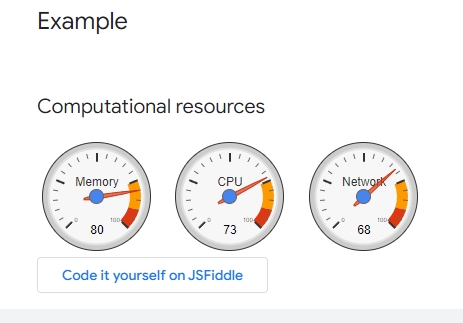
In the Google graph online information there is also this :

Can it be added to the FWH Lib ? Mr. Navaro ?
https://developers.google.com/chart/interactive/docs/gallery/gauge
Using: FWH 23.08 with Harbour

// Please install https://developer.microsoft.com/en-us/microsoft-edge/webview2/ x86 version before using it
#include "FiveWin.ch"
function Main()
local oWebView := TWebView():New()
oWebView:SetHtml( Html() )
oWebView:SetTitle( "Google charts" )
oWebView:SetSize( 1200, 800 )
oWebView:SetUserAgent( "Mozilla/5.0 (Linux; Android 6.0; Nexus 5 Build/MRA58N) AppleWebKit/537.36 (KHTML, like Gecko) Chrome/103.0.5060.53 Mobile Safari/537.36" )
sleep( 300 )
oWebView:Run()
oWebView:Destroy()
return nil
function Html()
local cHtml
TEXT INTO cHtml
<html>
<head>
<script type="text/javascript" src="https://www.gstatic.com/charts/loader.js"></script>
<script type="text/javascript">
google.charts.load('current', {'packages':['gauge']});
google.charts.setOnLoadCallback(drawChart);
function drawChart() {
var data = google.visualization.arrayToDataTable([
['Label', 'Value'],
['Memory', 80],
['CPU', 55],
['Network', 68]
]);
var options = {
width: 400, height: 120,
redFrom: 90, redTo: 100,
yellowFrom:75, yellowTo: 90,
minorTicks: 5
};
var chart = new google.visualization.Gauge(document.getElementById('chart_div'));
chart.draw(data, options);
setInterval(function() {
data.setValue(0, 1, 40 + Math.round(60 * Math.random()));
chart.draw(data, options);
}, 13000);
setInterval(function() {
data.setValue(1, 1, 40 + Math.round(60 * Math.random()));
chart.draw(data, options);
}, 5000);
setInterval(function() {
data.setValue(2, 1, 60 + Math.round(20 * Math.random()));
chart.draw(data, options);
}, 26000);
}
</script>
</head>
<body>
<div id="chart_div" style="width: 400px; height: 120px;"></div>
</body>
</html>
ENDTEXT
return cHtml

#include "FiveWin.ch"
function Main()
local oDlg, oWebView
DEFINE DIALOG oDlg TITLE "Google charts"
ACTIVATE DIALOG oDlg CENTERED ;
ON INIT ( oWebView := TWebView():New(, oDlg:hWnd ), oWebView:SetSize( 800, 600 ),;
oWebView:SetHtml( Html() ) ) ;
VALID ( oWebView:Terminate(), oWebView:Destroy(), .T. )
return nil
function Html()
local cHtml
TEXT INTO cHtml
<html>
<head>
<script type="text/javascript" src="https://www.gstatic.com/charts/loader.js"></script>
<script type="text/javascript">
google.charts.load('current', {'packages':['gauge']});
google.charts.setOnLoadCallback(drawChart);
function drawChart() {
var data = google.visualization.arrayToDataTable([
['Label', 'Value'],
['Memory', 80],
['CPU', 55],
['Network', 68]
]);
var options = {
width: 400, height: 120,
redFrom: 90, redTo: 100,
yellowFrom:75, yellowTo: 90,
minorTicks: 5
};
var chart = new google.visualization.Gauge(document.getElementById('chart_div'));
chart.draw(data, options);
setInterval(function() {
data.setValue(0, 1, 40 + Math.round(60 * Math.random()));
chart.draw(data, options);
}, 13000);
setInterval(function() {
data.setValue(1, 1, 40 + Math.round(60 * Math.random()));
chart.draw(data, options);
}, 5000);
setInterval(function() {
data.setValue(2, 1, 60 + Math.round(20 * Math.random()));
chart.draw(data, options);
}, 26000);
}
</script>
</head>
<body>
<div id="chart_div" style="width: 400px; height: 120px;"></div>
</body>
</html>
ENDTEXT
return cHtmla Quick update I tried .... Not working (but I have to read into the Webview information)
Trying to make the background transparent
<div id="chart_div" style="width: 400px; height: 120px;"><background-color="transparent;"></div>
If the html is made and the pie is drawn. do I try to change the data of the pie in the html ?
I mean that the pie is onscreen and the arduino is sending new data to update the pie.
with this info I can than test many samples. Thanks !!

#include "FiveWin.ch"
#Define CLR_ORANGE nRGB( 255, 165, 000 )
function Main()
local oDlg, oWebView, oBrush, oWnd, oMain
local aData, oBtn1
//DEFINE BRUSH oBrush FILE "arduino2.jpg" RESIZE
DEFINE BRUSH oBrush FILE "..\bitmaps\backgrnd\iosbg.bmp" RESIZE
//DEFINE BRUSH oBrush COLOR RGB( 77, 99, 110 )
DEFINE DIALOG oDlg WINDOW oMain SIZE 1400,900 PIXEL TRUEPIXEL TITLE "Google charts" BRUSH oBrush
// These says are done because I don't find the transparant clause for the gauges yet.
//
They simple make a region transparent
@ 1, 1 SAY " " OF oDlg SIZE 1400, 380 PIXEL COLORS CLR_ORANGE, CLR_WHITE TRANSPARENT UPDATE
@ 380, 1 SAY " " OF oDlg SIZE 470, 520 PIXEL COLORS CLR_ORANGE, CLR_WHITE TRANSPARENT UPDATE
@ 380, 950 SAY " " OF oDlg SIZE 700, 520 PIXEL COLORS CLR_ORANGE, CLR_WHITE TRANSPARENT UPDATE
@ 520, 1 SAY " " OF oDlg SIZE 1400, 900 PIXEL COLORS CLR_ORANGE, CLR_WHITE TRANSPARENT UPDATE
@ 15, 400 SAY "&Servo 1:" OF oDlg SIZE 100, 25 PIXEL COLORS CLR_ORANGE, CLR_WHITE TRANSPARENT UPDATE
@ 60, 400 BTNBMP oBtn1 OF oDlg SIZE 100, 40 NOBORDER PROMPT "Run Data" 2007 ACTION rundata(oDlg)
RunXBrowser(oDlg)
ACTIVATE DIALOG oDlg CENTERED ;
ON INIT ( oWebView := TWebView():New(, oDlg:hWnd ), oWebView:SetSize( 1400, 900 ),;
oWebView:SetHtml( Html() ) ) ;
VALID ( oWebView:Terminate(), oWebView:Destroy(), .T. )
return nil
function Html()
local cHtml
TEXT INTO cHtml
<html>
<head>
<style>
body {
display: flex;
align-items: center;
justify-content: center;
height: 100vh;
background-color: #004e5766;
font-family: Arial, sans-serif;
margin: 0;
padding: 0;
}
.container {
max-width: 400px;
margin: 0 auto;
padding: 40px;
background-color: #FFFFFF; //00FFFFFF is not transparent
border-radius: 5px;
display: flex;
flex-direction: column;
align-items: center;
box-shadow: 0px 0px 44px rgba(0, 0, 0, 0.7) !important;
overflow:none !important;
}
body {
background-color: #4d636e;
}
</style>
<script type="text/javascript" src="https://www.gstatic.com/charts/loader.js"></script>
<script type="text/javascript">
google.charts.load('current', {'packages':['gauge']});
google.charts.setOnLoadCallback(drawChart);
function drawChart() {
var data = google.visualization.arrayToDataTable([
['Label', 'Value'],
['Memory', 80],
['CPU', 55],
['Network', 68]
]);
var options = {
width: 400, height: 120,
redFrom: 90, redTo: 100,
yellowFrom:75, yellowTo: 90,
minorTicks: 5
};
var chart = new google.visualization.Gauge(document.getElementById('chart_div'));
chart.draw(data, options);
setInterval(function() {
data.setValue(0, 1, 40 + Math.round(60 * Math.random()));
chart.draw(data, options);
}, 1000);
setInterval(function() {
data.setValue(1, 1, 40 + Math.round(60 * Math.random()));
chart.draw(data, options);
}, 2000);
setInterval(function() {
data.setValue(2, 1, 60 + Math.round(20 * Math.random()));
chart.draw(data, options);
}, 2500);
}
</script>
</head>
<body background="c:\fwharb\samples\arduino2.jpg">
<div id="chart_div" style="width: 400px; height: 120px;"></div>
</body>
</html>
ENDTEXT
return cHtml
function runXbrowser(oDlg)
local oFont, oBrw, oData, oBrushBrw
DBCREATE( "TEST", { { "PROG", "C", 7, 0 } ;
, { "Num", "N", 5, 0 } ;
, { "SER0", "N", 5, 0 } ;
, { "SER1", "N", 5, 0 } ;
, { "SER2", "N", 5, 0 } ;
}, "DBFCDX", .T., "TST" )
FW_ArrayToDBF( { { "MOV",1,40,60,70 }, { "MOV",2,60,80,90 }, { "MOV",3,10,15,25 } } )
CLOSE TST
// Created
DEFINE BRUSH oBrushBrw COLOR RGB( 192, 192, 192 )
USE TEST SHARED NEW
DEFINE FONT oFont NAME "TAHOMA" SIZE 0,-14
@ 120,400 XBROWSE oBrw SIZE 400,200 PIXEL OF oDlg ;
DATASOURCE "TEST" COLUMNS "PROG", "NUM", "SER0", "SER1", "SER2" ;
HEADERS nil, nil, nil, nil, nil ;
COLSIZES 80, 70, 70, 70, 70 ;
CELL LINES NOBORDER TRANSPARENT
WITH OBJECT oBrw
:nStretchCol := 1
:nRowHeight := 20
:CreateFromCode()
END
WITH object oBrw:aCols[3]
:nEditType := EDIT_GET
:cEditPicture := "999"
:lAutoSave := .T.
end
return nil
function rundata(oDlg)
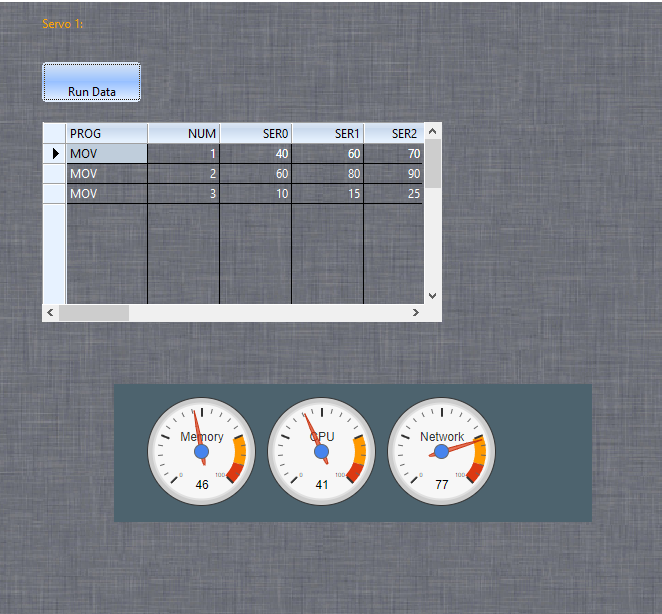
msginfo("I hope Mr. Antonio will be so kind to show the code to update the Xbrowse data and show them in the 3 gauges")
return NILYou can not mix FWH controls with TWebView
TWebView is just for HTML, etc
Keep them apart
Dear Marc,
I am coding it, please wait...
#include "FiveWin.ch"
#Define CLR_ORANGE nRGB( 255, 165, 000 )
extern dbfcdx
function Main()
local oDlg, oWebView, oBrush
local oBtn1, oPanel
DEFINE BRUSH oBrush FILE "..\bitmaps\backgrnd\iosbg.bmp"
DEFINE DIALOG oDlg SIZE 1200, 800 PIXEL TRUEPIXEL TITLE "Google charts" BRUSH oBrush
@ 1, 1 SAY " " OF oDlg SIZE 1400, 380 PIXEL COLORS CLR_ORANGE, CLR_WHITE TRANSPARENT UPDATE
@ 380, 1 SAY " " OF oDlg SIZE 470, 520 PIXEL COLORS CLR_ORANGE, CLR_WHITE TRANSPARENT UPDATE
@ 380, 950 SAY " " OF oDlg SIZE 700, 520 PIXEL COLORS CLR_ORANGE, CLR_WHITE TRANSPARENT UPDATE
@ 520, 1 SAY " " OF oDlg SIZE 1400, 900 PIXEL COLORS CLR_ORANGE, CLR_WHITE TRANSPARENT UPDATE
@ 15, 400 SAY "&Servo 1:" OF oDlg SIZE 100, 25 PIXEL COLORS CLR_ORANGE, CLR_WHITE TRANSPARENT UPDATE
@ 60, 400 BTNBMP oBtn1 OF oDlg SIZE 100, 40 NOBORDER PROMPT "Run Data" 2007 ;
ACTION oWebView:Eval( "Update( 50, 70, 90 );" )
@ 400, 300 PANEL oPanel OF oDlg SIZE 630, 230
RunXBrowser( oDlg )
ACTIVATE DIALOG oDlg CENTERED ;
ON INIT ( oWebView := TWebView():New(), oWebView:SetHtml( Html() ), oWebView:SetParent( oPanel ) ) ;
VALID ( oWebView:Terminate(), oWebView:Destroy(), .T. )
return nil
function Html()
local cHtml
TEXT INTO cHtml
<html>
<head>
<style>
body {
display: flex;
align-items: center;
justify-content: center;
height: 100vh;
background-color: #004e5766;
font-family: Arial, sans-serif;
margin: 0;
padding: 0;
}
.container {
max-width: 400px;
margin: 0 auto;
padding: 40px;
background-color: #FFFFFF; //00FFFFFF is not transparent
border-radius: 5px;
display: flex;
flex-direction: column;
align-items: center;
box-shadow: 0px 0px 44px rgba(0, 0, 0, 0.7) !important;
overflow:none !important;
}
body {
background-color: #4d636e;
}
</style>
<script type="text/javascript" src="https://www.gstatic.com/charts/loader.js"></script>
<script type="text/javascript">
google.charts.load('current', {'packages':['gauge']});
var options = {
width: 400, height: 120,
redFrom: 90, redTo: 100,
yellowFrom:75, yellowTo: 90,
minorTicks: 5
};
var chart;
var data;
google.charts.setOnLoadCallback(drawChart);
function drawChart() {
chart = new google.visualization.Gauge(document.getElementById('chart_div'));
data = google.visualization.arrayToDataTable([
['Label', 'Value'],
['Memory', 80],
['CPU', 55],
['Network', 68] ] );
chart.draw(data, options);
}
function Update( a, b, c ) {
data.setValue( 0, 1, a );
data.setValue( 1, 1, b );
data.setValue( 2, 1, c );
chart.draw( data, options );
}
</script>
</head>
<body background="c:\fwharb\samples\arduino2.jpg">
<div id="chart_div" style="width: 400px; height: 120px;"></div>
</body>
</html>
ENDTEXT
return cHtml
function runXbrowser(oDlg)
local oFont, oBrw, oData, oBrushBrw
DBCREATE( "TEST", { { "PROG", "C", 7, 0 } ;
, { "Num", "N", 5, 0 } ;
, { "SER0", "N", 5, 0 } ;
, { "SER1", "N", 5, 0 } ;
, { "SER2", "N", 5, 0 } ;
}, "DBFCDX", .T., "TST" )
FW_ArrayToDBF( { { "MOV",1,40,60,70 }, { "MOV",2,60,80,90 }, { "MOV",3,10,15,25 } } )
CLOSE TST
// Created
DEFINE BRUSH oBrushBrw COLOR RGB( 192, 192, 192 )
USE TEST SHARED NEW
DEFINE FONT oFont NAME "TAHOMA" SIZE 0,-14
@ 120,400 XBROWSE oBrw SIZE 400,200 PIXEL OF oDlg ;
DATASOURCE "TEST" COLUMNS "PROG", "NUM", "SER0", "SER1", "SER2" ;
HEADERS nil, nil, nil, nil, nil ;
COLSIZES 80, 70, 70, 70, 70 ;
CELL LINES NOBORDER TRANSPARENT
WITH OBJECT oBrw
:nStretchCol := 1
:nRowHeight := 20
:CreateFromCode()
END
WITH object oBrw:aCols[3]
:nEditType := EDIT_GET
:cEditPicture := "999"
:lAutoSave := .T.
end
return nil#include "FiveWin.ch"
#Define CLR_ORANGE nRGB( 255, 165, 000 )
extern dbfcdx
function Main()
local oDlg, oWebView, oBrush
local oBtn1, oBtn2, oBtn3, oPanel
DEFINE BRUSH oBrush FILE "..\bitmaps\backgrnd\iosbg.bmp"
DEFINE DIALOG oDlg SIZE 1200, 800 PIXEL TRUEPIXEL TITLE "Google charts" BRUSH oBrush
@ 15, 400 SAY "&Servo 1:" OF oDlg SIZE 130, 25 PIXEL COLORS CLR_ORANGE, CLR_WHITE TRANSPARENT UPDATE
@ 60, 400 BTNBMP oBtn1 OF oDlg SIZE 130, 40 NOBORDER PROMPT "Run Single Data" 2007 ;
ACTION oWebView:Eval( "Update( 50, 70, 90 );" )
@ 60, 600 BTNBMP oBtn2 OF oDlg SIZE 130, 40 NOBORDER PROMPT "Run XBrowse" 2007 ;
ACTION runxbrdata(oWebView)
@ 420, 350 PANEL oPanel OF oDlg SIZE 500, 200
RunXBrowser( oDlg )
ACTIVATE DIALOG oDlg CENTERED ;
ON INIT ( oWebView := TWebView():New(), oWebView:SetHtml( Html() ), oWebView:SetParent( oPanel ) ) ;
VALID ( oWebView:Terminate(), oWebView:Destroy(), .T. )
return nil
function Html()
local cHtml
TEXT INTO cHtml
<html>
<head>
<style>
body {
display: flex;
align-items: center;
justify-content: center;
height: 100vh;
background-color: #004e5766;
font-family: Arial, sans-serif;
margin: 0;
padding: 0;
}
.container {
max-width: 400px;
margin: 0 auto;
padding: 40px;
background-color: #FFFFFF; //00FFFFFF is not transparent
border-radius: 5px;
display: flex;
flex-direction: column;
align-items: center;
box-shadow: 0px 0px 44px rgba(0, 0, 0, 0.7) !important;
overflow:none !important;
}
body {
background-color: #4d636e;
}
</style>
<script type="text/javascript" src="https://www.gstatic.com/charts/loader.js"></script>
<script type="text/javascript">
google.charts.load('current', {'packages':['gauge']});
var options = {
width: 400, height: 120,
redFrom: 90, redTo: 100,
yellowFrom:75, yellowTo: 90,
minorTicks: 5
};
var chart;
var data;
google.charts.setOnLoadCallback(drawChart);
function drawChart() {
chart = new google.visualization.Gauge(document.getElementById('chart_div'));
data = google.visualization.arrayToDataTable([
['Label', 'Value'],
['Memory', 80],
['CPU', 55],
['Network', 68] ] );
chart.draw(data, options);
}
function Update( a, b, c ) {
data.setValue( 0, 1, a );
data.setValue( 1, 1, b );
data.setValue( 2, 1, c );
chart.draw( data, options );
}
</script>
</head>
<body background="c:\fwharb\samples\arduino2.jpg">
<div id="chart_div" style="width: 400px; height: 120px;"></div>
</body>
</html>
ENDTEXT
return cHtml
function runXbrowser(oDlg)
local oFont, oBrw, oData, oBrushBrw
DBCREATE( "TEST", { { "PROG", "C", 7, 0 } ;
, { "Num", "N", 5, 0 } ;
, { "SER0", "N", 5, 0 } ;
, { "SER1", "N", 5, 0 } ;
, { "SER2", "N", 5, 0 } ;
}, "DBFCDX", .T., "TST" )
FW_ArrayToDBF( { { "MOV",1,40,60,70 }, { "MOV",2,60,80,90 }, { "MOV",3,10,15,25 } } )
CLOSE TST
// Created
DEFINE BRUSH oBrushBrw COLOR RGB( 192, 192, 192 )
USE TEST SHARED NEW
DEFINE FONT oFont NAME "TAHOMA" SIZE 0,-14
@ 120,400 XBROWSE oBrw SIZE 400,200 PIXEL OF oDlg ;
DATASOURCE "TEST" COLUMNS "PROG", "NUM", "SER0", "SER1", "SER2" ;
HEADERS nil, nil, nil, nil, nil ;
COLSIZES 80, 70, 70, 70, 70 ;
CELL LINES NOBORDER TRANSPARENT
WITH OBJECT oBrw
:nStretchCol := 1
:nRowHeight := 20
:CreateFromCode()
END
WITH object oBrw:aCols[3]
:nEditType := EDIT_GET
:cEditPicture := "999"
:lAutoSave := .T.
end
return nil
function runxbrdata(oWebView)
local cData
test->(dbgotop())
do while !test->(eof())
cData = 'Update( '+str(test->ser0,2)+','+str(test->ser1,2)+','+str(test->ser2,2)+')'
oWebView:Eval( cData )
test->(dbskip())
sleep(3000)
enddo
test->(dbgotop())
return NILDear Mark,
well done!
Another way is updating after editing a xbrowse cell. If you let me know what cells will keep the values then we can do it also.
I am emailing you an updated webview DLLs that fix the resolution change. Please try them, thank you
I put the dll's in de sample folder where they are now, but I don't see the difference of the problem before with resolution.
For the Xbrowse :
PROG = Arduino program item
MOV = Move servo motor
TMP = Temperature sensor value
NUM = Program number (steps 1 to xxx that the robot is doing) cronologic sequence
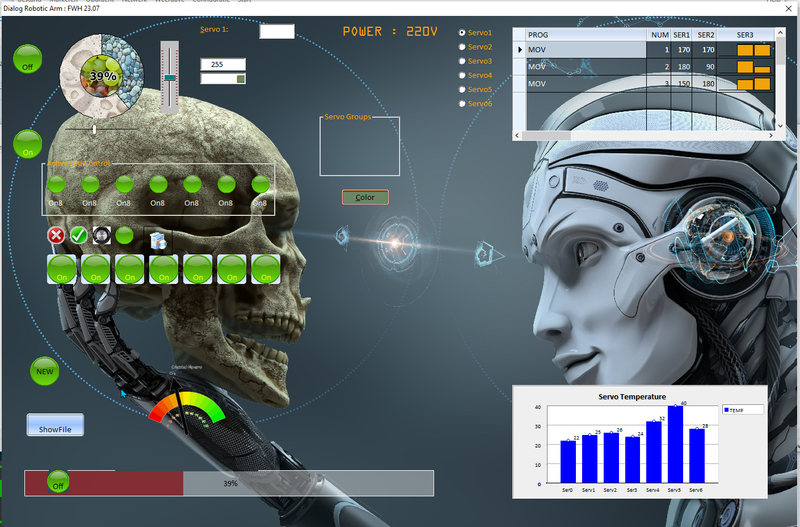
SER0 - SER2 (will be ser 5) are the 6 servo's values and the values that the gauges will show. For testing now 3 are used.
later on, the xbrowse will containe server input data from arduino, all specified with a PROG ID and a field like
SER0, SER1,... TMP1, TMP2,... AIR1,AIR2,....
One of the first thing however will be to get the program running in a FOLDEREX
Folder1 = current dialog
Folder2 = Settings (build later)
....
Antonio Linares wrote:You can not mix FWH controls with TWebViewIsn't this what we are doing now ? of do you mean something else ?
TWebView is just for HTML, etc
Keep them apart