FiveTech Support Forums

FiveWin / Harbour / xBase community
Board index FiveWin for Harbour/xHarbour Controls behave different in Window as in Dialog
Posts: 1487
Joined: Tue Jun 14, 2016 07:51 AM
Controls behave different in Window as in Dialog
Posted: Sat Feb 24, 2024 08:32 PM
I noticed that many controls behave different in Windows oWnd as dialogs oDlg. Why is that ?

Exact the same code, just this option :
Code (fw): Select all Collapse
if cRun = "Dialog"
  ACTIVATE DIALOG oMain CENTERED ;
  ON INIT ( oWebView := TWebView():New(), oWebView:SetHtml( Html() ), oWebView:SetParent( oPanel ) ) ;
  VALID ( oWebView:Terminate(), oWebView:Destroy(), .T. )
else
  ACTIVATE WINDOW oMain ON INIT OTimer:Activate() //;
      //ON PAINT oMain:DrawImage( "arduino2.jpg" ) CENTER
endif

If you ask what is the intention of this ? I'm preparing controls for a Robot dashboard and looking for controls that look nice )))

It seems that I best use a Dialog as Dashboard setup. AGree ??

WIndows :

Top left : Windows shows cam view, dialog not
Transparent on windows is much less in several options
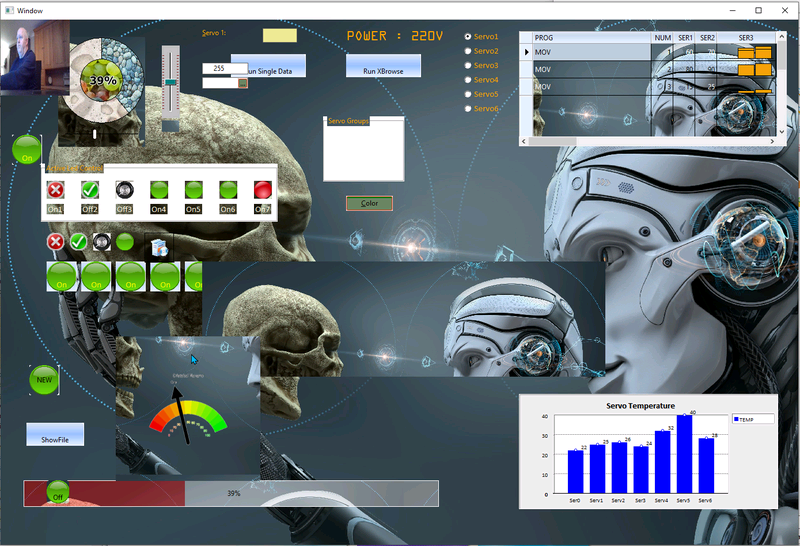


Dialog :
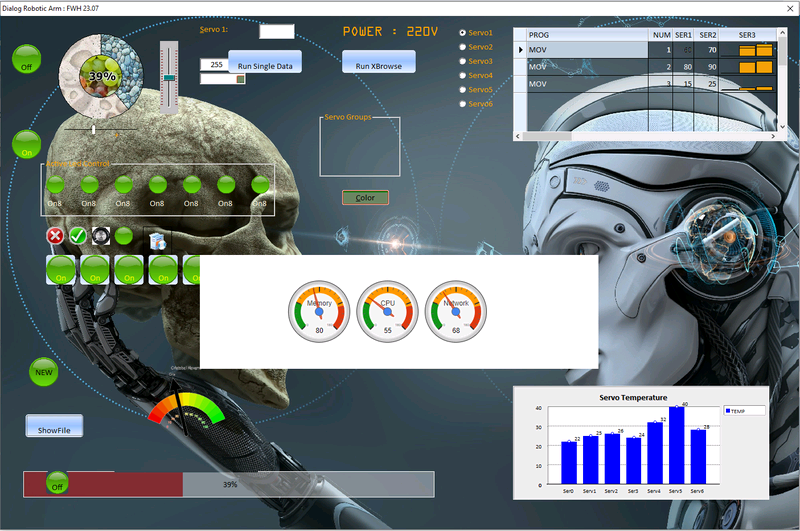
Marc Venken

Using: FWH 23.08 with Harbour
Posts: 44158
Joined: Thu Oct 06, 2005 05:47 PM
Re: Controls behave different in Window as in Dialog
Posted: Sat Feb 24, 2024 09:35 PM

Dear Marc,

Windows uses different code procedures to manage windows and dialogs, thus the differences.

We try to make them behave the same but there may be differences as the ones that you have spotted.

How are you showing the cam view ? Please post the code so we can review it, thanks

regards, saludos

Antonio Linares
www.fivetechsoft.com
Posts: 1487
Joined: Tue Jun 14, 2016 07:51 AM
Re: Controls behave different in Window as in Dialog
Posted: Sat Feb 24, 2024 11:12 PM
It is code for testing :wink:

The webcam screen can be bigger, but it will always go to the left top position
The idea is to use a webcam/camera with USB on top of the Robotarm.
In case of Dialog, I get a error : Error Twebcam, Load driver error, Check webcam connection.
In case of Window it is shown.
At this moment the webcam is the buildin one from the laptop.

I can send you the testing program but it is all cut and past parts from the forum, but working like first post. Once cleaned it could be a interesting sample for the sample dir.
It runs now also from the sample dir with

buildh.bat I just needed to add 1 lib : echo %hdirl%\googlefwh.lib + >> b32.bc

Code (fw): Select all Collapse
#include "WebCam.ch"

Public oMain

//  The Dialog/Window testing is done because I can't get all controls transparent on dialog or window 

if cRun = "Dialog"

DEFINE DIALOG oMain SIZE 1400,900 PIXEL TRUEPIXEL ;
  FONT oFont BRUSH oBrush ;
  TITLE "Dialog Robotic Arm : " + FWVERSION
else
  DEFINE WINDOW oMain FROM 50 , 100 TO 1000 , 1500 PIXEL TITLE "Window" BRUSH oBrush
endif

//  Code for all kind of code that you see above

RunWebcam(oMain)  //  oMain can be the  Dialog or Window like above

if cRun = "Dialog"
  ACTIVATE DIALOG oMain CENTERED ;
  ON INIT ( oWebView := TWebView():New(), oWebView:SetHtml( Html() ), oWebView:SetParent( oPanel ) ) ;
  VALID ( oWebView:Terminate(), oWebView:Destroy(), .T. )
else
  ACTIVATE WINDOW oMain ;
  ON INIT ( oWebView := TWebView():New(), oWebView:SetHtml( Html() ), oWebView:SetParent( oPanel ) ) ;
  VALID ( oWebView:Terminate(), oWebView:Destroy(), OTimer:Activate(), .T. )
endif


function runWebCam(oMain)
   Local oWebCam
   local hBmp
   @ 12, 45 WEBCAM oWebCam SIZE 75, 120 OF oMain START ADJUST RATE 66
   oWebCam:bLClicked = {|| MsgInfo( "Position can not be moved") }
Return Nil
Marc Venken

Using: FWH 23.08 with Harbour

Continue the discussion