FiveTech Support Forums

FiveWin / Harbour / xBase community
Board index FiveWin for Harbour/xHarbour To Nageswrao Del Objs on TscrollPanel
Posts: 7317
Joined: Thu Oct 18, 2012 07:17 PM
To Nageswrao Del Objs on TscrollPanel
Posted: Mon Feb 26, 2024 12:57 PM


Nages,

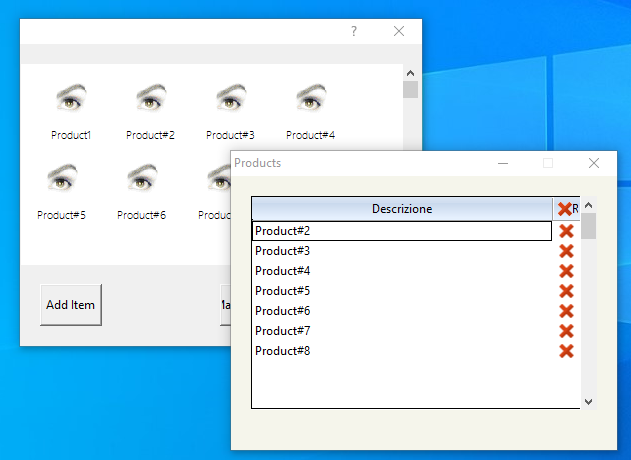
I create a Scroll Panel with some Objs and save the obj on adata array

To manage open a Xbrowse with aData

I wish erase the obj on TscrollPanel When Click (SetCheck) on one items on xbrowse except product number 1

and del item on adata and refresh the oBrw

how I can resolve ?

I Tried with ( but run bad)

FOR i := 1 TO LEN(oBrw:aCols)
oCol := oBrw:aCols[ i ]
oCol:bLDClickData := { || Erase_Items(oBrw,oPanel) }
NEXT

Function Erase_Items(oBrw,oPanel)
local nItem:= oBrw:aArrayData[ oBrw:nArrayAt ][2]
aDel(oBrw:aArraydata,nItem-1)
// xbrowser oBrw:aArraydata
oPanel:aControls[nItem]:destroy()
oBrw:refresh()
oPanel:refresh()
return nil


Code (fw): Select all Collapse
 Function Manage_Items(aData,oBrowse)
    local oDlg
   local oBar
   local oFont
   local oBold
   local nWd  := GetSysMetrics(0) * .30
   local nHt  := (GetSysMetrics(1) / 3.5 ) -20
   local oBtn := array(3)
   local aBmp:= {" ","elimina.bmp"}
   local aCols    := {}


     For n= 1 to Len(aData)
        If  !aData[n][5]
           else
          AAdd( aCols, {aData[n][1],n,!aData[n][5]})
       Endif
     Next

   DEFINE DIALOG oDlg SIZE nWd, nHt PIXEL ;   //TRUEPIXEL
       TITLE  "Products" ;
       FONT oFont   COLOR CLR_BLACK, RGB( 245,245,235)  ;
       STYLE nOR( DS_MODALFRAME, WS_POPUP, WS_CAPTION, WS_SYSMENU, ;
                  WS_MINIMIZEBOX)


    @ 10,10 XBROWSE oBrw SIZE -10,-20 PIXEL OF oDlg ;
          DATASOURCE aCols ;
          COLUMNS 1,3 ;
          HEADERS "Descrizione","R" ;
          COLSIZES 300, 40 ;
           NOBORDER  FONT oFONT

        WITH OBJECT oBrw
            :lHScroll:=.f.
            :lRecordSelector:= .F.
            :lDrawBorder := .t.

          WITH OBJECT :aCols[ 2]
             :SetCheck(aBmp, .t. )
             :nHeadBmpNo    := 2
          END
          :CreateFromCode()
       END

      ACTIVATE DIALOG oDlg CENTERED
    RETURN NIL
Since from 1991/1992 ( fw for clipper Rel. 14.4 - Momos)

I use : FiveWin for Harbour March-April 2024 - Harbour 3.2.0dev (harbour_bcc770_32_20240309) - Bcc7.70 - xMate ver. 1.15.3 - PellesC - mail: silvio[dot]falconi[at]gmail[dot]com
Posts: 10733
Joined: Sun Nov 19, 2006 05:22 AM
Re: To Nageswrao Del Objs on TscrollPanel
Posted: Tue Feb 27, 2024 12:28 PM
To delete nth control of a Panel/dialog/window
Code (fw): Select all Collapse
oPanel:aControls[ n ]:End()
HB_ADel( oPanel:aControls[ n ], n, .t. )
To delete current row in XBrowse ( applies to arrays, dbf, ado or any data source)
Code (fw): Select all Collapse
oBrw:Delete()
oBrw:Refresh()
This code:
Code (fw): Select all Collapse
FOR i := 1 TO LEN(oBrw:aCols)
oCol := oBrw:aCols[ i ]
oCol:bLDClickData := { || Erase_Items(oBrw,oPanel) }
NEXT
can be written as:
Code (fw): Select all Collapse
oBrw:bLDClickDatas :=  { || Erase_Items(oBrw,oPanel) }
Regards


G. N. Rao.

Hyderabad, India
Posts: 7317
Joined: Thu Oct 18, 2012 07:17 PM
Re: To Nageswrao Del Objs on TscrollPanel
Posted: Wed Feb 28, 2024 08:09 AM
nageswaragunupudi wrote:To delete nth control of a Panel/dialog/window
Code (fw): Select all Collapse
oPanel:aControls[ n ]:End()
HB_ADel( oPanel:aControls[ n ], n, .t. )
To delete current row in XBrowse ( applies to arrays, dbf, ado or any data source)
Code (fw): Select all Collapse
oBrw:Delete()
oBrw:Refresh()
This code:
Code (fw): Select all Collapse
FOR i := 1 TO LEN(oBrw:aCols)
oCol := oBrw:aCols[ i ]
oCol:bLDClickData := { || Erase_Items(oBrw,oPanel) }
NEXT
can be written as:
Code (fw): Select all Collapse
oBrw:bLDClickDatas :=  { || Erase_Items(oBrw,oPanel) }


Mr Rao

this del the record on Browse but on Panel there are also the btnbmp (oBj)
Code (fw): Select all Collapse
Function Erase_Items(oBrw,oPanel)
   local  nItem:=  oBrw:aArrayData[ oBrw:nArrayAt ][2]

   oBrw:Delete()
   oBrw:Refresh()

        oPanel:aControls[ nItem ]:End()
        HB_ADel( oPanel:aControls[ nItem ], nItem, .t. )

        oPanel:refresh()

   return nil


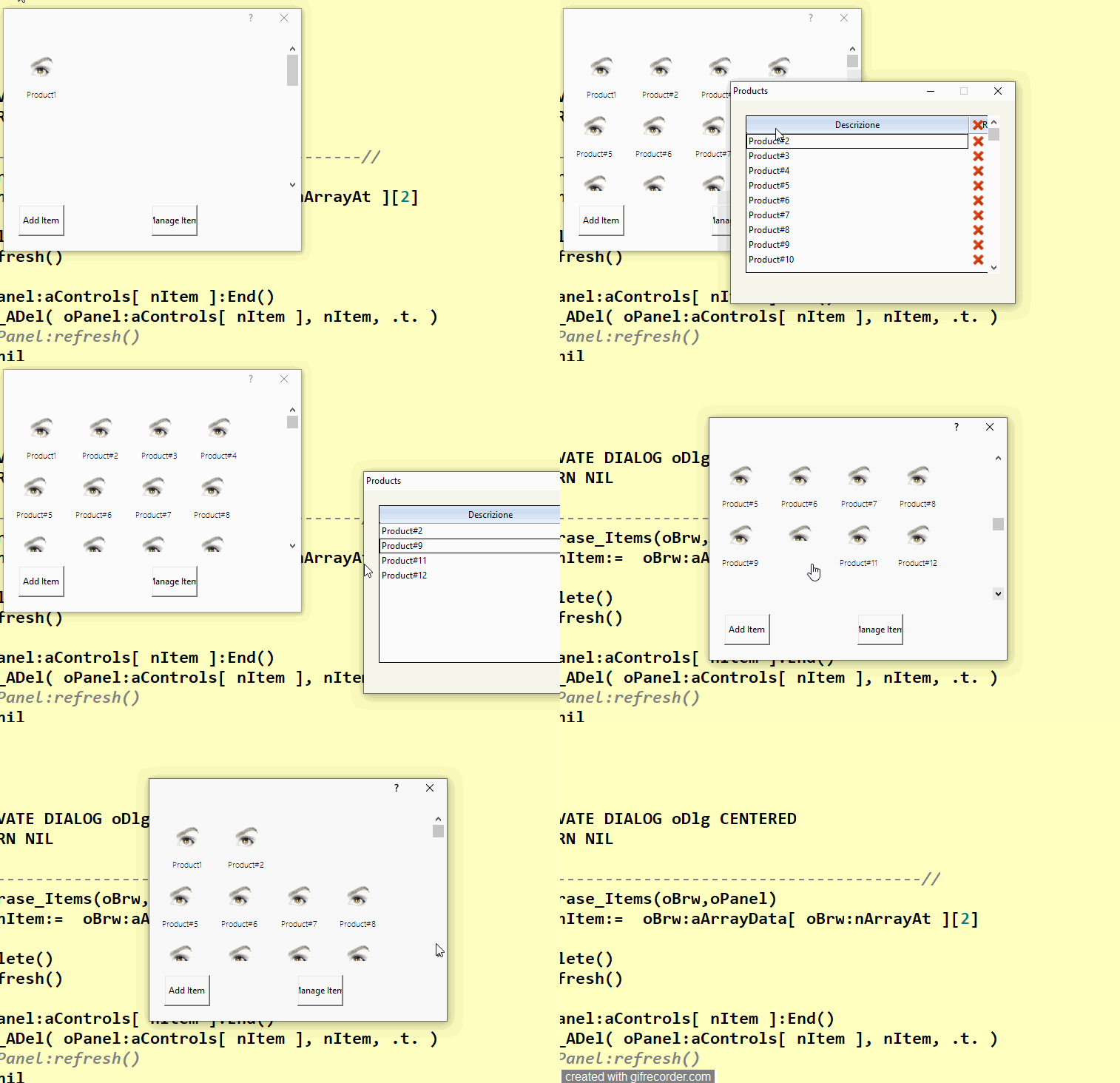
the btnbmps there are also on Panel scroll as you can see on Video

I tried with

oPanel:CheckResize() and oPanel:Setrange()

I see allway the box

Since from 1991/1992 ( fw for clipper Rel. 14.4 - Momos)

I use : FiveWin for Harbour March-April 2024 - Harbour 3.2.0dev (harbour_bcc770_32_20240309) - Bcc7.70 - xMate ver. 1.15.3 - PellesC - mail: silvio[dot]falconi[at]gmail[dot]com
Posts: 7317
Joined: Thu Oct 18, 2012 07:17 PM
Re: To Nageswrao Del Objs on TscrollPanel
Posted: Thu Feb 29, 2024 08:50 AM
Nages

oPanel:aControls[ nItem ]:End()
HB_ADel( oPanel:aControls[ nItem ], nItem, .t. )
ASize( oPanel:aControls, Len( oPanel:aControls ) )
oPanel:SetRange()
oPanel:refresh()


I saw on oPanel:aControls there are also the records


also if I make ASize( oPanel:aControls, Len( oPanel:aControls ) -1 ) then not refresh the panel


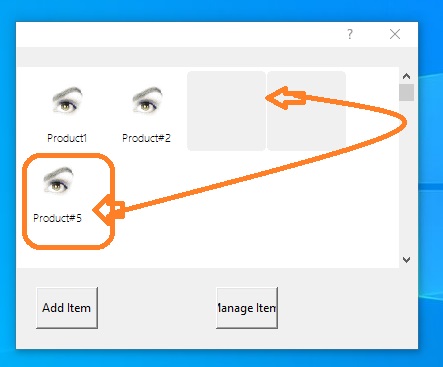
if there are any deleted objects the btnbmp should reposition themselves


if I delete products 3 and 4, product number 5 must be positioned after product 2

How I can resolve it ?
Since from 1991/1992 ( fw for clipper Rel. 14.4 - Momos)

I use : FiveWin for Harbour March-April 2024 - Harbour 3.2.0dev (harbour_bcc770_32_20240309) - Bcc7.70 - xMate ver. 1.15.3 - PellesC - mail: silvio[dot]falconi[at]gmail[dot]com
Posts: 10733
Joined: Sun Nov 19, 2006 05:22 AM
Re: To Nageswrao Del Objs on TscrollPanel
Posted: Mon Mar 04, 2024 07:12 AM
Code (fw): Select all Collapse
function DeleteControl( oPanel, nItem )

   local nTop, nLeft
   
   for n := Len( oPanel:aControls ) to nItem + 1 STEP -1
      oPanel:aControls[ n ]:nTop := oPanel:aControls[ n - 1 ]:nTop
      oPanel:aControls[ n ]:nLeft:= oPanel:aControls[ n - 1 ]:nLeft
   next
   oPanel:aControls[ nItem ]:End()
   HB_ADel( oPanel:aControls, nItem, .t. )
   oPanel:Refresh()
      
return nil
Regards


G. N. Rao.

Hyderabad, India
Posts: 7317
Joined: Thu Oct 18, 2012 07:17 PM
Re: To Nageswrao Del Objs on TscrollPanel
Posted: Mon Mar 04, 2024 08:33 AM
nageswaragunupudi wrote:
Code (fw): Select all Collapse
function DeleteControl( oPanel, nItem )

   local nTop, nLeft
   
   for n := Len( oPanel:aControls ) to nItem + 1 STEP -1
      oPanel:aControls[ n ]:nTop := oPanel:aControls[ n - 1 ]:nTop
      oPanel:aControls[ n ]:nLeft:= oPanel:aControls[ n - 1 ]:nLeft
   next
   oPanel:aControls[ nItem ]:End()
   HB_ADel( oPanel:aControls, nItem, .t. )
   oPanel:Refresh()
      
return nil
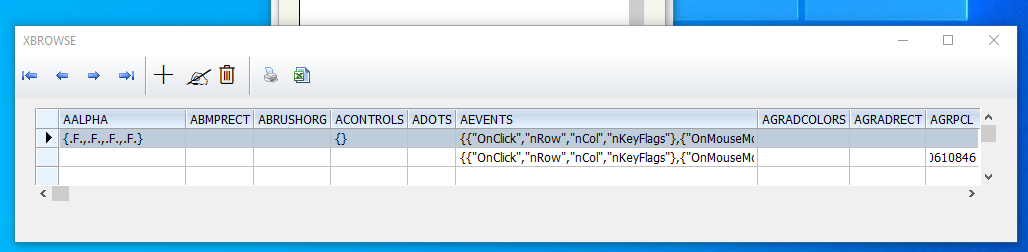
Sorry Nages,
but not erase the btnbmp on Panelscroll

I made

//I want erase only from second column of oBrw
oCol := oBrw:aCols[ 2 ]
oCol:bLDClickData := { || Erase_Items(oBrw,oPanel) }


Function Erase_Items(oBrw,oPanel,aData,oDlg,oFontSmall)
local nItem:= oBrw:aArrayData[ oBrw:nArrayAt ][2]

oBrw:Delete()
oBrw:Refresh()

DeleteControl( oPanel, nItem )

return nil

function DeleteControl( oPanel, nItem )

local nTop, nLeft

for n := Len( oPanel:aControls ) to nItem + 1 STEP -1
oPanel:aControls[ n ]:nTop := oPanel:aControls[ n - 1 ]:nTop
oPanel:aControls[ n ]:nLeft:= oPanel:aControls[ n - 1 ]:nLeft
next
oPanel:aControls[ nItem ]:End()
HB_ADel( oPanel:aControls, nItem, .t. )
oPanel:Refresh()

return nil
Since from 1991/1992 ( fw for clipper Rel. 14.4 - Momos)

I use : FiveWin for Harbour March-April 2024 - Harbour 3.2.0dev (harbour_bcc770_32_20240309) - Bcc7.70 - xMate ver. 1.15.3 - PellesC - mail: silvio[dot]falconi[at]gmail[dot]com
Posts: 7317
Joined: Thu Oct 18, 2012 07:17 PM
Re: To Nageswrao Del Objs on TscrollPanel
Posted: Mon Mar 04, 2024 10:06 AM
Not run ok

Since from 1991/1992 ( fw for clipper Rel. 14.4 - Momos)

I use : FiveWin for Harbour March-April 2024 - Harbour 3.2.0dev (harbour_bcc770_32_20240309) - Bcc7.70 - xMate ver. 1.15.3 - PellesC - mail: silvio[dot]falconi[at]gmail[dot]com
Posts: 10733
Joined: Sun Nov 19, 2006 05:22 AM
Re: To Nageswrao Del Objs on TscrollPanel
Posted: Mon Mar 04, 2024 12:57 PM

Let me check

Regards


G. N. Rao.

Hyderabad, India
Posts: 10733
Joined: Sun Nov 19, 2006 05:22 AM
Re: To Nageswrao Del Objs on TscrollPanel
Posted: Mon Mar 04, 2024 01:19 PM
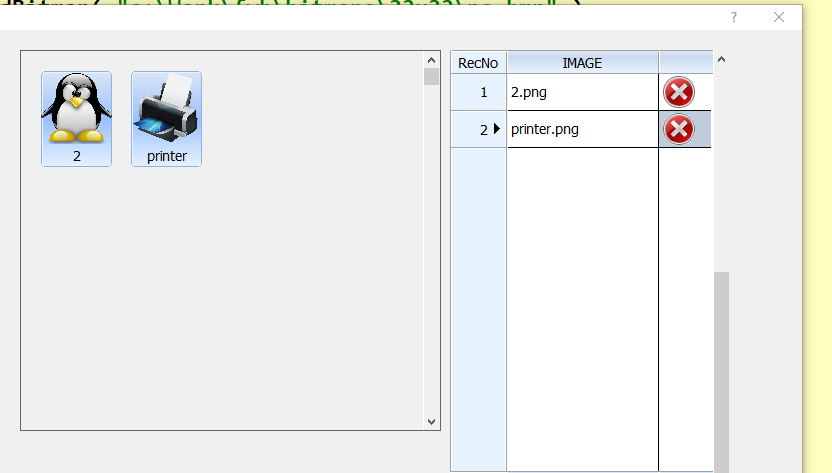
This is working perfectly for me
Code (fw): Select all Collapse
#include "fivewin.ch"

static cFolder := "c:\fwh\bitmaps\pngs\"

function Main()

   local oDlg, oFont, oPanel, oBrw
   local aImages

   aImages  := DIRECTORY( cFolder + "*.png" )

   DEFINE FONT oFont NAME "TAHOMA" SIZE 0,-14
   DEFINE DIALOG oDlg SIZE 800,500 PIXEL TRUEPIXEL FONT oFont

   @ 20,450 XBROWSE oBrw SIZE 280,-20 PIXEL OF oDlg ;
      DATASOURCE aImages COLUMNS 1,{ || " " } ;
      HEADERS "IMAGE", " " ;
      CELL LINES NOBORDER FOOTERS

   WITH OBJECT oBrw
      :nStretchCol   := 1
      :RecSelShowRecNo()
      WITH OBJECT :aCols[ 2 ]
         :AddBitmap( "c:\fwh\bitmaps\32x32\no.bmp" )
         :bBmpData := { || 1 }
         :bLDClickData  := { || DelImage( oBrw, oPanel ) }
      END
      :CreateFromCode()
   END

   ACTIVATE DIALOG oDlg CENTERED ;
      ON INIT ( oPanel := BuildPanel( oDlg, aImages ) )

   RELEASE FONT oFont

return nil

static function BuildPanel( oDlg, aImages )

   local oPanel, img
   local nRow  := 20
   local nCol  := 20

   oPanel := TScrollPanel():New( 20, 20, 400, 440, oDlg )

   for each img in aImages
      CreateBtn( oPanel, img, @nRow, @nCol )
   next

   oPanel:SetRange()

return oPanel

static function CreateBtn( oPanel, aImg, nRow, nCol )

   @ nRow, nCol BTNBMP PROMPT cFileNoExt( aImg[ 1 ] ) ;
      FILE cFolder + aImg[ 1 ] ;
      SIZE 72,96 PIXEL OF oPanel 2007

   if nCol > 200
      nRow  += 100
      nCol  :=  20
   else
      nCol  += 90
   endif

return nil

static function DelImage( oBrw, oPanel )

   local nItem    := oBrw:nArrayAt

   if DeleteControl( oPanel, nItem )
      oBrw:Delete()
      oBrw:Refresh()
   endif

return nil

static function DeleteControl( oPanel, nItem )

   local nTop, nLeft, nLen, n

   if ( nLen := Len( oPanel:aControls ) ) == 1 .or. nItem == nLen
      return .f.
   endif

   for n := nLen to nItem + 1 STEP -1
      oPanel:aControls[ n ]:nTop := oPanel:aControls[ n - 1 ]:nTop
      oPanel:aControls[ n ]:nLeft:= oPanel:aControls[ n - 1 ]:nLeft
   next
   oPanel:aControls[ nItem ]:End()
   HB_ADel( oPanel:aControls, nItem, .t. )
   oPanel:Refresh()

return .t.
Regards


G. N. Rao.

Hyderabad, India
Posts: 7317
Joined: Thu Oct 18, 2012 07:17 PM
Re: To Nageswrao Del Objs on TscrollPanel
Posted: Mon Mar 04, 2024 09:13 PM
nageswaragunupudi wrote:This is working perfectly for me
Code (fw): Select all Collapse
#include "fivewin.ch"

static cFolder := "c:\fwh\bitmaps\pngs\"

function Main()

   local oDlg, oFont, oPanel, oBrw
   local aImages

   aImages  := DIRECTORY( cFolder + "*.png" )

   DEFINE FONT oFont NAME "TAHOMA" SIZE 0,-14
   DEFINE DIALOG oDlg SIZE 800,500 PIXEL TRUEPIXEL FONT oFont

   @ 20,450 XBROWSE oBrw SIZE 280,-20 PIXEL OF oDlg ;
      DATASOURCE aImages COLUMNS 1,{ || " " } ;
      HEADERS "IMAGE", " " ;
      CELL LINES NOBORDER FOOTERS

   WITH OBJECT oBrw
      :nStretchCol   := 1
      :RecSelShowRecNo()
      WITH OBJECT :aCols[ 2 ]
         :AddBitmap( "c:\fwh\bitmaps\32x32\no.bmp" )
         :bBmpData := { || 1 }
         :bLDClickData  := { || DelImage( oBrw, oPanel ) }
      END
      :CreateFromCode()
   END

   ACTIVATE DIALOG oDlg CENTERED ;
      ON INIT ( oPanel := BuildPanel( oDlg, aImages ) )

   RELEASE FONT oFont

return nil

static function BuildPanel( oDlg, aImages )

   local oPanel, img
   local nRow  := 20
   local nCol  := 20

   oPanel := TScrollPanel():New( 20, 20, 400, 440, oDlg )

   for each img in aImages
      CreateBtn( oPanel, img, @nRow, @nCol )
   next

   oPanel:SetRange()

return oPanel

static function CreateBtn( oPanel, aImg, nRow, nCol )

   @ nRow, nCol BTNBMP PROMPT cFileNoExt( aImg[ 1 ] ) ;
      FILE cFolder + aImg[ 1 ] ;
      SIZE 72,96 PIXEL OF oPanel 2007

   if nCol > 200
      nRow  += 100
      nCol  :=  20
   else
      nCol  += 90
   endif

return nil

static function DelImage( oBrw, oPanel )

   local nItem    := oBrw:nArrayAt

   if DeleteControl( oPanel, nItem )
      oBrw:Delete()
      oBrw:Refresh()
   endif

return nil

static function DeleteControl( oPanel, nItem )

   local nTop, nLeft, nLen, n

   if ( nLen := Len( oPanel:aControls ) ) == 1 .or. nItem == nLen
      return .f.
   endif

   for n := nLen to nItem + 1 STEP -1
      oPanel:aControls[ n ]:nTop := oPanel:aControls[ n - 1 ]:nTop
      oPanel:aControls[ n ]:nLeft:= oPanel:aControls[ n - 1 ]:nLeft
   next
   oPanel:aControls[ nItem ]:End()
   HB_ADel( oPanel:aControls, nItem, .t. )
   oPanel:Refresh()

return .t.


Of Course your test run ok But

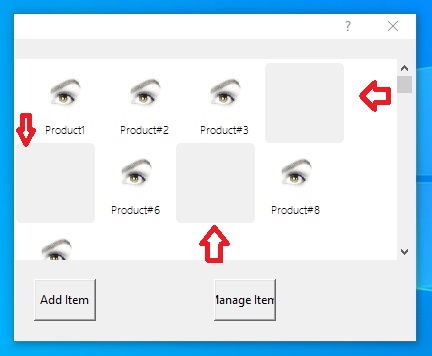
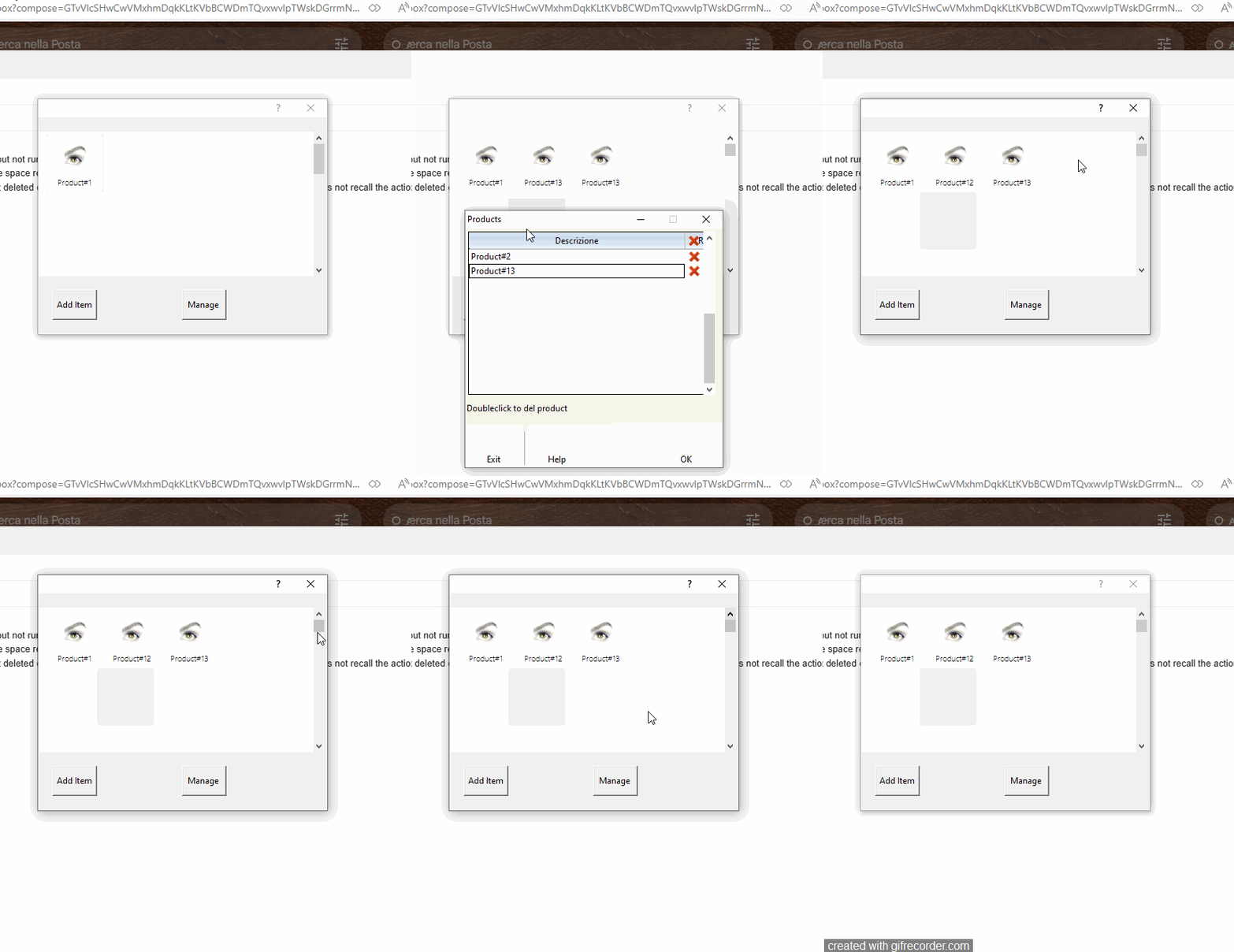
I tried to erase all buttons except one , then I press the scrollbar of panel scroll and I had this


when I had only two buttons I cannot delete printer button


then I have another situation
the final user can insert items directly on tpanel, only on another dialog can delete the btnbmp
these items are quick links to recall some application procedures, so each btnbmp is associated with an action to a Function.
the final user can insert items from a Menu popup as this
Code (fw): Select all Collapse
MENU oMenu POPUP
     MENUITEM "Procedure1"   ;
       ACTION   CreateBtn( oPanel, "C:\work\fwh\bitmaps\pngs\image1.PNG", @nRow, @nCol,"Procedure1",{||Dummy1()} )
     MENUITEM "Procedure2"   ;
       ACTION   CreateBtn( oPanel, "C:\work\fwh\bitmaps\pngs\image2.PNG", @nRow, @nCol,"Procedure2",{||Dummy1()} )
     ENDMENU
   ACTIVATE POPUP oMenu WINDOW oPanel AT 0, 0
Since from 1991/1992 ( fw for clipper Rel. 14.4 - Momos)

I use : FiveWin for Harbour March-April 2024 - Harbour 3.2.0dev (harbour_bcc770_32_20240309) - Bcc7.70 - xMate ver. 1.15.3 - PellesC - mail: silvio[dot]falconi[at]gmail[dot]com
Posts: 10733
Joined: Sun Nov 19, 2006 05:22 AM
Re: To Nageswrao Del Objs on TscrollPanel
Posted: Tue Mar 05, 2024 02:37 AM
when I had only two buttons I cannot delete printer button
Yes. The function I provided does not allow the last control to be deleted.
Regards


G. N. Rao.

Hyderabad, India
Posts: 7317
Joined: Thu Oct 18, 2012 07:17 PM
Re: To Nageswrao Del Objs on TscrollPanel
Posted: Tue Mar 05, 2024 08:36 AM
nageswaragunupudi wrote:
when I had only two buttons I cannot delete printer button
Yes. The function I provided does not allow the last control to be deleted.
Yes. I understood.

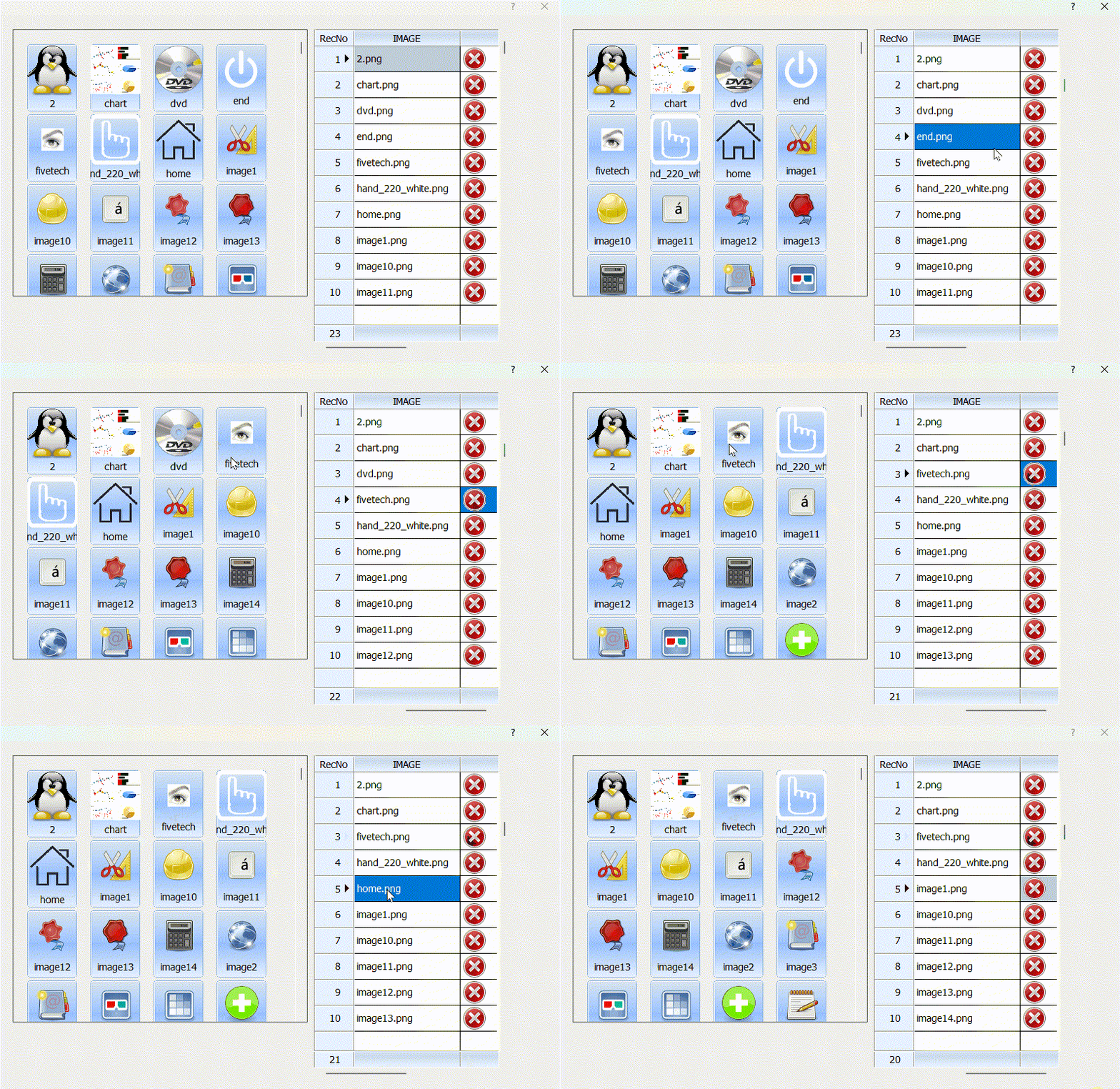
Do have you tried deleting all the btnbmps and moving the scrollbar?

It makes this mistake for me

Since from 1991/1992 ( fw for clipper Rel. 14.4 - Momos)

I use : FiveWin for Harbour March-April 2024 - Harbour 3.2.0dev (harbour_bcc770_32_20240309) - Bcc7.70 - xMate ver. 1.15.3 - PellesC - mail: silvio[dot]falconi[at]gmail[dot]com
Posts: 10733
Joined: Sun Nov 19, 2006 05:22 AM
Re: To Nageswrao Del Objs on TscrollPanel
Posted: Tue Mar 05, 2024 11:44 AM

I see the problem. Thanks.

Let me fix it

Regards


G. N. Rao.

Hyderabad, India
Posts: 7317
Joined: Thu Oct 18, 2012 07:17 PM
Re: To Nageswrao Del Objs on TscrollPanel
Posted: Tue Mar 05, 2024 12:10 PM
nageswaragunupudi wrote:I see the problem. Thanks.
Let me fix it

Nages,
I need to save the buttons in the archive (links.dbf) because the application must display the buttons at other times when the application is used by users
I sent a test
Since from 1991/1992 ( fw for clipper Rel. 14.4 - Momos)

I use : FiveWin for Harbour March-April 2024 - Harbour 3.2.0dev (harbour_bcc770_32_20240309) - Bcc7.70 - xMate ver. 1.15.3 - PellesC - mail: silvio[dot]falconi[at]gmail[dot]com
Posts: 10733
Joined: Sun Nov 19, 2006 05:22 AM
Re: To Nageswrao Del Objs on TscrollPanel
Posted: Tue Mar 05, 2024 12:33 PM
nageswaragunupudi wrote:I see the problem. Thanks.
Let me fix it
Please try this function instead
Code (fw): Select all Collapse
static function DeleteControl( oPanel, nItem )

   local nTop, nLeft, nLen, n

   if ( nLen := Len( oPanel:aControls ) ) == 1 .or. nItem == nLen
      return .f.
   endif

   for n := nLen to nItem + 1 STEP -1
      oPanel:aControls[ n ]:nTop := oPanel:aControls[ n - 1 ]:nTop
      oPanel:aControls[ n ]:nLeft:= oPanel:aControls[ n - 1 ]:nLeft
   next
   oPanel:aControls[ nItem ]:End()
   HB_ADel( oPanel:aControls, nItem, .t. )

   WITH OBJECT oPanel
      n  := :nPos
      :GoTop()
      :SetRange()
      :GoToPos( MIN( n, oPanel:nScrollRange ) )
      :Refresh()
   END

return .t.
We'll look into other issues later
Regards


G. N. Rao.

Hyderabad, India