FiveTech Support Forums

FiveWin / Harbour / xBase community
Board index FiveWin for Harbour/xHarbour How to put a horizontal scroll bar at the bottom of xBrowse
Posts: 2706
Joined: Fri Oct 07, 2005 01:50 PM
How to put a horizontal scroll bar at the bottom of xBrowse
Posted: Tue Mar 05, 2024 03:23 PM

To All

I have a client who wants extra large fonts and I was looking for a way to put a bottom horizontal scroll bar at the bottom of an xBrowse ??

Thanks

Rick Lipkin

Posts: 1487
Joined: Tue Jun 14, 2016 07:51 AM
Re: How to put a horizontal scroll bar at the bottom of xBrowse
Posted: Tue Mar 05, 2024 07:47 PM

Hey Rick,

Do you want a extra hor.scroll bar ? Not seen on the forum yet.

For the standart :

oBrw:nRowHeight := 40 // and use a larger font

oBrw:lHScroll := .T.

but I think you are looking for something else ...

Marc Venken

Using: FWH 23.08 with Harbour
Posts: 2706
Joined: Fri Oct 07, 2005 01:50 PM
Re: How to put a horizontal scroll bar at the bottom of xBrowse
Posted: Tue Mar 05, 2024 10:18 PM

Hi Marc

Thanks for your help ... Your idea did not work .. I am looking for a horizontal scroll bar across the bottom of my browser ( xbrowse ) since I have several columns that are out of range of the screen and I just want to be able to scroll across the bottom like we do on the Verticle scroll bar

Thanks

Rick Lipkin

Posts: 1487
Joined: Tue Jun 14, 2016 07:51 AM
Re: How to put a horizontal scroll bar at the bottom of xBrowse
Posted: Tue Mar 05, 2024 10:29 PM

But they are both standard when we setup the xbrowse ? Did you turn off the horizontal ?

with

oBrw:lHScroll := .T. or .f. we can put them on and off.

or in the

With object oBrw

...

...

  :lHScroll  := .T.

END

By change some of the Xbrowse code to show ?

Marc Venken

Using: FWH 23.08 with Harbour
Posts: 3358
Joined: Fri Oct 07, 2005 08:20 PM
Re: How to put a horizontal scroll bar at the bottom of xBrowse
Posted: Tue Mar 05, 2024 11:04 PM
Rick:

If you use a resource editor like Pelles, try this
Code (fw): Select all Collapse
Window styles    0x50B00000
I hope these can help you.

Regards
SOI, s.a. de c.v.
estbucarm@gmail.com
http://www.soisa.mex.tl/
http://sqlcmd.blogspot.com/
Tel. (722) 174 44 45
Carpe diem quam minimum credula postero
Posts: 2706
Joined: Fri Oct 07, 2005 01:50 PM
Re: How to put a horizontal scroll bar at the bottom of xBrowse
Posted: Wed Mar 06, 2024 02:46 PM
Armando

Here is the code ... I do have the form in a .rc but I would think you should be able to change the browse behaviour in code ?? Rao ??
Code (fw): Select all Collapse
REDEFINE xBROWSE oLBXA        ;
         RECORDSET oRsContact        ;
         COLUMNS "IDSTATUS",         ;
                 "COMPANY",          ;
                 "CONTACT",          ;
                 "ADDRESS1",         ;
                 "CITY",             ;
                 "STATE",            ;
                 "ZIP",              ;
                 "PHONE",            ;
                 "FIRSTNAME",        ;
                 "LASTNAME"          ;
         COLSIZES 70,135,97,105,65,35,45,80,70,70 ;
         HEADERS "IdStatus",         ;
                 "Company",          ;
                 "Contact",          ;
                 "Address1",         ;
                 "City",             ;
                 "St",               ;
                 "Zip",              ;
                 "Phone",            ;
                 "First Name",       ;
                 "Last Name"         ;
         ID 114 of oPark             ;
         AUTOSORT AUTOCOLS LINES CELL

       With object oLbxA
          :lHScroll := .t.   // doesn't work
       End

   oLbxA:lFooter  := .t.
   oCol           := oLbxA:aCols[ 1 ]
   oCol:bFooter   := { || Ltrim( Str( oLbxA:KeyNo() ) ) + " / " + LTrim( Str( oLbxA:KeyCount() ) ) }
   oLbxA:bChange  := { || oCol:RefreshFooter() }
*   oLbxA:lHScroll := .T.     // doesn't work

   oLbxA:lRecordSelector := .f.

   oLbxA:nMarqueeStyle := MARQSTYLE_HIGHLROW
   oLbxA:bClrGrad := { | lInvert | If( ! lInvert, ;
                    { { 0.50, 15790320, 15790320 }, ;
                    { 0.50,   15790320, 15790320 } }, ;
                    { { 0.50, 15790320, 15790320 }, ;
                    { 0.50,   15790320, 15790320 } } ) }
Posts: 6983
Joined: Fri Oct 07, 2005 07:07 PM
Re: How to put a horizontal scroll bar at the bottom of xBrowse
Posted: Wed Mar 06, 2024 04:00 PM

Rick,

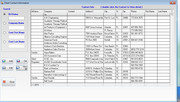
Could it be that your xBrowse is too high for the dialog? One can't even see the arrow down at the bottom of the vertical scrollbar.

Best regards,

Otto

Continue the discussion