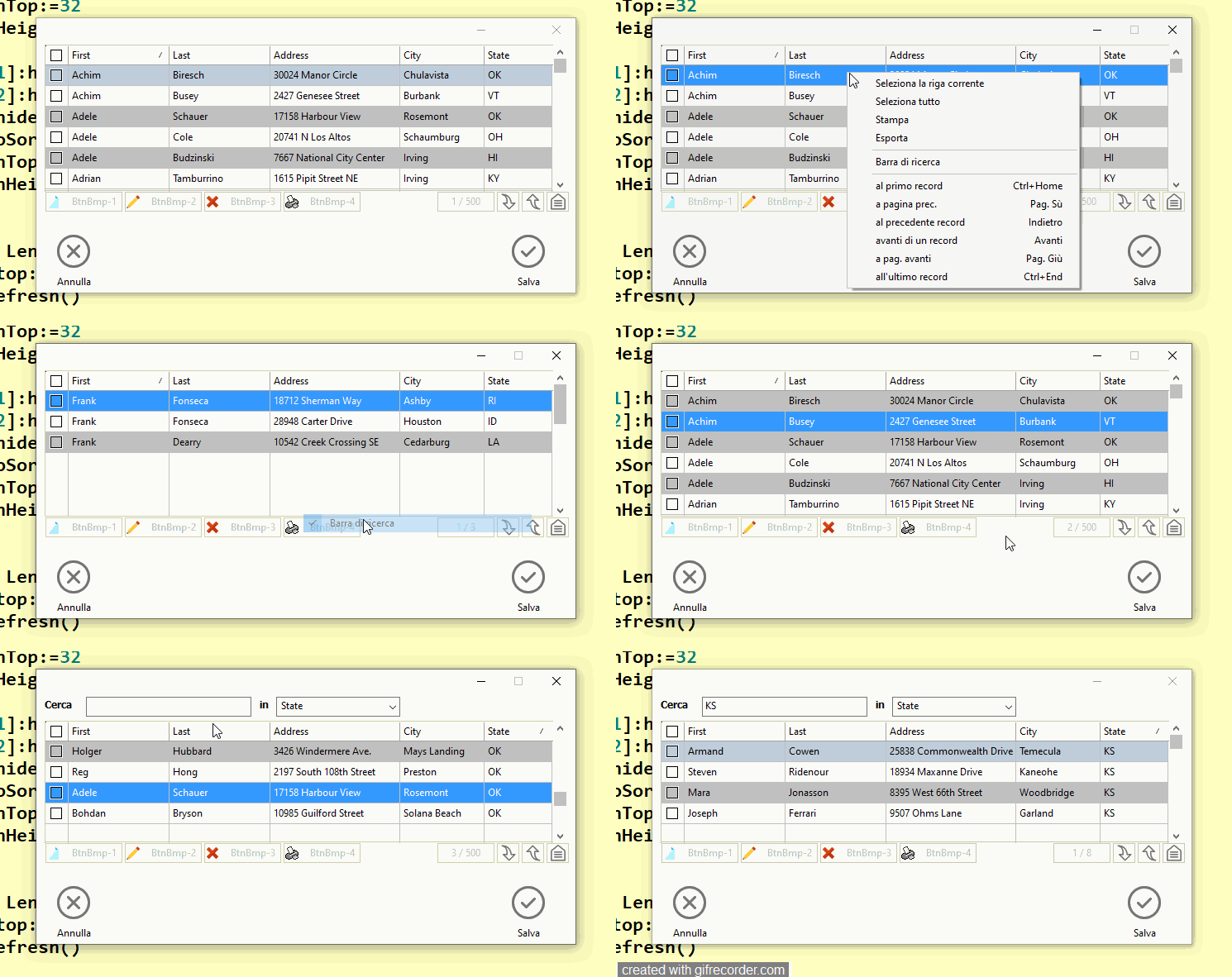
I want to hide the xbrowse search consisting of two say controls, a get control and a combobox through a popup menu
the test works but when Ichange the size of the xbrowse the get control and the combobox control remain active
with lsearch :=.t.
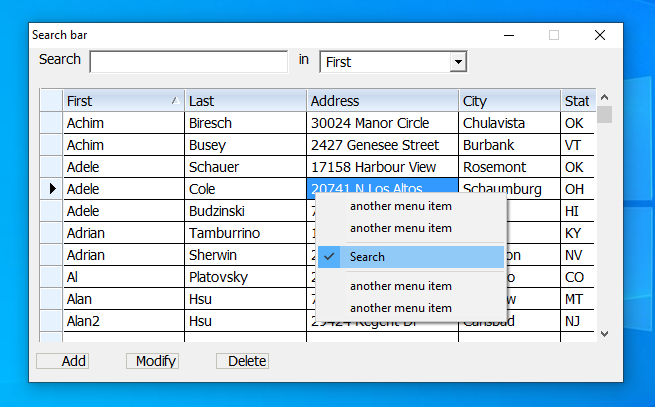
with lsearch :=.f.
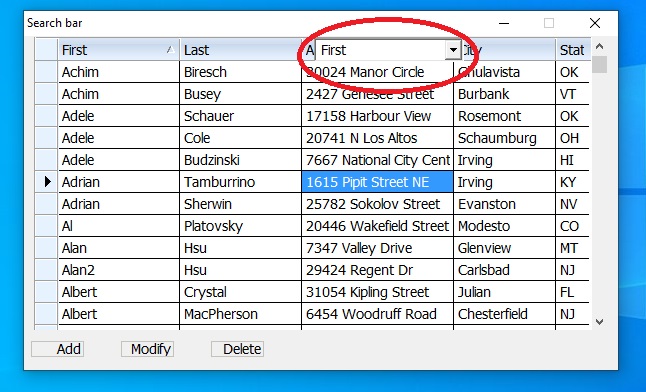
how I can resolve it ?
the test works but when Ichange the size of the xbrowse the get control and the combobox control remain active
with lsearch :=.t.
with lsearch :=.f.
#include 'fivewin.ch'
#include 'xbrowse.ch'
#include 'constant.ch'


REQUEST DBFCDX

function test()
   local oDlg, oBrw, oFont
   local nRight:= 75, nBottom:=22
   local nHt  := nBottom * DLG_CHARPIX_H
   local nWd  := Max( nRight * DLG_CHARPIX_W, 180 )

   local oSay:=array(2)
   local cSeek:=Space(100)
   local oGet
   local lSearch:=.t.
   local aBtnmenu := array(3)

   local  aCols    := { ;
                   { "FIRST",   "First"   ,,   120, },;
                   { "LAST",    "Last"    ,,   120, },;
                   { "STREET",  "Address" ,,   150, },;
                   { "CITY",    "City"    ,,   100, },;
                   { "STATE",   "State"   ,,    80, } }


   RDDSETDEFAULT( "DBFCDX" )

   SET DATE ITALIAN
   SET CENTURY ON

   FwNumFormat( 'E', .t. )
   SetGetColorFocus()


   USE CUSTOMER ALIAS CUST INDEX CUSTOMER

   DEFINE FONT oFont NAME 'Tahoma' SIZE 0, -14

   DEFINE DIALOG oDlg SIZE nWd, nHt PIXEL TRUEPIXEL;
       FONT oFont     ;
       TITLE "Search bar" ;
       STYLE nOR( DS_MODALFRAME, WS_POPUP, WS_CAPTION, WS_SYSMENU, ;
                  WS_MINIMIZEBOX)

 @ 12,15 say oSay[1] Prompt "Search" SIZE 46,24 PIXEL OF oDlg
 @ 12,450 say oSay[2] Prompt "in" SIZE 20,24 PIXEL OF oDlg
 @ 10, 165 GET oGet VAR cSeek SIZE 200,19 PIXEL OF oDlg PICTURE "@!"


   @ 40,10 XBROWSE oBrw SIZE -10,-40 PIXEL OF oDlg ;
          alias 'cust' COLUMNS aCols ;
          AUTOSORT FONT oFont;
          NOBORDER CELL LINES


          WITH OBJECT oBrw
            :lHScroll  := .f.
            :lIncrFilter      := .t.
            :bOnSort          := { |b,oCol| oBrw:Seek( "" ), ;
                                   oBrw:cFilterFld := oCol:cExpr, ;
                                   oBrw:SetFocus() }
            :oSeek := oGet
            :CreateFromCode()
         END

       oBrw:bRClicked := {|nRow,nCol| Disp_Menu(oDlg,nRow,nCol, "Cust", oBrw,@lSearch) }

       @ 10, 550 COMBOBOX oBrw:oSortCbx VAR oBrw:cSortOrder;
        SIZE 150,400 PIXEL OF oDlg HEIGHTGET 18 STYLE CBS_DROPDOWN


   @  148, 5  BTNBMP aBtnMenu[1] OF oDlg;
                BITMAP "NEW_SMALLBRW" ;
                PROMPT "Add" LEFT ;
                SIZE 55, 18  PIXEL FLAT NOROUND ;
                ACTION NIL
   @  148, 75  BTNBMP aBtnMenu[2] OF oDlg;
                BITMAP "MOD_SMALLBRW" ;
                PROMPT "Modify" LEFT ;
                SIZE 55, 18  PIXEL FLAT NOROUND ;
                ACTION NIL
   @  148, 145  BTNBMP aBtnMenu[3] OF oDlg;
                BITMAP "CAN_SMALLBRW" ;
                PROMPT "Delete" LEFT ;
                SIZE 55, 18   PIXEL FLAT NOROUND ;
                ACTION NIL


                oDlg:bResized  := <||
                  local oRect         := oDlg:GetCliRect()
                  oBrw:nHeight:= oRect:nBottom - 20
                  oSay[1]:setsize(90,   24.2)
                  oSay[1]:nTop        := oRect:ntop+2
                  oSay[1]:nLeft       := oRect:nLeft+10
                  oSay[2]:nTop        := oRect:ntop+2
                  oSay[2]:nLeft       := oRect:nLeft+270
                  oGet:nTop           := oRect:ntop+2
                  oGet:nLeft          := oRect:nLeft+60
                  oGet:setsize(200,   24.2)
                  oBrw:oSortCbx:nTop  := oRect:ntop+2
                  oBrw:oSortCbx:nLeft := oRect:nLeft+290


                  aBtnMenu[1]:nTop   := oRect:nBottom-30
                  aBtnMenu[1]:nLeft  := oRect:nleft+6
                  aBtnMenu[2]:nTop   := oRect:nBottom-30
                  aBtnMenu[2]:nLeft  := oRect:nleft+96
                  aBtnMenu[3]:nTop   := oRect:nBottom-30
                  aBtnMenu[3]:nLeft  := oRect:nleft+186
                  aBtnMenu[1]:nClrBorder := RGB(195,195,185)
                  aBtnMenu[2]:nClrBorder := RGB(195,195,185)
                  aBtnMenu[3]:nClrBorder := RGB(195,195,185)

                  oBrw:refresh()
                   RETURN nil
                   >

                   ACTIVATE DIALOG oDlg CENTERED;
                   ON INIT oDlg:resize()

   RELEASE FONT oFont
   RETURN NIL
//----------------------------------------------------------//
   Function Disp_Menu(oParent,nRow,nCol, cDbf,oBrw,lSearch)
      local oMenu
      local oSearch

      MENU oMenu POPUP
      MENUITEM "another menu item"
      MENUITEM "another menu item"
      SEPARATOR
      MENUITEM oSearch Prompt "Search" action (lSearch:=!lSearch,;
            IIF( lSearch,oBrw:ntop:=40,oBrw:ntop:=1),oBrw:refresh())
      SEPARATOR
      MENUITEM "another menu item"
      MENUITEM "another menu item"
      ENDMENU
      oSearch:SetCheck(lSearch)
   ACTIVATE POPUP oMenu OF oParent AT  oBrw:nTop+nRow, oBrw:nLeft+nCol
   RETURN (NIL)
how I can resolve it ?
Since from 1991/1992 ( fw for clipper Rel. 14.4 - Momos)
I use : FiveWin for Harbour March-April 2024 - Harbour 3.2.0dev (harbour_bcc770_32_20240309) - Bcc7.70 - xMate ver. 1.15.3 - PellesC - mail: silvio[dot]falconi[at]gmail[dot]com
I use : FiveWin for Harbour March-April 2024 - Harbour 3.2.0dev (harbour_bcc770_32_20240309) - Bcc7.70 - xMate ver. 1.15.3 - PellesC - mail: silvio[dot]falconi[at]gmail[dot]com