FiveTech Support Forums

FiveWin / Harbour / xBase community
Board index FiveWin for Harbour/xHarbour Another for Btnbmp
Posts: 7317
Joined: Thu Oct 18, 2012 07:17 PM
Re: Another for Btnbmp
Posted: Sun Mar 24, 2024 02:13 PM
I NOT UNDERSTOOD OTTO
PLEASE TRY THIS
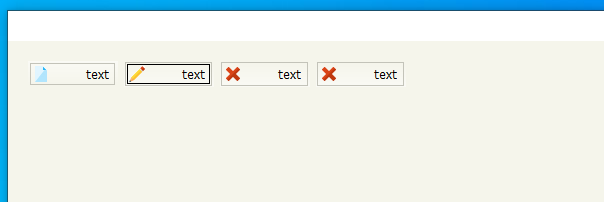

Code (fw): Select all Collapse
#include "FiveWin.ch"
#include "Constant.ch"

 #define DLG_nColorDlg     RGB( 245,245,235)
 #define DLG_nColortitle1  RGB( 219, 230, 244)
 #define DLG_nColortitle2  RGB( 207, 221, 239)
 #define DLG_nColorBar1    RGB( 250,250,245)
 #define DLG_nColorBar2    RGB( 245,245,235)
 #define DLG_nColorBtn1    RGB( 245,245,235)
 #define DLG_nColorBtn2    RGB(250,250,245)
 #define DLG_nColorBtnB    RGB(195,195,185)


Function test()
local oDlg,oFont,oBold
local oCursorBtn :=TCursor():New(,'HAND')
local oBtn:=array(4)
local nWd  := GetSysMetrics(0) * .58
local nHt  := (GetSysMetrics(1) / 2 ) -20
local nRow:= 10,nCol:= 10

oFont := TFont():New( "TAHOMA", 0, 14,, )
oBold := TFont():New( "TAHOMA", 0, 14,,.t. )


   DEFINE DIALOG oDlg SIZE nWd, nHt PIXEL ;
       FONT oFont   COLOR CLR_BLACK, DLG_nColorDlg  ;
       STYLE nOR( DS_MODALFRAME, WS_POPUP, WS_CAPTION, WS_SYSMENU, ;
                  WS_MINIMIZEBOX)

@ nRow, nCol BTNBMP obtn[1] ;
       PROMPT "text" LEFT ;
      FILENAME "1.bmp"   ;
      SIZE 45, 13 PIXEL FLAT NOROUND GDIP   OF oDlg ;
      ACTION NIL

       nCol+=48

@ nRow, nCol  BTNBMP obtn[2] ;
       PROMPT "text" LEFT ;
      FILENAME "2.bmp"   ;
       COLOR RGB(30,30,30),DLG_nColorBtn2;
      SIZE 45, 13 PIXEL FLAT NOROUND GDIP   OF oDlg ;
      ACTION NIL

      nCol+=48

 @ nRow, nCol  BTNBMP obtn[3] ;
       PROMPT "text" LEFT ;
       FILENAME "3.bmp"   ;
       SIZE 45, 13 PIXEL FLAT NOROUND GDIP   OF oDlg ;
       ACTION NIL

       nCol+=48


    @ nRow,nCol BTNBMP obtn[4] FILE "3.bmp" ;
      SIZE 45, 13  PIXEL OF oDlg FLAT NOROUND GDIP;
       PROMPT "text" LEFT ;
      ACTION NIL


    For n= 1 to len(oBtn)
              obtn[n]:nClrText := CLR_BLACK
              *obtn[n]:setcolor( DLG_nColorBtn2,DLG_nColorBtn1)
             obtn[n]:bClrGrad := { | lPressed | If( ! lPressed,;
                 { { 1, DLG_nColorBar2, DLG_nColorBar1} },;
                 { { 1, DLG_nColorBar1, DLG_nColorBar2} } ) }
              obtn[n]:nClrBorder := { |lMouseOver,oBtn| If( lMouseOver, DLG_nColorBtnB,  DLG_nColorBtnB ) }
              obtn[n]:oCursor:=   oCursorBtn
           next


Activate DIALOG oDlg
return nil
Since from 1991/1992 ( fw for clipper Rel. 14.4 - Momos)

I use : FiveWin for Harbour March-April 2024 - Harbour 3.2.0dev (harbour_bcc770_32_20240309) - Bcc7.70 - xMate ver. 1.15.3 - PellesC - mail: silvio[dot]falconi[at]gmail[dot]com
Posts: 6983
Joined: Fri Oct 07, 2005 07:07 PM
Re: Another for Btnbmp
Posted: Sun Mar 24, 2024 05:49 PM

Silvio

FLAT NOROUND GDIP

When these attributes are used, it doesn't work.

I have done tests without them, then it works.

There are so many ifs in the class that it would seem better to me to make a new one without all this legacy.

Best regards,

Otto

I used: C:\fwh2023\source\classes\btnbmp.prg

Posts: 10733
Joined: Sun Nov 19, 2006 05:22 AM
Re: Another for Btnbmp
Posted: Mon Mar 25, 2024 01:55 AM
Dear Mr. Silvio
when I press a button then a black border forms how do I remove the black border?
By default, this border, called FocusRect is drawn around the button in focus, same way as Windows OS paints TButton, TButtonBmp. This border indicates to the user which button has focus currently.

You can avoid painting this border, by specifying the clauses "FLAT" along with "NOBORDER".
In this case no FocusRect is drawn around the button in focus as a result, the user does not know which button has focus currently. The programmer has to use colors/gradients to indicate which button has focus.

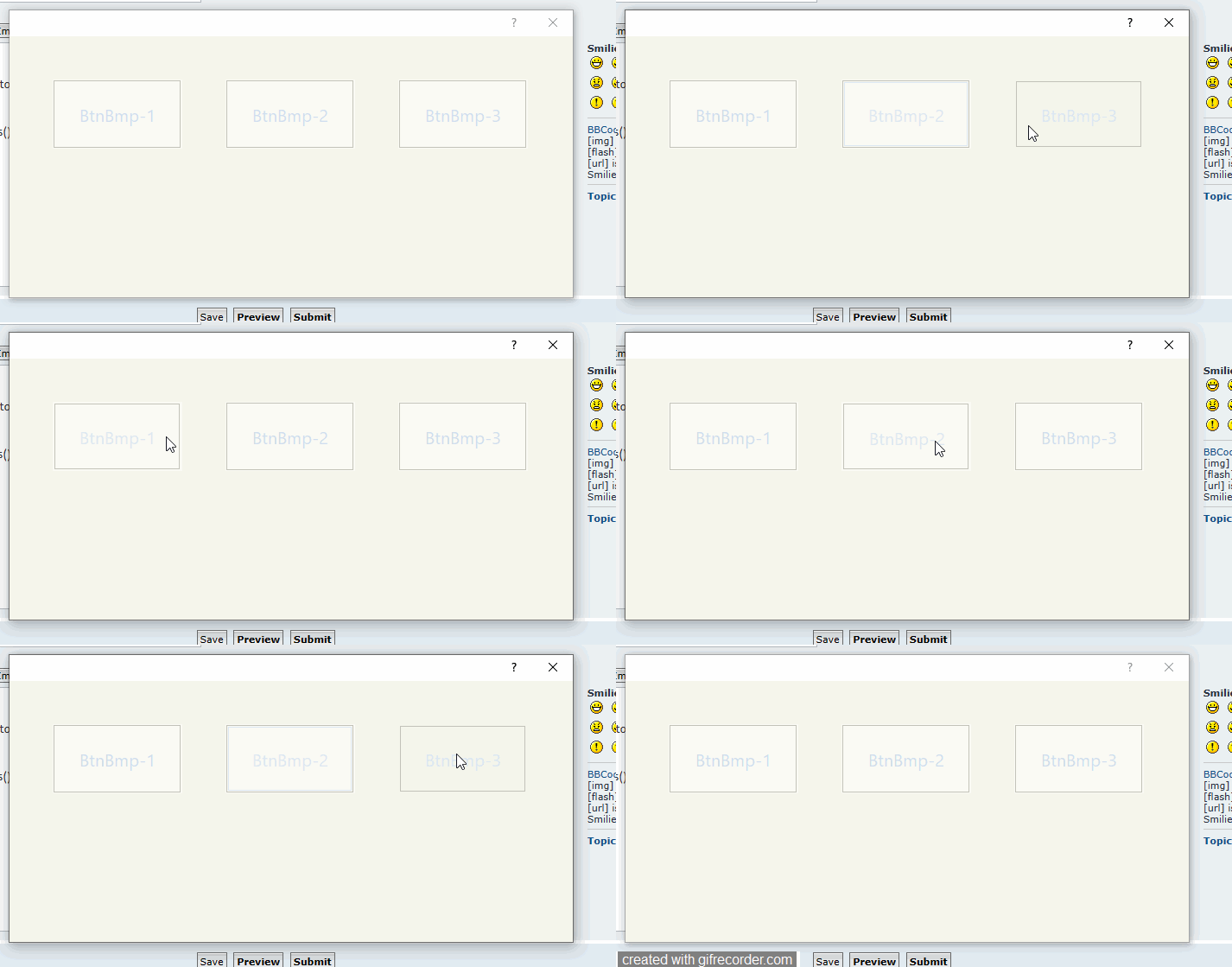
I provide you a sample program, suppressing drawing of border while indicating the focused button with colors.

I used some simple colors for demonstration, but you can use your own colors/gradients according to your taste.
Code (fw): Select all Collapse
function BtnBmpBorder()

   local oDlg, oFont, oBtn, aBtn[ 3 ]

   DEFINE FONT oFont NAME "Segoe UI" SIZE 0,-20
   DEFINE DIALOG oDlg SIZE 650,300 PIXEL TRUEPIXEL FONT oFont

   @  50, 50 BTNBMP    aBtn[ 1 ] PROMPT "BtnBmp-1"  SIZE 150,80 PIXEL OF oDlg FLAT NOBORDER GDIP NOROUND
   @  50,250 BTNBMP    aBtn[ 2 ] PROMPT "BtnBmp-2"  SIZE 150,80 PIXEL OF oDlg FLAT NOBORDER GDIP NOROUND
   @  50,450 BTNBMP    aBtn[ 3 ] PROMPT "BtnBmp-3"  SIZE 150,80 PIXEL OF oDlg FLAT NOBORDER GDIP NOROUND

   for each oBtn in aBtn
      WITH OBJECT oBtn
         :nClrText   := { |lOver,o| If( o:HasFocus(), CLR_WHITE, If( lOver, CLR_BLACK,  CLR_WHITE ) ) }
         :bClrGrad   := { |lOver,o| If( o:HasFocus(), METRO_RED, If( lOver, CLR_HGREEN, CLR_GREEN ) ) }
      END
   next

   ACTIVATE DIALOG oDlg CENTERED
   RELEASE FONT oFont

return nil
Regards


G. N. Rao.

Hyderabad, India
Posts: 6983
Joined: Fri Oct 07, 2005 07:07 PM
Re: Another for Btnbmp
Posted: Mon Mar 25, 2024 08:20 AM
Dear Mr. Rao,

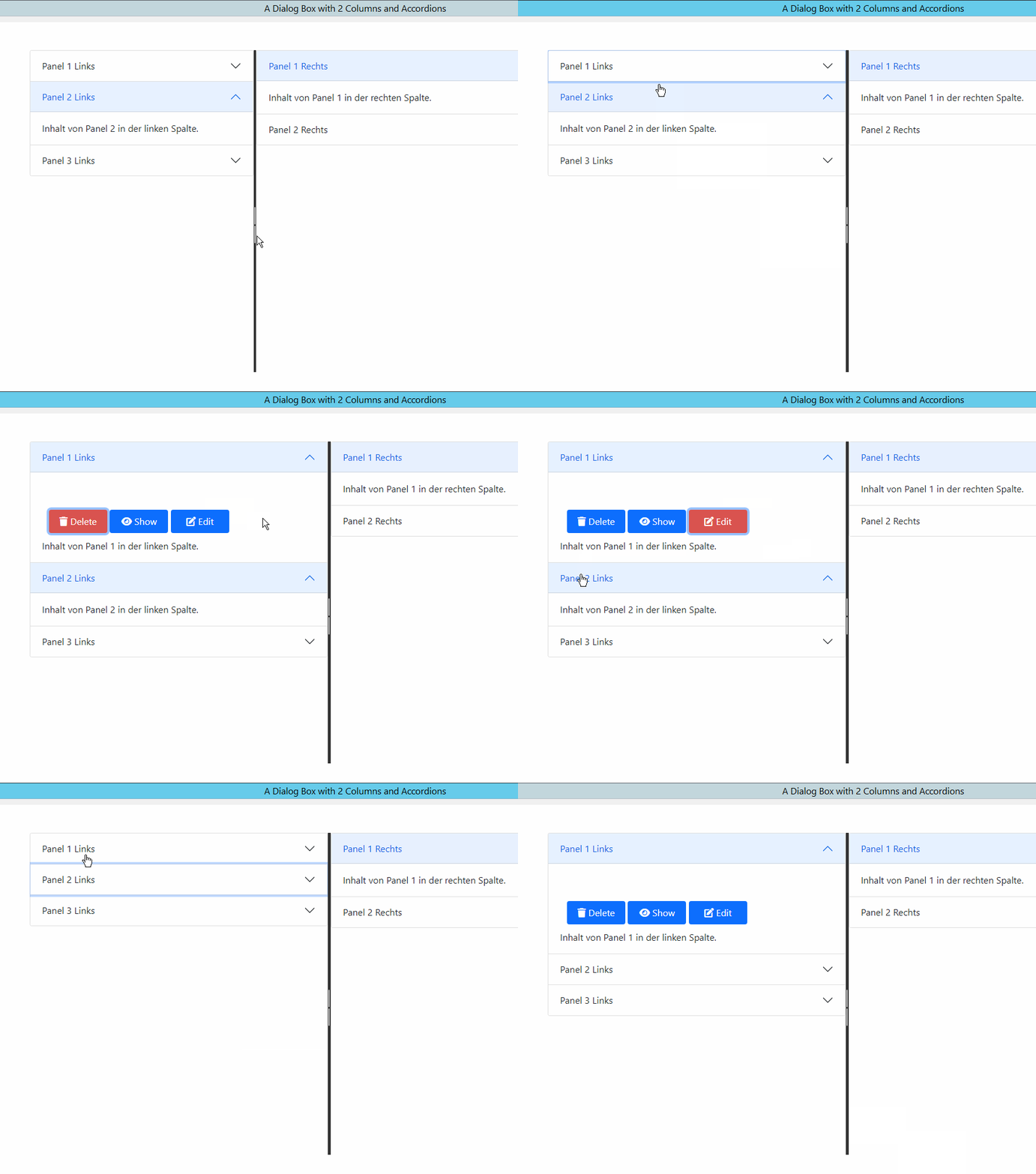
When an element, such as a button, is focused on a webpage, the browser typically outlines it with a dotted or solid border. This behavior is akin to the "FocusRect" you mentioned. The focus outline is crucial for accessibility, as it assists users, especially those using keyboard navigation, to understand which element is currently active.

Here is a sample I made with WebView2 to demonstrate.

Best regards,
Otto

Posts: 7317
Joined: Thu Oct 18, 2012 07:17 PM
Re: Another for Btnbmp
Posted: Mon Mar 25, 2024 09:03 AM
nageswaragunupudi wrote:Dear Mr. Silvio
when I press a button then a black border forms how do I remove the black border?
By default, this border, called FocusRect is drawn around the button in focus, same way as Windows OS paints TButton, TButtonBmp. This border indicates to the user which button has focus currently.

You can avoid painting this border, by specifying the clauses "FLAT" along with "NOBORDER".
In this case no FocusRect is drawn around the button in focus as a result, the user does not know which button has focus currently. The programmer has to use colors/gradients to indicate which button has focus.

I provide you a sample program, suppressing drawing of border while indicating the focused button with colors.

I used some simple colors for demonstration, but you can use your own colors/gradients according to your taste.
Code (fw): Select all Collapse
function BtnBmpBorder()

   local oDlg, oFont, oBtn, aBtn[ 3 ]

   DEFINE FONT oFont NAME "Segoe UI" SIZE 0,-20
   DEFINE DIALOG oDlg SIZE 650,300 PIXEL TRUEPIXEL FONT oFont

   @  50, 50 BTNBMP    aBtn[ 1 ] PROMPT "BtnBmp-1"  SIZE 150,80 PIXEL OF oDlg FLAT NOBORDER GDIP NOROUND
   @  50,250 BTNBMP    aBtn[ 2 ] PROMPT "BtnBmp-2"  SIZE 150,80 PIXEL OF oDlg FLAT NOBORDER GDIP NOROUND
   @  50,450 BTNBMP    aBtn[ 3 ] PROMPT "BtnBmp-3"  SIZE 150,80 PIXEL OF oDlg FLAT NOBORDER GDIP NOROUND

   for each oBtn in aBtn
      WITH OBJECT oBtn
         :nClrText   := { |lOver,o| If( o:HasFocus(), CLR_WHITE, If( lOver, CLR_BLACK,  CLR_WHITE ) ) }
         :bClrGrad   := { |lOver,o| If( o:HasFocus(), METRO_RED, If( lOver, CLR_HGREEN, CLR_GREEN ) ) }
      END
   next

   ACTIVATE DIALOG oDlg CENTERED
   RELEASE FONT oFont

return nil
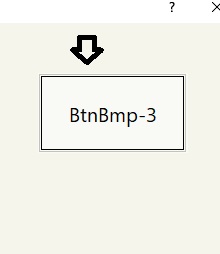
Nages I understood but I need the border extern of color RGB(195,195,185)
as this picture
Since from 1991/1992 ( fw for clipper Rel. 14.4 - Momos)

I use : FiveWin for Harbour March-April 2024 - Harbour 3.2.0dev (harbour_bcc770_32_20240309) - Bcc7.70 - xMate ver. 1.15.3 - PellesC - mail: silvio[dot]falconi[at]gmail[dot]com
Posts: 7317
Joined: Thu Oct 18, 2012 07:17 PM
Re: Another for Btnbmp
Posted: Mon Mar 25, 2024 09:11 AM
Nages,
I think there is an error
the btnbmp class takes the color of the text to create the internal box when it has focus

for a sample I set the nClrText
:nClrText := { |lOver,o| If( o:HasFocus(), RGB( 219, 230, 244), If( lOver, RGB( 219, 230, 244), RGB( 207, 221, 239) ) ) }

and I have this result


try with this config

ren NOBORDER on btnbmp

for each oBtn in aBtn
WITH OBJECT oBtn
:nClrText := { |lOver,o| If( o:HasFocus(), DLG_nColortitle1, If( lOver, RGB(195,195,185), RGB(195,195,185) ) ) }
:bClrGrad := { |lOver,o| If( o:HasFocus(), RGB( 250,250,245), If( lOver, RGB( 245,245,235), RGB( 250,250,245) ) ) }
:nClrBorder := RGB(195,195,185)
END
next
Since from 1991/1992 ( fw for clipper Rel. 14.4 - Momos)

I use : FiveWin for Harbour March-April 2024 - Harbour 3.2.0dev (harbour_bcc770_32_20240309) - Bcc7.70 - xMate ver. 1.15.3 - PellesC - mail: silvio[dot]falconi[at]gmail[dot]com
Posts: 10733
Joined: Sun Nov 19, 2006 05:22 AM
Re: Another for Btnbmp
Posted: Mon Mar 25, 2024 10:14 AM
When an element, such as a button, is focused on a webpage, the browser typically outlines it with a dotted or solid border. This behavior is akin to the "FocusRect" you mentioned. The focus outline is crucial for accessibility, as it assists users, especially those using keyboard navigation, to understand which element is currently active.
Yes. I know very well. No argument over this.
That is what FWH does it by default in case of all classes of buttons.
Still, in case some programmer does not want a border, my solution is for them.
Regards


G. N. Rao.

Hyderabad, India
Posts: 10733
Joined: Sun Nov 19, 2006 05:22 AM
Re: Another for Btnbmp
Posted: Mon Mar 25, 2024 12:05 PM
the btnbmp class takes the color of the text to create the internal box when it has focus
Yes, for painting focusrect in case of FLAT style buttons.
Regards


G. N. Rao.

Hyderabad, India
Posts: 7317
Joined: Thu Oct 18, 2012 07:17 PM
Re: Another for Btnbmp
Posted: Mon Mar 25, 2024 11:41 PM
nageswaragunupudi wrote:
the btnbmp class takes the color of the text to create the internal box when it has focus
Yes, for painting focusrect in case of FLAT style buttons.

but it shouldn't be like this....the box must be dotted and not necessarily take the color from the color of the text, honestly maybe operationally it's right for you but aesthetically it's wrong, why does nages think if I have a button to which I have given specific colors I end up with a black rectangle which is ugly to look at

Even if we try to change the color of the border, it will always be the color of the text
Code (fw): Select all Collapse
 if ::lFlatStyle
      ::nClrBorder = ::nClrText
   endif
but this is the external edge...and in any case I was talking about the internal rectangle

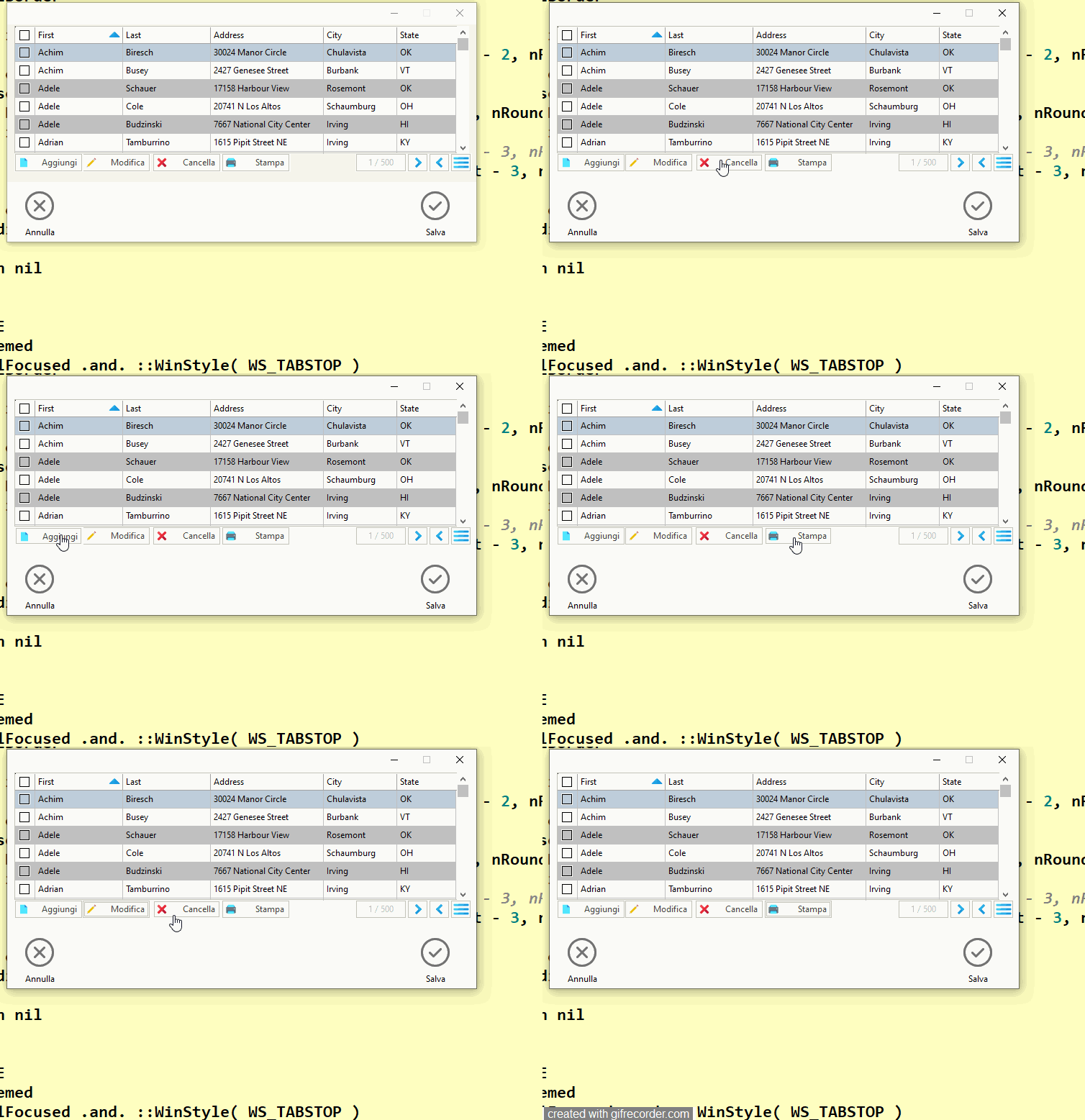
In my opinion it should be like this


obviously giving me a migraine I changed the class
Since from 1991/1992 ( fw for clipper Rel. 14.4 - Momos)

I use : FiveWin for Harbour March-April 2024 - Harbour 3.2.0dev (harbour_bcc770_32_20240309) - Bcc7.70 - xMate ver. 1.15.3 - PellesC - mail: silvio[dot]falconi[at]gmail[dot]com
Posts: 6983
Joined: Fri Oct 07, 2005 07:07 PM
Re: Another for Btnbmp
Posted: Tue Mar 26, 2024 12:31 AM

Silvio,

If you need a focus rectangle in a specific color, you would have to implement the drawing yourself. You can do this by drawing a rectangle using functions like WndBoxClr, where you can specify the brush or pen color.

Otto

   local hPen, oCli  := ::GetCliRect()

  hPen = CreatePen( PS_SOLID, 1, nRGB( 255, 0, 0 ) )

  WndBoxClr( ::GetDC(), 1, 1, oCli:nBottom - 2, oCli:nRight - 2, hPen )

  DeleteObject( hPen )
Posts: 10733
Joined: Sun Nov 19, 2006 05:22 AM
Re: Another for Btnbmp
Posted: Tue Mar 26, 2024 09:38 AM
Mr Silvio

Please make a small modificatin in btnbmp.prg:
Please locate these lines in the method PaintBorder
Code (fw): Select all Collapse
            RoundBox( ::hDC, 1, 1, ::nWidth - 2, ::nHeight - 1, nRound, nRound, XEval( ::nClrBorder, ::lMover, Self ) )
            if ::lFocused
               RoundBox( ::hDC, 3, 3, ::nWidth - 4, ::nHeight - 3, nRound, nRound, XEval( ::nClrText, ::lMover, Self ) )
            endif
Please change ::nClrText to ::nClrBorder
Regards


G. N. Rao.

Hyderabad, India
Posts: 7317
Joined: Thu Oct 18, 2012 07:17 PM
Re: Another for Btnbmp
Posted: Tue Mar 26, 2024 11:57 AM
nageswaragunupudi wrote:Mr Silvio

Please make a small modificatin in btnbmp.prg:
Please locate these lines in the method PaintBorder
Code (fw): Select all Collapse
            RoundBox( ::hDC, 1, 1, ::nWidth - 2, ::nHeight - 1, nRound, nRound, XEval( ::nClrBorder, ::lMover, Self ) )
            if ::lFocused
               RoundBox( ::hDC, 3, 3, ::nWidth - 4, ::nHeight - 3, nRound, nRound, XEval( ::nClrText, ::lMover, Self ) )
            endif
Please change ::nClrText to ::nClrBorder
I found the same solution last night and I talked about it with Antonio
Since from 1991/1992 ( fw for clipper Rel. 14.4 - Momos)

I use : FiveWin for Harbour March-April 2024 - Harbour 3.2.0dev (harbour_bcc770_32_20240309) - Bcc7.70 - xMate ver. 1.15.3 - PellesC - mail: silvio[dot]falconi[at]gmail[dot]com

Continue the discussion