FiveTech Support Forums

FiveWin / Harbour / xBase community
Board index FiveWin para Harbour/xHarbour Centrar texto VERTICALMENTE
Posts: 1445
Joined: Mon Oct 10, 2005 02:38 PM
Centrar texto VERTICALMENTE
Posted: Mon Apr 08, 2024 10:45 PM

Hola a todos,

Tengo que centrar un texto verticalmente. Está escrito en el eje de las 'y', en vertical, el FONT que utilizo está definido así:

DEFINE FONT oFnt_Arial6V NAME "Arial" SIZE 0,-6 OF ::oPrn NESCAPEMENT 900

PRINTER contempla centrar horizontalmente respecto del eje 'x', pero en vertical respecto del eje 'y' no lo veo.

¿Cómo lo harían Ustedes?

A ver que se les ocurre.

Muchas gracias

Un Saludo

Carlos G.


FiveWin 25.12 + Harbour 3.2.0dev (r2502110321), BCC 7.7 Windows 11 Home

Posts: 10733
Joined: Sun Nov 19, 2006 05:22 AM
Re: Centrar texto VERTICALMENTE
Posted: Tue Apr 09, 2024 03:49 AM
Please try this sample program
Code (fw): Select all Collapse
#include "fivewin.ch"

function Main()

   local oPrn, oFont

   PRINT oPrn PREVIEW

   DEFINE FONT oFont NAME "Arial" SIZE 0,-60 NESCAPEMENT 900 OF oPrn

   PAGE
      oPrn:Box( 1, 1, 9, 4, 1, nil, nil, "INCHES" )
      @ 1,1 PRINT TO oPrn TEXT "VTEXT" SIZE 3,8 INCHES ALIGN "" FONT oFont
   ENDPAGE
   ENDPRINT
   RELEASE FONT oFont

return nil
Regards


G. N. Rao.

Hyderabad, India
Posts: 1445
Joined: Mon Oct 10, 2005 02:38 PM
Re: Centrar texto VERTICALMENTE
Posted: Tue Apr 09, 2024 02:10 PM
[quote="nageswaragunupudi"]Please try this sample program
Code (fw): Select all Collapse
#include "fivewin.ch"

function Main()

   local oPrn, oFont

   PRINT oPrn PREVIEW

   DEFINE FONT oFont NAME "Arial" SIZE 0,-60 NESCAPEMENT 900 OF oPrn

   PAGE
      oPrn:Box( 1, 1, 9, 4, 1, nil, nil, "INCHES" )
      @ 1,1 PRINT TO oPrn TEXT "VTEXT" SIZE 3,8 INCHES ALIGN "" FONT oFont
   ENDPAGE
   ENDPRINT
   RELEASE FONT oFont

return nil
Thank you very much mr. Nages

But that's not how it works:

PRINT oPrn FILE "C:\Temp\lerele.pdf"

I don't use HaruPDF.

Thank you very much anyway.

Un Saludo

Carlos G.


FiveWin 25.12 + Harbour 3.2.0dev (r2502110321), BCC 7.7 Windows 11 Home
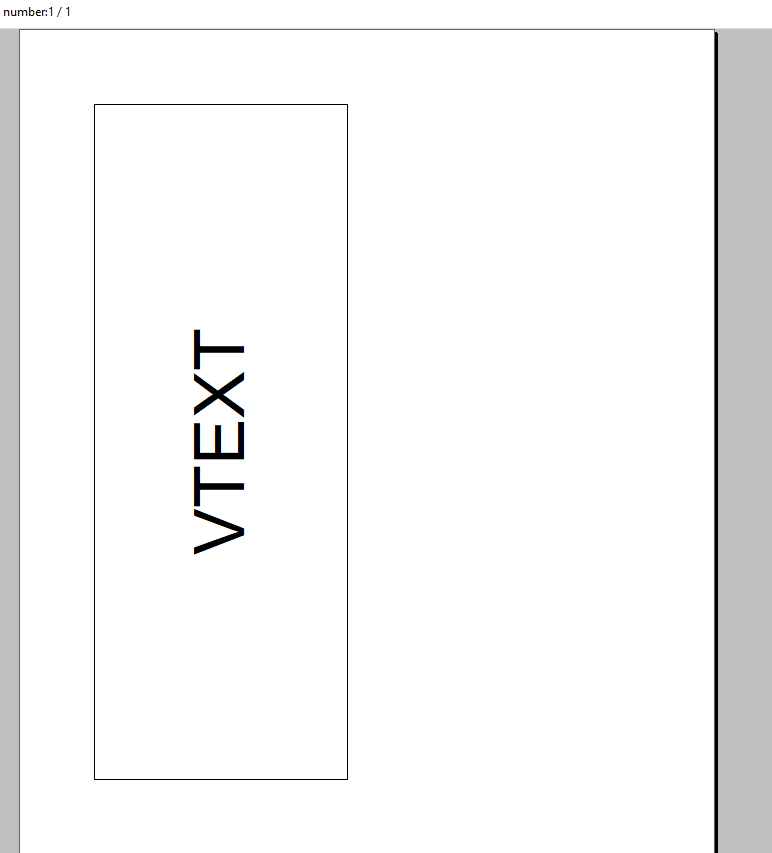
Posts: 1445
Joined: Mon Oct 10, 2005 02:38 PM
Re: Centrar texto VERTICALMENTE
Posted: Tue Apr 09, 2024 03:28 PM

Mr. Nages,

I use the class TImprime and TUtilprn (provided years ago by Rafa Carmona ).

At the moment this is how it works for me (more or less):

ndummyaltura := ( ::oPrn:CmVertPhySize() / 2 ) + ( ::oPrn:CmtrGetTextWidth( AllTrim( ::oTDbfDatAmp:REGMER ), ::oFnt_Arial6V ) / 2 )


UTILPRN ::oUtil ndummyaltura, 0.5 ;

    SAY AllTrim(::oTDbfDatAmp:REGMER) FONT ::oFnt_Arial6V COLOR CLR_BLACK

I want to center the text at half height of the page.

Note: New Method for de Printer.PRG

METHOD CmtrTextToVCenter( cText, oFont ) INLINE ;

      ( ::CmVertPhySize() / 2 ) + ::CmtrGetTextWidth( cText, oFont ) / 2

Thank you again,

Un Saludo

Carlos G.


FiveWin 25.12 + Harbour 3.2.0dev (r2502110321), BCC 7.7 Windows 11 Home

Posts: 10733
Joined: Sun Nov 19, 2006 05:22 AM
Re: Centrar texto VERTICALMENTE
Posted: Tue Apr 09, 2024 04:05 PM
Please try this way
Code (fw): Select all Collapse
#include "fivewin.ch"

function Main()

   local oPrn, oFont
   local cPdf  := "lerele.pdf" // your pdf file name

   TPrinter():lUseFWPDF := .t.
   
   PRINT oPrn FILE cPdf PREVIEW  // PREVIEW is optional. You can ommit PREVIEW

   DEFINE FONT oFont NAME "Arial" SIZE 0,-60 NESCAPEMENT 900 OF oPrn

   PAGE
      oPrn:Box( 1, 1, 9, 4, 1, nil, nil, "INCHES" )
      @ 1,1 PRINT TO oPrn TEXT "VTEXT" SIZE 3,8 INCHES ALIGN "" FONT oFont
   ENDPAGE
   ENDPRINT
   RELEASE FONT oFont

   TPrinter():lUseFWPDF := .f.

return nil
and let us know
Regards


G. N. Rao.

Hyderabad, India
Posts: 8515
Joined: Tue Dec 20, 2005 07:36 PM
Re: Centrar texto VERTICALMENTE
Posted: Tue Apr 09, 2024 04:06 PM
Mira se ayuda:
Code (fw): Select all Collapse
// C:\FWH\SAMPLES\IMPTXT3.PRG

#Include "FiveWin.ch"

FUNCTION Main()

   LOCAL WNOMBREARQPDF

   IF FILE( "C:\TEMP\ARCHIVO.PDF" )

      ERASE( "C:\TEMP\ARCHIVO.PDF" )

   ENDIF

   MsgRun( "GENERANDO ARCHIVO *.PDF...", ;
           "Por Favor, Aguarde...     ", ;
           { || WinExec( Generar_PDF() ), 3 } )

   // Perfect, mister Nages, Thank You
   IF FILE( "C:\TEMP\ARCHIVO.PDF" )

      WNOMBREARQPDF := "C:\TEMP\archivo.pdf"

      // ShellExecute( 0, "Print", WNOMBREARQPDF,,, 3 )  // Impresora

      ShellExecute( 0, "OPEN", WNOMBREARQPDF )           // Acrobat

   ENDIF

RETURN NIL

FUNCTION Generar_PDF()

   LOCAL cText := MEMOREAD( "C:\TEMP\arq.txt" )
   LOCAL oPrn, oFont, oFontV, nLinha, nPage := 1

   nLinha := 0

   PRINT oPrn FILE "C:\TEMP\archivo.pdf"  // em silencio sem preview

      DEFINE FONT oFont  NAME "COURIER NEW" SIZE 0,-10                 OF oPrn
      DEFINE FONT oFontV NAME "COURIER NEW" SIZE 0,-80 NESCAPEMENT 900 OF oPrn

      WHILE .NOT. EMPTY( cText )

         SYSREFRESH()

         CURSORWAIT()

         PAGE

            @ nLinha-10, 00 PRINT TO oPrn TEXT "FIVEWIN" SIZE 3,8 INCHES ALIGN "" FONT oFontV

            @ nLinha, 1 PRINT TO oPrn TEXT @cText SIZE 7,10 INCHES FONT oFont

            IF nLinha >= 23

               ENDPAGE

               nPage := nPage + 1 // Number pages

               PAGE

            ENDIF
   
         ENDPAGE

         nLinha := nLinha + 1

      ENDDO

   ENDPRINT

   RELEASE FONT oFont
   RELEASE FONT oFontV

   CURSORARROW()

RETURN NIL

// FIN / END
Regards, saludos.
João Santos - São Paulo - Brasil - Phone: +55(11)95150-7341
Posts: 10733
Joined: Sun Nov 19, 2006 05:22 AM
Re: Centrar texto VERTICALMENTE
Posted: Tue Apr 09, 2024 04:49 PM
FiveWiDi wrote:Mr. Nages,

I use the class TImprime and TUtilprn (provided years ago by Rafa Carmona ).

At the moment this is how it works for me (more or less):

ndummyaltura := ( ::oPrn:CmVertPhySize() / 2 ) + ( ::oPrn:CmtrGetTextWidth( AllTrim( ::oTDbfDatAmp:REGMER ), ::oFnt_Arial6V ) / 2 )

UTILPRN ::oUtil ndummyaltura, 0.5 ;
SAY AllTrim(::oTDbfDatAmp:REGMER) FONT ::oFnt_Arial6V COLOR CLR_BLACK

I want to center the text at half height of the page.


Note: New Method for de Printer.PRG

METHOD CmtrTextToVCenter( cText, oFont ) INLINE ;
( ::CmVertPhySize() / 2 ) + ::CmtrGetTextWidth( cText, oFont ) / 2


Thank you again,
I can only comment on FWH classes.
What all you want to do, I am sure we can do with FWH classes in a far simpler way.

To print text vertically and horizontally centered on the page. No calculations required. The command is very simple:
Code (fw): Select all Collapse
@ 0, 0 PRINT TO oPrn TEXT "Single/MultiLine Text" ALIGN "" FONT oFont
It's that simple.
Regards


G. N. Rao.

Hyderabad, India
Posts: 10733
Joined: Sun Nov 19, 2006 05:22 AM
Re: Centrar texto VERTICALMENTE
Posted: Tue Apr 09, 2024 04:58 PM
Mr. Karinha
Mira se ayuda:
Your example is longer but the same as my original sample as far as vertical oriented text is concerned,

You are missing the real point.

If you execute the program on a computer where MSWord is installed, you can not see the vertical text in the PDF.

You see the vertical text in PDF if (1) MS Word is not installed or (2) we set TPrinter():lUseFWPDF := .t.
Regards


G. N. Rao.

Hyderabad, India
Posts: 8515
Joined: Tue Dec 20, 2005 07:36 PM
Re: Centrar texto VERTICALMENTE
Posted: Tue Apr 09, 2024 05:17 PM
nageswaragunupudi wrote:Mr. Karinha
Mira se ayuda:
Your example is longer but the same as my original sample as far as vertical oriented text is concerned,

You are missing the real point.

If you execute the program on a computer where MSWord is installed, you can not see the vertical text in the PDF.

You see the vertical text in PDF if (1) MS Word is not installed or (2) we set TPrinter():lUseFWPDF := .t.
Ok. Thanks for the information Master Nages. I did not know that.

Ok, gracias por la información Maestro Nages. No sabia de eso.

Regards, saludos.
João Santos - São Paulo - Brasil - Phone: +55(11)95150-7341
Posts: 10733
Joined: Sun Nov 19, 2006 05:22 AM
Re: Centrar texto VERTICALMENTE
Posted: Tue Apr 09, 2024 06:08 PM

Please try these samples in the samples folder:

print01.prg

print02.prg

pdfharu1.prg

pdfharu2.prg

You can see how to generate pdfs using Word, FWH own pdf, HaruPDF, Image2pdf

Please see how simplest and one line code to print complex outputs.

And advise us what more you want us to provide

Regards


G. N. Rao.

Hyderabad, India
Posts: 1445
Joined: Mon Oct 10, 2005 02:38 PM
Re: Centrar texto VERTICALMENTE
Posted: Tue Apr 09, 2024 07:07 PM
nageswaragunupudi wrote:Please try this way
Code (fw): Select all Collapse
#include "fivewin.ch"

function Main()

   local oPrn, oFont
   local cPdf  := "lerele.pdf" // your pdf file name

   TPrinter():lUseFWPDF := .t.
   
   PRINT oPrn FILE cPdf PREVIEW  // PREVIEW is optional. You can ommit PREVIEW

   DEFINE FONT oFont NAME "Arial" SIZE 0,-60 NESCAPEMENT 900 OF oPrn

   PAGE
      oPrn:Box( 1, 1, 9, 4, 1, nil, nil, "INCHES" )
      @ 1,1 PRINT TO oPrn TEXT "VTEXT" SIZE 3,8 INCHES ALIGN "" FONT oFont
   ENDPAGE
   ENDPRINT
   RELEASE FONT oFont

   TPrinter():lUseFWPDF := .f.

return nil
and let us know
Yes mr. Nages, now it works.

But de quality of the typography in the PDF is not good.

I guess the best solution must be to use HaruPDF.

For now i have what i wanted, i will leave this matter for later.

Thank you so much

Un Saludo

Carlos G.


FiveWin 25.12 + Harbour 3.2.0dev (r2502110321), BCC 7.7 Windows 11 Home

Posts: 10733
Joined: Sun Nov 19, 2006 05:22 AM
Re: Centrar texto VERTICALMENTE
Posted: Wed Apr 10, 2024 12:49 AM
But de quality of the typography in the PDF is not good.
Yes. Also PDF file size is large.
I guess the best solution must be to use HaruPDF.
Yes. Simple and smaller pdf file sizes.
Regards


G. N. Rao.

Hyderabad, India
Posts: 10733
Joined: Sun Nov 19, 2006 05:22 AM
Re: Centrar texto VERTICALMENTE
Posted: Wed Apr 10, 2024 01:18 AM

Using PRINT oPrn FILE <pdffile>, there are 3 ways to generate PDFs.

  1. Using Microsoft Word, if installed on the PC.

This is the default.

Printer class generates emf files and embeds them into Word document and saves as PDF.

pros: Good quality and medium size pdfs

cons: (1) Does not support rotated text and (2) pdf document is an image and not editable.

  1. Using FWH's own PDF generator.(written many years ago)

If MSWord is not installed, this is the default.

We can also force this by setting TPrinter():lUseFWPDF := .t.

cons: (1) Lesser quality (2) Large size and (3) pdf is not editable.

  1. Using HaruPDF, by setting TPrinter():lUseHaruPDF := .t.

pros: (1) Smaller size. (2) Good Quality (3) pdfs are editable.

cons: (1) Does not support Unicode fonts. (Concern only for East/Middle Asian languages)

(2) Does not support Hallow Text with image brush.

Regards


G. N. Rao.

Hyderabad, India

Continue the discussion