FiveTech Support Forums

FiveWin / Harbour / xBase community
Board index FiveWin for Harbour/xHarbour combobox color
Posts: 7317
Joined: Thu Oct 18, 2012 07:17 PM
combobox color
Posted: Fri Apr 26, 2024 08:30 AM

I have a combobox

@ 10, 120 COMBOBOX aget[1] VAR cCategoria Items ArrTranspose(aCategorie )[ 2] size 200,90 PIXEL OF oDlg

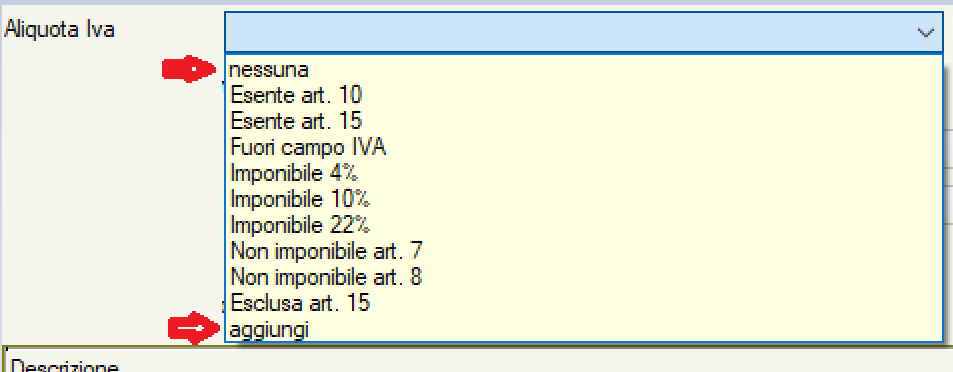
on first element of aCategorie there is "nessuna" and the last item is "Aggiungi"

I wish change color and font of text only on these two items

Since from 1991/1992 ( fw for clipper Rel. 14.4 - Momos)

I use : FiveWin for Harbour March-April 2024 - Harbour 3.2.0dev (harbour_bcc770_32_20240309) - Bcc7.70 - xMate ver. 1.15.3 - PellesC - mail: silvio[dot]falconi[at]gmail[dot]com
Posts: 1772
Joined: Thu Sep 05, 2019 05:32 AM
Re: combobox color
Posted: Fri Apr 26, 2024 04:17 PM
hi Silvio,

as i can say a normal Combobox can only change Color for all Items
to change it for special Item you need Ownerdraw.

i know that Fivewin have
Code (fw): Select all Collapse
ON DRAWITEM
but i have not find out how it work so i wrote my own Method

here a CODE snip which i use
Code (fw): Select all Collapse
oCombo_left:bOwnerDraw := { | a, b, c, d | oExpl_Left:DoMyComBo( a, b, c, d, @acItem, @acType, @acBitmaps, oCombo_left ) }
Code (fw): Select all Collapse
METHOD DoMyComBo() CLASS TExplorer
LOCAL WinDir        := GETENV( "Windir" )
LOCAL cPara         := ""
LOCAL cAlign        := nOr( DT_LEFT, DT_NOPREFIX )
LOCAL nIcoHandle    := 0
LOCAL nSize         := 32
LOCAL ii, nCount, xPara
LOCAL oSelf
LOCAL nIdCtl
LOCAL oStruc
LOCAL nPointer
LOCAL acItem, acType, cItemText, oObj
LOCAL CtlType
LOCAL CtlID
LOCAL itemID
LOCAL itemAction
LOCAL itemState
LOCAL hwndItem
LOCAL hDC
LOCAL aRect
LOCAL nLeft
LOCAL nTop
LOCAL nRight
LOCAL nBottom
LOCAL itemData
LOCAL cDLL
LOCAL hModule
LOCAL nResID        := 0
LOCAL cBitmap, hBitMap, acBitmaps, aBitmaps
LOCAL OldAt         := - 1
LOCAL BrushHiBack   := CreateSolidBrush( BFcolor )
LOCAL BrushSysColor := CreateSolidBrush( BGcolor )
LOCAL aGrad         := { ;
                    { .5, BFcolor, BGcolor }, ;
                    { .6, BGcolor, BFcolor } ;
                    }

   nCount := PCOUNT()
   FOR ii := 1 TO nCount
      xPara := PValue( ii )
      DO CASE
         CASE ii = 1
            oSelf := xPara
         CASE ii = 2
            nIdCtl := xPara
         CASE ii = 3
            oStruc := xPara
         CASE ii = 4
            nPointer := xPara

         CASE ii = 5
            acItem := xPara
         CASE ii = 6
            acType := xPara
         CASE ii = 7
            acBitmaps := xPara
         CASE ii = 8
            oObj := xPara
            IF !EMPTY( oObj )
               IF VALTYPE( oObj ) = "O"
                  OldAt := oObj:nAt

                  oObj:SetBitmaps( acBitmaps )
               ENDIF
            ENDIF
      ENDCASE
   NEXT

   CtlType := oStruc:CtlType
   CtlID := oStruc:CtlID
   itemID := oStruc:itemID
   itemAction := oStruc:itemAction
   itemState := oStruc:itemState
   hwndItem := oStruc:hwndItem
   hDC := oStruc:hDC
   aRect := oStruc:aRect
   itemData := oStruc:itemData

   nTop := aRect[ 1 ]
   nLeft := aRect[ 2 ]
   nBottom := aRect[ 3 ]
   nRight := aRect[ 4 ]

   IF CtlType = ODT_COMBOBOX .OR. CtlType = ODT_LISTBOX               // .AND. CtlID =

      SetBkMode( hDC, 1 )                                             // TRANSPARENT =1 OPAQUE =2

      DO CASE
         CASE itemAction = ODA_SELECT
            FillRect( hDC, aRect, BrushSysColor )
            SetTextColor( hDC, BFcolor )

         CASE itemAction = ODA_DRAWENTIRE
            IF OldAt = itemID + 1 .AND. oObj:IsOpen()
               OldAt = - 1
               IF BGColor = 256 * 256 * 256 - 1                       // 16777215
                  //  Msginfo("white")
                  FillRect( hDC, aRect, COLOR_MENUHILIGHT + 1 )
                  SetTextColor( hDC, GetSysColor( COLOR_MENU ) )
               ELSE
                  GradientFill( hDC, aRect[ 1 ], aRect[ 2 ], aRect[ 3 ] - 1, aRect[ 4 ], aGrad, .t. )
                  //                FillRect( hDC, aRect, BrushSysColor )
                  SetTextColor( hDC, BFcolor )
               ENDIF
            ELSE
               FillRect( hDC, aRect, BrushSysColor )
               SetTextColor( hDC, BFcolor )
            ENDIF

         CASE itemAction = ODA_FOCUS
            IF BGColor = 256 * 256 * 256 - 1                          // 16777215
               FillRect( hDC, aRect, COLOR_MENUHILIGHT + 1 )
               SetTextColor( hDC, GetSysColor( COLOR_MENU ) )
            ELSE
               GradientFill( hDC, aRect[ 1 ], aRect[ 2 ], aRect[ 3 ] - 1, aRect[ 4 ], aGrad, .t. )
               //                FillRect( hDC, aRect, BrushSysColor )
               SetTextColor( hDC, BFcolor )
            ENDIF

      ENDCASE
greeting,

Jimmy
Posts: 6983
Joined: Fri Oct 07, 2005 07:07 PM
Re: combobox color
Posted: Sat Apr 27, 2024 11:01 AM
Hello,
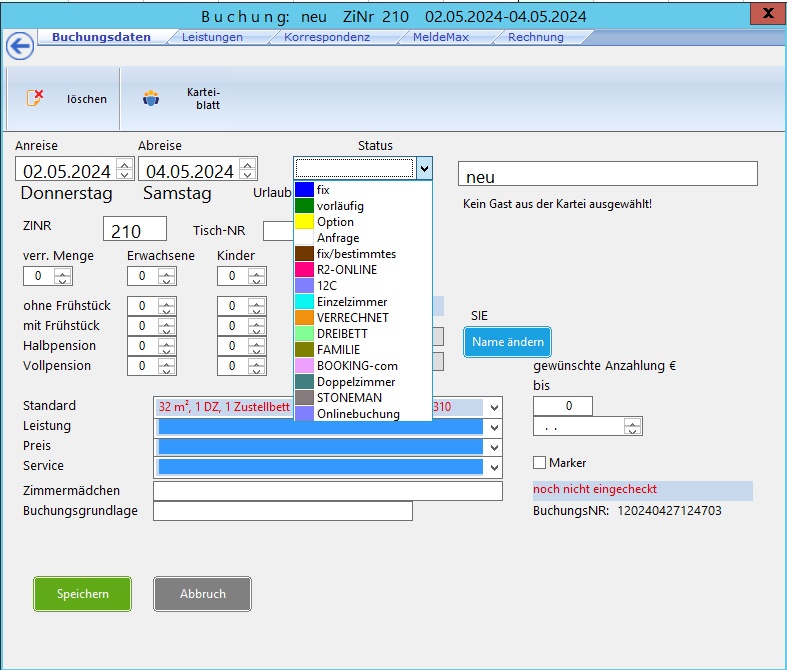
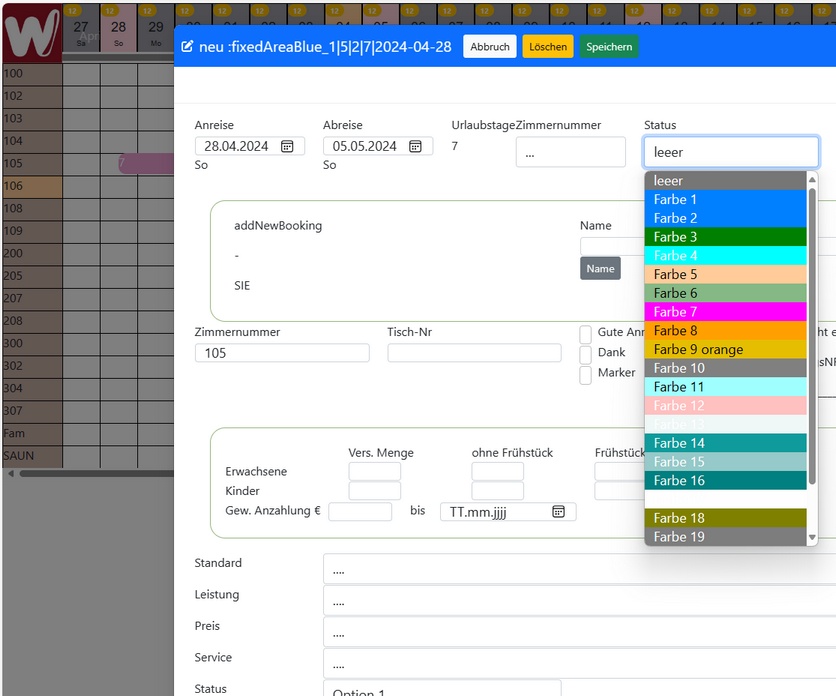
We use combobox with bitmaps.
Best regards,
Otto


Now with WEBVIEW2 or mod harbour, these things are easily done.

Posts: 1772
Joined: Thu Sep 05, 2019 05:32 AM
Re: combobox color
Posted: Sat Apr 27, 2024 12:36 PM
hi Silvio.
Otto wrote:We use combobox with bitmaps.
Solution from Otto, using colored Bitmap, seems me a easy Solution
greeting,

Jimmy
Posts: 7317
Joined: Thu Oct 18, 2012 07:17 PM
Re: combobox color
Posted: Sat Apr 27, 2024 06:10 PM
Otto wrote:Hello,
We use combobox with bitmaps.
Best regards,
Otto


Now with WEBVIEW2 or mod harbour, these things are easily done.


Perhaps you not understood my problem , please ready my message please I not Wish bitmap i Wish colorize only the text of item , i not want list of colors, i Wish only colorize the First item text and the last item text
Since from 1991/1992 ( fw for clipper Rel. 14.4 - Momos)

I use : FiveWin for Harbour March-April 2024 - Harbour 3.2.0dev (harbour_bcc770_32_20240309) - Bcc7.70 - xMate ver. 1.15.3 - PellesC - mail: silvio[dot]falconi[at]gmail[dot]com
Posts: 7317
Joined: Thu Oct 18, 2012 07:17 PM
Re: combobox color
Posted: Sat Apr 27, 2024 06:15 PM
Jimmy wrote:hi Silvio.
We use combobox with bitmaps.
Solution from Otto, using colored Bitmap, seems me a easy Solution


Perhaps you not understood my problem , please ready my message please I not Wish bitmap i Wish colorize only the text of item , i not want list of colors, i Wish only colorize the First item text and the last item text


this is the source

AAdd( ademo, {"00000","Nessuna"} )
DO WHILE !oDbf:Eof()
AAdd( ademo, {oDbf:Cod,TRIM(oDbf:DESC)} )
oDbf:Skip()
ENDDO
AAdd( ademo, {"00000","Aggiungi"} )


I wish only "Nessuna" and "Aggiungi" with another color more clear
Since from 1991/1992 ( fw for clipper Rel. 14.4 - Momos)

I use : FiveWin for Harbour March-April 2024 - Harbour 3.2.0dev (harbour_bcc770_32_20240309) - Bcc7.70 - xMate ver. 1.15.3 - PellesC - mail: silvio[dot]falconi[at]gmail[dot]com
Posts: 1772
Joined: Thu Sep 05, 2019 05:32 AM
Re: combobox color
Posted: Sun Apr 28, 2024 05:21 AM
hi Silvio,
Silvio.Falconi wrote:
hi Silvio.
Perhaps you not understood my problem , please ready my message please I not Wish bitmap i Wish colorize only the text of item , i not want list of colors, i Wish only colorize the First item text and the last item text
I do understand your Problem, but do you understand Ownerdraw ?
it is much more complicate than using a bitmap to mark a Item in Combobox or LIstbox using different Font and Color
greeting,

Jimmy
Posts: 6983
Joined: Fri Oct 07, 2005 07:07 PM
Re: combobox color
Posted: Sun Apr 28, 2024 07:45 AM
Dear Jimmy,

I think using TComboMetro and changing the Paint method would be an option.

Best regards,
Otto

Code (fw): Select all Collapse
METHOD Paint() CLASS TComboMetro

   local aInfo, aRect, hBrush
   local nBtnTop, nBtnLeft

   aInfo    := ::DispBegin()

   aRect    := GetClientRect( ::hWnd )

   if GetFocus() == ::hWnd
      hBrush   := CreateSolidBrush( TGet():nClrFocus )
      FillRect( ::hDC, aRect, hBrush )
      DeleteObject( hBrush )
      FillRect( ::hDC, { aRect[ 1 ], aRect[ 4 ] - ::nHeight, aRect[ 3 ], aRect[ 4 ] }, ::oBrush:hBrush )
   else
      FillRect( ::hDC, aRect, ::oBrush:hBrush )
   endif

   WndBox2007( ::hDC, aRect[ 1 ], aRect[ 2 ], aRect[ 3 ] - 1, aRect[ 4 ] - 1, ::nClrBorder )
   nBtnTop     := Int( ( aRect[ 1 ] + aRect[ 3 ] ) / 2 - 0 )
   nBtnLeft    := Int( aRect[ 4 ] - ::nHeight / 2 - 5 )

   MoveTo( ::hDC, nBtnLeft,      nBtnTop )
   LineTo( ::hDC, nBtnLeft + 5,  nBtnTop + 5, ::hPenButton )
   LineTo( ::hDC, nBtnLeft + 10, nBtnTop,     ::hPenButton )

   aRect[ 4 ]  -= aRect[ 3 ]
   aRect[ 2 ]  += 12
   aRect[ 4 ]  -= 2

   ::oFont:Activate( ::hDC )
   SetTextColor( ::hDC, CLR_BLACK )
   aRect[ 3 ]  -= 1
   DrawTextTransparent( ::hDC, ::aItems[ ::nAt ], aRect, DT_VCENTER + DT_SINGLELINE )
   ::oFont:DeActivate( ::hDC )

   ::DispEnd( aInfo )

return nil
Posts: 6983
Joined: Fri Oct 07, 2005 07:07 PM
Re: combobox color
Posted: Sun Apr 28, 2024 08:04 AM
Dear Jimmy,
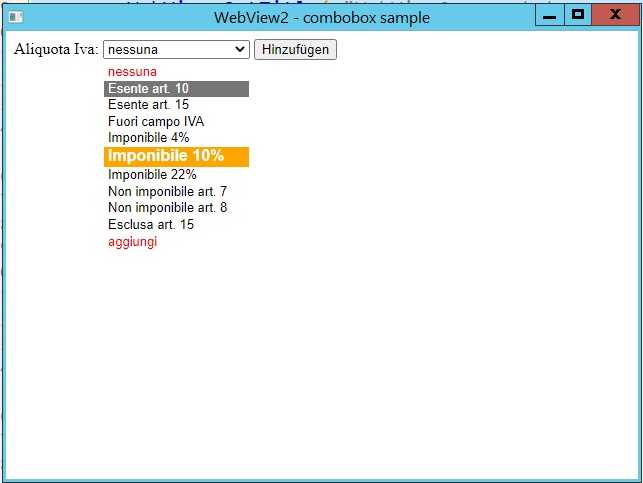
nevertheless, I think that the future for the frontend will be HTML (WEBVIEW2)

Best regards,
Otto


Code (fw): Select all Collapse
    #include "FiveWin.ch"

    function Main()

       local oWebView := TWebView():New()

       oWebView:SetHtml( Html() )
       oWebView:SetTitle( "WebView2 - combobox sample" )

       oWebView:SetUserAgent( "Mozilla/5.0 (Linux; Android 6.0; Nexus 5 Build/MRA58N) AppleWebKit/537.36 (KHTML, like Gecko) Chrome/103.0.5060.53 Mobile Safari/537.36" )
       oWebView:Bind( "SendToFWH" )
       oWebView:bOnBind = { | cJson, cCalls | Login( cJson, cCalls, oWebView ) }
       sleep( 300 )
       oWebView:Run()
       oWebView:Destroy()

    return nil

    function Login( cJson, cCalls, oWebView )

       local hData

       hb_jsonDecode( cJson, @hData )

       if hData[ 1 ][ "username" ] != "Antonio" .or. hData[ 1 ][ "password" ] != "1234"
          oWebView:Return( cCalls, 0, "{ 'result': 'incorrect values' }" )
       else
          oWebView:Return( cCalls, 0, "{ 'result': 'correct!' }" )
      endif

    return nil  

    function Html()

       local cHtml

       TEXT INTO cHtml
     
     <!DOCTYPE html>
        <!DOCTYPE html>
        <!DOCTYPE html>
            <html lang="en">
            <head>
            <meta charset="UTF-8">
            <meta name="viewport" content="width=device-width, initial-scale=1.0">
            <title>Mehrwertsteuer-Auswahl</title>
            <style>
              .special-color {
                color: red;
              }
              .taxable-10-percent {
                background-color: orange;
                color: white;
                font-weight: bold;
                font-size: larger;
              }
            </style>
            </head>
            <body>
            
            <form action="/submit-form-url" method="post">
              <label for="vatRate">Aliquota Iva:</label>
              <select name="vatRate" id="vatRate">
                <option value="none" class="special-color">nessuna</option>
                <option value="exempt_art_10">Esente art. 10</option>
                <option value="exempt_art_15">Esente art. 15</option>
                <option value="outside_scope_vat">Fuori campo IVA</option>
                <option value="taxable_4_percent">Imponibile 4%</option>
                <option value="taxable_10_percent" class="taxable-10-percent">Imponibile 10%</option>
                <option value="taxable_22_percent">Imponibile 22%</option>
                <option value="not_taxable_art_7">Non imponibile art. 7</option>
                <option value="not_taxable_art_8">Non imponibile art. 8</option>
                <option value="excluded_art_15">Esclusa art. 15</option>
                <option value="add" class="special-color">aggiungi</option>
              </select>
            
              <input type="submit" value="Hinzufügen">
            </form>
            
            </body>
            </html>
    

       ENDTEXT

    return cHtml
Posts: 6983
Joined: Fri Oct 07, 2005 07:07 PM
Re: combobox color
Posted: Sun Apr 28, 2024 08:51 AM
Hello,
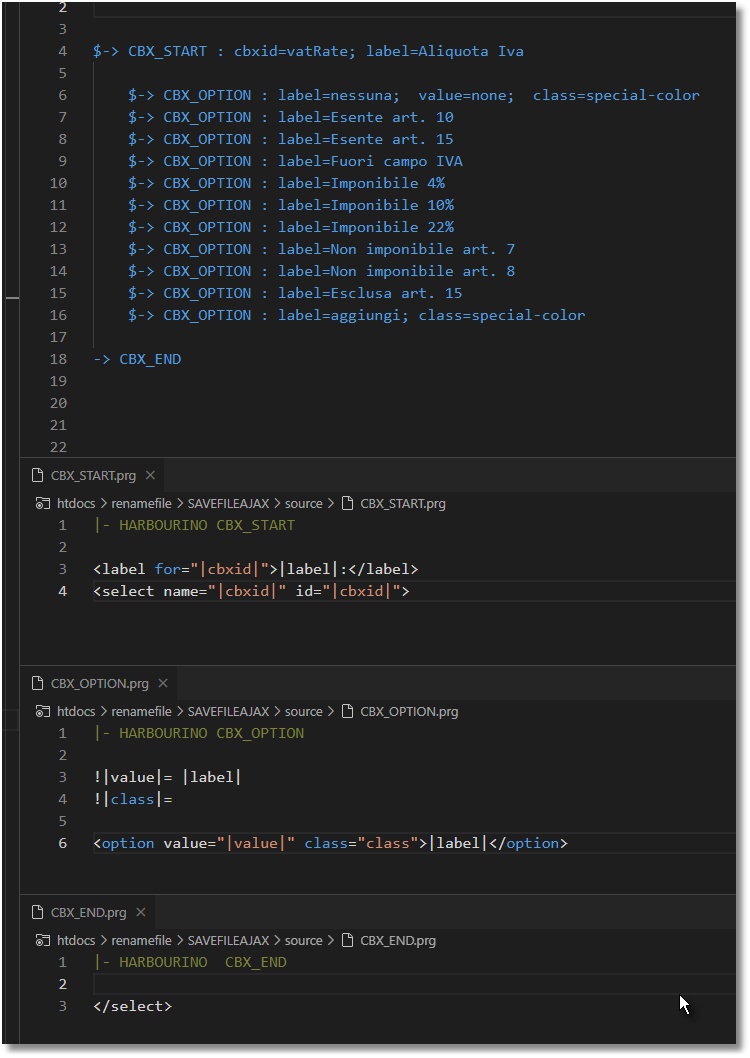
In my case, I use the HARBOURINO preprocessor and patcher, so the source code for the combobox would look like this.

And here are the files that Harbourino needs:
Best regards,
Otto
Posts: 7317
Joined: Thu Oct 18, 2012 07:17 PM
Re: combobox color
Posted: Sun Apr 28, 2024 12:26 PM

don't teach me HTML or php or asp.net because I have thirty years of experience in HTML because I teachl it at school HTML+CSS, don't be a professor with me

It doesn't suit you.

I asked how it was done in Windows fwh +harbour

Since from 1991/1992 ( fw for clipper Rel. 14.4 - Momos)

I use : FiveWin for Harbour March-April 2024 - Harbour 3.2.0dev (harbour_bcc770_32_20240309) - Bcc7.70 - xMate ver. 1.15.3 - PellesC - mail: silvio[dot]falconi[at]gmail[dot]com
Posts: 6983
Joined: Fri Oct 07, 2005 07:07 PM
Re: combobox color
Posted: Sun Apr 28, 2024 03:24 PM

Have you tried TComboMetro?

Posts: 1772
Joined: Thu Sep 05, 2019 05:32 AM
Re: combobox color
Posted: Sun Apr 28, 2024 04:41 PM
hi Otto,
Otto wrote:Have you tried TComboMetro?
how to identify which Item is active to draw when not have itemID of DRAWITEMSTRUCT structure
https://learn.microsoft.com/en-us/windows/win32/api/winuser/ns-winuser-drawitemstruct

METHOD Paint() CLASS TComboMetro does not have any itemID to identify it
greeting,

Jimmy
Posts: 6983
Joined: Fri Oct 07, 2005 07:07 PM
Re: combobox color
Posted: Sun Apr 28, 2024 05:36 PM

Dear Jimmy,

In TComboMetro, the combobox is done with an xbrowse.

Maybe we could make aItems multidimensional and then pass the color along with it.

Or just pass another ARRAY with the colors. And then compare it in ::bClrStd.

::bClrStd := { || If( ::nArrayAt == ::nHoverAt .and. ::nArrayAt > ::nBlankRows, ;

{ CLR_WHITE, CLR_BLUE }, { CLR_BLACK, CLR_WHITE } ) }

Best regards,

Otto

Posts: 1772
Joined: Thu Sep 05, 2019 05:32 AM
Re: combobox color
Posted: Sun Apr 28, 2024 06:49 PM
hi Otto,
Otto wrote:In TComboMetro, the combobox is done with an xbrowse.

::bClrStd := { || If( ::nArrayAt == ::nHoverAt .and. ::nArrayAt > ::nBlankRows, ;
{ CLR_WHITE, CLR_BLUE }, { CLR_BLACK, CLR_WHITE } ) }
i did not know that, so it should be easy when is based on xbrowse
greeting,

Jimmy