FiveTech Support Forums

FiveWin / Harbour / xBase community
Board index FiveWin for Harbour/xHarbour how to change the size of an xbrowse in runtime
Posts: 7318
Joined: Thu Oct 18, 2012 07:17 PM
how to change the size of an xbrowse in runtime
Posted: Thu May 02, 2024 04:06 PM

I not Know How change the height of a xbrowse I tried with

Static function changeBrw(oBrw,lmarried)

IF lmarried

oBrw:nHeight -= 40

else

oBrw:nHeight += 40

endif

oBrw:refresh()

return nil

but not happen nothing

Since from 1991/1992 ( fw for clipper Rel. 14.4 - Momos)

I use : FiveWin for Harbour March-April 2024 - Harbour 3.2.0dev (harbour_bcc770_32_20240309) - Bcc7.70 - xMate ver. 1.15.3 - PellesC - mail: silvio[dot]falconi[at]gmail[dot]com
Posts: 6984
Joined: Fri Oct 07, 2005 07:07 PM
Re: how to change the size of an xbrowse in runtime
Posted: Thu May 02, 2024 04:54 PM

What if you use oDlg:refresh() or oWnd:refresh() if the xbrowse is on a window?

Does it change?

Regards,

Otto

Posts: 1487
Joined: Tue Jun 14, 2016 07:51 AM
Re: how to change the size of an xbrowse in runtime
Posted: Thu May 02, 2024 07:37 PM

It is :

:nRowHeight:= if(hBrw["RIJHOOGTE"]>0,hBrw["RIJHOOGTE"],h_system["BRW_RIJHOOGTE"])

Marc Venken

Using: FWH 23.08 with Harbour
Posts: 7318
Joined: Thu Oct 18, 2012 07:17 PM
Re: how to change the size of an xbrowse in runtime
Posted: Thu May 02, 2024 07:51 PM

the xbrowse is in a dialog

the initial size is

@ 40,10 XBROWSE oBrw SIZE -10,-110 PIXEL OF oDlg ;

      DATASOURCE oList COLUMNS aCols ;

      AUTOSORT FONT oFont;

      NOBORDER CELL LINES

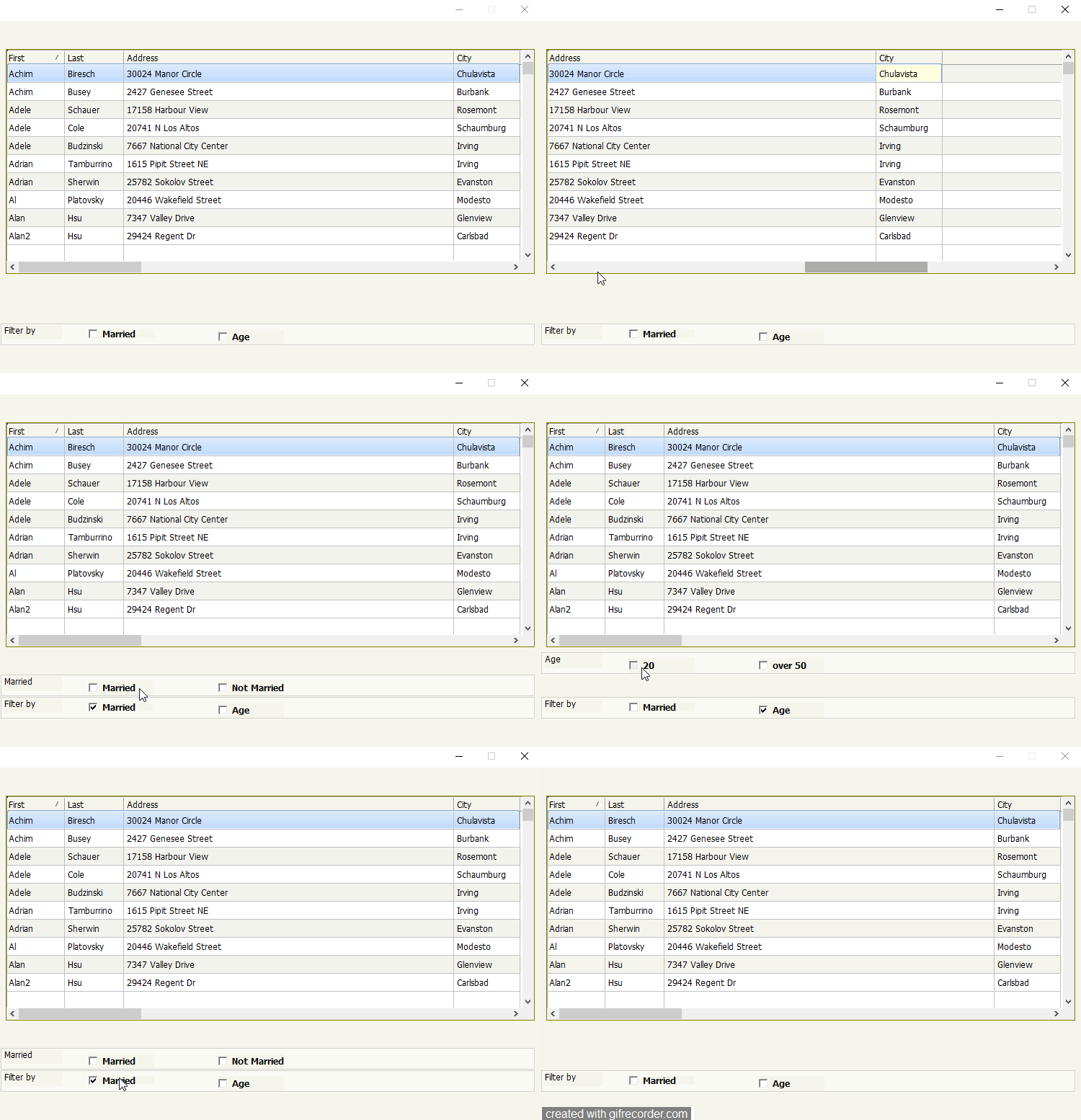
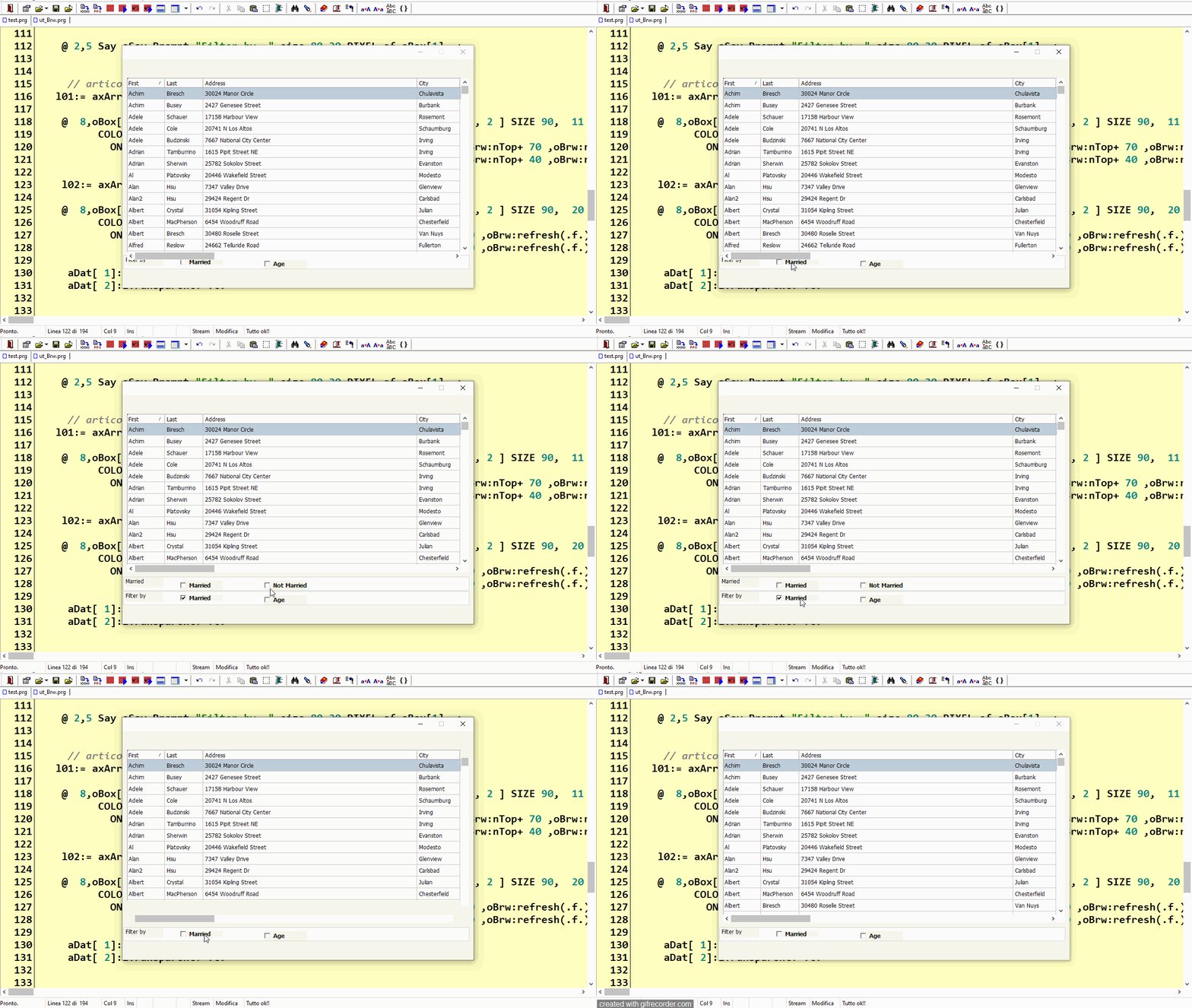
if I click on a checkbox the procedure must change the height to the xbrowse example - 60

in another procedure I have already done it but I reduce the ntop of the xbrowse, now I want to make space below

Since from 1991/1992 ( fw for clipper Rel. 14.4 - Momos)

I use : FiveWin for Harbour March-April 2024 - Harbour 3.2.0dev (harbour_bcc770_32_20240309) - Bcc7.70 - xMate ver. 1.15.3 - PellesC - mail: silvio[dot]falconi[at]gmail[dot]com
Posts: 7318
Joined: Thu Oct 18, 2012 07:17 PM
Re: how to change the size of an xbrowse in runtime
Posted: Thu May 02, 2024 08:20 PM
I'm trying to raise the xbrowse but I don't understand how to do it, I tried both with nHeight and with NBottom


I put the checkboxes in a panel under the browse
if I click on the first check I have to raise the xbrowse
Since from 1991/1992 ( fw for clipper Rel. 14.4 - Momos)

I use : FiveWin for Harbour March-April 2024 - Harbour 3.2.0dev (harbour_bcc770_32_20240309) - Bcc7.70 - xMate ver. 1.15.3 - PellesC - mail: silvio[dot]falconi[at]gmail[dot]com
Posts: 6984
Joined: Fri Oct 07, 2005 07:07 PM
Re: how to change the size of an xbrowse in runtime
Posted: Thu May 02, 2024 08:33 PM

If you use negative values for size, you should use the following to change it:

oBrw:nBottomMargin -= 40

Regards,

Otto

Posts: 7318
Joined: Thu Oct 18, 2012 07:17 PM
Re: how to change the size of an xbrowse in runtime
Posted: Thu May 02, 2024 09:14 PM
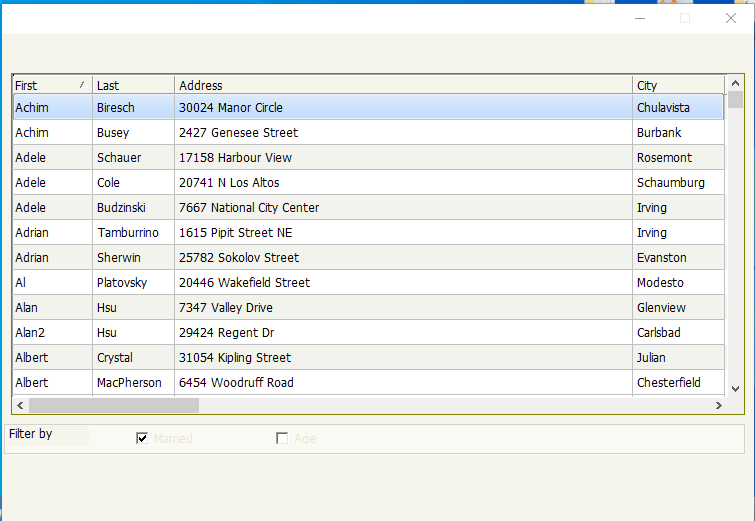
a test


I not Know How change the height of xBrowse
Since from 1991/1992 ( fw for clipper Rel. 14.4 - Momos)

I use : FiveWin for Harbour March-April 2024 - Harbour 3.2.0dev (harbour_bcc770_32_20240309) - Bcc7.70 - xMate ver. 1.15.3 - PellesC - mail: silvio[dot]falconi[at]gmail[dot]com
Posts: 7318
Joined: Thu Oct 18, 2012 07:17 PM
Re: how to change the size of an xbrowse in runtime
Posted: Thu May 02, 2024 09:18 PM
Otto wrote:Please post the line where you create xbrowse?
the sample


need tslines.prg class
Code (fw): Select all Collapse
#include 'fivewin.ch'
#include 'xbrowse.ch'
#include 'constant.ch'

 #define DLG_nColorDlg     RGB(245,245,235)
 #define DLG_nColortitle1  RGB(219,230,244)
 #define DLG_nColortitle2  RGB(207,221,239)
 #define DLG_nColorBar1    RGB(250,250,245)
 #define DLG_nColorBar2    RGB(245,245,235)
 #define DLG_nColorBtn1    RGB(245,245,235)
 #define DLG_nColorBtn2    RGB(250,250,245)
 #define DLG_nColorBtnB    RGB(195,195,185)


REQUEST DBFCDX

Function test()
   local oDlg, oBrw, oFont,oBold, oList,oBrush
         local nBottom:= 32.4
         local nRight := 95
         local nHt       := nBottom * DLG_CHARPIX_H
         local nWd       := Max( nRight * DLG_CHARPIX_W, 180 )
         local oBox:=array(3)

   local  aCols    := { ;
                   { "FIRST",   "First"   ,,   80, },;
                   { "LAST",    "Last",,   80, },;
                   { "STREET",  "Address"   ,,   100, },;
                   { "CITY",    "City"        ,,   90, } }

   local oSayfiltro
   local oCbx1,lmarried:=.f.
   local oCbx2,lAge:=.f.
   local nMarried,oCbx3
   local nRow:= 420,nCol:= 10
   local nInterlinea := 20
   local aGradgreen := { Rgb(250,250,245),rgb(210,210,205)}

       oList:=TCustomer():New()
       oList:setorder(1)
       oList:Gotop()

  oFont := TFont():New( "TAHOMA", 0, 14,, )
  oBold := TFont():New( "TAHOMA", 0, 14,,.t. )
  DEFINE BRUSH oBrush   STYLE BDIAGONAL COLOR  Rgb(195,195,185)

   DEFINE DIALOG oDlg SIZE nWd, nHt PIXEL TRUEPIXEL;
       FONT oFont   COLOR CLR_BLACK, RGB(245,245,235)  ;
       STYLE nOR( DS_MODALFRAME, WS_POPUP, WS_CAPTION, WS_SYSMENU, ;
                  WS_MINIMIZEBOX)

   @ 40,10 XBROWSE oBrw SIZE -10,390 PIXEL OF oDlg ;
          DATASOURCE oList COLUMNS aCols ;
          AUTOSORT FONT oFont;
          NOBORDER CELL LINES

  // MyStyleBrowse(oBrw,oBrush)

 WITH OBJECT oBrw
  :nRowHeight          := 25
            :l2007               := .F.
            :l2015               := .T.
            :lRecordSelector     := .F.
            :nColDividerStyle    := LINESTYLE_LIGHTGRAY
            :nRowDividerStyle    := LINESTYLE_LIGHTGRAY
            :nStretchCol         := STRETCHCOL_WIDEST
            :nMarqueeStyle        := MARQSTYLE_HIGHLROW


   :CreateFromCode()
END


    oBox[1]:=MyBox(nRow, 2,oDlg:nWidth-10,30,Rgb(250,250,245),rgb(210,210,205))
    nRow -=31
    oBox[2]:=MyBox(nRow, 2,oDlg:nWidth-10,30,Rgb(250,250,245),rgb(210,210,205))
    nRow -=31
    oBox[3]:=MyBox(nRow, 2,oDlg:nWidth-10,30,Rgb(250,250,245),rgb(210,210,205))


  ACTIVATE DIALOG oDlg CENTERED ;
  ON INIT (oBox[2]:hide(),oBox[3]:Hide(),;
                 Config_Form(oBox,oFont,oBold,oDlg,oBrw) )

   RELEASE FONT oFont

   return nil


   Function Config_Form(oBox,oFont,oBold,oDlg,oBrw)
   local aDat:=array(20)
   local nRow:= 0,nCol:= 10
   local nInterlinea := 30

   local axArray :={ { .F., "Married"   },;
                     { .F., "Age"   },;
                     { .F., "Married"   },;
                     { .F., "Not Married"   },;
                     { .F., "20"   },;
                     { .F., "over 50"   }}


   STATIC l01, l02, l03, l04, l05, l06 := .F.


    @ 2,5 Say oSay Prompt "Filter by  " size 80,20 PIXEL of oBox[1]  ;
                          COLOR CLR_BLACK, Rgb(250,250,245)
              oSay:lTransparent:=.t.
     // articoli
   l01:= axArray[ 1, 1 ]

    @  8,oBox[1]:nLeft+120  CHECKBOX  aDat[ 1] VAR l01 Prompt axArray[ 1, 2 ] SIZE 90,  11 PIXEL OF oBox[1] ;
          COLOR CLR_BLACK, Rgb(250,250,245) FONT oBold ;
            ON CHANGE ( IIf(l01,(oBox[2]:Show(), obrw:nBottom:=100 ,oBrw:refresh(.f.) ),;
                                (oBox[2]:Hide(), obrw:nBottom:=200 ,oBrw:refresh(.f.) ) ) )

    l02:= axArray[ 2, 1 ]

    @  8,oBox[1]:nLeft+300  CHECKBOX  aDat[ 2] VAR l02 Prompt axArray[ 2, 2 ] SIZE 90,  20 PIXEL OF oBox[1] ;
          COLOR CLR_BLACK, Rgb(250,250,245) FONT oBold ;
            ON CHANGE ( IIf(l02,(oBox[3]:Show(), obrw:nBottom:=100 ,oBrw:refresh(.f.) ),;
                                (oBox[3]:Hide(), obrw:nBottom:=200 ,oBrw:refresh(.f.) ) ) )

     aDat[ 1]:lTransparent:=.t.
     aDat[ 2]:lTransparent:=.t.


      l03:= axArray[ 3, 1 ]
     @ 2,5 Say oSay Prompt "Married  " size 80,20 PIXEL of oBox[2] TRANSPARENT ;
                          COLOR CLR_BLACK, Rgb(250,250,245)

      @  8,oBox[1]:nLeft+120  CHECKBOX  aDat[ 3] VAR l03 Prompt axArray[ 3, 2 ] SIZE 90,  20 PIXEL OF oBox[2] ;
          COLOR CLR_BLACK, Rgb(250,250,245) FONT oBold   WHEN  l01

      aDat[ 3]:lTransparent:=.t.

        l04:= axArray[ 4, 1 ]

       @  8,oBox[1]:nLeft+300  CHECKBOX  aDat[ 4] VAR l04 Prompt axArray[ 4, 2 ] SIZE 90,  20 PIXEL OF oBox[2] ;
          COLOR CLR_BLACK, Rgb(250,250,245) FONT oBold   WHEN  l01

         aDat[ 4]:lTransparent:=.t.


      l05:= axArray[ 5, 1 ]
     @ 2,5 Say oSay Prompt "Age  " size 80,20 PIXEL of oBox[3] TRANSPARENT ;
                          COLOR CLR_BLACK, Rgb(250,250,245)

      @  8,oBox[1]:nLeft+120  CHECKBOX  aDat[ 5] VAR l05 Prompt axArray[ 5, 2 ] SIZE 90,  20 PIXEL OF oBox[3] ;
          COLOR CLR_BLACK, Rgb(250,250,245) FONT oBold   WHEN  l02
           aDat[ 5]:lTransparent:=.t.


           l06:= axArray[ 6, 1 ]

       @  8,oBox[1]:nLeft+300  CHECKBOX  aDat[ 6] VAR l06 Prompt axArray[ 6, 2 ] SIZE 90,  20 PIXEL OF oBox[3] ;
          COLOR CLR_BLACK, Rgb(250,250,245) FONT oBold   WHEN  l02
           aDat[ 6]:lTransparent:=.t.

      RETURN NIL


//---------------------------------------------------------------------//
 Function MyBox(nTop, nLeft, nBottom, nRight,nClrLite, nClrDark)
   local cType:= "GBOX"
   return TSLines():New( nTop, nLeft, nBottom, nRight, cType, , nClrLite, nClrDark)
//---------------------------------------------------------------------//

CLASS TXData from TDatabase
      DATA cDbfPath   init ".\"
     ENDCLASS
CLASS TCustomer from TXData
   METHOD New()
ENDCLASS
 METHOD New( lShared ) CLASS TCustomer
   Default lShared := .t.
   ::super:New(,::cDbfPath + "Customer" ,"DBFCDX", lShared)
   if ::use()
      ::setOrder(1)
      ::gotop()
   endif
   RETURN Self
Since from 1991/1992 ( fw for clipper Rel. 14.4 - Momos)

I use : FiveWin for Harbour March-April 2024 - Harbour 3.2.0dev (harbour_bcc770_32_20240309) - Bcc7.70 - xMate ver. 1.15.3 - PellesC - mail: silvio[dot]falconi[at]gmail[dot]com
Posts: 6984
Joined: Fri Oct 07, 2005 07:07 PM
Re: how to change the size of an xbrowse in runtime
Posted: Thu May 02, 2024 09:23 PM

Static function changeBrw(oBrw,lmarried)

IF lmarried

oBrw:nBottomMargin -= 40

else

oBrw:nBottomMargin += 40

endif

oBrw:refresh()

return nil

Posts: 7318
Joined: Thu Oct 18, 2012 07:17 PM
Re: how to change the size of an xbrowse in runtime
Posted: Thu May 02, 2024 09:32 PM
Otto wrote:Static function changeBrw(oBrw,lmarried)
IF lmarried
oBrw:nBottomMargin -= 40
else
oBrw:nBottomMargin += 40
endif
oBrw:refresh()
return nil
use the test I published
Since from 1991/1992 ( fw for clipper Rel. 14.4 - Momos)

I use : FiveWin for Harbour March-April 2024 - Harbour 3.2.0dev (harbour_bcc770_32_20240309) - Bcc7.70 - xMate ver. 1.15.3 - PellesC - mail: silvio[dot]falconi[at]gmail[dot]com
Posts: 7318
Joined: Thu Oct 18, 2012 07:17 PM
Re: how to change the size of an xbrowse in runtime
Posted: Thu May 02, 2024 09:36 PM
change
Code (fw): Select all Collapse
l01:= axArray[ 1, 1 ]

    @  8,oBox[1]:nLeft+120  CHECKBOX  aDat[ 1] VAR l01 Prompt axArray[ 1, 2 ] SIZE 90,  11 PIXEL OF oBox[1] ;
          COLOR CLR_BLACK, Rgb(250,250,245) FONT oBold ;
            ON CHANGE ( IIf(l01,(oBox[2]:Show(), obrw:nBottomMargin-=40 ,oBrw:refresh(.f.) ),;
                                (oBox[2]:Hide(), obrw:nBottomMargin+=40 ,oBrw:refresh(.f.) ) ) )

    l02:= axArray[ 2, 1 ]

    @  8,oBox[1]:nLeft+300  CHECKBOX  aDat[ 2] VAR l02 Prompt axArray[ 2, 2 ] SIZE 90,  20 PIXEL OF oBox[1] ;
          COLOR CLR_BLACK, Rgb(250,250,245) FONT oBold ;
            ON CHANGE ( IIf(l02,(oBox[3]:Show(), obrw:nBottomMargin-=80 ,oBrw:refresh(.f.) ),;
                                (oBox[3]:Hide(), obrw:nBottomMargin+=80 ,oBrw:refresh(.f.) ) ) )
but give error
Since from 1991/1992 ( fw for clipper Rel. 14.4 - Momos)

I use : FiveWin for Harbour March-April 2024 - Harbour 3.2.0dev (harbour_bcc770_32_20240309) - Bcc7.70 - xMate ver. 1.15.3 - PellesC - mail: silvio[dot]falconi[at]gmail[dot]com
Posts: 6984
Joined: Fri Oct 07, 2005 07:07 PM
Re: how to change the size of an xbrowse in runtime
Posted: Thu May 02, 2024 09:38 PM

For

@ 40,10 XBROWSE oBrw SIZE -10,390 PIXEL OF oDlg ;

you need:

oBrw:nRightMargin += 40

oBrw:nHeight += 40

Posts: 7318
Joined: Thu Oct 18, 2012 07:17 PM
Re: how to change the size of an xbrowse in runtime
Posted: Thu May 02, 2024 09:51 PM
Code (fw): Select all Collapse
 l01:= axArray[ 1, 1 ]

    @  8,oBox[1]:nLeft+120  CHECKBOX  aDat[ 1] VAR l01 Prompt axArray[ 1, 2 ] SIZE 90,  11 PIXEL OF oBox[1] ;
          COLOR CLR_BLACK, Rgb(250,250,245) FONT oBold ;
            ON CHANGE ( IIf(l01,(oBox[2]:Show(), obrw:nBottomMargin:= oBrw:nTop+ 70 ,oBrw:refresh(.f.) ),;
                                (oBox[2]:Hide(), obrw:nBottomMargin:= oBrw:nTop+ 40 ,oBrw:refresh(.f.) ) ) )
first step seem run ok

Since from 1991/1992 ( fw for clipper Rel. 14.4 - Momos)

I use : FiveWin for Harbour March-April 2024 - Harbour 3.2.0dev (harbour_bcc770_32_20240309) - Bcc7.70 - xMate ver. 1.15.3 - PellesC - mail: silvio[dot]falconi[at]gmail[dot]com
Posts: 514
Joined: Sun Oct 16, 2005 03:32 AM
Re: how to change the size of an xbrowse in runtime
Posted: Fri May 03, 2024 04:22 PM
Silvio,

This is a humble suggestion
Code (fw): Select all Collapse
......
   // @  8,oBox[1]:nLeft+120  CHECKBOX  aDat[ 1] VAR l01 Prompt axArray[ 1, 2 ] SIZE 90,  11 PIXEL OF oBox[1] ;
   //       COLOR CLR_BLACK, Rgb(250,250,245) FONT oBold ;
   //         ON CHANGE ( IIf(l01,(oBox[2]:Show(), obrw:nBottom:=100 ,oBrw:refresh(.f.) ),;
   //                             (oBox[2]:Hide(), obrw:nBottom:=200 ,oBrw:refresh(.f.) ) ) )

    @  8,oBox[1]:nLeft+120  CHECKBOX  aDat[ 1] VAR l01 Prompt axArray[ 1, 2 ] SIZE 90,  11 PIXEL OF oBox[1] ;
          COLOR CLR_BLACK, Rgb(250,250,245) FONT oBold ;
            ON CHANGE ( ChangeSizeBrw( l01, l02, oBox, oBrw ) )
......
   // @  8,oBox[1]:nLeft+300  CHECKBOX  aDat[ 2] VAR l02 Prompt axArray[ 2, 2 ] SIZE 90,  20 PIXEL OF oBox[1] ;
   //       COLOR CLR_BLACK, Rgb(250,250,245) FONT oBold ;
   //         ON CHANGE ( IIf(l02,(oBox[3]:Show(), obrw:nBottom:=100 ,oBrw:refresh(.f.) ),;
   //                             (oBox[3]:Hide(), obrw:nBottom:=200 ,oBrw:refresh(.f.) ) ) )

    @  8,oBox[1]:nLeft+300  CHECKBOX  aDat[ 2] VAR l02 Prompt axArray[ 2, 2 ] SIZE 90,  20 PIXEL OF oBox[1] ;
          COLOR CLR_BLACK, Rgb(250,250,245) FONT oBold ;
            ON CHANGE ( ChangeSizeBrw( l01, l02, oBox, oBrw ) )
......
Code (fw): Select all Collapse
Function ChangeSizeBrw( l01, l02, oBox, oBrw )
   LOCAL nHeight
   
   DO CASE
      CASE !l01 .AND. !l02
           nHeight := 390
           oBox[2]:Hide()
           oBox[3]:Hide()
      CASE l01 .AND. !l02
           nHeight := 340
           oBox[2]:Show()
           oBox[3]:Hide()
      CASE !l01 .AND. l02
           nHeight := 310
           oBox[2]:Hide()
           oBox[3]:Show()
      CASE l01 .AND. l02
           nHeight := 310
           oBox[2]:Show()
           oBox[3]:Show()
   ENDCASE
   
   oBrw:SetSize( oBrw:nWidth , nHeight, .T. )
   oBrw:refresh(.f.)

Return(NIL)

Saludos,


Carlos Gallego


*** FWH-25.12, xHarbour 1.3.1 Build 20241008, Borland C++7.70, PellesC, ADS 11.1***

Posts: 6984
Joined: Fri Oct 07, 2005 07:07 PM
Re: how to change the size of an xbrowse in runtime
Posted: Fri May 03, 2024 04:46 PM
Hello friends,
For anyone interested in solutions with mod_harbour or WebView2:
There is a solution with mod_harbour for this issue.
Here is the link: Feel free to check it out!

https://forums.fivetechsupport.com/viewtopic.php?f=45&t=44481&p=269851&sid=47b4a676d7650c0bd41dd07071e78bcb#p269851

Best regards,
Otto