\source\function\IMGTXTIO.PRGRegards, saludos.
\source\function\IMGTXTIO.PRGpedroluis wrote:Hola amigos !FWH uses FWPDF class to generate PDF using HaruPDF.
Como puedo solucionar la impresi贸n de un c贸digo de barras
que saqu茅 de barlib.zip de libre distribuci贸n,
que tiene el programa go_code.prg y que me da error al
querer imprimir al usar la funci贸n FILLRECT().
Gracias, como siempre !
Compiler version: xHarbour 1.2.3 Intl. (SimpLex) (Build 20221118)
FiveWin version: FWH 23.07
C compiler version: Borland/Embarcadero C++ 7.4 (32-bit)
Windows 10 64 Bits, version: 6.2, Build 9200
Error description: Warning BASE/1004 Message not found: FWPDF:FILLRECT
Stack Calls
===========
Called from: source\rtl\tobject.prg => FWPDF:ERROR( 0 )
Called from: source\rtl\tobject.prg => FWPDF:MSGNOTFOUND( 0 )
Called from: source\rtl\tobject.prg => FWPDF:FILLRECT( 0 )
Called from: go_code.prg => GO_CODE( 38 )
Called from: barlib.prg => CODE128( 34 )
Called from: barlib.prg => C_CODE128( 39 )
TPrinter():lUseHaruPDF := .F.
PRINT oPrn FILE cPdf#include "fivewin.ch"
REQUEST FWZEBRA
REQUEST FWHARU
function Main()
聽 聽local cName, cCity, cCountry, cItem
聽 聽local oPrn, oFont
聽 聽cName 聽 聽:= "Antonio Linares"
聽 聽cCity 聽 聽:= "Marbella"
聽 聽cCountry := "Spain"
聽 聽cItem 聽 聽:= "123456789012"
聽 聽TPrinter():lUseHaruPDF := .t.
聽 聽PRINT oPrn PREVIEW FILE "barcode.pdf"
聽 聽DEFINE FONT oFont NAME "TAHOMA" SIZE 0,-14 OF oPrn
聽 聽PAGE
聽 聽@ 1.00, 1 PRINT TO oPrn TEXT cName 聽 聽SIZE 4, 0.3 INCHES FONT oFont
聽 聽@ 1.30, 1 PRINT TO oPrn TEXT cCity 聽 聽SIZE 4, 0.3 INCHES FONT oFont
聽 聽@ 1.60, 1 PRINT TO oPrn TEXT cCountry SIZE 4, 0.3 INCHES FONT oFont
聽 聽@ 1.90, 1 PRINT TO oPrn TEXT cItem 聽 聽SIZE 4, 0.3 INCHES FONT oFont
聽 聽@ 1.00,5.00 PRINT TO oPrn TEXT "Address :" + CRLF + cName + CRLF + cCity + CRLF + cCountry + CRLF + cItem ;
聽 聽 聽 AS BARCODE TYPE "QR-CODE" SIZE 2,2 INCHES
聽 聽@ 3.0, 1 PRINT TO oPrn TEXT cName + " : CODE128" SIZE 4.0, 0.3 INCHES FONT oFont
聽 聽@ 3.5, 1 PRINT TO oPrn TEXT cName AS BARCODE TYPE "CODE128" SIZE 4,1 INCHES
聽 聽@ 5.5, 1 PRINT TO oPrn TEXT cItem + " : EAN13" SIZE 4.0, 0.3 INCHES FONT oFont
聽 聽@ 6.0, 1 PRINT TO oPrn TEXT cItem AS BARCODE TYPE "EAN13" SIZE 4,1 INCHES
聽 聽ENDPAGE
聽 聽ENDPRINT
聽 聽RELEASE FONT oFont
return nil
Muchas gracias Sr. Rao, funciona perfecto !
Como dice usted, no hace falta usar una librer铆a externa.
S贸lo unos problemitas:
1) En mi programa tengo 17 fonts distintos, y cuando imprime el c贸digo de barras realmente no se cu谩l toma y no se como definirle uno determinado.
2) En el SIZE <nWidth>, si pongo un valor menor que 4, queda igual. No se achica. El BARSIZE <nSize> no funciona. Me da error de compilaci贸n.
Pero a pesar de todo, con la respuesta que amablemente me pas贸, se pudo solucionar el problema.
Muchisimas gracias !
Sr.Rao
No puedo ajustar el ancho del c贸digo de barras
Necesito que tenga 4 cms. de ancho y sale de 4.7 cms.
@ 25.55+x3,01.00 PRINT TO oPrn TEXT mcodbar1 AS BARCODE TYPE "CODE128" SIZE 4,0.8 CM
La altura de 0.8 cms sale bi茅n.
Gracias !
#include "fivewin.ch"
REQUEST FWZEBRA
REQUEST FWHARU
function Main()
聽 聽local cName, cCity, cCountry, cItem
聽 聽local oPrn, oFont
聽 聽cName 聽 聽:= "Antonio Linares"
聽 聽cCity 聽 聽:= "Marbella"
聽 聽cCountry := "Spain"
聽 聽cItem 聽 聽:= "123456789012"
聽 聽TPrinter():lUseHaruPDF := .t.
聽 聽PRINT oPrn PREVIEW FILE "barcode.pdf"
聽 聽DEFINE FONT oFont NAME "TAHOMA" SIZE 0,-14 OF oPrn
聽 聽PAGE
聽 聽@ 1.00, 1 PRINT TO oPrn TEXT cName 聽 聽SIZE 4, 0.3 INCHES FONT oFont
聽 聽@ 1.30, 1 PRINT TO oPrn TEXT cCity 聽 聽SIZE 4, 0.3 INCHES FONT oFont
聽 聽@ 1.60, 1 PRINT TO oPrn TEXT cCountry SIZE 4, 0.3 INCHES FONT oFont
聽 聽@ 1.90, 1 PRINT TO oPrn TEXT cItem 聽 聽SIZE 4, 0.3 INCHES FONT oFont
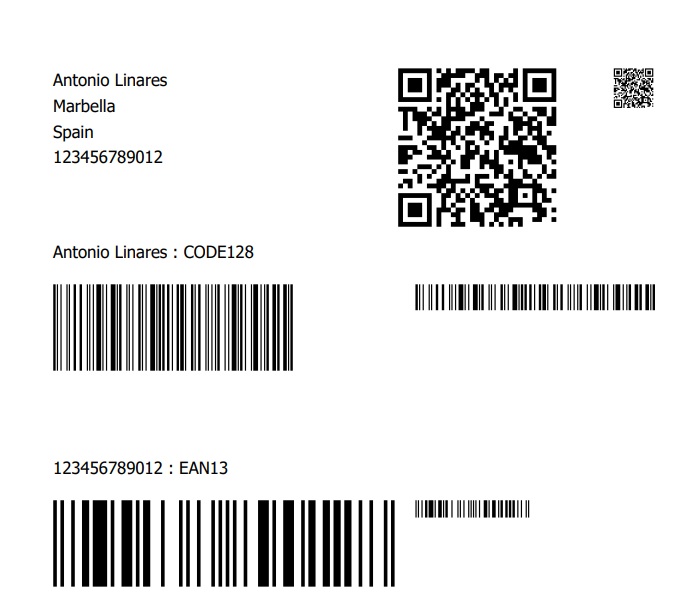
聽 聽@ 1.00,5.00 PRINT TO oPrn TEXT "Address :" + CRLF + cName + CRLF + cCity + CRLF + cCountry + CRLF + cItem ;
聽 聽 聽 AS BARCODE TYPE "QR-CODE" SIZE 2,2 INCHES
聽 聽@ 1.00,7.50 PRINT TO oPrn TEXT "Address :" + CRLF + cName + CRLF + cCity + CRLF + cCountry + CRLF + cItem ;
聽 聽 聽 AS BARCODE TYPE "QR-CODE" SIZE 0.5,0.5 INCHES 聽 // Mas chico
聽 聽@ 3.0, 1 PRINT TO oPrn TEXT cName + " : CODE128" SIZE 4.0, 0.3 INCHES FONT oFont
聽 聽@ 3.5, 1 PRINT TO oPrn TEXT cName AS BARCODE TYPE "CODE128" SIZE 4,1 INCHES
聽 聽@ 3.5, 5.2 PRINT TO oPrn TEXT cName AS BARCODE TYPE "CODE128" SIZE 1.2,0.3 INCHES //Mas chico
聽 聽@ 5.5, 1 PRINT TO oPrn TEXT cItem + " : EAN13" SIZE 4.0, 0.3 INCHES FONT oFont
聽 聽@ 6.0, 1 PRINT TO oPrn TEXT cItem AS BARCODE TYPE "EAN13" SIZE 4,1 INCHES
聽 聽@ 6.0, 5.2 PRINT TO oPrn TEXT cItem AS BARCODE TYPE "EAN13" SIZE 0.5,0.2 INCHES //Mas chico
聽 聽ENDPAGE
聽 聽ENDPRINT
聽 聽RELEASE FONT oFont
return nil
1) En mi programa tengo 17 fonts distintos, y cuando imprime el c贸digo de barras realmente no se cu谩l toma y no se como definirle uno determinado.Barcode does not use any font. Nothing to do with fonts.
2) En el SIZE <nWidth>, si pongo un valor menor que 4, queda igual. No se achica. El BARSIZE <nSize> no funciona. Me da error de compilaci贸n.We need to provide both width and height in the SIZE clause
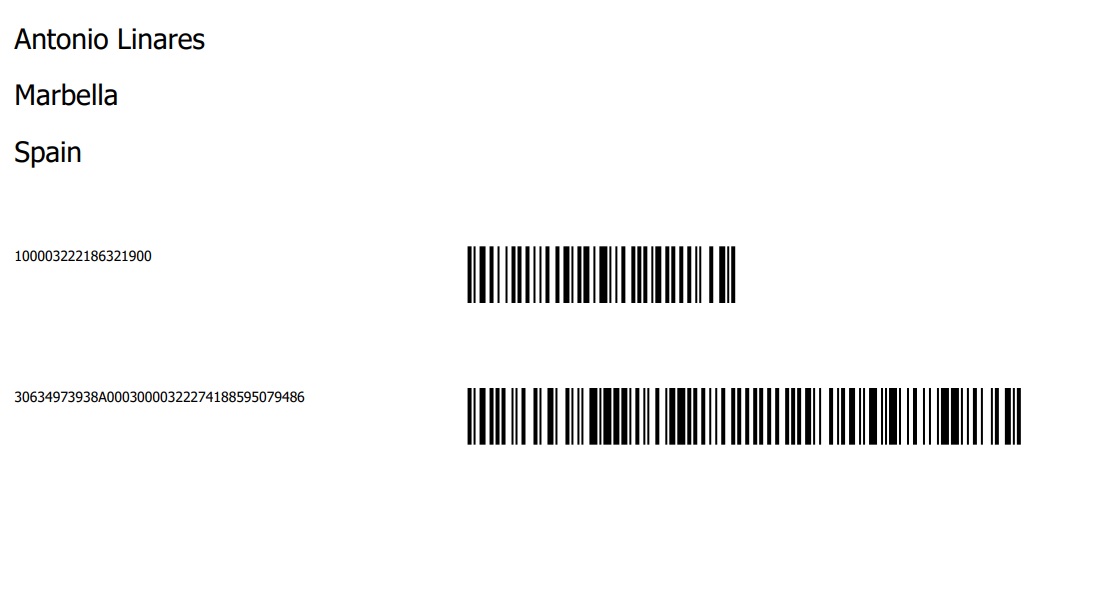
.. SIZE 聽nWidth, nHeight UNITS INCHES/CM/MMEste c贸digo de barras, tendr铆a que tener 4 CM 100003222186321900 (18 d铆gitos)
Este otro c贸digo de barras tendr铆a que tener 8.5 CM 30634973938A00030000322274188595079486 (38 d铆gitos)
#include "fivewin.ch"
REQUEST FWZEBRA
REQUEST FWHARU
function Main()
聽 聽local cName, cCity, cCountry, cItem, cItem2
聽 聽local oPrn, oFont, oFont1
聽 聽cName 聽 聽:= "Antonio Linares"
聽 聽cCity 聽 聽:= "Marbella"
聽 聽cCountry := "Spain"
聽 聽cItem 聽 聽:= "100003222186321900"
聽 聽cItem2 聽 := "30634973938A00030000322274188595079486"
聽 聽TPrinter():lUseHaruPDF := .t.
聽 聽PRINT oPrn PREVIEW FILE "barcode.pdf"
聽 聽DEFINE FONT oFont NAME "TAHOMA" SIZE 0,-14 OF oPrn
聽 聽DEFINE FONT oFont1 NAME "TAHOMA" SIZE 0,-07 OF oPrn
聽 聽PAGE
聽 聽@ 1.00, 1 PRINT TO oPrn TEXT cName 聽 聽SIZE 4, 0.3 CM FONT oFont
聽 聽@ 2.00, 1 PRINT TO oPrn TEXT cCity 聽 聽SIZE 4, 0.3 CM FONT oFont
聽 聽@ 3.00, 1 PRINT TO oPrn TEXT cCountry SIZE 4, 0.3 CM FONT oFont
聽 聽@ 4.00, 1 PRINT TO oPrn TEXT cItem 聽 聽SIZE 4, 0.3 CM FONT oFont
聽 聽@ 5.0, 1 PRINT TO oPrn TEXT cItem 聽 SIZE 7.5, 3 CM FONT oFont1
聽 聽@ 5.0, 9 PRINT TO oPrn TEXT cItem AS BARCODE TYPE "CODE128" SIZE 4,1 CM
聽 聽@ 7.5, 1 PRINT TO oPrn TEXT cItem2 SIZE 7.5, 3 CM FONT oFont1
聽 聽@ 7.5, 9 PRINT TO oPrn TEXT cItem2 AS BARCODE TYPE "CODE128" SIZE 8.5,1 CM
聽 聽
聽 聽ENDPAGE
聽 聽ENDPRINT
聽 聽RELEASE FONT oFont
return nil
Hola amigo !
El tema es que el primero quiero que me quede de un tama帽o de 4 cmts. y el segundo de 8,5 una vez impresos,
y eso es lo que no logro.
pedroluis wrote:Hola amigo !Una idea loca, prueba con (4.00) , (0.8 )
El tema es que el primero quiero que me quede de un tama帽o de 4 cmts. y el segundo de 8,5 una vez impresos,
y eso es lo que no logro.
pedroluis wrote:Hola amigo !Is this a legal requirement? Don't we have any choice to increase the size by an extra of 1/2 cm?
El tema es que el primero quiero que me quede de un tama帽o de 4 cmts. y el segundo de 8,5 una vez impresos,
y eso es lo que no logro.
Pedro, tienes raz贸n
Aunque le indicamos 4cm el ancho del codigo de barra es 4.5 cm aprox y el de 8.5 es casi 9.5 cm
No habia hecho la prueba de medirlos
Tambien prob茅 con mm y el resultado es el mismo.
Tal vez Mr. Rao nos pueda explicar si hay alguna solucion
#include "fivewin.ch"
REQUEST FWZEBRA
REQUEST FWHARU
//----------------------------------------------------------------------------//
function Main()
聽 聽local cItem1 聽 := "100003222186321900"
聽 聽local cItem2 聽 := "30634973938A00030000322274188595079486"
聽 聽local oPrn, oPen, oFont
聽 聽TPrinter():lUseHaruPDF := .F. 聽 // Not using HaruPDF
聽 聽PRINT oPrn PREVIEW FILE "barcode.pdf"
聽 聽DEFINE FONT oFont NAME "TAHOMA" SIZE 0,-14 OF oPrn
聽 聽DEFINE PEN oPen WIDTH 1 COLOR CLR_HRED OF oPrn
聽 聽PAGE
聽 聽@ 聽3, 2 PRINT TO oPrn TEXT cItem1 SIZE 10,1 CM FONT oFont
聽 聽oPrn:Lines( { { 4, 2 }, { 4, 6 }, { 4.4, 6 } }, oPen, "CM" )
聽 聽@ 4.5, 2 PRINT TO oPrn TEXT cItem1 AS BARCODE TYPE "CODE128" SIZE 4,1 CM
聽 聽@ 10, 2 PRINT TO oPrn TEXT cItem2 SIZE 20,1 CM FONT oFont
聽 聽oPrn:Lines( { { 11, 2 }, { 11, 10.5 }, { 11.4, 10.5 } }, oPen, "CM" )
聽 聽@ 11.5, 2 PRINT TO oPrn TEXT cItem2 AS BARCODE TYPE "CODE128" SIZE 8.5,1 CM
聽 聽ENDPAGE
聽 聽ENDPRINT
聽 聽RELEASE FONT oFont
return nilOk Sr. Rao.
Entendido !!!
Muchas gracias y disculpe las molestias.