FiveTech Support Forums

FiveWin / Harbour / xBase community
Board index FiveWin for Harbour/xHarbour XBROWSE (It's giving me an error when I put Transparent)
Posts: 56
Joined: Tue Mar 23, 2010 12:53 PM
XBROWSE (It's giving me an error when I put Transparent)
Posted: Mon May 20, 2024 07:51 PM
It's giving me an error when I put Transparent


oDB_TEMPO_VENDA:lTransparent := .F. ------> OK
oDB_TEMPO_VENDA:lTransparent := .T. ------> ERROR


Fw VERSION 22.03

Code (fw): Select all Collapse
    *----------------------------------------------------------------------------
    oDB_TEMPO_VENDA                                     := TXBrowse():New( oDlg_PDV_VENDAS )
    oDB_TEMPO_VENDA:cAlias                          := "tempo"
    oDB_TEMPO_VENDA:bKeyDown                        :={|nKey|  if(nkey=13,(T_COD_PRODUTO:=tempo->COD_PRODUTO,APAGAR_ITENS_PDV(T_PODE_DELETAR,tempo->ID,tempo->NOME_PRODUTO) , ),) , if(nkey=27,(T_PODE_DELETAR:="N",oT_PDV_COD_BARRA:SetFocus() , ),)  }
    oDB_TEMPO_VENDA:bLDblClick                      :={|| T_COD_PRODUTO:=tempo->COD_PRODUTO }
    oDB_TEMPO_VENDA:bRClicked                       :={|| Msgstop("Opção Não Existe !",SISTEMA) }   
    oDB_TEMPO_VENDA:lColDividerComplete         := .F.
    oDB_TEMPO_VENDA:lHScroll                    := .F.      //-----> Barra Rolagem Horiz.
    oDB_TEMPO_VENDA:lVScroll                        := .F.   
    oDB_TEMPO_VENDA:lFooter                     := .T.
    oDB_TEMPO_VENDA:lRecordSelector             := .T.  
    oDB_TEMPO_VENDA:nHeaderLines                := 1
    oDB_TEMPO_VENDA:nDataLines                  := 2.5
    oDB_TEMPO_VENDA:bClrStd                         := {|| { COR_LETRAS_GRID, IIF((oDB_TEMPO_VENDA:KeyNo())%2==0, COR_1_bClrStd , COR_2_bClrStd   ) } }     
    oDB_TEMPO_VENDA:bClrSelFocus                    := {|| { M->COR_1_bClrSelFocus, M->COR_2_bClrSelFocus  } }         
    oDB_TEMPO_VENDA:bClrRowFocus                    := {|| { M->COR_1_bClrRowFocus, M->COR_2_bClrRowFocus   } }
    oDB_TEMPO_VENDA:nColDividerStyle            := 4
    oDB_TEMPO_VENDA:nRowDividerStyle            := 4
    oDB_TEMPO_VENDA:nMarqueeStyle               := 7
    oDB_TEMPO_VENDA:nFooterLines                := 1
    oDB_TEMPO_VENDA:lAllowColSwapping           := .T.                                 //  Click no header (.f.)Trava
    oDB_TEMPO_VENDA:l2007                           := M->ESTILO_l2007 
    oDB_TEMPO_VENDA:lTransparent                    := .T.   &&&& faz o browse Transparente
   oDB_TEMPO_VENDA:lDisplayZeros                := (.F.)
   oDB_TEMPO_VENDA:lColChangeNotify             := (.T.)   &&&&& gerar evento por coluna
    oDB_TEMPO_VENDA:lAllowRowSizing             := .T. 
    oDB_TEMPO_VENDA:CreateFromResource(4027)
    *-------------------------------------------------------------------------


Code (fw): Select all Collapse
Aplicacao
=============================
 Empresa...: Hisomais Embalagens Ltda
 Data Erro.: 20/05/2024, 16:44:08
 Caminho...: C:\PROJETOS\MESTOQ\MESTOQ.EXE (32 bits)
 Versao....: xHarbour 1.2.3 Intl. (SimpLex) (Build 20201212)
 FiveWin...: FWH 22.03
 Compilador: Borland/Embarcadero C++ 7.4 (32-bit)
 Windows...: 6.2, Build 9200 

Abaixo a Descriao do Erro 
Error BASE/1068  Erro nos parƒmetros: acesso de array
 Arquivos:
     [   1] = U   
     [   2] = N   1

Rotinas / Linhas Chamadas
=============================
 Chamada por..: .\source\classes\XBROWSE.PRG =>  txbrowse:paint( 2205 )
 Chamada por..: .\source\classes\XBROWSE.PRG =>  txbrowse:display( 2133 )
 Chamada por..: .\source\classes\CONTROL.PRG =>  tcontrol:handleevent( 1793 )
 Chamada por..: .\source\classes\XBROWSE.PRG =>  txbrowse:handleevent( 11921 )
 Chamada por..: .\source\classes\WINDOW.PRG =>  _fwh( 3559 )
 Chamada por..:  =>  dialogbox( 0 )
 Chamada por..: .\source\classes\DIALOG.PRG =>  tdialog:activate( 304 )
 Chamada por..: C:\PROJETOS\MESTOQ\PRG_OBJ\PDV_PRE_VENDAS.PRG =>  pdv_pre_venda( 722 )
 Chamada por..: C:\PROJETOS\MESTOQ\PRG_OBJ\SISTEMA.PRG =>  (b)monta_menu_ribbon( 3385 )
 Chamada por..: .\source\classes\TRBTN.PRG =>  trbtn:click( 717 )
 Chamada por..: .\source\classes\TRBTN.PRG =>  trbtn:lbuttonup( 920 )
 Chamada por..: .\source\classes\CONTROL.PRG =>  tcontrol:handleevent( 1817 )
 Chamada por..: .\source\classes\TRBTN.PRG =>  trbtn:handleevent( 1578 )
 Chamada por..: .\source\classes\WINDOW.PRG =>  _fwh( 3559 )
 Chamada por..:  =>  winrun( 0 )
 Chamada por..: .\source\classes\WINDOW.PRG =>  twindow:activate( 1097 )
 Chamada por..: C:\PROJETOS\MESTOQ\PRG_OBJ\SISTEMA.PRG =>  main( 1923 )
Posts: 10733
Joined: Sun Nov 19, 2006 05:22 AM
Re: XBROWSE (It's giving me an error when I put Transparent)
Posted: Mon May 20, 2024 09:58 PM
This is a bug in xbrowse.prg.
We regret the inconvenience and thank you for pointing this out.

Please apply the following fix to xbrowse.prg.
Please locate the following lines of code in the METHOD Paint()
Code (fw): Select all Collapse
   else
      if ::lTransparent .and. Empty( ::oBrush:hBitmap )
         if ! Empty( ::oWnd:oBrush:hBitmap )
            aOrg  := SetBrushOrgEx( ::hDC, nBmpWidth( ::oWnd:oBrush:hBitmap ) - ::nLeft, ;
                                  nBmpHeight( ::oWnd:oBrush:hBitmap ) - ::nTop )
         endif
         FillRect( ::hDC, GetClientRect( ::hWnd ), ::oWnd:oBrush:hBrush )
         SetBrushOrgEx( ::hDC, aOrg[ 1 ], aOrg[ 2 ] )
      else
See the last but one line:
Code (fw): Select all Collapse
         SetBrushOrgEx( ::hDC, aOrg[ 1 ], aOrg[ 2 ] )
Please modify this line as 3 lines like this:
Code (fw): Select all Collapse
         if aOrg != nil
            SetBrushOrgEx( ::hDC, aOrg[ 1 ], aOrg[ 2 ] )
         endif
This fix should solve the problem.
Regards


G. N. Rao.

Hyderabad, India
Posts: 56
Joined: Tue Mar 23, 2010 12:53 PM
Re: XBROWSE (It's giving me an error when I put Transparent)
Posted: Tue May 21, 2024 08:33 PM
Hello

Not Worrk


Posts: 56
Joined: Tue Mar 23, 2010 12:53 PM
Re: XBROWSE (It's giving me an error when I put Transparent)
Posted: Wed May 22, 2024 08:59 PM

HELLO

Posts: 10733
Joined: Sun Nov 19, 2006 05:22 AM
Re: XBROWSE (It's giving me an error when I put Transparent)
Posted: Wed May 22, 2024 09:56 PM
This is the revised code:
Code (fw): Select all Collapse
   // Paint Background
   if ::bPaintBack != nil
      Eval( ::bPaintBack, Self )
   else
      if ::lTransparent .and. Empty( ::oBrush:hBitmap )
         if ! Empty( ::oWnd:oBrush:hBitmap )
            aOrg  := SetBrushOrgEx( ::hDC, nBmpWidth( ::oWnd:oBrush:hBitmap ) - ::nLeft, ;
                                  nBmpHeight( ::oWnd:oBrush:hBitmap ) - ::nTop )
         endif
         FillRect( ::hDC, GetClientRect( ::hWnd ), ::oWnd:oBrush:hBrush )
         if aOrg != nil
            SetBrushOrgEx( ::hDC, aOrg[ 1 ], aOrg[ 2 ] )
         endif
      else
         oRect       := ::DataRect()
         aOrg  := SetBrushOrgEx( ::hDC, oRect:nLeft, oRect:nTop )
         FillRect( ::hDC, oRect:aRect, ::oBrush:hBrush )
         SetBrushOrgEx( ::hDC, aOrg[ 1 ], aOrg[ 2 ] )
      endif
   endif
   // Paint Background end
This is working here and should work for you too.
Regards


G. N. Rao.

Hyderabad, India
Posts: 56
Joined: Tue Mar 23, 2010 12:53 PM
Re: XBROWSE (It's giving me an error when I put Transparent)
Posted: Thu May 23, 2024 02:49 PM
It was great, the only thing missing was that detail.

Posts: 56
Joined: Tue Mar 23, 2010 12:53 PM
Re: XBROWSE (It's giving me an error when I put Transparent)
Posted: Fri May 24, 2024 04:41 PM

the columns were not transparent

Posts: 56
Joined: Tue Mar 23, 2010 12:53 PM
Re: XBROWSE (It's giving me an error when I put Transparent)
Posted: Sat May 25, 2024 12:43 PM

Hi, is this possible on Xbrowse?

Posts: 10733
Joined: Sun Nov 19, 2006 05:22 AM
Re: XBROWSE (It's giving me an error when I put Transparent)
Posted: Sat May 25, 2024 01:04 PM
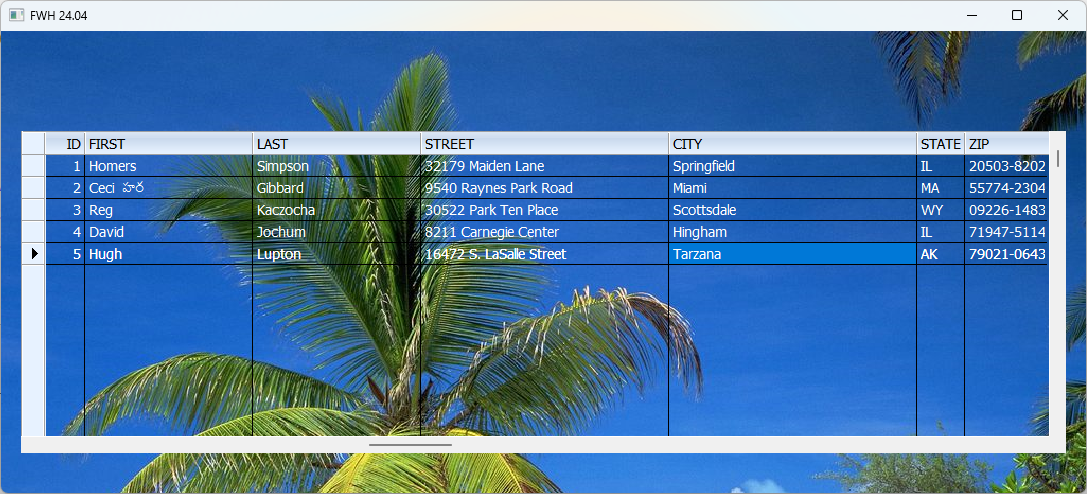
Transparency for headers and record-selector is not implemented yet.
We may provide in future versions.

But full data area of the xbrowse, including all columns can be fully transparent.

Sample:
Code (fw): Select all Collapse
#include "fivewin.ch"

REQUEST DBFCDX

function Main()

   local oWnd, oFont, oBrush, oBrw

   USE CUSTOMER
   SET FILTER TO RECNO() < 6

   DEFINE BRUSH oBrush FILE "c:\fwh\bitmaps\sea.bmp" RESIZE
   DEFINE FONT oFont NAME "TAHOMA" SIZE 0,-14
   DEFINE WINDOW oWnd FROM 0,0 TO 500,1100 PIXEL BRUSH oBrush TITLE FWVERSION
   oWnd:SetFont( oFont )

   @ 100, 20 XBROWSE oBrw SIZE -20,-40 PIXEL OF oWnd ;
      DATASOURCE ALIAS() AUTOCOLS ;
      CELL LINES NOBORDER ;
      COLOR CLR_WHITE,CLR_BLACK TRANSPARENT

   WITH OBJECT oBrw
      //
      :CreateFromCode()
   END

   ACTIVATE WINDOW oWnd CENTERED
   RELEASE FONT oFont
   RELEASE BRUSH oBrush

return nil
Regards


G. N. Rao.

Hyderabad, India
Posts: 8515
Joined: Tue Dec 20, 2005 07:36 PM
Re: XBROWSE (It's giving me an error when I put Transparent)
Posted: Sat May 25, 2024 01:50 PM
Code (fw): Select all Collapse
#Include "FiveWin.ch"

STATIC oFont

REQUEST DBFCDX

FUNCTION Main()

   LOCAL oWnd, oBrush, oBrw, aGrad

   USE CUSTOMER

   SET FILTER TO RecNo() < 6

   GO TOP

// aGrad := { { 1.0, 16744448, 16777215 }, { 0.1, 16744448, 16777215 } } // Blue
   aGrad := { { 1.0, 12824535, 16777215 }, { 0.1, 12824535, 16777215 } } // Purple
// aGrad := { { 1.0, 3926784, 16777215  }, { 0.1,  3926784, 16777215 } } // Green

   // DEFINE BRUSH oBrush FILE "..\bitmaps\sea.bmp" RESIZE
   DEFINE BRUSH oBrush COLOR aGrad

   DEFINE FONT oFont NAME "TAHOMA" SIZE 0, - 14

   DEFINE WINDOW oWnd FROM 0, 0 TO 500, 1100 PIXEL BRUSH oBrush ;
      TITLE FWVERSION

   oWnd:SetFont( oFont )

   @ 100, 20 XBROWSE oBrw SIZE - 20, - 40 PIXEL OF oWnd ;
      DATASOURCE Alias() AUTOCOLS                       ;
      CELL LINES NOBORDER                               ;
      COLOR CLR_WHITE, CLR_BLACK TRANSPARENT

   BrwColors( oBrw, .T. )

   WITH OBJECT oBrw

      oBrw:AutoFit() // Auto ajuste / ajuste automatico do xBrowse()

      :nStretchCol := STRETCHCOL_WIDEST  // Ajusta as colunas do xBrowse.
      //
      :CreateFromCode()
   END

   ACTIVATE WINDOW oWnd CENTERED

   RELEASE FONT oFont
   RELEASE BRUSH oBrush

   CLOSE DATA

RETURN NIL
// ESTA EM: INV1.PRG
STATIC FUNCTION BrwColors( oBrw, lFoot )

   local cClrBack

   DEFAULT lFoot          := .F.

   oBrw:l2007             := .F.
   oBrw:nRowHeight        := 24
   oBrw:nHeaderHeight     := 24 
   oBrw:lFooter           := lFoot
   
   //oBrw:lRecordSelector     := .F.
   //oBrw:lColDividerComplete := .F.
   //oBrw:lRowDividerComplete := .F.
   
   oBrw:lFlatStyle        := .T.

   oBrw:bClrHeader        := { || { CLR_BLACK, CLR_WHITE, CLR_WHITE } } //RGB( 232, 255, 232 ), RGB( 232, 255, 232 ) }}
   oBrw:lFullGrid         := .F.

// oBrw:nRowDividerStyle  := LINESTYLE_NOLINES // DARKGRAY  // LINESTYLE_LIGHTGRAY
// oBrw:nColDividerStyle  := LINESTYLE_NOLINES // LIGHTGRAY // LINESTYLE_NOLINES

   oBrw:nMarqueeStyle := MARQSTYLE_HIGHLROW

   oBrw:bClrStd = { || If( oBrw:KeyNo() % 2 == 0, ;
                         { If( ( oBrw:cAlias )->( Deleted() ), CLR_HRED, CLR_BLUE ),;
                           RGB( 198, 255, 198 ) }, ;
                         { If( ( oBrw:cAlias )->( Deleted() ), CLR_HRED, CLR_BLUE ),;
                           RGB( 232, 255, 232 ) } ) }

   oBrw:bClrSel = { || { If( ( oBrw:cAlias )->( Deleted() ), CLR_HRED, CLR_WHITE ),;
                           RGB( 34, 177, 76 ) } } //RGB( 0x33, 0x66, 0xCC ) } }
   
   cClrBack = Eval( oBrw:bClrSelFocus )[ 2 ]

   oBrw:bClrSelFocus  := { || { If( ( oBrw:cAlias )->( Deleted() ), CLR_HRED, CLR_WHITE ),;
                              cClrBack } }

   oBrw:SetColor( CLR_BLUE, RGB( 232, 255, 232 ) )

   oBrw:SetFont( oFont )

RETURN NIL

// FIN / END
Regards, saludos.
João Santos - São Paulo - Brasil - Phone: +55(11)95150-7341

Continue the discussion