FiveTech Support Forums

FiveWin / Harbour / xBase community
Board index FiveWin for Harbour/xHarbour Relative coordinates of Controls
Posts: 10733
Joined: Sun Nov 19, 2006 05:22 AM
Relative coordinates of Controls
Posted: Wed May 22, 2024 04:29 AM
It is now possible to specify coordinates (i.e., nTop, nLeft, nWidth, nHeight ) of a control relative to the size of the parent window/dialog. If the parent window/dialog is resized, the controls also will be moved/resized depending on the way the relative coordinates are specified.

When the controls are resized, the fonts also are resized proportionately.

Sample:
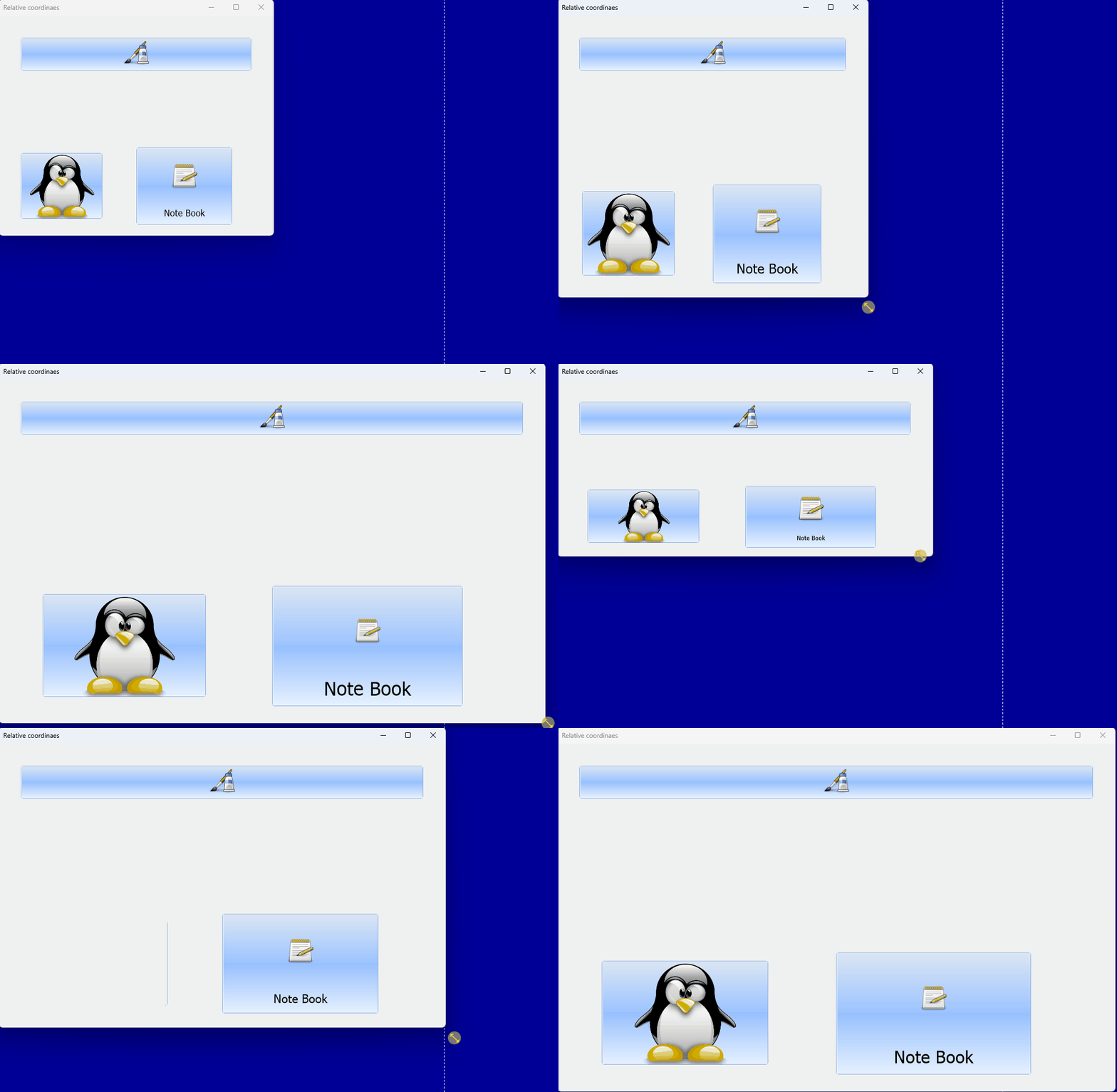
Code (fw): Select all Collapse
#include "fivewin.ch"

function Main()

   local oDlg, oFont, aBtn[ 3 ]

   DEFINE FONT oFont NAME "TAHOMA" SIZE 0,-16
   DEFINE DIALOG oDlg SIZE 500,400 PIXEL TRUEPIXEL RESIZABLE ;
      FONT oFont TITLE "Relative coordinaes"

   @ 40,40 BTNBMP aBtn[ 1 ] FILE "..\bitmaps\pngs\image8.png" ;
      SIZE -40,60 PIXEL OF oDlg 2007 CENTER GDIP

   @ 250,40 BTNBMP aBtn[ 2 ] FILE "..\bitmaps\pngs\2.png" ;
      SIZE 150,120 RELATIVE PIXEL OF oDlg 2007 GDIP

   @ -0.4,-0.5 BTNBMP aBtn[ 3 ] PROMPT "Note Book" FILE "..\bitmaps\pngs\image7.png" ;
      SIZE 0.35, 0.35 PIXEL OF oDlg 2007 GDIP

   ACTIVATE DIALOG oDlg CENTERED
   RELEASE FONT oFont

return nil


To start with, this feature is now implemented for TBtnBmp and is being extended to other controls

Sample.2:
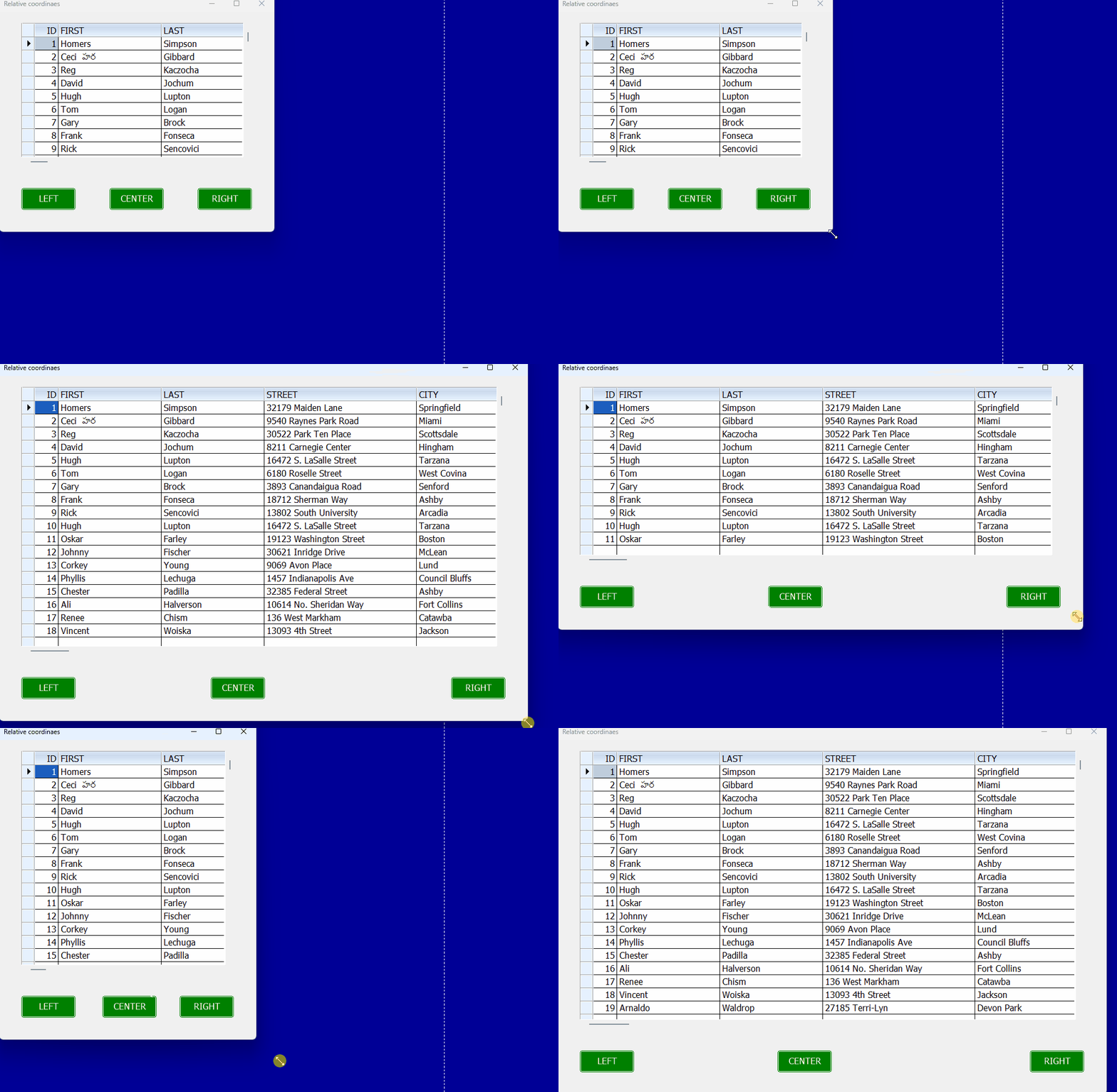
Code (fw): Select all Collapse
#include "fivewin.ch"

function Main()

   local oDlg, oFont, oBrw, aBtn[ 3 ]

   USE CUSTOMER NEW SHARED

   DEFINE FONT oFont NAME "TAHOMA" SIZE 0,-16
   DEFINE DIALOG oDlg SIZE 500,400 PIXEL TRUEPIXEL RESIZABLE ;
      FONT oFont TITLE "Relative coordinaes"

   @ 20,40 XBROWSE oBrw SIZE -40,-120 PIXEL OF oDlg ;
      DATASOURCE "CUSTOMER" AUTOCOLS CELL LINES NOBORDER
   oBrw:CreateFromCode()

   @ -80,40 BTNBMP aBtn[ 1 ] PROMPT "LEFT"    SIZE 100,40 PIXEL OF oDlg FLAT GDIP ;
      COLOR CLR_WHITE,CLR_GREEN

   @ -80,0.4 BTNBMP aBtn[ 1 ] PROMPT "CENTER" SIZE 100,40 PIXEL OF oDlg FLAT GDIP ;
      COLOR CLR_WHITE,CLR_GREEN

   @ -80,-140 BTNBMP aBtn[ 1 ] PROMPT "RIGHT" SIZE 100,40 PIXEL OF oDlg FLAT GDIP ;
      COLOR CLR_WHITE,CLR_GREEN

   ACTIVATE DIALOG oDlg CENTERED
   RELEASE FONT oFont

return nil
Regards


G. N. Rao.

Hyderabad, India
Posts: 1283
Joined: Fri Feb 10, 2006 02:34 PM
Re: Relative coordinates of Controls
Posted: Wed May 22, 2024 05:18 AM

Rao,

Awesome, congratulations

C.

Salutacions, saludos, regards

"...programar es fácil, hacer programas es difícil..."

UT Page -> https://carles9000.github.io/
Forum UT -> https://discord.gg/bq8a9yGMWh
HIX -> https://github.com/carles9000/hix
Posts: 1445
Joined: Mon Oct 10, 2005 02:38 PM
Re: Relative coordinates of Controls
Posted: Wed May 22, 2024 06:27 AM
Carles wrote:Rao,

Awesome, congratulations

C.
+1
:D

Un Saludo

Carlos G.


FiveWin 25.12 + Harbour 3.2.0dev (r2502110321), BCC 7.7 Windows 11 Home

Posts: 476
Joined: Sat Feb 03, 2007 06:36 AM
Re: Relative coordinates of Controls
Posted: Wed May 22, 2024 12:05 PM

Mr. Rao, +100

Excelente!

Posts: 1487
Joined: Tue Jun 14, 2016 07:51 AM
Re: Relative coordinates of Controls
Posted: Wed May 22, 2024 12:15 PM
  • 1

Very usefull !!

Marc Venken

Using: FWH 23.08 with Harbour
Posts: 1344
Joined: Wed Nov 16, 2005 09:14 PM
Re: Relative coordinates of Controls
Posted: Wed May 22, 2024 12:16 PM

Excelente!!! Es una funcionalidad muy esperada y necesaria

Muchas gracias Mr. Rao

Posts: 1816
Joined: Wed Oct 26, 2005 02:49 PM
Re: Relative coordinates of Controls
Posted: Wed May 22, 2024 12:58 PM
Excelente Mr. Rao :D :D :D
Saludos
LEANDRO AREVALO
Bogotá (Colombia)
https://hymlyma.com
https://hymplus.com/
leandroalfonso111@gmail.com
leandroalfonso111@hotmail.com

[ Turbo Incremental Link64 6.98 Embarcadero 7.70 ] [ FiveWin 25.01 ] [ xHarbour 64 bits) ]
Posts: 1387
Joined: Fri May 23, 2008 01:33 PM
Re: Relative coordinates of Controls
Posted: Wed May 22, 2024 01:29 PM
+1
Waiting other controls. :D
Regards,


Hakan ONEMLI


Harbour & MSVC 2022 & FWH 23.06
Posts: 3358
Joined: Fri Oct 07, 2005 08:20 PM
Re: Relative coordinates of Controls
Posted: Wed May 22, 2024 02:43 PM

Mr. Rao:

Excelent job, as usual.

Regards

SOI, s.a. de c.v.
estbucarm@gmail.com
http://www.soisa.mex.tl/
http://sqlcmd.blogspot.com/
Tel. (722) 174 44 45
Carpe diem quam minimum credula postero
Posts: 8515
Joined: Tue Dec 20, 2005 07:36 PM
Re: Relative coordinates of Controls
Posted: Wed May 22, 2024 03:54 PM
Master Rao, in Resolution: 1024 x 768, the buttons disappear.

Maestro Rao, en Resolución: 1024 x 768, los botones desaparecen.

Maestro Rao, ¿es posible controlar VÍA la resolución de pantalla (vídeo) elegida por el usuario?

Master Rao, is it possible to control VIA the screen resolution (video) chosen by the user?
Code (fw): Select all Collapse
// C:\FWH\SAMPLES\RAORESI2.PRG

#include "FiveWin.ch"
#include "common.ch"
#include "xbrowse.ch"

STATIC lMaximized := .T.   // Mister Rao, pls!

FUNCTION Main()

   LOCAL oDlg, oFont, oBrw, aBtn[ 3 ], nHMsg, oSaida
   LOCAL cMsgBar := 'Puedes cambiar de tamaño o maximizar...'

   USE CUSTOMER NEW SHARED

   DEFINE FONT oFont NAME "TAHOMA" SIZE 0, - 16

   DEFINE DIALOG oDlg SIZE 500, 400 PIXEL TRUEPIXEL RESIZABLE ;
      FONT oFont TITLE "Relative coordinaes"

   @ 20, 40 XBROWSE oBrw SIZE - 40, - 120 PIXEL OF oDlg ;
      DATASOURCE "CUSTOMER" AUTOCOLS CELL LINES NOBORDER

   oBrw:CreateFromCode()

   @ - 80, 40 BTNBMP aBtn[ 1 ] PROMPT "LEFT"    SIZE 100, 40 PIXEL OF oDlg  ;
      FLAT GDIP COLOR CLR_WHITE, CLR_GREEN

   @ - 80, 0.4 BTNBMP aBtn[ 1 ] PROMPT "CENTER" SIZE 100, 40 PIXEL OF oDlg  ;
      FLAT GDIP COLOR CLR_WHITE, CLR_GREEN

   @ - 80, - 140 BTNBMP aBtn[ 1 ] PROMPT "RIGHT" SIZE 100, 40 PIXEL OF oDlg ;
      FLAT GDIP COLOR CLR_WHITE, CLR_GREEN

   @  +600, 650 BTNBMP aBtn[ 1 ] PROMPT "BIEN!" SIZE 100, 40 PIXEL OF oDlg ;
      FLAT GDIP COLOR CLR_WHITE, CLR_GREEN

   ACTIVATE DIALOG oDlg CENTERED ;
      ON INIT ( nHMsg := nSetMsgBar( oDlg, cMsgBar ), ;
                If( lMaximized, oDlg:Maximize(), ) )

   RELEASE FONT oFont

RETURN NIL

FUNCTION nSetMsgBar( oDlg, cMsgBar )

   SET MESSAGE OF oDlg  TO cMsgBar   NOINSET  CENTERED

RETURN 024 //nº a guardar en la variable  nHMsg

// FIN / END
Regards, saludos.
João Santos - São Paulo - Brasil - Phone: +55(11)95150-7341
Posts: 10733
Joined: Sun Nov 19, 2006 05:22 AM
Re: Relative coordinates of Controls
Posted: Wed May 22, 2024 04:10 PM
Master Rao, in Resolution: 1024 x 768, the buttons disappear.
This implementation will be released in the next version.
No point testing these samples with your existing version of FWH
Master Rao, is it possible to control VIA the screen resolution (video) chosen by the user?
Controls should be relative to the size of window/dialog.
Window/Dialog should be relative to the screen resolution. This will be implemented later.
Regards


G. N. Rao.

Hyderabad, India
Posts: 1144
Joined: Mon Feb 05, 2007 07:15 PM
Re: Relative coordinates of Controls
Posted: Fri May 24, 2024 04:19 PM
muy bueno
lo esperamos con ansias locas :roll: :lol: :D :oops: :cry:
Cesar Cortes Cruz

SysCtrl Software

Mexico


' Sin +- FWH es mejor "
Posts: 3022
Joined: Fri Oct 07, 2005 01:45 PM
Re: Relative coordinates of Controls
Posted: Fri May 24, 2024 10:22 PM

I have always used resources ( .rc file ) because I could never figure out how to get the proper @ coordinates on a dialog. Of course, with resources, resizing is not possible.

After all these years, I would REALLY APPRECIATE knowing how we can actually determine the proper @ x,y values for controls. I've asked before and never received an answer. Because my screens contain a lot of data, I must be quite precise with control placement.

I love what you are doing, but if I can never figure out how to accurately determine the @ x,y values, I will sadly not be able to use it.

( Another example of where documentation of FWH would be so helpful ).

Tim Stone
http://www.MasterLinkSoftware.com
http://www.autoshopwriter.com
timstone@masterlinksoftware.com
Using: FWH 23.10 with Harbour 3.2.0 / Microsoft Visual Studio Community 2022-24 32/64 bit
Posts: 10733
Joined: Sun Nov 19, 2006 05:22 AM
Re: Relative coordinates of Controls
Posted: Sat May 25, 2024 01:55 AM
Of course, with resources, resizing is not possible.
No.
It is possible to have resizable dialogs with resources also.
Here is an example.

rc file:
Code (fw): Select all Collapse
TEST DIALOG 6, 15, 306, 227
STYLE DS_MODALFRAME | WS_POPUP | WS_VISIBLE | WS_CAPTION | WS_SYSMENU | WS_THICKFRAME | WS_MAXIMIZEBOX | WS_MINIMIZEBOX
CAPTION "TXBrowse demo"
FONT 8, "MS Sans Serif"
{
 CONTROL "", 101, "TXBrowse", 0 | WS_CHILD | WS_VISIBLE | WS_VSCROLL | WS_HSCROLL | WS_TABSTOP, 4, 5, 297, 202
}
Please see I added
Code (fw): Select all Collapse
WS_THICKFRAME | WS_MAXIMIZEBOX | WS_MINIMIZEBOX
to the dialog definition.

The program:
Code (fw): Select all Collapse
#include "fivewin.ch"

function Main()

   local oDlg, oBrw

   USE STATES

   DEFINE DIALOG oDlg RESOURCE "TEST"

   REDEFINE XBROWSE oBrw OF oDlg ID 101 ;
      DATASOURCE ALIAS() COLUMNS "CODE","NAME","CODE" ;
      CELL LINES NOBORDER

   WITH OBJECT oBrw
      :nStretchCol   := 2
      :nRightMargin  := 30
      :nBottomMargin := 30
   END

   ACTIVATE DIALOG oDlg CENTERED

return nil


You can test this sample with the current or any older version of FWH.

We are now implementing auto-resize of controls for those created from source and not from resource.
Later we will extend this feature to resources also.
Finally, we will have this feature for dialogs created from source as well as resource.
Regards


G. N. Rao.

Hyderabad, India
Posts: 3022
Joined: Fri Oct 07, 2005 01:45 PM
Re: Relative coordinates of Controls
Posted: Tue May 28, 2024 09:56 PM

If I understand you correctly, currently this should work with a browse control. However, not any other controls ( ie. GET fields, buttons, etc ) when using an .rc file.

However, it is your intention to eventually make a dialog resize with ALL controls responding correctly within an .rc file.

That would be great.

Tim Stone
http://www.MasterLinkSoftware.com
http://www.autoshopwriter.com
timstone@masterlinksoftware.com
Using: FWH 23.10 with Harbour 3.2.0 / Microsoft Visual Studio Community 2022-24 32/64 bit