

Buenas noches, los que estan trabajando en 64bits, pueden facilitar sus entorno de trabajo actual mente estoy trabajando con xharbour y como editor xMate . Se les agradece
Board index FiveWin for Harbour/xHarbour ayuda para configurar entorno FWH2404 de 64 bits
Page: 1 2 (25 posts)
Buen día Carlos, yo te recomiendo utilizar Harbour a 64, yo igual tenía xHarboiur y xmate a 32, muy fácil, pero siento que tendrás más potencial con Harbour, hay varios cambios por implementar, ahora, te recomiendo utilizar para compilar los ejemplos de prueba que vienen en fwh64 /samples por medio de test64.hbp y el bat go64
Saludos

Carlos
I use xMate as well ... I would be most appreciative if you get a working xMate 64 bit .env file you would be willing to share ..
Thanks
Rick Lipkin

It seems as xMate does not know how to work with bcc77 64 bits...
Maybe the only solution is to fool it so it thinks it is working with 32 bits but it using bcc77 64 bits:
-
copy bcc64.exe to bcc32.exe
-
copy ilink64.exe to ilink32.exe
-
Rename all libs as .lib instead of .a
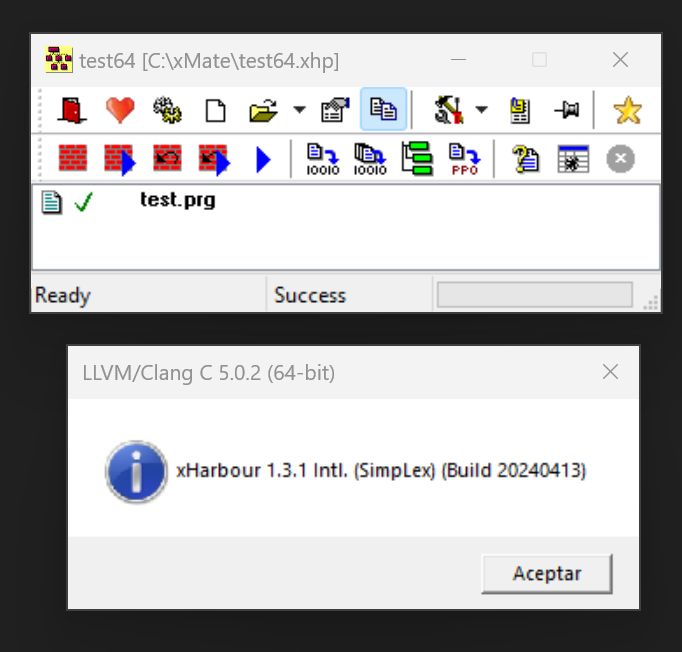
Got it! :-)
xharbourbcc64.env
xharbourbcc64.env
[Environment]
Description 1=Borland 7.7 64bits
Description 2=
Description 3=
PRG Compiler ver=xHarbour64
C compiler ver=bcc7764
Subsystem=FWH2404
Author=FiveTech
Last update=06/07/2024

[Advanced]
Command types=1,1,1,1,1,1,1,1,1

[Harbour]
HB_INSTALL=c:\xharbour64
HB_LIB_INSTALL=%HB_INSTALL%\lib
HB_COMMAND=%HB_BIN_INSTALL%\harbour.exe %PRG% /m /n0 /gc1 /es2 /a /i%HB_INC_INSTALL% /ic:\FWH64\include;%HB_INSTALL%\include
Option prefix=/

[C]
C_INSTALL=C:\bcc7764
C_COMP_COMMAND=%C_INSTALL%\bin\bcc64.Exe -c -I%HB_INSTALL%\include -I%C_INC_INSTALL% -I%C_INC_INSTALL%\windows\sdk -I%C_INSTALL%\include\windows\crtl -o%OBJ% %C%
C_LIB_COMMAND=%C_BIN_INSTALL%\TLib.Exe %LIB% /P512 @%RSP% , %LST%
C_LINK_COMMAND=%C_BIN_INSTALL%\iLink32.Exe -Gn -aa -Tpe -s -v @%LNK%
C_RC_COMMAND=
C_DLL_COMMAND=%C_BIN_INSTALL%\iLink32.Exe -Gn -aa -Tpd -M -L%C_LIB_INSTALL% @%LNK%
Option prefix=-

[User]
POSTEXE_COMMAND=
POSTLIB_COMMAND=
POSTDLL_COMMAND=

[Files]
%C_LIB_INSTALL%\c0w64.obj=1
C:\FWH64\LIB\Fivehx64.lib=2
C:\FWH64\LIB\Fivec64.lib=3
%HB_LIB_INSTALL%\rtl.lib=4
%HB_LIB_INSTALL%\vm.lib=5
%HB_LIB_INSTALL%\gtgui.lib=6
%HB_LIB_INSTALL%\lang.lib=7
%HB_LIB_INSTALL%\macro.lib=8
%HB_LIB_INSTALL%\rdd.lib=9
%HB_LIB_INSTALL%\dbfntx.lib=10
%HB_LIB_INSTALL%\dbfcdx.lib=11
%HB_LIB_INSTALL%\dbffpt.lib=12
%HB_LIB_INSTALL%\hbsix.lib=13
%HB_LIB_INSTALL%\debug.lib=14
%HB_LIB_INSTALL%\common.lib=15
%HB_LIB_INSTALL%\pp.lib=16
%HB_LIB_INSTALL%\pcrepos.lib=17
%HB_LIB_INSTALL%\ct.lib=18
%HB_LIB_INSTALL%\zlib.lib=19
%HB_LIB_INSTALL%\hbzip.lib=20
%HB_LIB_INSTALL%\libmisc.lib=21
%HB_LIB_INSTALL%\tip.lib=22
%HB_LIB_INSTALL%\png.lib=23
%C_LIB_INSTALL%\cw64.lib=24
%C_LIB_INSTALL%\IMPORT64.LIB=25
%C_LIB_INSTALL%\uuid.lib=26
%C_LIB_INSTALL%\PSDK\ws2_32.lib=27
%C_LIB_INSTALL%\PSDK\odbc32.lib=28
%C_LIB_INSTALL%\PSDK\rassapi.lib=29
%C_LIB_INSTALL%\PSDK\nddeapi.lib=30
%C_LIB_INSTALL%\PSDK\msimg32.lib=31
%C_LIB_INSTALL%\PSDK\psapi.lib=32
%C_LIB_INSTALL%\PSDK\GdiPlus.lib=33
%C_LIB_INSTALL%\PSDK\iphlpapi.lib=34
%C_LIB_INSTALL%\PSDK\shell32.lib=35
%C_LIB_INSTALL%\PSDK\uxtheme.lib=36

[DLL Files]
%C_LIB_INSTALL%\import64.lib=1
%HB_LIB_INSTALL%\harbour.lib=2
%C_LIB_INSTALL%\c0w64.obj=3
%C_LIB_INSTALL%\cw64.lib=4Antonio muchas gracias por el tiempo
como solucionastes el error OUT
Fatal: Illegal option: OUT:D:\Proyectos64bits\MiTecho\formato\Bin\formatos.Exe
Copia ilink64.exe a ilink32.exe
Si usas ilink64.exe se cree que estás usando MSVC64
listo quedo esa parte ya no sale ese error pero ahora me dice que no encuentra el menu.obj sera por que crea un test.obj ?
Fatal: Unable to open file 'MENU.OBJ'
en este casa mi prg es menu,prg
C_COMP_COMMAND=%C_INSTALL%\bin\bcc64.Exe -c -I%HB_INSTALL%\include -I%C_INC_INSTALL% -I%C_INC_INSTALL%\windows\sdk -I%C_INSTALL%\include\windows\crtl -otest.obj %C%
te paso mi proyecto de prueba.
Prueba a cambiar esa línea así:
C_COMP_COMMAND=%C_INSTALL%\bin\bcc64.Exe -c -I%HB_INSTALL%\include -I%C_INC_INSTALL% -I%C_INC_INSTALL%\windows\sdk -I%C_INSTALL%\include\windows\crtl -o%OBJ% %C%
Si se soluciono ahora las LIB tambien hay que copiar las extension .a a .lib ?
Listo ya pude crear mi primera aplicación 64bits con el viejo amigo XMATE muchas gracias Antonio por tu apoyo ultima consulta por el momento que lib falta para este error
Error: Unresolved external 'HB_FUN_HB_CODEPAGE_ESWIN' referenced from D:\PROYECTOS64BITS\MITECHO\FORMATO\OBJ\MENU.OBJ
y para trabajar con mariadb que lib mas hay que agregar
REQUEST HB_CODEPAGE_ESWIN y HB_SetCodePage("ESWIN") es lo mismo ?
CARLOS ATUNCAR wrote:Si se soluciono ahora las LIB tambien hay que copiar las extension .a a .lib ?Si, asi es
CARLOS ATUNCAR wrote:REQUEST HB_CODEPAGE_ESWIN y HB_SetCodePage("ESWIN") es lo mismo ?REQUEST HB_CODEPAGE_ESWIN solicita que se enlace
HB_SetCodePage("ESWIN") lo activa
No necesitamos renombrar nada! :-) Lo único: copy ilink64.exe ilink32.exe
xMate soporta ficheros .TLS que permiten definir las extensiones a usar
xharbourbcc64.tls
xharbourbcc64.env
xMate soporta ficheros .TLS que permiten definir las extensiones a usar
xharbourbcc64.tls
%OBJEXT%=.o
%LIBEXT%=.a[Environment]
Description 1=xHarbour64 with bcc7764
Description 2=
Description 3=
PRG Compiler ver=xHarbour64
C compiler ver=bcc7764
Subsystem=FWH2404
Author=FiveTech
Last update=06/07/2024
[Advanced]
Command types=1,1,1,1,1,1,1,1,1
[Harbour]
HB_INSTALL=C:\XHARBOUR64
HB_LIB_INSTALL=%HB_INSTALL%\lib
HB_COMMAND=%HB_BIN_INSTALL%\harbour.exe %PRG% /m /n0 /gc1 /es2 /a /i%HB_INC_INSTALL% /ic:\fwh64\include;%HB_INSTALL%\include
Option prefix=/
[C]
C_INSTALL=c:\bcc7764
C_COMP_COMMAND=%C_INSTALL%\bin\bcc64.exe -c -I%HB_INSTALL%\include -I%C_INC_INSTALL% -I%C_INC_INSTALL%\windows\sdk -I%C_INSTALL%\include\windows\crtl -o%OBJ% %C%
C_LIB_COMMAND=%C_BIN_INSTALL%\tlib.exe %LIB% /P512 @%RSP% , %LST%
C_LINK_COMMAND=%C_BIN_INSTALL%\iLink32.exe -Gn -aa -Tpe -s -v @%LNK%
C_RC_COMMAND=
C_DLL_COMMAND=%C_BIN_INSTALL%\iLink32.exe -Gn -aa -Tpd -M -L%C_LIB_INSTALL% @%LNK%
Option prefix=-
[User]
POSTEXE_COMMAND=
POSTLIB_COMMAND=
POSTDLL_COMMAND=
[Files]
%C_LIB_INSTALL%\c0w64.o=1
c:\fwh64\lib\fivehx64.a=2
C:\fwh64\lib\fivec64.a=3
%HB_LIB_INSTALL%\rtl.a=4
%HB_LIB_INSTALL%\vm.a=5
%HB_LIB_INSTALL%\gtgui.a=6
%HB_LIB_INSTALL%\lang.a=7
%HB_LIB_INSTALL%\macro.a=8
%HB_LIB_INSTALL%\rdd.a=9
%HB_LIB_INSTALL%\dbfntx.a=10
%HB_LIB_INSTALL%\dbfcdx.a=11
%HB_LIB_INSTALL%\dbffpt.a=12
%HB_LIB_INSTALL%\hbsix.a=13
%HB_LIB_INSTALL%\debug.a=14
%HB_LIB_INSTALL%\common.a=15
%HB_LIB_INSTALL%\pp.a=16
%HB_LIB_INSTALL%\pcrepos.a=17
%HB_LIB_INSTALL%\ct.a=18
%HB_LIB_INSTALL%\zlib.a=19
%HB_LIB_INSTALL%\hbzip.a=20
%HB_LIB_INSTALL%\libmisc.a=21
%HB_LIB_INSTALL%\tip.a=22
%HB_LIB_INSTALL%\png.a=23
%C_LIB_INSTALL%\cw64.a=24
%C_LIB_INSTALL%\IMPORT64.a=25
%C_LIB_INSTALL%\uuid.a=26
%C_LIB_INSTALL%\PSDK\ws2_32.a=27
%C_LIB_INSTALL%\PSDK\odbc32.a=28
%C_LIB_INSTALL%\PSDK\rassapi.a=29
%C_LIB_INSTALL%\PSDK\nddeapi.a=30
%C_LIB_INSTALL%\PSDK\msimg32.a=31
%C_LIB_INSTALL%\PSDK\psapi.a=32
%C_LIB_INSTALL%\PSDK\GdiPlus.a=33
%C_LIB_INSTALL%\PSDK\iphlpapi.a=34
%C_LIB_INSTALL%\PSDK\shell32.a=35
%C_LIB_INSTALL%\PSDK\uxtheme.a=36
[DLL Files]
%C_LIB_INSTALL%\import64.a=1
%HB_LIB_INSTALL%\harbour.a=2
%C_LIB_INSTALL%\c0w64.o=3
%C_LIB_INSTALL%\cw64.a=4Page: 1 2 (25 posts)