FiveTech Support Forums

FiveWin / Harbour / xBase community
Board index FiveWin para Harbour/xHarbour Preview a PDF con imagen de fondo
Posts: 1344
Joined: Wed Nov 16, 2005 09:14 PM

Preview a PDF con imagen de fondo

Posted: Tue Jun 18, 2024 07:38 PM
Estimados:
Tengo un problema al generar con la clase PRINT un documento y exportarlo a PDF con la clausula GRAY de una imagen de fondo
El preview lo genera correctamente (la imagen de fondo se ve en degrades) pero al presionar exportar a PDF genera el documento con un color GRIS de fondo
Si emito la impresion por impresora Microsoft Print to PDF, también sale en forma correcta.
Este un código de ejemplo:
Code (fw): Select all Collapse
#include "FiveWin.ch"
FUNCTION Main()
//                1  2       3     4      5   6   7     8       9
Local aDatos := {;
                 {"Juan 1","Pago 1","Juan","Pedro","1000","Algo 1"},;
                 {"Juan 2","Pago 2","Juan","Pedro","2000","Algo 2"},;
                 {"Juan 3","Pago 3","Juan","Pedro","3000","Algo 3"},;
                 {"Juan 4","Pago 4","Juan","Pedro","4000","Algo 4"},;
                 {"Juan 5","Pago 5","Juan","Pedro","5000","Algo 5"},;
                 {"Juan 6","Pago 6","Juan","Pedro","6000","Algo 6"},;
                 {"Juan 7","Pago 7","Juan","Pedro","7000","Algo 7"};
                }
ImprimoRecibos(aDatos)
RETURN nil

STATIC FUNCTION ImprimoRecibos( aDatos )

   LOCAL oPrn, oFont,n := 0, nRow, i := 1, aSizes

   DEFINE FONT oFont NAME "Arial" SIZE 36, 70 

   PRINT oPrn DOC "recibos"  PREVIEW

   //aSizes := oPrn:Units2Pix(0,0,7.2,327.0,'CM')
   //xbrowse (aSizes)
   
   //oPrn:SetSize( aSizes[3], aSizes[4] )
   nRow := 4
   PAGE
      @ 0,0 PRINT TO oPrn IMAGE "fondo.jpg" SIZE oPrn:nHorzRes(), oPrn:nVertRes() PIXEL GRAY
      @ nRow ,  1 PRINT TO oPrn TEXT aDatos[i,1] SIZE 7,.5 CM FONT oFont LASTROW nRow ALIGN "C"
      @ nRow ,  1 PRINT TO oPrn TEXT aDatos[i,2] SIZE 7,.5 CM FONT oFont LASTROW nRow ALIGN "C"
      @ nRow ,  1 PRINT TO oPrn TEXT aDatos[i,3] SIZE 7,.5 CM FONT oFont LASTROW nRow ALIGN "C"
      @ nRow ,  1 PRINT TO oPrn TEXT aDatos[i,4] SIZE 7,.5 CM FONT oFont LASTROW nRow ALIGN "C"
      @ nRow ,  1 PRINT TO oPrn TEXT aDatos[i,5] SIZE 7,.5 CM FONT oFont LASTROW nRow ALIGN "C"
      @ nRow ,  1 PRINT TO oPrn TEXT aDatos[i,6] SIZE 7,.5 CM FONT oFont LASTROW nRow ALIGN "C"    
      @ nRow ,  1 PRINT TO oPrn IMAGE "..\bitmaps\olga1.jpg" SIZE 4, 4 CM LASTROW nRow
   ENDPAGE 

   ENDPRINT

RETURN nil
Esta es la imagen de fondo

Asi se ve el preview
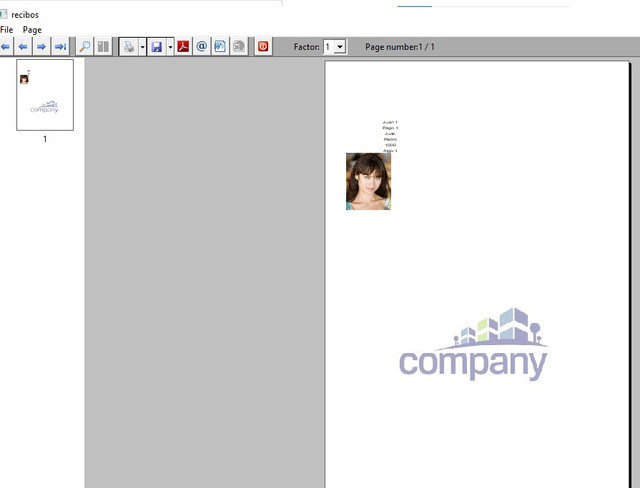
Asi se ve el PDF generado seleccionando la impresora Microsoft Print to PDF

Asi se ve el PDF generado desde el preview


Alguno sugerencia?
Posts: 8523
Joined: Tue Dec 20, 2005 07:36 PM

Re: Preview a PDF con imagen de fondo

Posted: Wed Jun 19, 2024 02:59 PM
Buen dia. Si usted usar PDFMACHINE.exe impresora virtual, funciona bién! Mira:

https://imgur.com/c3g6OrT


https://broadgun.com/pdfmachine/pdfmachine-white/

Regards, saludos.
João Santos - São Paulo - Brasil - Phone: +55(11)95150-7341
Posts: 8523
Joined: Tue Dec 20, 2005 07:36 PM

Re: Preview a PDF con imagen de fondo

Posted: Wed Jun 19, 2024 03:14 PM
Testes:
Code (fw): Select all Collapse
#include "FiveWin.ch"

FUNCTION Main()

   // 1  2       3     4      5   6   7     8       9
   LOCAL aDatos := { ;
      { "Juan 1", "Pago 1", "Juan", "Pedro", "1000", "Algo 1" }, ;
      { "Juan 2", "Pago 2", "Juan", "Pedro", "2000", "Algo 2" }, ;
      { "Juan 3", "Pago 3", "Juan", "Pedro", "3000", "Algo 3" }, ;
      { "Juan 4", "Pago 4", "Juan", "Pedro", "4000", "Algo 4" }, ;
      { "Juan 5", "Pago 5", "Juan", "Pedro", "5000", "Algo 5" }, ;
      { "Juan 6", "Pago 6", "Juan", "Pedro", "6000", "Algo 6" }, ;
      { "Juan 7", "Pago 7", "Juan", "Pedro", "7000", "Algo 7" };
      }

   ImprimoRecibos( aDatos )

RETURN NIL

FUNCTION ImprimoRecibos( aDatos )

   LOCAL oPrn, oFont, n := 0, nRow, i := 1, aSizes, oBrush

   // PRINT oPrn PREVIEW

   PRINT oPrn DOC "RECIBOS" PREVIEW MODAL

   // PRINT oPrn PREVIEW FILE "RECIBOS.pdf"

      DEFINE FONT oFont NAME "Arial" SIZE 36, 70 // FONT AQUI

      oPrn:SetPortrait()
      oPrn:SetPage(9)

      nRow := 4

      PAGE

         // @ 0.5,.6 PRINT TO oPrn IMAGE "NEW.PNG" SIZE 8, 3 CM GRAY

         // @ 0, 0 PRINT TO oPrn IMAGE "fondo.jpg" SIZE oPrn:nHorzRes(), oPrn:nVertRes() PIXEL GRAY

         @ 0, 0 PRINT TO oPrn IMAGE ALLTRIM( "FONDO.jpg" ) SIZE oPrn:nHorzRes(), oPrn:nVertRes() PIXEL GRAY

         // FUNCIONA
         // oPrn:SayImage( 0, 0, "FONDO.jpg", oPrn:nHorzRes(), oPrn:nVertRes(), NIL , .T., CLR_GRAY )

         @ nRow,  1 PRINT TO oPrn TEXT aDatos[ i, 1 ] SIZE 7, .5 CM FONT oFont LASTROW nRow ALIGN "C"
         @ nRow,  1 PRINT TO oPrn TEXT aDatos[ i, 2 ] SIZE 7, .5 CM FONT oFont LASTROW nRow ALIGN "C"
         @ nRow,  1 PRINT TO oPrn TEXT aDatos[ i, 3 ] SIZE 7, .5 CM FONT oFont LASTROW nRow ALIGN "C"
         @ nRow,  1 PRINT TO oPrn TEXT aDatos[ i, 4 ] SIZE 7, .5 CM FONT oFont LASTROW nRow ALIGN "C"
         @ nRow,  1 PRINT TO oPrn TEXT aDatos[ i, 5 ] SIZE 7, .5 CM FONT oFont LASTROW nRow ALIGN "C"
         @ nRow,  1 PRINT TO oPrn TEXT aDatos[ i, 6 ] SIZE 7, .5 CM FONT oFont LASTROW nRow ALIGN "C"

         @ nRow,  1 PRINT TO oPrn IMAGE "..\bitmaps\olga1.jpg" SIZE 4, 4 CM LASTROW nRow

      ENDPAGE

   ENDPRINT

   // NO FUNCIONA
   // FWSavePreviewToPDF( oPrn, "RECIBOS.pdf", .F. )

RETURN NIL
Regards, saludos.
João Santos - São Paulo - Brasil - Phone: +55(11)95150-7341
Posts: 1344
Joined: Wed Nov 16, 2005 09:14 PM

Re: Preview a PDF con imagen de fondo

Posted: Wed Jun 19, 2024 03:15 PM
Gracias Jao por responder, pero quiero usar las clases nativas de Fivewin.
Esto es lo que quiero resolver.
cmsoft wrote: Asi se ve el PDF generado desde el preview
Porque de hecho en la impresión a PDF desde Microsoft Print to PDF tambien funciona bien
Tal vez estoy haciendo algo mal en la definicion
Posts: 8523
Joined: Tue Dec 20, 2005 07:36 PM

Re: Preview a PDF con imagen de fondo

Posted: Wed Jun 19, 2024 03:32 PM
César, con ADOBE:

https://imgur.com/ZUBZUUD


Regards, saludos.
João Santos - São Paulo - Brasil - Phone: +55(11)95150-7341
Posts: 1344
Joined: Wed Nov 16, 2005 09:14 PM

Re: Preview a PDF con imagen de fondo

Posted: Wed Jun 19, 2024 03:40 PM

Claro, pero ahi no sale en modo marca de agua (el degradez gris)

La idea es que el PDF generado respete las caracteristicas del Preview

Posts: 8523
Joined: Tue Dec 20, 2005 07:36 PM

Re: Preview a PDF con imagen de fondo

Posted: Wed Jun 19, 2024 03:56 PM
cmsoft wrote:Claro, pero ahi no sale en modo marca de agua (el degradez gris)
La idea es que el PDF generado respete las caracteristicas del Preview
Creo, sea un BUG del FiveWin, ó el ADOBE és antiguo.

Mira usando .PNG

https://imgur.com/rx9fRTV


Regards, saludos.
João Santos - São Paulo - Brasil - Phone: +55(11)95150-7341
Posts: 1344
Joined: Wed Nov 16, 2005 09:14 PM

Re: Preview a PDF con imagen de fondo

Posted: Wed Jun 19, 2024 04:00 PM

Pero si presionas ahi en generar pdf (en el boton del preview) como te genera el pdf?

Porque la vista previa esta bien, lo que queda mal es el pdf generado

Posts: 8523
Joined: Tue Dec 20, 2005 07:36 PM

Re: Preview a PDF con imagen de fondo

Posted: Wed Jun 19, 2024 04:22 PM
César con este modelo, funciona bién el .PDF con GRAY y SIN GRAY.

https://imgur.com/zVOt9JV


Code (fw): Select all Collapse
#include "FiveWin.ch"

FUNCTION Main()

   // 1  2       3     4      5   6   7     8       9
   LOCAL aDatos := { ;
      { "Juan 1", "Pago 1", "Juan", "Pedro", "1000", "Algo 1" }, ;
      { "Juan 2", "Pago 2", "Juan", "Pedro", "2000", "Algo 2" }, ;
      { "Juan 3", "Pago 3", "Juan", "Pedro", "3000", "Algo 3" }, ;
      { "Juan 4", "Pago 4", "Juan", "Pedro", "4000", "Algo 4" }, ;
      { "Juan 5", "Pago 5", "Juan", "Pedro", "5000", "Algo 5" }, ;
      { "Juan 6", "Pago 6", "Juan", "Pedro", "6000", "Algo 6" }, ;
      { "Juan 7", "Pago 7", "Juan", "Pedro", "7000", "Algo 7" };
      }

   ImprimoRecibos( aDatos )

RETURN NIL

FUNCTION ImprimoRecibos( aDatos )

   LOCAL oPrn, oFont, n := 0, nRow, i := 1, aSizes, oBrush

   // PRINT oPrn PREVIEW

   // PRINT oPrn DOC "RECIBOS" PREVIEW MODAL

   PRINT oPrn PREVIEW FILE "RECIBOS.pdf" MODAL

      DEFINE FONT oFont NAME "Arial" SIZE 36, 70 // FONT AQUI

      oPrn:SetPortrait()
      oPrn:SetPage(9)

      nRow := 4

      PAGE

         @ 0.5,.6 PRINT TO oPrn IMAGE "COMPANY.PNG" SIZE 8, 3 CM // GRAY

         // @ 0, 0 PRINT TO oPrn IMAGE "fondo.jpg" SIZE oPrn:nHorzRes(), oPrn:nVertRes() PIXEL GRAY

         // @ 0, 0 PRINT TO oPrn IMAGE ALLTRIM( "FONDO.jpg" ) SIZE oPrn:nHorzRes(), oPrn:nVertRes() PIXEL GRAY

         @ 400, 0 PRINT TO oPrn IMAGE ALLTRIM( "COMPANY.PNG" ) SIZE oPrn:nHorzRes(), oPrn:nVertRes() PIXEL GRAY

         @ nRow,  1 PRINT TO oPrn TEXT aDatos[ i, 1 ] SIZE 7, .5 CM FONT oFont LASTROW nRow ALIGN "C"

         @ nRow,  1 PRINT TO oPrn TEXT aDatos[ i, 2 ] SIZE 7, .5 CM FONT oFont LASTROW nRow ALIGN "C"

         @ nRow,  1 PRINT TO oPrn TEXT aDatos[ i, 3 ] SIZE 7, .5 CM FONT oFont LASTROW nRow ALIGN "C"

         @ nRow,  1 PRINT TO oPrn TEXT aDatos[ i, 4 ] SIZE 7, .5 CM FONT oFont LASTROW nRow ALIGN "C"

         @ nRow,  1 PRINT TO oPrn TEXT aDatos[ i, 5 ] SIZE 7, .5 CM FONT oFont LASTROW nRow ALIGN "C"

         @ nRow,  1 PRINT TO oPrn TEXT aDatos[ i, 6 ] SIZE 7, .5 CM FONT oFont LASTROW nRow ALIGN "C"

         @ nRow,  1 PRINT TO oPrn IMAGE "..\bitmaps\olga1.jpg" SIZE 4, 4 CM LASTROW nRow

         // FUNCIONA
         // oPrn:SayImage( 0, 0, "FONDO.jpg", oPrn:nHorzRes(), oPrn:nVertRes(), NIL , .T., CLR_GRAY )

      ENDPAGE

   ENDPRINT

   // NO FUNCIONA
   // FWSavePreviewToPDF( oPrn, "RECIBOS.pdf", .F. )

RETURN NIL
Regards, saludos.
João Santos - São Paulo - Brasil - Phone: +55(11)95150-7341
Posts: 1344
Joined: Wed Nov 16, 2005 09:14 PM

Re: Preview a PDF con imagen de fondo

Posted: Wed Jun 19, 2024 06:15 PM

No, sigue saliendo mal

Y ademas no es la idea que lo ubique en un lugar de la hoja, sino como fondo de toda la hoja

Posts: 8523
Joined: Tue Dec 20, 2005 07:36 PM

Re: Preview a PDF con imagen de fondo

Posted: Wed Jun 19, 2024 07:10 PM
Cesar, desculpe, mas no comprendo porque no puede ser asi:
Code (fw): Select all Collapse
#include "FiveWin.ch"

FUNCTION Main()

   // 1  2       3     4      5   6   7     8       9
   LOCAL aDatos := { ;
      { "Juan 1", "Pago 1", "Juan", "Pedro", "1000", "Algo 1" }, ;
      { "Juan 2", "Pago 2", "Juan", "Pedro", "2000", "Algo 2" }, ;
      { "Juan 3", "Pago 3", "Juan", "Pedro", "3000", "Algo 3" }, ;
      { "Juan 4", "Pago 4", "Juan", "Pedro", "4000", "Algo 4" }, ;
      { "Juan 5", "Pago 5", "Juan", "Pedro", "5000", "Algo 5" }, ;
      { "Juan 6", "Pago 6", "Juan", "Pedro", "6000", "Algo 6" }, ;
      { "Juan 7", "Pago 7", "Juan", "Pedro", "7000", "Algo 7" };
      }

   ImprimoRecibos( aDatos )

RETURN NIL

FUNCTION ImprimoRecibos( aDatos )

   LOCAL oPrn, oFont, n := 0, nRow, i := 1, aSizes, oBrush

   // PRINT oPrn PREVIEW

   // PRINT oPrn DOC "RECIBOS" PREVIEW MODAL

   PRINT oPrn PREVIEW FILE "RECIBOS.pdf" MODAL

      DEFINE FONT oFont NAME "Arial" SIZE 36, 70 // FONT AQUI

      oPrn:SetPortrait()
      oPrn:SetPage(9)

      nRow := 4

      PAGE

         oPrn:SayImage( 0, 0, "FONDO.JPG", oPrn:nHorzRes(), oPrn:nVertRes(), NIL, .T., CLR_WHITE, CLR_HGRAY  )

         @ 0.5,.6 PRINT TO oPrn IMAGE "COMPANY.PNG" SIZE 8, 3 CM GRAY

         // @ 0.5,.6 PRINT TO oPrn IMAGE "COMPANY3.PNG" SIZE 8, 3 CM // GRAY

         // @ 0, 0 PRINT TO oPrn IMAGE "fondo.jpg" SIZE oPrn:nHorzRes(), oPrn:nVertRes() PIXEL GRAY

         // @ 0, 0 PRINT TO oPrn IMAGE ALLTRIM( "FONDO.jpg" ) SIZE oPrn:nHorzRes(), oPrn:nVertRes() PIXEL GRAY

         // @ 400, 0 PRINT TO oPrn IMAGE ALLTRIM( "COMPANY.PNG" ) SIZE oPrn:nHorzRes(), oPrn:nVertRes() PIXEL GRAY
         // 400, 0 PRINT TO oPrn IMAGE ALLTRIM( "COMPANY3.PNG" ) SIZE oPrn:nHorzRes(), oPrn:nVertRes() PIXEL // GRAY

         @ nRow,  1 PRINT TO oPrn TEXT aDatos[ i, 1 ] SIZE 7, .5 CM FONT oFont LASTROW nRow ALIGN "C"

         @ nRow,  1 PRINT TO oPrn TEXT aDatos[ i, 2 ] SIZE 7, .5 CM FONT oFont LASTROW nRow ALIGN "C"

         @ nRow,  1 PRINT TO oPrn TEXT aDatos[ i, 3 ] SIZE 7, .5 CM FONT oFont LASTROW nRow ALIGN "C"

         @ nRow,  1 PRINT TO oPrn TEXT aDatos[ i, 4 ] SIZE 7, .5 CM FONT oFont LASTROW nRow ALIGN "C"

         @ nRow,  1 PRINT TO oPrn TEXT aDatos[ i, 5 ] SIZE 7, .5 CM FONT oFont LASTROW nRow ALIGN "C"

         @ nRow,  1 PRINT TO oPrn TEXT aDatos[ i, 6 ] SIZE 7, .5 CM FONT oFont LASTROW nRow ALIGN "C"

         @ nRow,  1 PRINT TO oPrn IMAGE "..\bitmaps\olga1.jpg" SIZE 4, 4 CM LASTROW nRow

      ENDPAGE

   ENDPRINT

   // NO FUNCIONA
   // FWSavePreviewToPDF( oPrn, "RECIBOS.pdf", .F. )

RETURN NIL
Regards, saludos.
João Santos - São Paulo - Brasil - Phone: +55(11)95150-7341
Posts: 1344
Joined: Wed Nov 16, 2005 09:14 PM

Re: Preview a PDF con imagen de fondo

Posted: Wed Jun 19, 2024 08:12 PM

No puede ser así, porque lo que necesito es un fondo de hoja, que ocupe toda la hoja.

Igualmente, el ejemplo que me pasaste hace el mismo efecto de error cuando genero el PDF desde el PREVIEW que la imagen sale con un fondo gris que no representa como se ve en la imagen previsualizada

Posts: 1144
Joined: Mon Feb 05, 2007 07:15 PM

Re: Preview a PDF con imagen de fondo

Posted: Wed Jun 19, 2024 10:15 PM

Han probado con impresoras distintas?

Cesar Cortes Cruz

SysCtrl Software

Mexico


' Sin +- FWH es mejor "
Posts: 1144
Joined: Mon Feb 05, 2007 07:15 PM

Re: Preview a PDF con imagen de fondo

Posted: Wed Jun 19, 2024 10:35 PM
comprobado, solo en el prev se mira transparente :shock:
Cesar Cortes Cruz

SysCtrl Software

Mexico


' Sin +- FWH es mejor "
Posts: 1344
Joined: Wed Nov 16, 2005 09:14 PM

Re: Preview a PDF con imagen de fondo

Posted: Wed Jun 19, 2024 11:38 PM

Claro, el preview se ve bien, pero al generar el pdf desde el preview se ve mal

Gracias Cesar por probar