Marc Venken wrote: DEFINE RIBBONBAR oRBar WINDOW oWnd PROMPT "Databases", "Leveranciers", "Ingeven Documenten","Software";
HEIGHT 130 TOPMARGIN 25
ADD GROUP oGr1 RIBBON oRBar TO OPTION 1 PROMPT "Databases" width 130 ;
BITMAP "bitmaps\maveco.ico"
@ 02, 05 ADD BUTTON oBtn1_1 GROUP oGr1 BITMAP "bitmaps\cut16.BMP" ;
SIZE 120, 20 PROMPT "Klanten" MOSTLEFT round ;
action ( Folder_klanten(oWnd) )
@ 24, 05 ADD BUTTON oBtn1_2 GROUP oGr1 BITMAP "bitmaps\copy16.BMP" ;
SIZE 120, 20 PROMPT "Leveranciers" MOSTLEFT round;
action ( Folder_Leveranciers(oWnd) )
@ 46, 05 ADD BUTTON oBtn1_3 GROUP oGr1 BITMAP "bitmaps\paste16.BMP" ;
SIZE 120, 20 PROMPT "Artikels" MOSTLEFT round;
action ( Folder_artikels(oWnd) )
// Documents =============================
ADD GROUP oGr2 RIBBON oRBar TO OPTION 1 PROMPT "Documents" width 130 ;
BITMAP "bitmaps\fivetech.BMP"
@ 02, 05 ADD BUTTON oBtn2_1 GROUP oGr2 BITMAP "bitmaps\cut16.BMP" ;
SIZE 120, 20 PROMPT "Orders" MOSTLEFT round ;
action ( Folder_Orders(oWnd) )
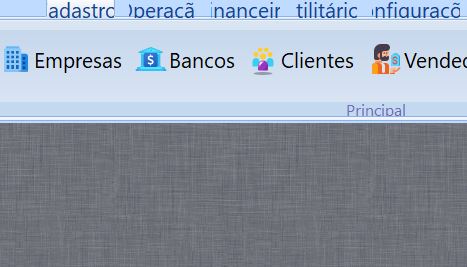
Thank you for the answer, the problem is:
oRBar:SetFont( TFont():New( cFont, 0, - ( nFontSize - 3 ) ) )
oRBar:nHeightFld := 25
After changing the font size of the tabs, their size does not increase by itself, how can I force the increase? Thanks in advance.