Hello Yunus,
I don't know your skills in FIVEWIN.
But considering that you will sooner or later also create a web version, you are best positioned to implement it on the web if you hard code your dialogs.
I would start with the simple edit mask, create a DBF deposit and fill it. Then make the additions in the existing yunus.prg.
Best regards,
Otto
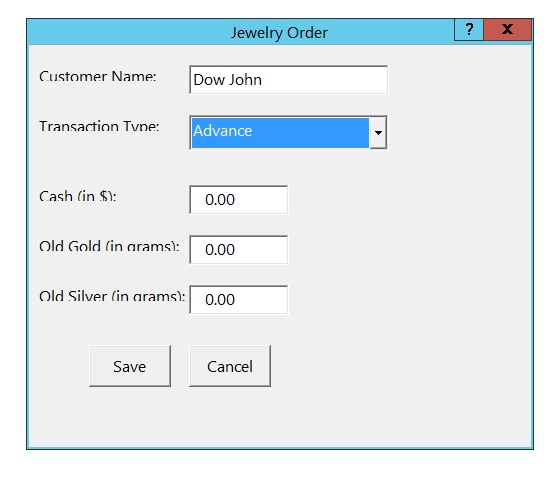
#include "FiveWin.ch"

static oDlg

//----------------------------------------------------------------------------//

function Main()

    LOCAL oDlg, oCustomerName, oTransactionType, oCash, oOldGold, oOldSilver, oCbx
    LOCAL cCustomerName := "                      "
    LOCAL cTransactionType := "                   "
    LOCAL nCash := 0.0
    LOCAL nOldGold := 0.0
    LOCAL nOldSilver := 0.0
    LOCAL oFont

    DEFINE FONT oFont NAME "Segoe UI" SIZE 0, -16

    DEFINE DIALOG oDlg ;
           TITLE "Jewelry Order" ;
           FROM 200, 200 ;
           TO 600, 700 ;  // Increased height for more spacing
           PIXEL ;
           TRUEPIXEL

    oDlg:SetFont(oFont)

    @ 20, 10 SAY "Customer Name:" OF oDlg PIXEL
    @ 20, 160 GET oCustomerName VAR cCustomerName OF oDlg SIZE 200, 30 PIXEL

    @ 70, 10 SAY "Transaction Type:" OF oDlg PIXEL
    @ 70, 160 COMBOBOX oCbx VAR cTransactionType ITEMS { "Order", "Advance" } SIZE 200,400 OF oDlg PIXEL HEIGHTGET 30

    @ 140, 10 SAY "Cash (in $):" OF oDlg PIXEL
    @ 140, 160 GET oCash VAR nCash OF oDlg SIZE 100, 30 PICTURE "9999.99" PIXEL

    @ 190, 10 SAY "Old Gold (in grams):" OF oDlg PIXEL
    @ 190, 160 GET oOldGold VAR nOldGold OF oDlg SIZE 100, 30 PICTURE "9999.99" PIXEL

    @ 240, 10 SAY "Old Silver (in grams):" OF oDlg PIXEL
    @ 240, 160 GET oOldSilver VAR nOldSilver OF oDlg SIZE 100, 30 PICTURE "9999.99" PIXEL

    @ 300, 60 BUTTON "&Save" SIZE 80, 40 PIXEL OF oDlg ACTION SaveTransaction(cCustomerName, cTransactionType, nCash, nOldGold, nOldSilver)
    @ 300, 160 BUTTON "&Cancel" SIZE 80, 40 PIXEL OF oDlg ACTION oDlg:End()

    ACTIVATE DIALOG oDlg CENTERED

    RELEASE FONT oFont

return nil

//----------------------------------------------------------------------------//

function SaveTransaction(cCustomerName, cTransactionType, nCash, nOldGold, nOldSilver)
    // Here, you would save the transaction details to your database.
    MsgInfo("Transaction Saved:" + CRLF + ;
            "Customer Name: " + cCustomerName + CRLF + ;
            "Transaction Type: " + cTransactionType + CRLF + ;
            "Cash: " + Transform(nCash, "9999.99") + CRLF + ;
            "Old Gold: " + Transform(nOldGold, "9999.99") + CRLF + ;
            "Old Silver: " + Transform(nOldSilver, "9999.99"))

    oDlg:End()
return nil

//----------------------------------------------------------------------------//

